version and meta list in the Game Panel Console to check them, and change Reunion’s options in reunion.cfg.
What are ReHLDS and Reunion?
ReHLDS is a reverse-engineered version of Valve’s Half-Life dedicated server (HLDS). It fixes bugs and security problems, runs faster and adds an API that plugins use. ReGameDLL does the same for the Counter-Strike game code and adds extra cvars and commands such asendround and swapteams.
Reunion continues the old DProto project for ReHLDS. It needs ReHLDS (API 3.10 or later) and runs as a Metamod plugin. It gives non-Steam players a SteamID, so admins and bans by SteamID work for them too.
How to check ReHLDS, ReGameDLL and Reunion
Open the Console while the server is running and type: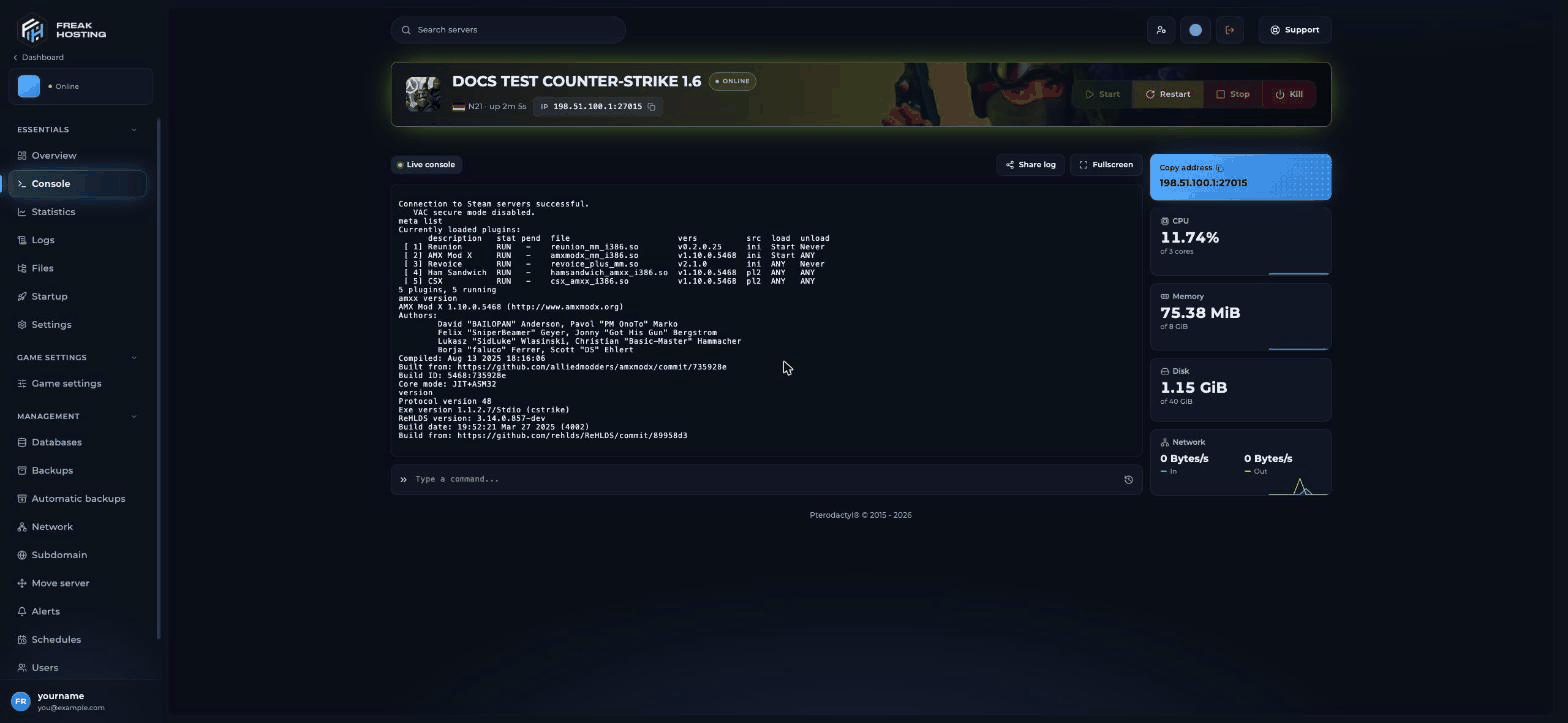
meta list shows Reunion and Revoice running; version shows the ReHLDS build
How to configure reunion.cfg
Reunion readsreunion.cfg from the server’s root folder or from the cstrike folder. Open it in Files, change a value, save and restart the server. The file says it plainly: “DONT CHANGE ANYTHING IF YOU DONT KNOW WHAT IT MEANS!”
Optional ReHLDS add-ons
Five more Metamod plugins are uploaded but switched off incstrike/addons/metamod/plugins.ini: reauthcheck, rechecker, whblocker, resemiclip and hitbox_fix. To use one, remove the ; in front of its line, set up its config file and restart. See Metamod.
How to update ReHLDS, ReGameDLL and Reunion
These parts are matched to each other on your server. Before you update any of them, make a backup.
Download only from the official release pages: ReHLDS, ReGameDLL and Reunion. Restart and run
version, game version and meta list afterwards.
How they are installed on a plain HLDS server (for reference)
You don’t need this on FREAKHOSTING. ReHLDS works with the pre-anniversary HLDS from SteamCMD (app_update 90 -beta steam_legacy validate), not the 25th anniversary build:
- Replace HLDS’s
engine_i486.sowith the ReHLDS one. - Install Metamod and AMX Mod X.
- Create
cstrike/addons/reunion/, copyreunion_mm_i386.sointo it and addlinux addons/reunion/reunion_mm_i386.soat the top of Metamod’splugins.ini. - Copy
reunion.cfgto the server root orcstrike, setSteamIdHashSalt, start the server and typemeta list.
Frequently asked questions
Do I need to install Reunion or ReHLDS on my CS 1.6 server?
No. Both are installed and running, with ReGameDLL and Revoice+. Installing other copies over them can break the server.Why does Reunion show “fail” in meta list?
Usuallyreunion.cfg has an empty or short SteamIdHashSalt, or the .so file and config are from different versions. Restore your last working reunion.cfg or a backup. The console shows the reason when the server starts.
Can Steam and non-Steam players use voice chat together?
Yes. Revoice+ converts voice between the two client types. Voice chat must be on in Game settings.Does Reunion stop SteamID changers?
No. Reunion’s FAQ says ID changers can’t be detected on the server.SteamIdHashSalt only stops a player taking a specific other player’s ID.
Related guides
CS 1.6 server guide
Every Counter-Strike 1.6 page in one place.
Metamod
The loader Reunion runs in.
Add admins
SteamIDs in users.ini.
Can't connect
Non-Steam and VAC problems.
Tested by the FREAKHOSTING team on our Game Panel on 30 October 2026 (Counter-Strike 1.6 on ReHLDS 3.14.0.857 with ReGameDLL 5.28.0.756 and Reunion 0.2.0.25). Options checked against the official Reunion repository, ReHLDS README and ReGameDLL README on 30 October 2026.
Need Extra Help?
If you encounter any issues, our support team is ready to assist:- Live Chat: Quick assistance via our website.
- Support Ticket: Open a Ticket
- Discord: Join our Community
- Email: support@freakhosting.com
Last Updated: October 2026