/rcon login <password> in chat. Once logged in, put /rcon before any command, for example /rcon kick 3 or /rcon gmx. Type /rcon cmdlist to see every command.
How to log in to RCON
1
Copy your Rcon password
In the Game Panel, open your server and click Startup. Copy the value of Rcon password. To change it, type a new value, click outside the field and restart the server.
2
Join your server
Connect to your server. See connect to your server.
3
Log in
Open the chat and type:If the password is right, you are now logged in as RCON admin.
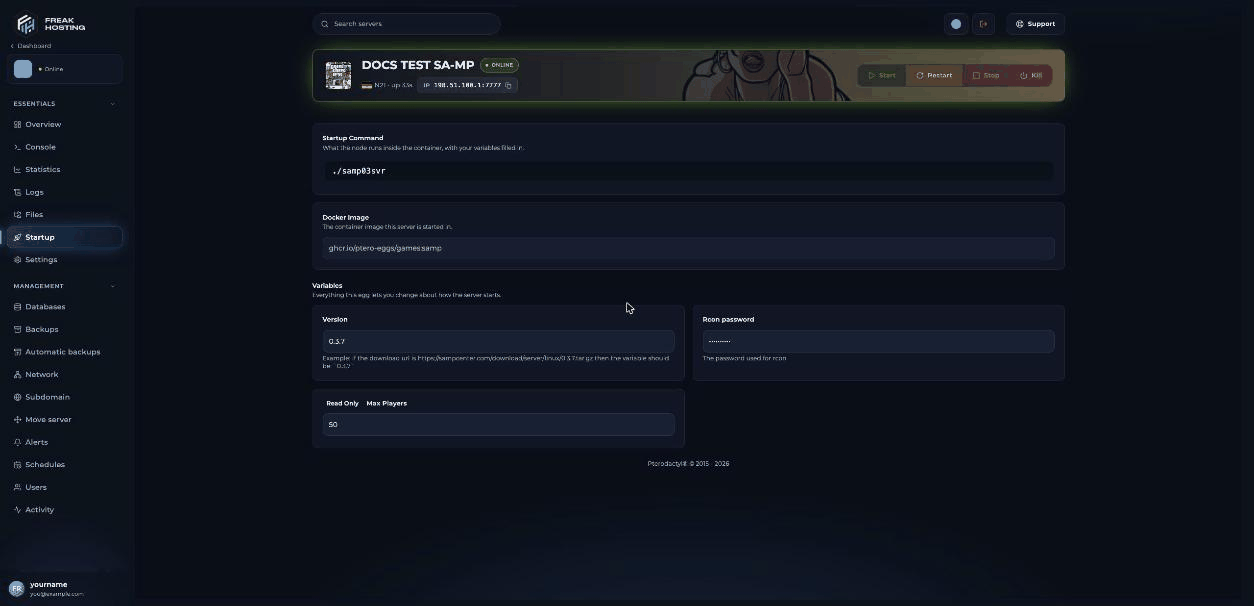
The Rcon password on the Startup page
server.cfg: the panel writes the Startup value to rcon_password at every start. Never set it to changeme, because the SA-MP server refuses to start with that password.
Why doesn’t the panel console accept commands?
The Linux SA-MP server prints its output to the console, but it doesn’t read commands typed there. Run admin commands in game with/rcon instead, or let your gamemode or an admin filterscript run them with SendRconCommand.
Which RCON commands can I use?
For bans, see ban and unban players.
Are RCON changes saved?
No. Commands such ashostname, password, weather and changemode change the running server only. After a restart, the server uses server.cfg again. To keep a change, edit server.cfg. Bans are the exception: they are written to the ban file.
Frequently asked questions
How do I check if a player is an RCON admin in my script?
UseIsPlayerAdmin(playerid) in your gamemode or filterscript. It returns true for players logged in with /rcon login.
Can I give someone admin without sharing the RCON password?
Not with RCON itself. Most gamemodes and admin filterscripts have their own admin levels. Use those for moderators and keep the RCON password for yourself.Can I turn RCON off?
Yes. Addrcon 0 to server.cfg and restart. The Rcon password field on Startup must still have a value.
Why is my /rcon login rejected?
Check that you copied the Rcon password from Startup exactly and that the server was restarted after you changed it.Related guides
SA-MP server guide
Every SA-MP page in one place.
Ban and unban players
ban, banip and unbanip.
Set a server password
Lock your server.
server.cfg explained
Settings that survive a restart.
Startup variables
Change the Rcon password.
Tested by the FREAKHOSTING team on our Game Panel on 3 November 2026 (SA-MP 0.3.7-R2 Linux server). Commands checked against the official open.mp RCON documentation on 3 November 2026.
Need Extra Help?
If you encounter any issues, our support team is ready to assist:- Live Chat: Quick assistance via our website.
- Support Ticket: Open a Ticket
- Discord: Join our Community
- Email: support@freakhosting.com
Last Updated: November 2026