server.cfg is the SA-MP server’s configuration file. Each line is a setting name, a space and a value, for example hostname My Server. On a FREAKHOSTING SA-MP server it is in the main folder: edit it in Files, save and restart. The panel sets port, maxplayers and rcon_password at every start; you change all other lines yourself.
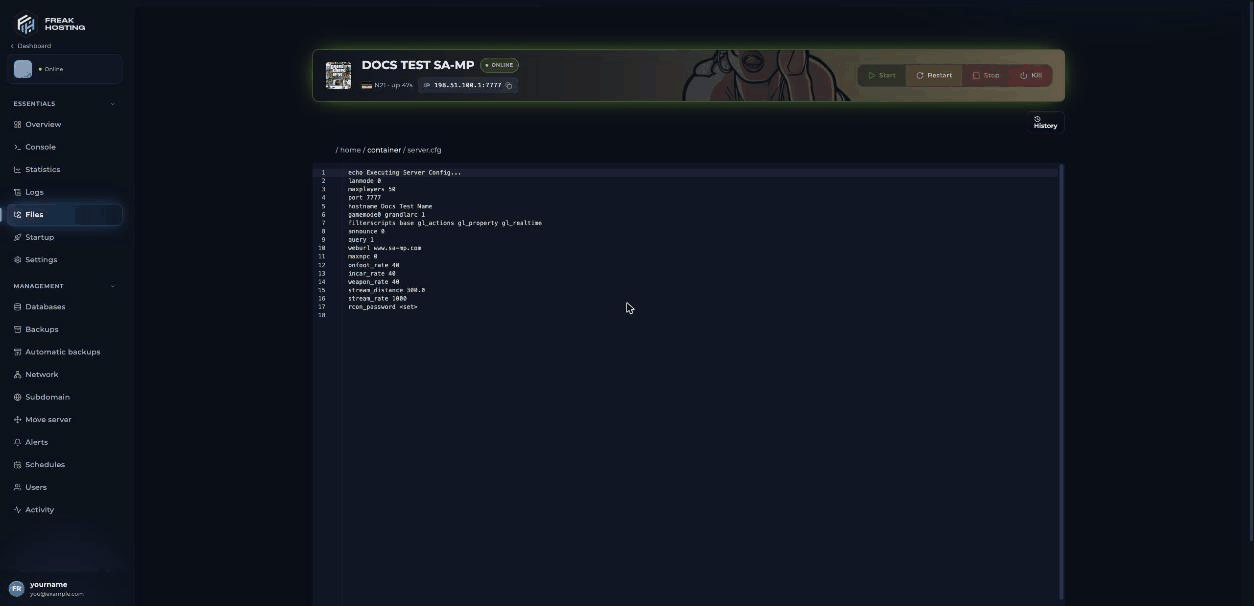
server.cfg of a new SA-MP server in the file editor
What is in server.cfg on a new server?
Lower
onfoot_rate, incar_rate and weapon_rate values improve sync but use more bandwidth.
Which settings can I add?
How to edit server.cfg
1
Open the file
In the Game Panel, open your server, click Files and open
server.cfg.2
Change or add lines
Edit a value or add a new line. Keep one setting per line and one line per setting.
3
Save and restart
Save the file and restart the server. If something breaks, use the editor’s History button to go back to an earlier version.
Frequently asked questions
How do I change my SA-MP server name?
Change thehostname line, save and restart. As an RCON admin you can also use /rcon hostname <name>; that lasts until the next restart.
Why does my maxplayers value change back?
The panel writes Max Players from Startup intomaxplayers at every start. Your slots are set by your plan; for more, open a ticket.
Why does my rcon_password change back?
The panel writes the Rcon password from Startup at every start. Change it there instead.Can I change settings without a restart?
Many settings can be changed for the running server with RCON, for example/rcon hostname or /rcon password. These changes are lost at the next restart. See RCON commands.
Related guides
SA-MP server guide
Every SA-MP page in one place.
RCON commands
Change settings while the server runs.
Install a gamemode
The gamemode0 line.
Not showing in the list
announce and query.
File Manager
Edit files and file history.
Tested by the FREAKHOSTING team on our Game Panel on 3 November 2026 (SA-MP 0.3.7-R2 Linux server). Settings checked against the official open.mp server.cfg documentation on 3 November 2026.
Need Extra Help?
If you encounter any issues, our support team is ready to assist:- Live Chat: Quick assistance via our website.
- Support Ticket: Open a Ticket
- Discord: Join our Community
- Email: support@freakhosting.com
Last Updated: November 2026