Waiting commands for 127.0.0.1:27020.
Before you start
- Log in to the Game Panel.
- Own ARK: Survival Evolved on Steam or the Epic Games Store. ARK: Survival Ascended cannot join an ASE server.
- The server files take about 20 GB. They are already installed.
How to set up your ARK server
1
Stop the server
Click Stop. ARK rewrites its settings files when it shuts down and ignores changes made while it runs, so always save settings with the server stopped.
2
Open Game settings
Click Game settings under GAME SETTINGS. The Checks box at the top lists anything you should fix.
3
Change the admin password
A new server starts with a template admin password that is public knowledge. In Server, find Admin password, click Change, enter your own password in New value and click Done. Use letters, numbers,
- and _ only. See become admin.4
Name your server
Enter a Server name. This is the name players see in the server list.
5
Set a password (optional)
Click Set next to Server password if you want a private server. Leave it empty for an open server.
6
Choose the map
Pick a Map. Choose only maps without “(Ascended)” in the name: those entries are ARK: Survival Ascended maps and an ASE server cannot load them. See change the map.
7
Choose PvE or PvP
Turn on PvE (no player fighting) for a PvE server, or leave it off for PvP.
8
Review and save
Click Review and save, check the changes and confirm. You see Saved … changes. when it is done.
9
Start and wait
Click Start. The panel shows the server as running before ARK is ready. Watch the console until it shows the ready line below.
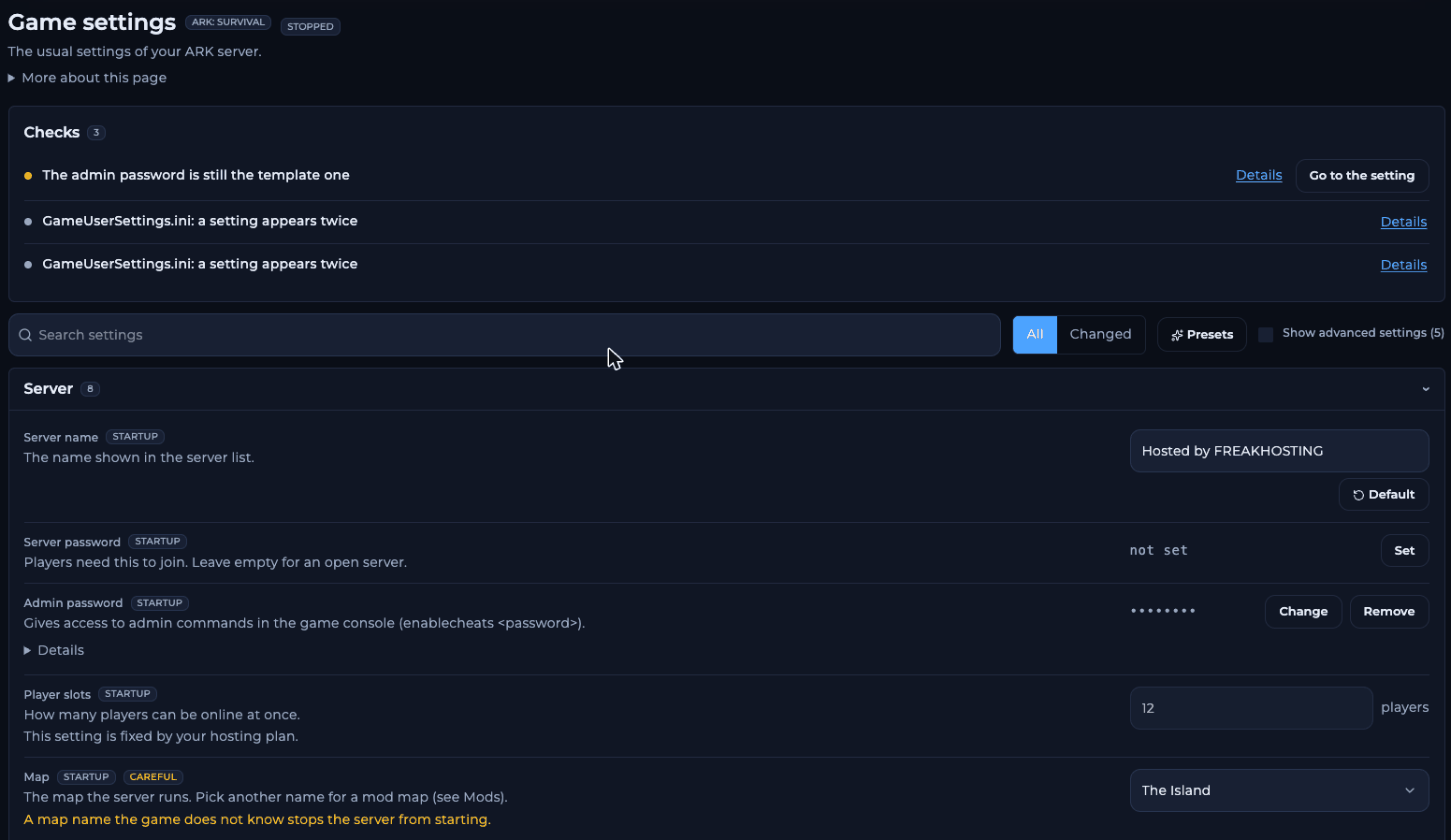
Game settings with Checks and the Server section
What the console shows on the first start
The panel console is an RCON client: it connects to the game once the map has loaded. Until then it repeats these lines every 5 seconds, which is normal:[S_API FAIL] SteamAPI_Init() failed is harmless.
How to join your ARK server
If the server has a password, the game asks for it when you join. If you can’t find the server, see not showing in the list.
Make your first backup
Once your world is set up, make a panel backup and set up automatic backups. The world is saved every 15 minutes by default (Save every in Limits and saving) and when you stop the server from the panel.Frequently asked questions
What ports does an ARK: Survival Evolved server use?
7777 for the game, 7778 as the peer port, 27015 for the server browser (query) and 27020 for RCON. They are set up for you; leave the RCON and query ports as they are.Can I change the player limit?
No. Player slots is fixed by your hosting plan.Why can’t I join right after starting?
ARK is still loading the map. Wait until the console showsWaiting commands for 127.0.0.1:27020.
Can I make the game easier or faster?
Yes. Use a preset such as Boosted x3 or change single rates. See rates and multipliers.Related guides
ARK server guide
Every ARK page in one place.
Become admin
Admin password and enablecheats.
Install mods
Steam Workshop mods.
Change the map
Official ASE maps.
Not showing in the list
Find your server.
Tested by the FREAKHOSTING team on our Game Panel on 2 November 2026 (ARK: Survival Evolved dedicated server, The Island). Steps may differ slightly if the game changes.
Need Extra Help?
If you encounter any issues, our support team is ready to assist:- Live Chat: Quick assistance via our website.
- Support Ticket: Open a Ticket
- Discord: Join our Community
- Email: support@freakhosting.com
Last Updated: November 2026