203.0.113.10:2302. Make a backup before you add mods.
Before you start
- You can sign in to the Game Panel. See how to log in.
- DayZ is installed on your PC through Steam.
How to set up your DayZ server
1
Open Game settings
Open your server and click Game settings under GAME SETTINGS in the sidebar. This page edits
serverDZ.cfg, the server’s main config file.2
Name the server
Under Server, set Server name. This is the name players see in the server list.
3
Set an admin password
Set Admin password. Without one nobody can use admin commands in game; the panel warns “No admin password” until you set it. You log in in game with
#login <password>.4
Pick the map
Under Server, choose Map: Chernarus, Livonia or Sakhal. Each map has its own world, so switching later starts on a different world.
5
Optional: password and player slots
Set Server password for a private server. Player slots shows how many players can join (64 by default).
6
Review, save and start
Click Review and save, check the changes and click Save changes. Start the server. DayZ servers take a minute or two to finish loading.
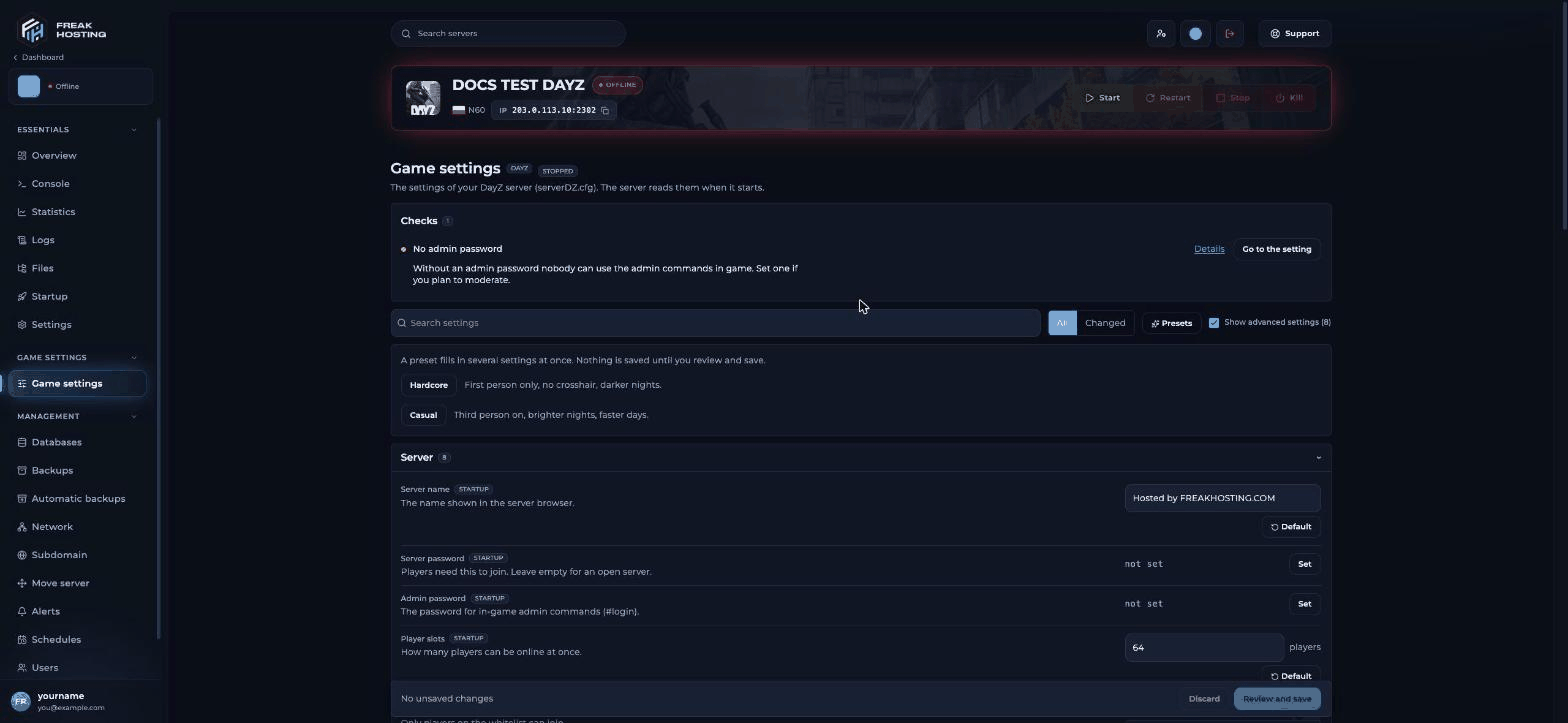
DayZ Game settings in the Game Panel
How to join your DayZ server
1
Copy your address
On the Console page, copy the address from the address card, for example
203.0.113.10:2302.2
Open the DayZ Launcher
Start DayZ from Steam. In the launcher, click Servers, then Direct Connect.
3
Enter the address and connect
Enter your server’s IP and port and click Connect. If the launcher can’t find the server with the game port, try the Query Port shown on the Startup page instead.
Make your first backup
Open Backups and click Create backup. Do this before you add mods or edit mission files. To back up every night, set up automatic backups.Frequently asked questions
Which DayZ map should I choose?
Chernarus is the original map and Livonia now comes with the base game. Sakhal is part of the Frostline DLC, so players need that DLC to join a Sakhal server. Pick one before players start building, because each map keeps its own world.How do I become admin on my DayZ server?
Set Admin password in Game settings, join, and type#login <password> in chat. See DayZ admin commands.
How do I add mods?
Export your mod list from the DayZ Launcher and upload it, or list mod folders in Server-side mods or Extra client mods. See how to install mods.Why can’t players see my server in the list?
New servers can take a few minutes to appear. Use Direct Connect in the meantime and check the server finished starting in the Console.Related guides
DayZ server guide
Every DayZ page in one place.
DayZ server settings explained
Every option on the Game settings page.
Install mods
Mod list, keys and signatures.
DayZ admin commands
#login, #kick and more.
Create and restore backups
Undo mistakes.
Tested by the FREAKHOSTING team on 30 October 2026 (DayZ stable branch on our Game Panel). Steps may differ slightly if the game or its mods change.
Need Extra Help?
If you encounter any issues, our support team is ready to assist:- Live Chat: Quick assistance via our website.
- Support Ticket: Open a Ticket
- Discord: Join our Community
- Email: support@freakhosting.com
Last Updated: October 2026