Admin. Save, restart and test the ports with openports. Players can always join directly with your address, for example 203.0.113.10:22003, through Quick Connect.
Quick checks
How to make your MTA server show in the list
1
Open Game settings
Open your server in the Game Panel and click Game settings. If Checks shows “Note: No owner e-mail”, click Go to the setting.
2
Set the owner e-mail
Enter an e-mail address in Owner e-mail. It is not public; the MTA team uses it to contact you. The panel notes that a missing or wrong address can hide the server from the list.
3
Check the listing settings
Make sure Show in the server list is on and ACL groups protected by serial contains
Admin. The panel warns that turning serial protection off can affect visibility in the master list.4
Review, save and restart
Click Review and save, Save changes, then restart the server.
5
Test the ports
In the Console, type
openports. The ASE port (game port + 123, by default 22126) must be reachable for the server list.6
Search by name
In the MTA server browser, search for your Server name. Give the master list some time to pick up the change.
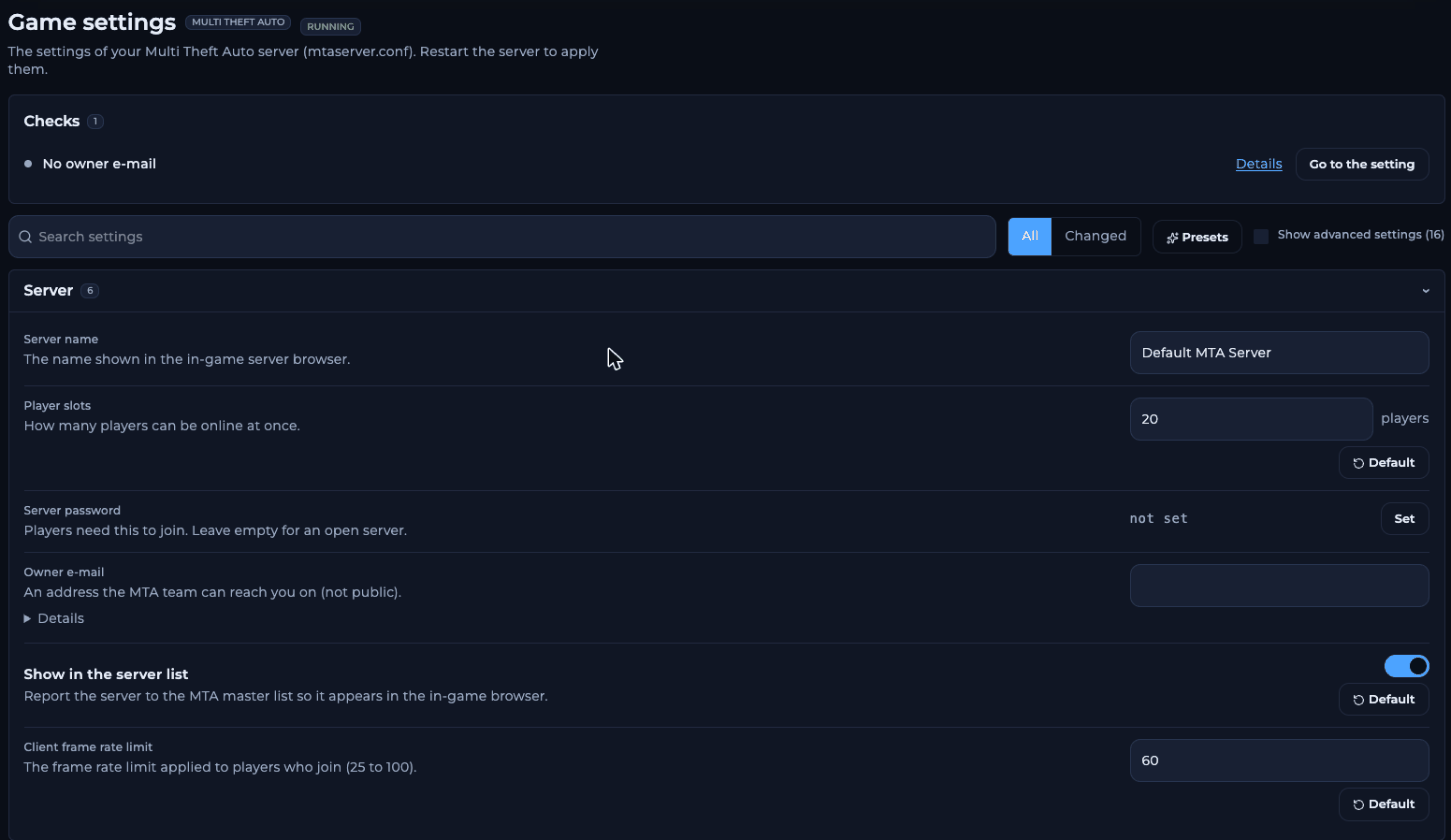
Checks shows a note when the owner e-mail is missing
How to join without the server list
The list isn’t needed to play:- Quick Connect: in the MTA main menu, choose Quick Connect and enter your server’s address, for example
203.0.113.10with port22003. - Console: press F8 and type
connect 203.0.113.10 22003.
What the console tells you
Frequently asked questions
Does a server password hide my server?
They are separate settings. Show in the server list decides whether the server is reported to the master list; Server password decides who can join.Why can players join by IP but not find me in the list?
The game port works, but the listing doesn’t. Check the owner e-mail, Show in the server list, serial protection and the ASE port as above.Can I hide my server from the list on purpose?
Yes. Turn Show in the server list off, save and restart. Players then join only with your address.What is “Do not announce on the LAN”?
An advanced setting that turns off the broadcast that lets players on the same local network find the server. It doesn’t affect the internet server list.Related guides
MTA server guide
Every MTA page in one place.
Server ports
22003, 22005 and 22126.
Console warnings
What fresh-server warnings mean.
Getting started
First steps on your MTA server.
Tested by the FREAKHOSTING team on our Game Panel on 2 November 2026 (MTA:SA server 1.6, 64-bit). Steps may differ slightly if the game changes. Listing rules checked against the official Multi Theft Auto wiki.
Need Extra Help?
If you encounter any issues, our support team is ready to assist:- Live Chat: Quick assistance via our website.
- Support Ticket: Open a Ticket
- Discord: Join our Community
- Email: support@freakhosting.com
Last Updated: November 2026