/rcon login yourpassword with your RCON password, then run commands such as /rcon kick 3 or /rcon gmx.
How to turn on RCON
1
Open the RCON section
Open your server, click Game settings and open Remote console (RCON).
2
Enable RCON
Turn on Enable RCON.
3
Set your RCON password
Your server already has a random RCON password. To choose your own, click Change, type it in New value and click Done. Use letters and digits only. The server doesn’t accept
changeme.4
Save and restart
Click Review and save, then Save changes, and click Restart now.
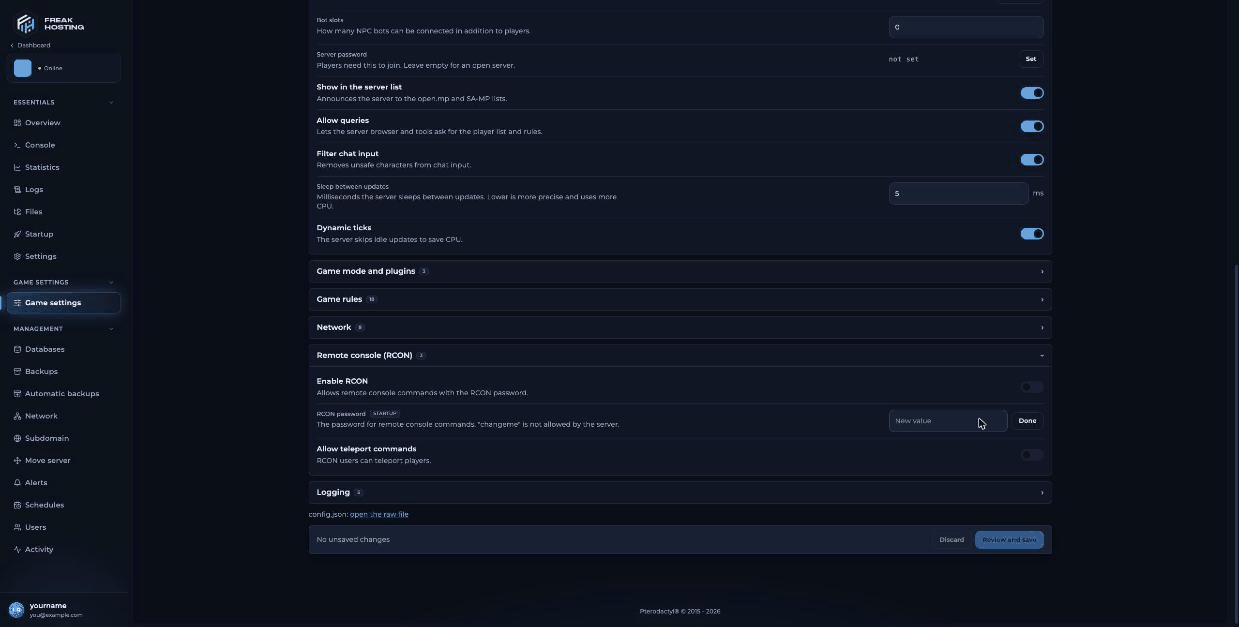
The Remote console (RCON) section with the New value field
STARTUP badge because it uses the same value as the RCON Password variable on Startup.
How to log in to RCON in game
Join your server and type in the chat box:/rcon login Admin2026x. After you log in, start every command with /rcon. Scripts can check IsPlayerAdmin to give RCON admins extra rights (open.mp documentation).
open.mp RCON commands
All commands below come from the open.mp server documentation. Replace[ID] with the player ID.
Changes made with commands like
hostname, password or weather last until the next restart. Make permanent changes in Game settings. If you use /rcon exit, start the server again from the panel.
Frequently asked questions
Why does /rcon login not work?
Check that Enable RCON is on, that you restarted after saving, and that you typed the current RCON password exactly, with no spaces.Is RCON the same as admin in my gamemode?
No. RCON is built into the server. Many gamemodes have their own admin system with their own commands; see your gamemode’s documentation.Can I use RCON from outside the game?
The open.mp documentation describes a separate RCON tool for Windows. In-game/rcon login is the simplest way.
How do I ban a player permanently?
Use/rcon ban [ID] or /rcon banip [IP]. See ban and unban players.
Related guides
open.mp server guide
Every open.mp page in one place.
Ban and unban players
bans.json, banip and unbanip.
Install a gamemode
gmx, changemode and rotation.
config.json explained
The rcon keys and more.
Startup variables
RCON Password and Version.
Tested by the FREAKHOSTING team on our Game Panel on 3 November 2026 (open.mp server 1.6.7.3218), with commands checked against the official open.mp documentation. Steps may differ slightly if the game changes.
Need Extra Help?
If you encounter any issues, our support team is ready to assist:- Live Chat: Quick assistance via our website.
- Support Ticket: Open a Ticket
- Discord: Join our Community
- Email: support@freakhosting.com
Last Updated: November 2026