sv_password in server.cfg at every start. Players then join with cl_password "yourpassword"; connect "203.0.113.10:27015" in the game console. Leave the field empty to remove the password.
How to set or change the password
1
Open Startup
Open your server in the Game Panel and click Startup.
2
Enter the password
Type the password in Server Password. It can be up to 40 characters. The field saves when you click out of it.
3
Restart the server
Restart the server. The password applies from this start.
4
Share it with your players
Send the password and your address from Network to your friends.
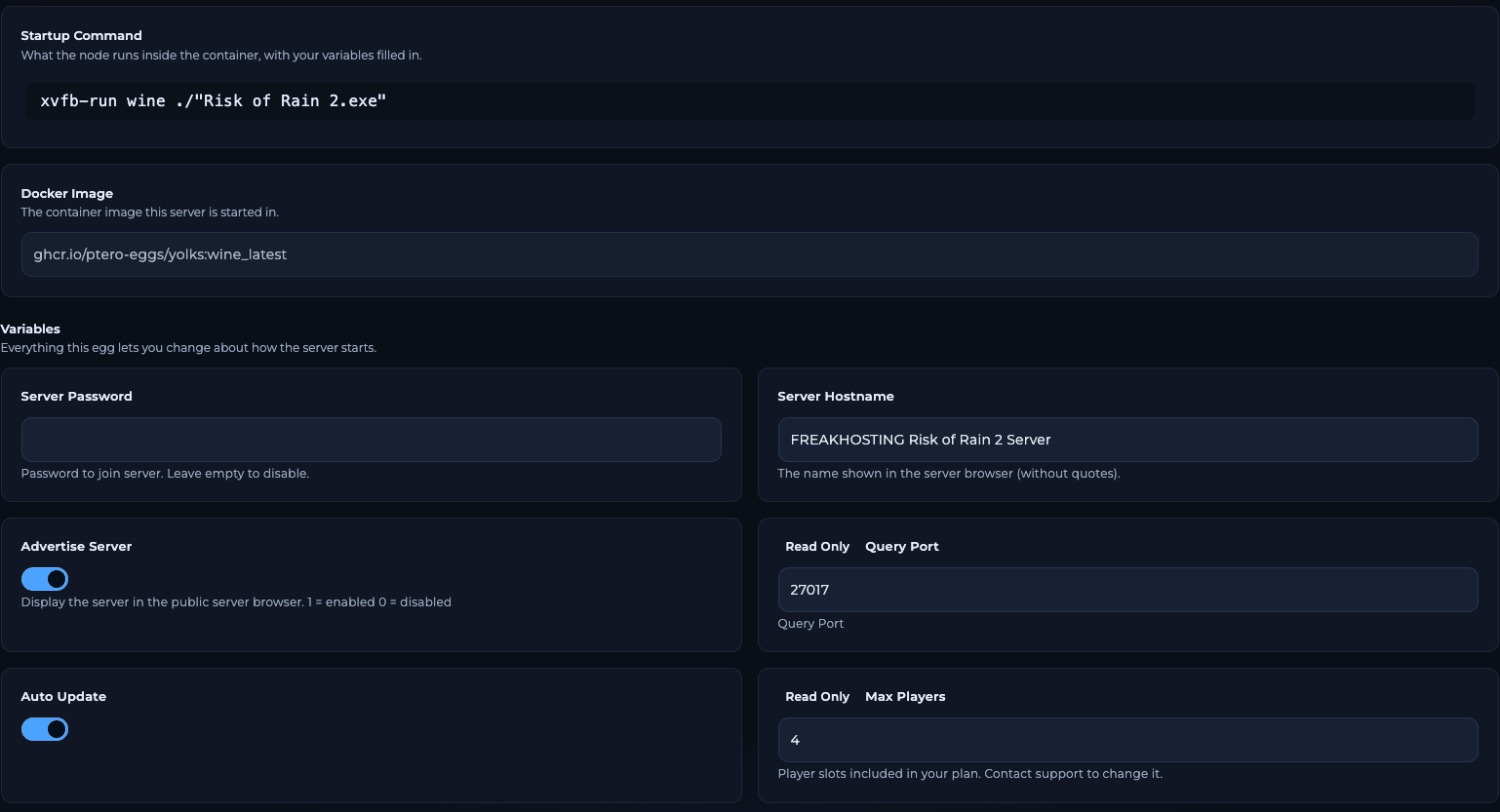
Server Password on the Startup page
How to remove the password
Clear Server Password so the field is empty, then restart. An empty password means anyone can join.How do players join a passworded server?
In Risk of Rain 2, open the console with Ctrl + Alt + ~ and type:cl_password is the password the game sends when it joins a passworded server. Set it before connect. See join your server for the Steam server list.
Tips for a good password
- Don’t reuse a password from an account. The server password is stored as plain text in
server.cfg. - Keep it simple, such as letters and numbers, so players can type it in the console.
- To keep strangers out of the list too, turn off Advertise Server on Startup. Players then join only with your address.
Frequently asked questions
Can I put the password in server.cfg instead?
No need, and it won’t stick. The panel rewritessv_password from Server Password every time the server starts. Always change it on Startup.
How do I lock out a player who knows the password?
Change Server Password and restart the server. Only players you give the new password to can join again. See ping limits and kicking.Why doesn’t my password work?
Restart the server after changing it, check for typing mistakes and make sure players setcl_password before connect.
How do I hide my server from the public list?
Turn off Advertise Server on Startup and restart. The password and the list are separate settings, so use both for a private server.Related guides
Risk of Rain 2 server guide
Every Risk of Rain 2 page in one place.
Join your server
Server list and console connect.
Getting started
All Startup fields.
server.cfg explained
Which keys the panel sets.
Startup variables
How Startup works.
Tested by the FREAKHOSTING team on our Game Panel on 3 November 2026 (Risk of Rain 2 dedicated server, Startup page). In-game steps follow the official Risk of Rain 2 Wiki console page. Steps may differ slightly if the game changes.
Need Extra Help?
If you encounter any issues, our support team is ready to assist:- Live Chat: Quick assistance via our website.
- Support Ticket: Open a Ticket
- Discord: Join our Community
- Email: support@freakhosting.com
Last Updated: November 2026