latest by default), and Exiled Pre-Releases adds test versions. The game itself is updated through SteamCMD, and Beta Branch picks a Steam beta. EXILED is installed by the installation script, so after changing these, back up and use Reinstall in Settings.
Before you start
- Make a backup. Reinstalling re-runs the installation script, and the panel warns that some files may be deleted or changed.
- Check that your plugins support the new EXILED version.
- Startup variables are explained in startup variables.
What do the Startup variables do?
The Startup Command (
./LocalAdmin with your port) and the Docker Image are read only.
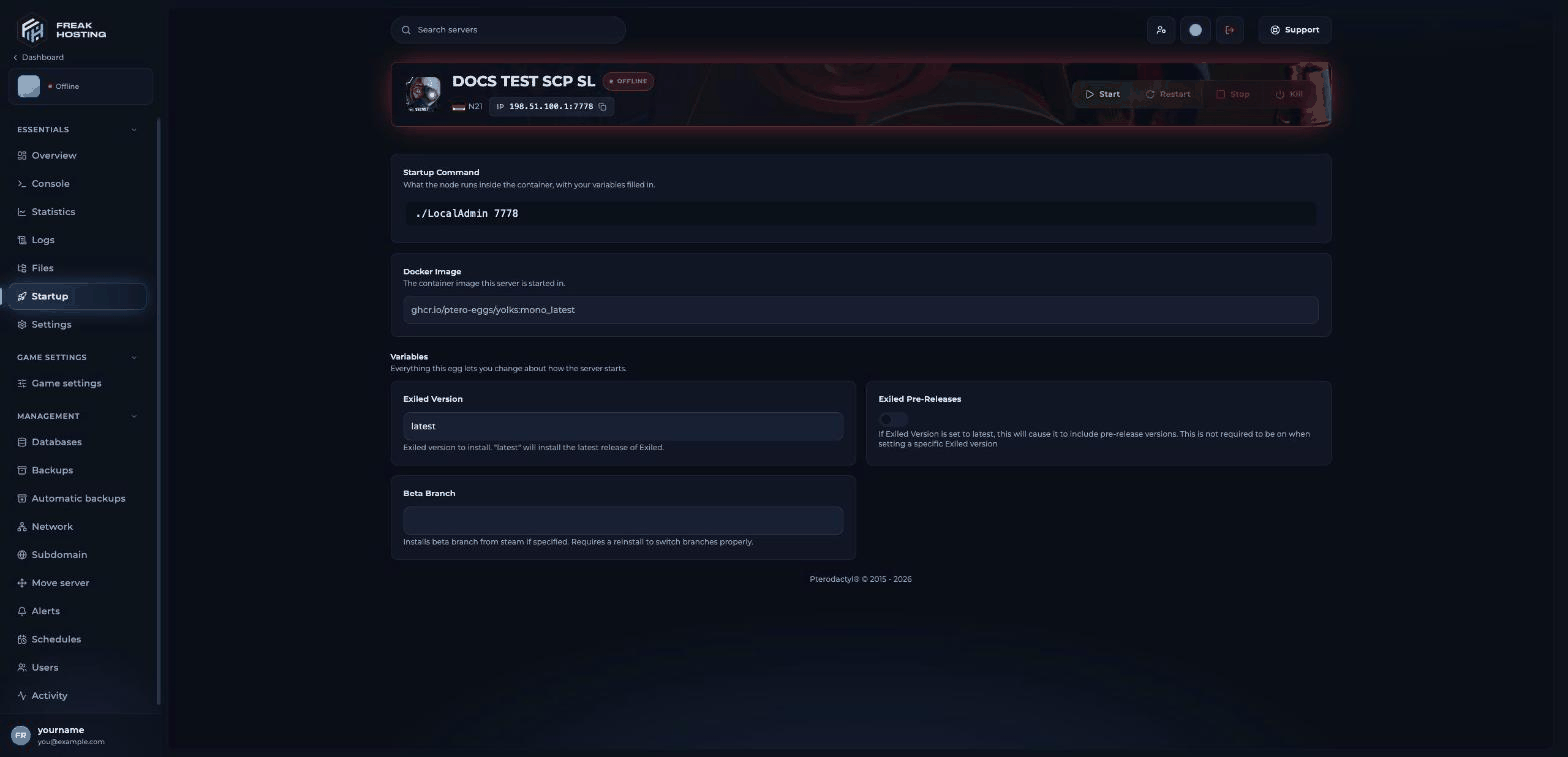
Exiled Version, Exiled Pre-Releases and Beta Branch on the Startup page
How to change the EXILED version
1
Back up your server
Make a backup, and download your
.config folder or at least config_gameplay.txt, config_remoteadmin.txt and .config/EXILED/Configs/ to your PC.2
Set Exiled Version
Click Startup. Leave Exiled Version on
latest for the newest release, or enter the version your plugins need.3
Choose pre-releases
Turn Exiled Pre-Releases on only if you want test versions. Leave it off for a public server.
4
Reinstall
Open Settings, click Reinstall Server and confirm. The server stops and the installation script runs again with your new values.
5
Check and start
Check that your plugins and config files are still there; restore them from your copy if needed. Then start the server and watch the console for errors.
How to update the game
When the server starts, the console shows SteamCMD checking SCP:SL’s dedicated server (Steam app996560), for example Success! App '996560' already up to date. Restart the server after a game update is released. If plugins break after a game update, update them and EXILED to versions made for the new game version.
How to use a beta branch
Enter the branch name in Beta Branch, then reinstall as above. To go back to the normal version, empty Beta Branch and reinstall again. Players need a game version that matches the server to join.Frequently asked questions
Which EXILED version is on my server?
The one set in Exiled Version when the server was last installed. Withlatest, that is the newest release at that time.
Will a reinstall delete my configs?
The panel warns that some files may be deleted or changed during a reinstall. Always back up first and keep a copy of your config files.Why does my server not start after a game update?
Usually a plugin or EXILED is not yet updated for the new game version. Remove plugins one by one, or update EXILED, then try again. See connection and start errors.Related guides
SCP:SL server guide
Every SCP:SL page in one place.
Install EXILED plugins
Upload and configure plugins.
Connection and start errors
Fix start problems.
Settings and reinstall
The Reinstall card.
Backups
Make and restore backups.
Tested by the FREAKHOSTING team on our Game Panel on 3 November 2026 (SCP: Secret Laboratory dedicated server with EXILED). Steps may differ slightly if the game changes.
Need Extra Help?
If you encounter any issues, our support team is ready to assist:- Live Chat: Quick assistance via our website.
- Support Ticket: Open a Ticket
- Discord: Join our Community
- Email: support@freakhosting.com
Last Updated: November 2026