csgo/cfg/server.cfg. Open it in Files to change the server name (hostname), add a join password (sv_password) or an RCON password (rcon_password), and set downloads, tags and region. The server runs it on every start, and the panel never overwrites it, so your edits stay after restarts.
Where is server.cfg on a CS:GO server?
1
Open Files
In the Game Panel, open your server and click Files.
2
Go to csgo/cfg
Open the
csgo folder, then cfg. You’ll see server.cfg among Valve’s stock config files.3
Edit and save
Click
server.cfg, make your change, save, then restart the server.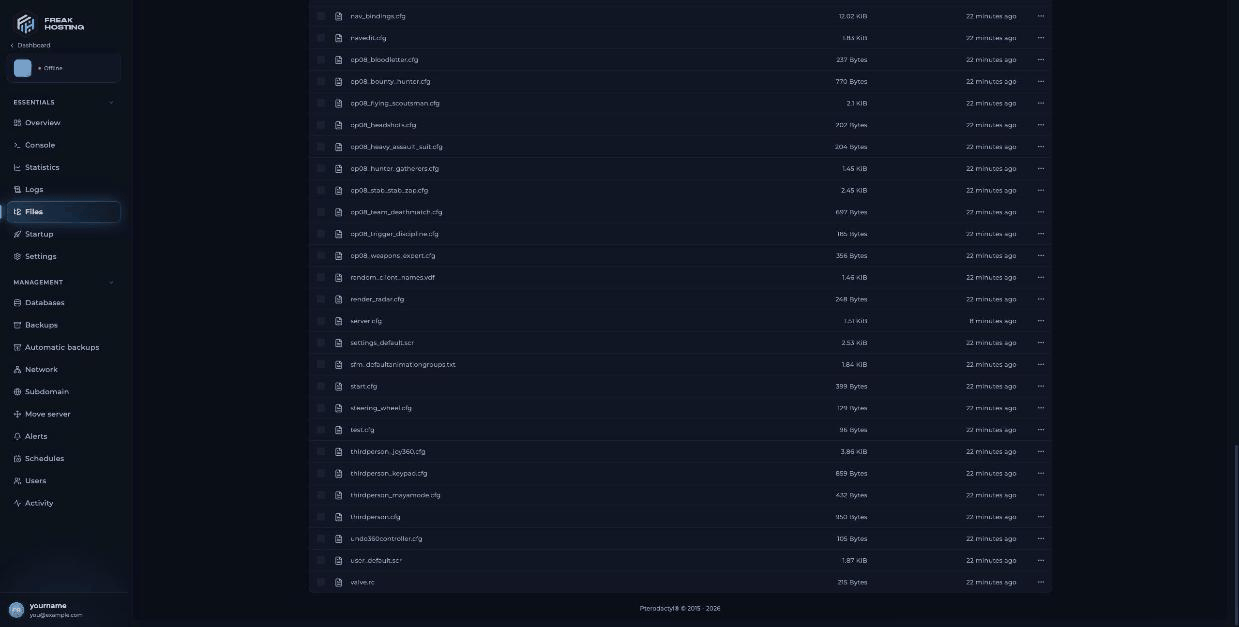
The csgo/cfg folder in Files with server.cfg and the stock config files
What the default server.cfg lines do
The file also has a block of network rate settings. Leave those as they are. Lines not listed here can stay unchanged.
Lines you can add
Example: a typical first edit
Most customers change only a few lines. This example sets a name, an RCON password and a join password. Put each setting on its own line:status in the console: the hostname line shows your new name.
How gamemode_*_server.cfg overrides work
CS:GO ships a config file for each mode, such asgamemode_competitive.cfg and gamemode_casual.cfg, in csgo/cfg. Don’t edit those. Instead, create a file with _server added to the name, for example gamemode_competitive_server.cfg. The game runs it each time that mode loads, so you can keep your own values there without editing Valve’s files.
Example gamemode_competitive_server.cfg that removes bots:
_server.cfg files exist at first, so the console shows exec: couldn't exec gamemode_competitive_server.cfg until you create one. That line is harmless.
Frequently asked questions
Why didn’t my server.cfg change apply?
Most settings apply on the next start. Save the file and restart. Check the line for typos and make sure each setting is on its own line.Does the panel overwrite server.cfg?
No. We tested this: a changedhostname and an added rcon_password stayed after a restart.
Can I change max players in server.cfg?
No. Max Players on Startup is read only and matches the slots in your plan. For more slots, open a ticket.What does “couldn’t exec banned_user.cfg” mean?
The ban list file doesn’t exist yet because nobody has been banned. It appears after the first saved ban.Related guides
CS:GO server guide
Every CS:GO page in one place.
Game modes
game_type and game_mode values.
Set up RCON
Add rcon_password.
Set a password
Add sv_password.
File Manager
Edit files in the panel.
Tested by the FREAKHOSTING team on our Game Panel on 3 November 2026 (Counter-Strike: Global Offensive legacy, version 1.38.8.1). Steps may differ slightly if the game changes.
Need Extra Help?
If you encounter any issues, our support team is ready to assist:- Live Chat: Quick assistance via our website.
- Support Ticket: Open a Ticket
- Discord: Join our Community
- Email: support@freakhosting.com
Last Updated: November 2026