4465480, then paste it into Steam Account Token on Startup in the Game Panel and restart. The server passes it to Steam with sv_setsteamaccount. Without a valid token, your server isn’t listed and stays on Starting.
Before you start
Steam only lets you create tokens if your account:- has a qualifying phone number registered,
- is not limited,
- is not community banned or locked,
- owns the game the token is for. CS:GO is free, so add it to your library from its Steam store page first.
How to create a GSLT for CS:GO
1
Open Steam's game server page
Go to steamcommunity.com/dev/managegameservers and log in with your Steam account.
2
Enter the App ID
In the form for a new game server account, enter App ID
4465480. This is the App ID of the standalone CS:GO game on Steam, which your server reports.3
Add a memo and create the token
Type a memo that helps you recognise the server, for example
My CS:GO server, and create the account.4
Copy the token
Copy the login token Steam shows for the new account. It is a string of letters and numbers. Keep it private.
How to add the token in the Game Panel
1
Open Startup
Open your server in the Game Panel and click Startup.
2
Paste the token
Replace
0 in Steam Account Token with your token. The field accepts letters and numbers only. If you see “The value may only contain letters and numbers.”, remove any spaces or other characters you copied by mistake. The value saves when you click away from the field.3
Restart the server
Restart the server so it starts with the new token.
4
Check the console
Watch the console. The line
Could not establish connection to Steam servers. should no longer appear. Type status: the version line should no longer say insecure or disconnected from Steam3.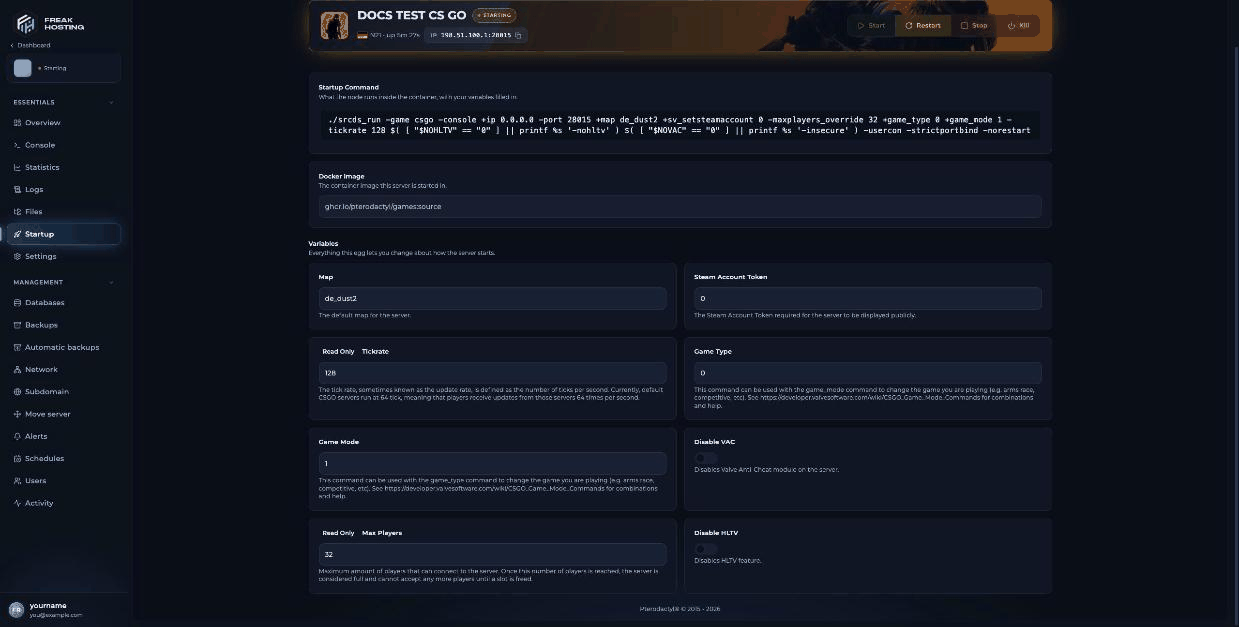
Steam Account Token on the CS:GO Startup page, still set to the default 0
Keep your token working
Steam makes you responsible for your tokens. If a token is banned, Steam may also restrict the account that created it from playing the game.
Frequently asked questions
Which App ID do I use for a CS:GO GSLT?
Use4465480, the App ID of the standalone CS:GO game on Steam. 730 is now the App ID of Counter-Strike 2.
Can I make a GSLT without a phone number on Steam?
No. Steam requires a qualifying phone number on the account, and the account must not be limited.My token is pasted but the server still says Starting. What now?
Check the token has no spaces, that it was created for App ID4465480, and that it hasn’t expired. Then restart. See stuck on Starting.
Does a GSLT make my server VAC-secured?
The token lets the server log in to Steam. VAC also needs Disable VAC to stay off on Startup, because turning it on starts the server without Valve Anti-Cheat.Related guides
CS:GO server guide
Every CS:GO page in one place.
Stuck on Starting
Fix a server that never comes online.
Not showing in the server list
Get listed or join by IP.
Getting started
Full first-time setup.
Startup variables
How Startup works.
Tested by the FREAKHOSTING team on our Game Panel on 3 November 2026 (Counter-Strike: Global Offensive legacy, version 1.38.8.1). Steps may differ slightly if the game changes.
Need Extra Help?
If you encounter any issues, our support team is ready to assist:- Live Chat: Quick assistance via our website.
- Support Ticket: Open a Ticket
- Discord: Join our Community
- Email: support@freakhosting.com
Last Updated: November 2026