How to turn automatic updates on or off
1
Open Startup
Open your server in the Game Panel and click Startup.
2
Find AUTO_UPDATE
Under Variables, find AUTO_UPDATE (“Disabling or enabling automated updates on boot”). It is on by default.
3
Switch it
Click the switch. The panel saves the change straight away.
4
Restart
Restart the server. The setting applies from the next start.
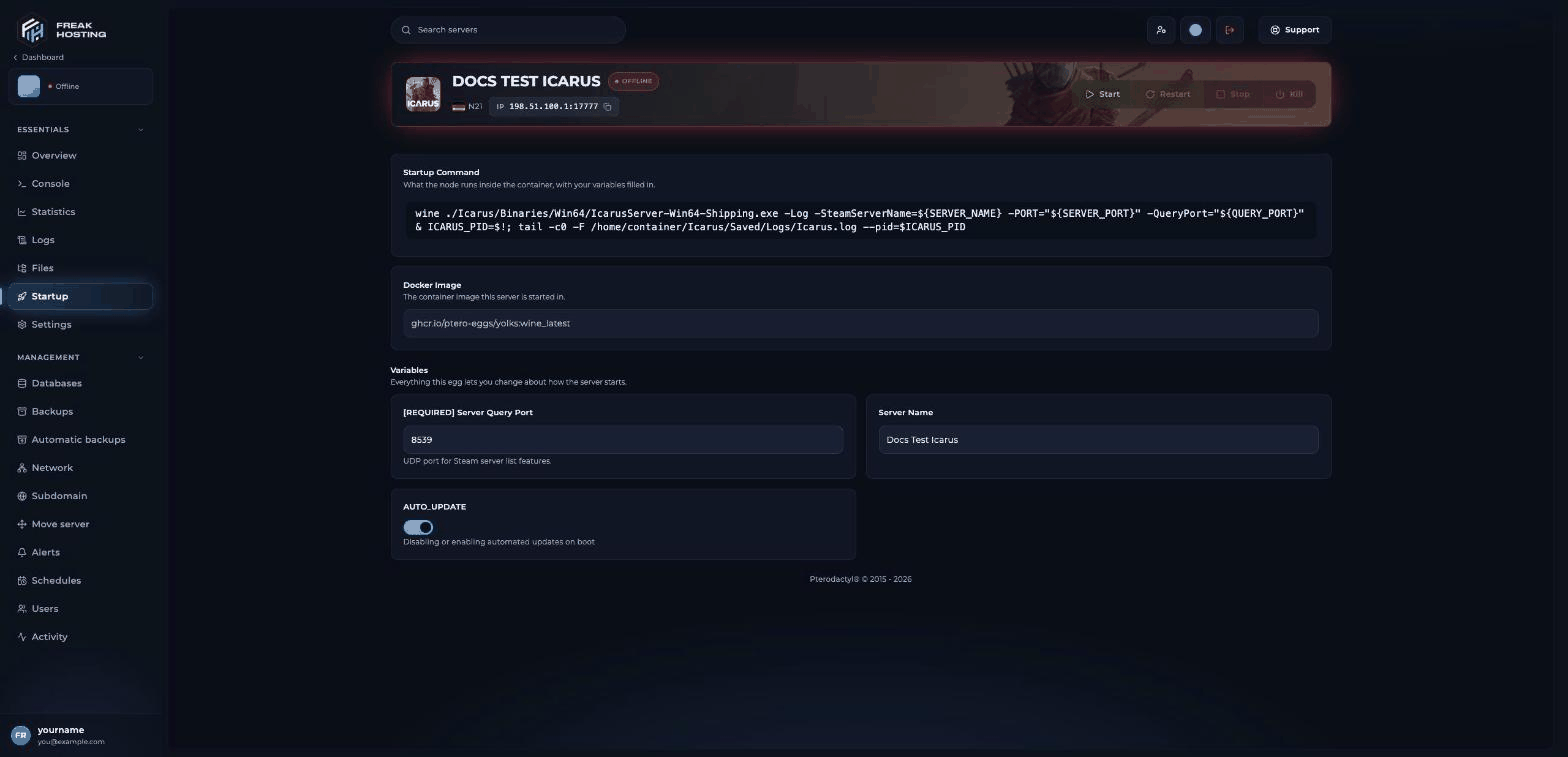
AUTO_UPDATE on the Startup page
How to update after an Icarus patch
RocketWerkz releases Icarus updates regularly. When players’ games have updated and the server has not, they may not be able to join until the server runs the same build.- Make a backup first, so you can go back if the update breaks your prospect.
- Check that AUTO_UPDATE is on.
- Restart the server and watch the console. The update adds a few minutes to the start.
- Join when you see
Match State Changed from EnteringMap to WaitingToStart.
Should I turn AUTO_UPDATE off?
Keep it on in most cases. Turn it off only for a short time, for example if you want to keep playing for a day before taking a new update. Players whose game has already updated may not be able to join a server on an older build.How to restart every night so updates install
Restart the server on a schedule so it picks up updates on its own:1
Create a schedule
Click Schedules and New schedule, and set a time when nobody plays, for example 05:00.
2
Add a restart task
Add a task, choose Change the power state and Restart, and save.
ResumeProspect=True in ServerSettings.ini (the default), the server loads the same prospect again after the restart. See resume prospects.
Frequently asked questions
How do I know which version my server runs?
Restart with AUTO_UPDATE on. The server then runs the latest public build, the same as players who have updated Icarus in Steam.Can I run the Icarus experimental branch?
There is no branch option on Startup. Open a ticket if you need it.Does an update delete my prospects?
Your prospects are saved inIcarus/Saved/PlayerData/DedicatedServer/Prospects/, separate from the game files. Make a backup before each update anyway, so you can go back if something goes wrong.
Why can’t my friends join after an update?
Their game and the server are probably on different builds. Restart the server with AUTO_UPDATE on, and ask players to update Icarus in Steam.Related guides
Icarus server guide
Every Icarus page in one place.
Resume prospects
Load the last prospect after a restart.
Not showing in the list
Find your server after an update.
Console errors explained
What the start-up log means.
Schedules and tasks
Restart on a timetable.
Tested by the FREAKHOSTING team on our Game Panel on 3 November 2026 (Icarus Dedicated Server). Steps may differ slightly if the game changes.
Need Extra Help?
If you encounter any issues, our support team is ready to assist:- Live Chat: Quick assistance via our website.
- Support Ticket: Open a Ticket
- Discord: Join our Community
- Email: support@freakhosting.com
Last Updated: November 2026