Icarus/Saved/Config/WindowsServer/ServerSettings.ini in Files with a join and admin password. Restart, open Join Session in Icarus, switch the browser to dedicated servers and join. The first start takes about 3 minutes.
Before you start
- Log in to the Game Panel.
- Every player needs Icarus on Steam. Styx prospects also need the Icarus: Styx Expansion DLC.
How to start your Icarus server for the first time
1
Start the server
Open your server in the Game Panel and click Start. The server files (about 10 GB) are already installed.
2
Wait for the ready lines
Open Console. After about 3 minutes you see these two lines, which mean the server is ready:Many red error lines appear before this. They are normal: see console errors explained.
3
Stop the server
Click Stop. Icarus shuts down in under 30 seconds.
How to name your Icarus server
1
Open Startup
Click Startup in the sidebar.
2
Change Server Name
Type a name in Server Name, up to 32 characters. Spaces are fine, for example
Prospectors EU. The panel saves when you click out of the field.SessionName key in ServerSettings.ini does nothing on current versions, so always use Server Name. Leave [REQUIRED] Server Query Port as it is.
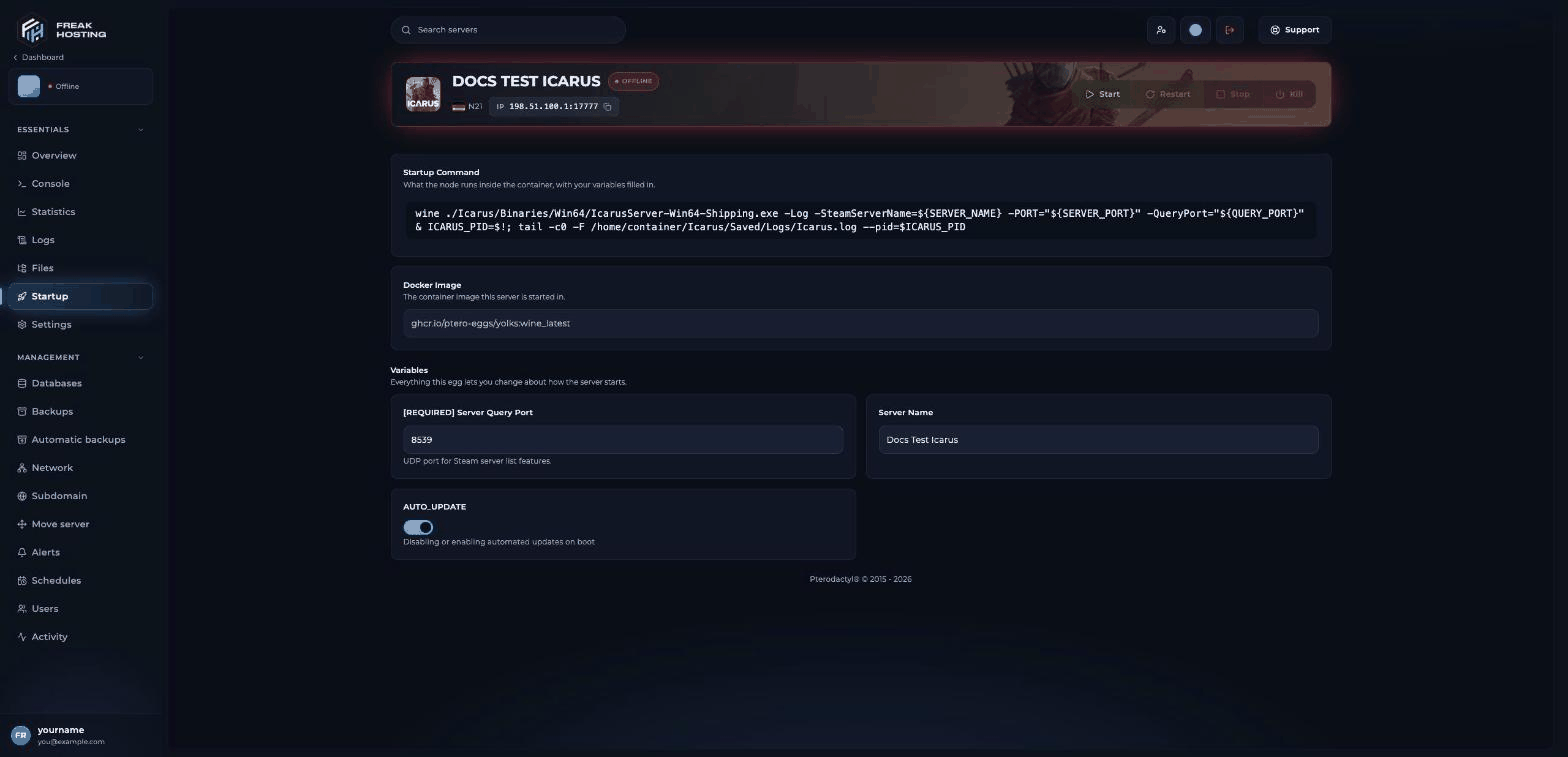
Startup page with Server Name, Server Query Port and AUTO_UPDATE
How to create ServerSettings.ini
Icarus keeps its server settings in a file the server does not create on its first start. You create it once.1
Open the WindowsServer folder
Click Files and open
Icarus > Saved > Config > WindowsServer. It contains only GameUserSettings.ini at first.2
Create the file
Click New file, paste the text below, click Create File, type
ServerSettings.ini as the File Name and click Create File again.3
Set your passwords
Replace
YourJoinPassword with the password players type to join, or delete it for an open server. Replace YourAdminPassword with your own admin password. Always set an admin password: when it is empty, anyone who types /AdminLogin becomes admin.4
Start the server
Click Start and wait for the ready lines again.
How to join your Icarus server
- Start Icarus and select your character.
- Click Join Session in the HAB menu.
- Use the toggle in the top right corner to switch the browser to dedicated servers.
- Find your Server Name and join. Enter the join password if you set one.
How to start your first prospect
A new server has no prospect (a mission, outpost or Open World), so the first player lands in the Server Lobby. From there you create a new prospect or load an existing one. By default any player in the lobby can do this. Log in as admin first with/AdminLogin YourAdminPassword if you set AllowNonAdminsToLaunchProspects to False.
After that, the server resumes the last prospect at every start. See prospect settings and resume prospects.
Make your first backup
Once your prospect is running, make a panel backup and set up automatic backups.Frequently asked questions
Why is there no ServerSettings.ini on my server?
Icarus does not create it on the first start. Create it yourself inIcarus/Saved/Config/WindowsServer/ as shown above.
Which ports does my Icarus server use?
The game port (17777 by default) and a Steam query port. Both are set up for you and shown on Network. Leave [REQUIRED] Server Query Port as it is.Can I change the player limit?
Your player slots come from your plan. To get more, open a ticket.Why does the server go back to the lobby after a few minutes?
If nobody joins within 300 seconds of a prospect loading, or the server is empty for 300 seconds, Icarus returns to the lobby. See stuck in the lobby.Related guides
Icarus server guide
Every Icarus page in one place.
ServerSettings.ini explained
Every key and its default.
Become admin
AdminPassword and /AdminLogin.
Upload a prospect
Bring your local world.
Tested by the FREAKHOSTING team on our Game Panel on 3 November 2026 (Icarus Dedicated Server). Steps may differ slightly if the game changes.
Need Extra Help?
If you encounter any issues, our support team is ready to assist:- Live Chat: Quick assistance via our website.
- Support Ticket: Open a Ticket
- Discord: Join our Community
- Email: support@freakhosting.com
Last Updated: November 2026