eula.txt in Files, change eula=false to eula=true, save and start the server. You can also switch on Accept EULA in Version Changer or Modpacks.
Why does my server ask for the EULA?
Every Minecraft server must accept the Minecraft EULA once. Until it does, the server createseula.txt with eula=false, prints a message such as You need to agree to the EULA in order to run the server. Go to eula.txt for more info. and stops. Accepting the EULA is your decision as the server owner: FREAKHOSTING doesn’t accept it for you.
How to accept the EULA in eula.txt
1
Read the EULA
Read the Minecraft EULA. Only continue if you accept it.
2
Open eula.txt
Click Files and click
eula.txt in the main folder. If it isn’t there yet, start the server once so it’s created.3
Change false to true
Change the line to:
4
Save and start
Click Save Content, then Start. The server now starts normally.
How to accept the EULA when you change version or install a modpack
Version Changer and Modpacks both have an Accept EULA switch. Switch it on only if you have read and accept the EULA. The panel then writeseula=true for you.
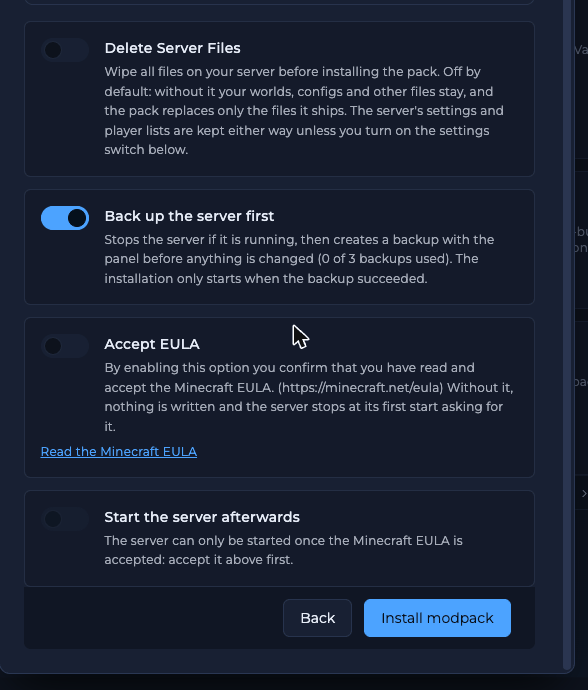
The Accept EULA switch in the modpack install options
Delete Server Files in Version Changer or Modpacks wipes
eula.txt too. Accept the EULA again in the same dialog, or edit eula.txt afterwards.Frequently asked questions
What is the Minecraft EULA?
It is Mojang’s End User Licence Agreement for Minecraft. It sets rules for servers, for example what you may sell to players. Read it at minecraft.net/eula.I set eula=true but the server still stops. Why?
Check that you clicked Save Content, that the file iseula.txt in the main folder and that the line reads exactly eula=true. If the server still stops, open Logs: the cause is something else. See server crashing.
Do I need to accept the EULA again after an update?
Not usually.eula.txt stays when you change version, unless you used Delete Server Files.
Can FREAKHOSTING accept the EULA for me?
No. The EULA is an agreement between you and Mojang, so only you can accept it.Related guides
Minecraft server guide
Every Minecraft guide in one place.
Set up your Minecraft server
The full first-start checklist.
Change your server version
Version Changer and its Accept EULA switch.
Can't connect
Server running but nobody can join?
Reviewed by the FREAKHOSTING team on 29 October 2026. Game Panel steps were checked on our panel (Minecraft 26.1, Paper and Fabric); game and plugin details follow their official documentation. Steps may differ slightly if the game change.
Need Extra Help?
If you encounter any issues, our support team is ready to assist:- Live Chat: Quick assistance via our website.
- Support Ticket: Open a Ticket
- Discord: Join our Community
- Email: support@freakhosting.com
Last Updated: October 2026