60), click Review and save, then restart the server. The panel writes the value to <fpslimit> in mtaserver.conf. A fresh server is set to 36.
How to change the FPS limit in the Game Panel
1
Open Game settings
Log in to the Game Panel, open your MTA server and click Game settings under GAME SETTINGS.
2
Find the field
In the Server section, find Client frame rate limit. You can also type
frame in Search settings.3
Enter the new limit
Type a number from 25 to 100, for example
60. The field gets a CHANGED tag.4
Review and save
Click Review and save. The Review your changes dialog shows the exact line, such as
<fpslimit>60</fpslimit>. Click Save changes.5
Restart the server
Restart the server. Players who join after the restart get the new limit.
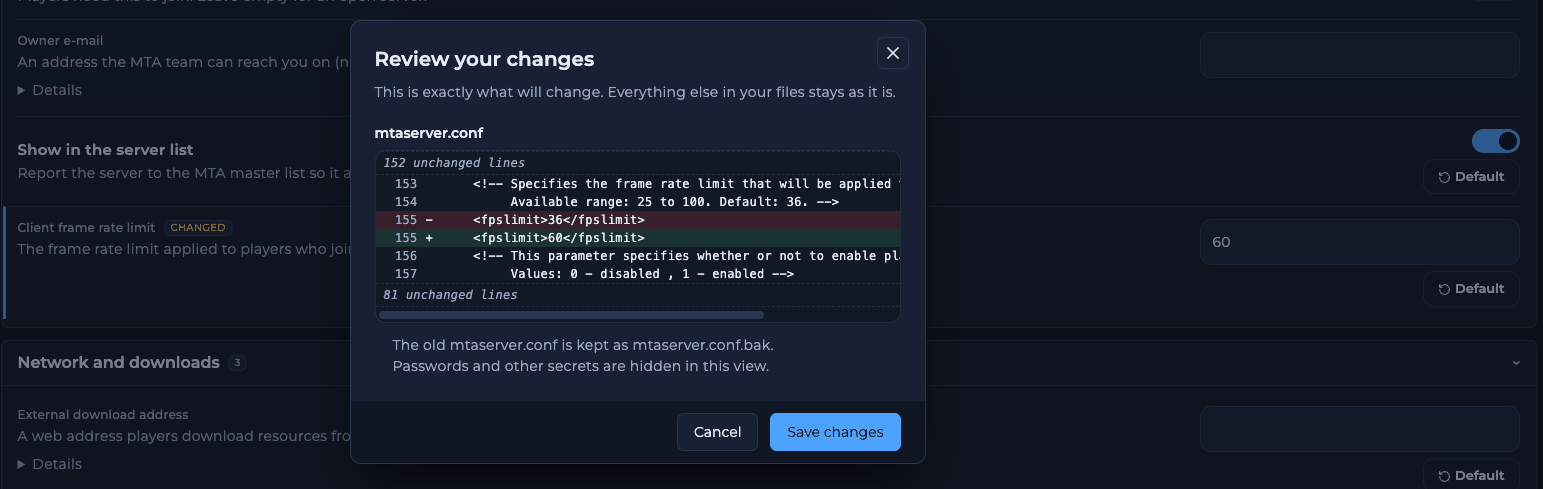
The Review your changes dialog shows the fpslimit line before you save
Which FPS limit should I use?
The FPS limit is the highest frame rate players’ games may run at on your server. The MTA wiki advises a value between 40 and 60 and calls 74 the highest recommended value. Above about 74 FPS, GTA: San Andreas has physics bugs.How to remove the FPS limit
The panel field accepts 25 to 100. MTA itself also accepts0 (no limit) and values up to 32767 in mtaserver.conf. To use one, open the raw file with the mtaserver.conf: open the raw file link at the bottom of Game settings, change <fpslimit>, save and restart. Because of the physics bugs above, we don’t recommend it.
How to set the FPS limit from a script
Resources can change the limit while the server runs with the Lua functionsetFPSLimit:
setFPSLimit changes the limit after the server has started, so it takes over from the value in Game settings. For a fixed limit, use Game settings and leave scripts out of it.
Why is a player’s FPS lower than the limit?
The server limit is a maximum. Each player also has their own limit in the MTA client, which is 100 by default. When both are set, the lower one wins. A player whose PC can’t reach the limit sees their own frame rate.Frequently asked questions
What is the default FPS limit in MTA?
A fresh FREAKHOSTING server is set to 36. The current MTA example configuration uses 74.Does a higher FPS limit cause lag on the server?
The FPS limit applies to each player’s game, not to the server’s network sync. For lag, see lag and sync settings.Why did my FPS limit not change?
Restart the server after saving. If it still shows the old value, check that a resource doesn’t callsetFPSLimit on start.
Can players raise the FPS limit themselves?
No. Players can only lower their own frame rate. The server limit is the maximum.Related guides
MTA server guide
Every MTA page in one place.
Change server settings
How Game settings works.
mtaserver.conf explained
Every setting and its key.
Lag and sync settings
Sync rates and bandwidth saving.
Tested by the FREAKHOSTING team on our Game Panel on 2 November 2026 (MTA:SA server 1.6, 64-bit). Steps may differ slightly if the game changes. FPS advice checked against the official Multi Theft Auto wiki.
Need Extra Help?
If you encounter any issues, our support team is ready to assist:- Live Chat: Quick assistance via our website.
- Support Ticket: Open a Ticket
- Discord: Join our Community
- Email: support@freakhosting.com
Last Updated: November 2026