config.json, keeps the old file as config.json.bak, and the new settings apply after a restart.
What is on the Game settings page?
Game settings is a form for your server’sconfig.json. It has six sections. Click a section to open or close it.
The toolbar at the top helps you find things:
- Search settings finds a field by name.
- All / Changed shows every field or only the ones you changed.
- Show advanced settings adds 13 extra fields, such as streaming distance and sync rates. Leave them at their defaults unless you know you need them.
How to change a setting
1
Open Game settings
Open your server and click Game settings under GAME SETTINGS.
2
Change the fields
Edit a field or flip a toggle. Changed fields get a
CHANGED badge and a Default button that puts the default value back. The bar at the bottom counts your unsaved changes.3
Fix any red values
If a value is out of range, a red message appears under the field and you can’t save until you fix it.
4
Review and save
Click Review and save. The Review your changes dialog shows exactly what changes in
config.json. Passwords are hidden. Click Save changes, or Cancel to go back. Click Discard on the bar to throw away all unsaved changes.5
Restart
The panel shows “Restart the server to apply your changes”. Click Restart now. The server keeps using the old settings until it restarts.
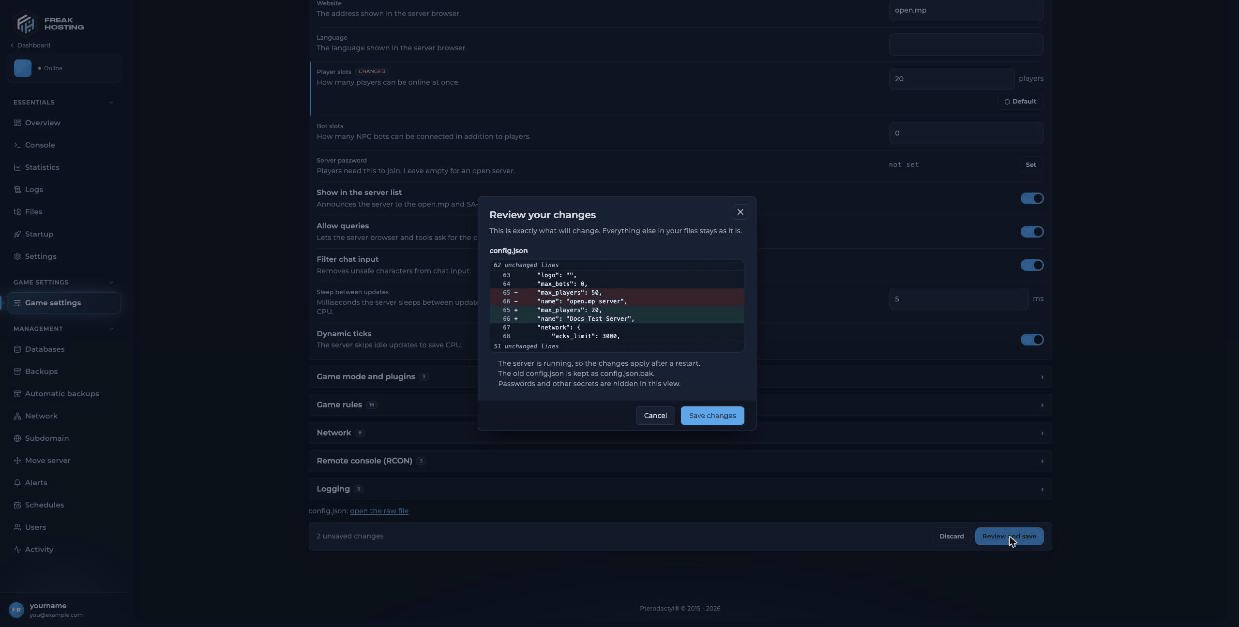
The Review your changes dialog before saving config.json
How to use the Roleplay and Deathmatch presets
A preset fills in several settings at once. Nothing is saved until you review and save.
Click Presets, choose one, check the changed fields, then click Review and save. Presets only change server settings. The way your game mode plays still depends on its script.
Can I edit config.json directly?
Yes. Click config.json: open the raw file at the bottom of Game settings, or openconfig.json in the File Manager. Stop the server first, keep valid JSON (quotes, commas and brackets), and save. For what each key does, see config.json explained.
Frequently asked questions
Why didn’t my change work?
Settings apply after a restart. Check that you clicked Save changes and then restarted the server.How do I undo a change?
Before saving, click Default on the field or Discard on the bar. After saving, the previous file is kept asconfig.json.bak in Files; you can rename it back to config.json with the server stopped, or restore a backup.
Can I give my server more player slots?
Your slots come from Max Players on Startup (your plan), written intoconfig.json at every start, so changing Player slots here has no effect. For more slots, open a ticket.
Does LAN mode make my server private?
It blocks everyone outside the server’s own network, so players on the internet can’t join. Use a Server password instead. See set a password.Related guides
open.mp server guide
Every open.mp page in one place.
config.json explained
What each key does.
Set a password
Make your server private.
RCON and admin login
Turn on RCON and log in.
File Manager
Edit and upload files.
Tested by the FREAKHOSTING team on our Game Panel on 3 November 2026 (open.mp server 1.6.7.3218). Steps may differ slightly if the game changes.
Need Extra Help?
If you encounter any issues, our support team is ready to assist:- Live Chat: Quick assistance via our website.
- Support Ticket: Open a Ticket
- Discord: Join our Community
- Email: support@freakhosting.com
Last Updated: November 2026