Legacy Network started on port. Players join with the address from Overview, using the open.mp launcher or the SA-MP 0.3.7 client.
Before you start
- Log in to the Game Panel.
- Have Grand Theft Auto: San Andreas for PC and the open.mp launcher installed. The launcher also joins SA-MP servers.
- Your server runs the open.mp server with the example game mode
gungame, so it works before you change anything.
What is open.mp?
open.mp (open.multiplayer) is a multiplayer mod for Grand Theft Auto: San Andreas that is backwards compatible with SA-MP. According to the open.mp project, old SA-MP.amx scripts load on the open.mp server without changes, and players on the SA-MP client can join. Settings live in config.json, which the Game settings page edits for you.
How to set up your open.mp server
1
Open Game settings
Open your server and click Game settings under GAME SETTINGS. The Checks row says
Nothing to fix. when the settings are valid.2
Name your server
In the Server section, enter a Server name. This is what players see in the server browser. It can be up to 178 characters.
3
Set a password (optional)
Next to Server password, click Set and enter a password if only invited players should join. Leave it empty for an open server. See set a password.
4
Choose visibility
Leave Show in the server list on to be listed in the open.mp and SA-MP server lists, or turn it off so players can only join with the address.
5
Review and save
Click Review and save. The Review your changes dialog shows exactly what changes in
config.json. Click Save changes.6
Restart the server
Click Restart now on the yellow banner, or restart the server. Watch the console until it shows
[Info] Legacy Network started on port followed by your port. This takes a few seconds.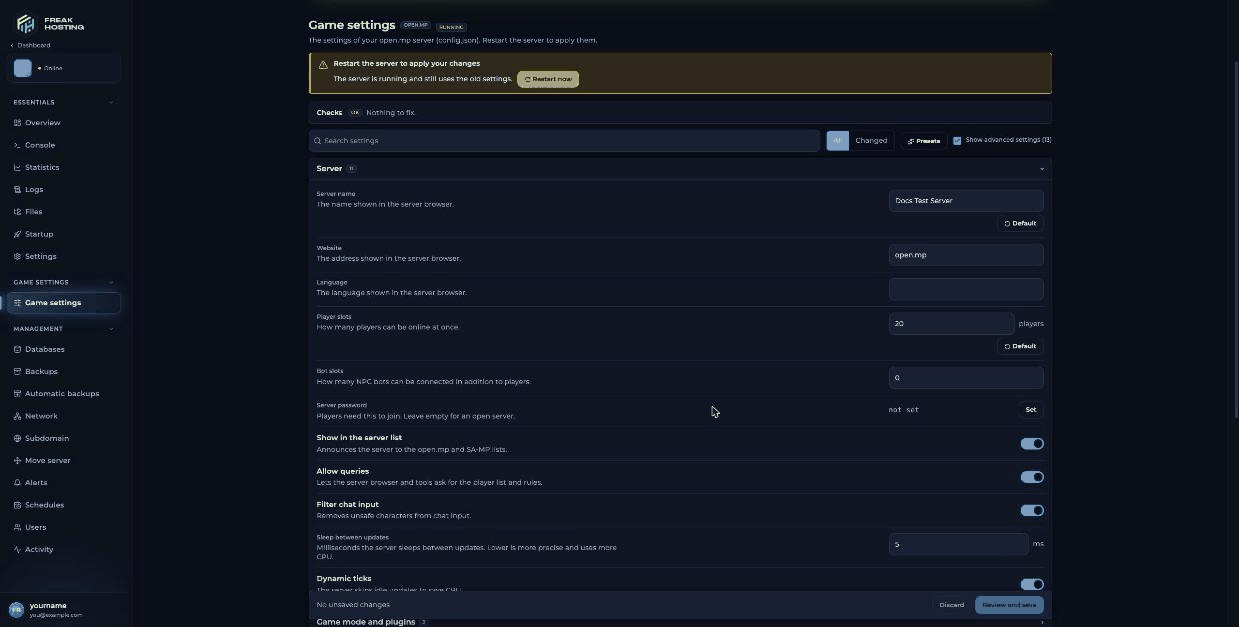
Game settings for open.mp in the FREAKHOSTING Game Panel
How to join your open.mp server
1
Copy the address
On Overview, copy the ADDRESS under the server info (the copy icon next to it). It is your IP and port, for example
203.0.113.10:7777.2
Add it in the launcher
Open the open.mp launcher (or the SA-MP 0.3.7 client), add the address to your favourites and connect.
3
Enter the password
If you set a Server password, the game asks for it when you join.
How many players can join?
Your player slots come from Max Players on Startup, which shows the slots in your plan. The panel writes it intoconfig.json at every start, so changing Player slots in Game settings has no effect. To get more slots, open a ticket.
Make your first backup
Before you upload your own game mode or plugins, make a panel backup. When you save in Game settings, the panel also keeps the previous file asconfig.json.bak.
Frequently asked questions
What port does my open.mp server use?
It uses the port shown on Overview in the Game Panel. The open.mp default is 7777, but your server may use a different port, so always join with the address from the panel.Do players need the open.mp launcher?
No. The open.mp launcher is recommended, but Allow 0.3.7 clients is on by default, so players with the older SA-MP 0.3.7 client can also join.How do I become admin on my open.mp server?
Turn on Enable RCON in Game settings, restart, then type/rcon login yourpassword in game. See RCON commands and admin login.
How do I change the game mode?
Upload your compiled.amx file to gamemodes/ and enter its name in Game modes. See install a gamemode.
Can I still run a SA-MP server instead?
Yes, open.mp and SA-MP are separate products. If you already run SA-MP, see our SA-MP server guide or migrate to open.mp.Related guides
open.mp server guide
Every open.mp page in one place.
Change server settings
Game settings, presets and saving.
Install a gamemode
Your own game mode and filterscripts.
RCON and admin login
Turn on RCON and log in.
Not showing in the list
Find your server or join by IP.
Tested by the FREAKHOSTING team on our Game Panel on 3 November 2026 (open.mp server 1.6.7.3218). Steps may differ slightly if the game changes.
Need Extra Help?
If you encounter any issues, our support team is ready to assist:- Live Chat: Quick assistance via our website.
- Support Ticket: Open a Ticket
- Discord: Join our Community
- Email: support@freakhosting.com
Last Updated: November 2026