fxmanifest.lua file. To install one on FREAKHOSTING, click Resources under FIVEM, click Upload a resource and drop the .zip (up to 100 MB). Then switch on Start at boot for it, which adds an ensure line to server.cfg, and restart. Upload bigger resources with SFTP.
Before you start
- Use resources made for RedM. GTA V (FiveM) scripts don’t work in Red Dead Redemption 2.
- Check that the zip contains a
fxmanifest.lua. - Read the resource’s instructions for dependencies, such as
oxmysql,vorp_coreor a menu resource, and for any.sqlfile to import.
What is on the Resources page?
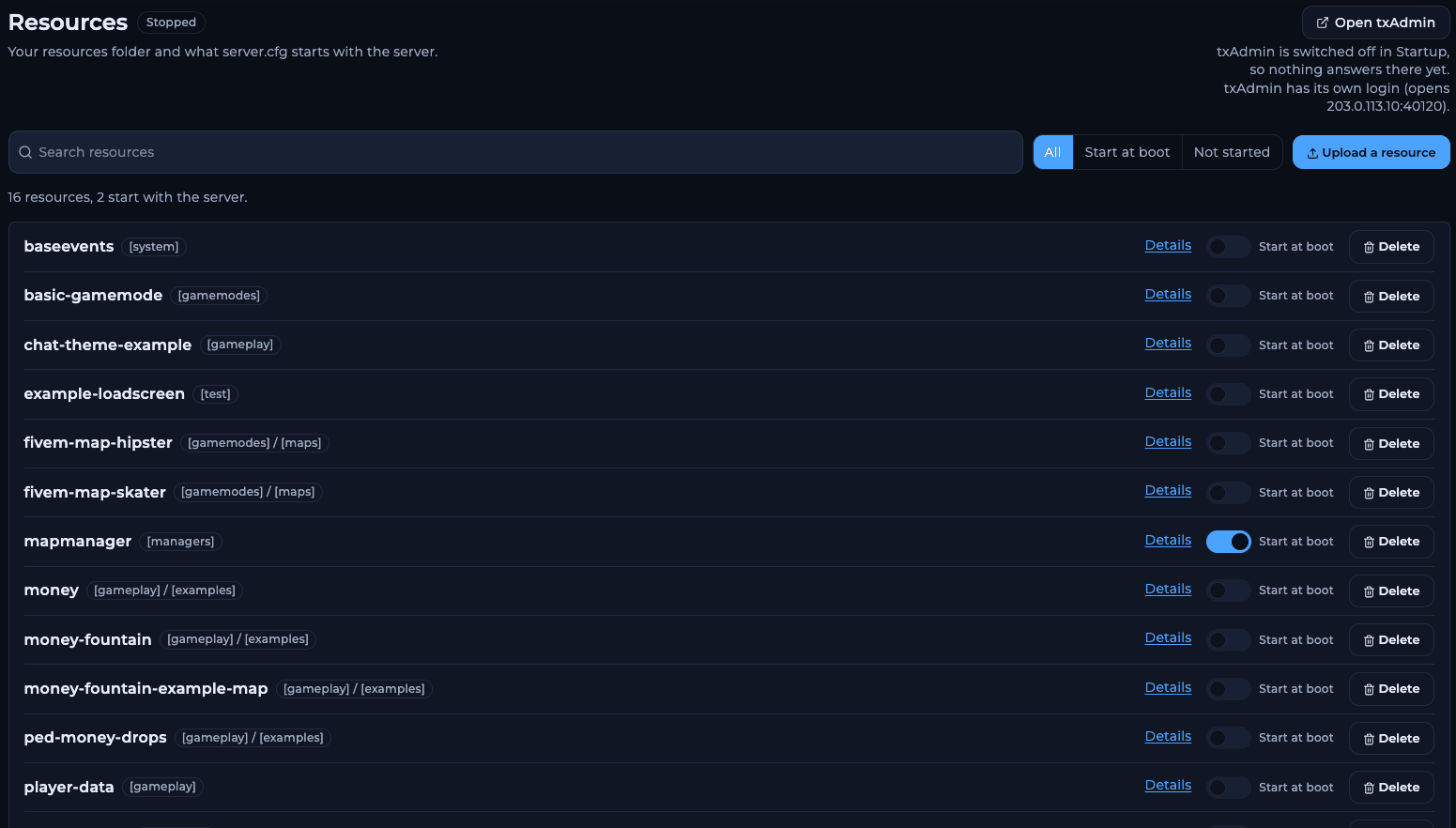
The Resources page
A new server shows “16 resources, 2 start with the server”: the Cfx.re default resources, with
mapmanager and spawnmanager switched on.
Which default resources are for RedM?
The default set is shared with FiveM.redm-map-one is the RedM spawn map; switch it on for a plain server. fivem-map-hipster and fivem-map-skater are GTA V maps; leave them off. Example resources such as money-fountain and ped-money-drops are code examples from Cfx.re, not features you need.
How to install a RedM resource
1
Open Resources
Open your server in the Game Panel and click Resources under FIVEM.
2
Upload the zip
Click Upload a resource. Drop the
.zip on the box, or click Choose a zip file. The panel checks it first, then unpacks it on the server.3
Switch on Start at boot
Find the resource in the list and switch on Start at boot. The dialog shows the line it adds, for example
+ ensure playernames. Click Start at boot.4
Import its SQL, if any
If the resource ships a
.sql file, import it into your database first. See database setup.5
Restart
Restart the server, or start the resource now from the console (see below).
How to start a resource without a restart
While the server is running, type these in the Console:refresh rescans the resources folder so the server finds new resources. ensure starts the resource, or restarts it if it is already running. To stop one, use stop myresource.
Does the start order matter?
Yes. A resource must start after the resources it depends on. Putoxmysql first, then your framework (for example vorp_core), then scripts that use it. After switching on Start at boot, check where the new ensure line sits: open Server config, click Advanced: open the raw file and move the line below its dependencies if needed.
How to install resources bigger than 100 MB
- Unzip the resource on your computer.
- Connect with an SFTP client such as FileZilla or WinSCP. See how to connect via SFTP.
- Upload the folder into
resources, or into a category folder such asresources/[scripts]. - On Resources, switch on Start at boot for it and restart.
Frequently asked questions
Why does the console say “Couldn’t find resource”?
The name in theensure line doesn’t match the folder name, or fxmanifest.lua is one folder too deep inside the zip. Rename the folder or move its contents up one level.
Why don’t my changes on Resources work with txAdmin?
If txAdmin runs a recipe from its own folder undertxData, the Resources page edits a folder that server doesn’t use. Manage that server’s resources in txAdmin or with Files in the recipe folder.
Does Delete remove a resource for good?
Yes, Delete removes the resource’s files. Make a backup first if you might want it back.Can I use FiveM scripts on RedM?
Not as they are. FiveM scripts are written for GTA V’s models, maps and natives. Look for a RedM version of the script.Related guides
RedM server guide
Every RedM guide in one place.
Install VORP Core
The framework most scripts need.
Database setup
oxmysql and SQL imports.
Edit server.cfg
The raw file and ensure order.
Connect via SFTP
Upload big folders.
Tested by the FREAKHOSTING team on our Game Panel on 2 November 2026 (RedM, FXServer build 38055 with txAdmin 8.1.2). Commands checked against the official Cfx.re server commands. Steps may differ slightly if the game changes.
Need Extra Help?
If you encounter any issues, our support team is ready to assist:- Live Chat: Quick assistance via our website.
- Support Ticket: Open a Ticket
- Discord: Join our Community
- Email: support@freakhosting.com
Last Updated: November 2026