plugins folder in Files, upload the plugin’s Linux .so file there, and add a plugins line to server.cfg with the .so extension, for example plugins streamer.so. For a filterscript, upload the .amx to filterscripts and add its name without .amx to the filterscripts line. Restart to load them.
What is the difference between a plugin and a filterscript?
Your server runs on Linux, so Windows
.dll plugins don’t work. Download the Linux build from the plugin’s release page.
Before you start
- Download the Linux
.sofile of each plugin your gamemode needs, in the version its include file expects. - Make a backup.
How to install a plugin
1
Stop the server
2
Create the plugins folder
A new server has no
plugins folder. In Files, click New folder and name it plugins.3
Upload the .so file
Open
plugins and click Upload. Upload the Linux file, for example streamer.so.4
Add the plugins line
Open Keep all plugins on one
server.cfg and add a line with every plugin, separated by spaces, each with .so:plugins line.5
Start and check the console
Start the server. The console lists each plugin under Server Plugins and ends with
Loaded 2 plugins. (or your number). A plugin that fails shows Failed with the reason.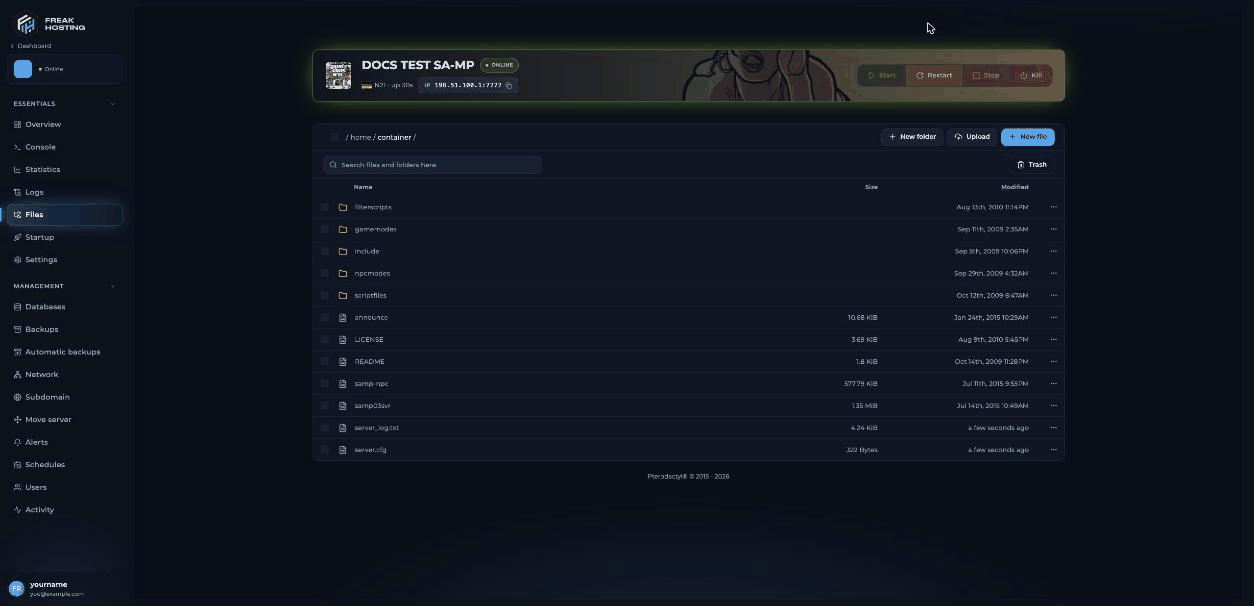
The SA-MP main folder, where you create the plugins folder
How to install a filterscript
1
Upload the .amx file
In Files, open
filterscripts and upload the compiled .amx, for example myadmin.amx.2
Add it to the filterscripts line
In
server.cfg, add the name without .amx to the end of the line:3
Save and restart
Save and restart the server. The console shows
Loaded 5 filterscripts. (or your number).Load a filterscript without restarting
Log in to RCON in game and use these commands. They don’t changeserver.cfg, so add the filterscript there too if it should load after a restart.
How to use a MySQL plugin with your server
1
Create a database
Open Databases and click Create database. See databases.
2
Copy the details
Copy the host, database name, user name and password from the database’s card.
3
Enter them in your script
Put the details where your gamemode or plugin expects them, then install the MySQL plugin’s Linux
.so as above and restart.Frequently asked questions
Why does my plugin say “cannot open shared object file”?
Usually theplugins line is missing the .so extension, or the file isn’t in plugins. Check the spelling and case: Linux file names are case-sensitive. See common errors.
Can I use .dll plugins?
No..dll files are for Windows servers. Your server needs the Linux .so build of the same plugin.
My gamemode says “Run time error 19”. What does that mean?
A function the script calls isn’t available, usually because the plugin that provides it didn’t load. Check the plugin lines in the console. See common errors.Can I use plugins made for open.mp components?
Components are for the open.mp server only. See SA-MP or open.mp?.Related guides
SA-MP server guide
Every SA-MP page in one place.
Install a gamemode
Upload and select your gamemode.
Common errors
Plugins that fail to load.
server.cfg explained
The plugins and filterscripts lines.
Databases
Create a MySQL database.
Tested by the FREAKHOSTING team on our Game Panel on 3 November 2026 (SA-MP 0.3.7-R2 Linux server). Plugin and filterscript rules checked against the official open.mp server.cfg documentation on 3 November 2026. Steps may differ slightly if the game changes.
Need Extra Help?
If you encounter any issues, our support team is ready to assist:- Live Chat: Quick assistance via our website.
- Support Ticket: Open a Ticket
- Discord: Join our Community
- Email: support@freakhosting.com
Last Updated: November 2026