server.cfg in Files, add a line such as password mysecret and restart the server. Only players who enter that password can join. As an RCON admin you can also set it in game with /rcon password mysecret and remove it with /rcon password 0; that change lasts until the next restart.
Server password or RCON password?
Never use your RCON password as the server password. Anyone who can join would then be able to log in as admin.
How to set a password in server.cfg
1
Open server.cfg
In the Game Panel, open your server, click Files and open
server.cfg.2
Add the password line
A new server has no
password line. Add one, for example:3
Save and restart
Save the file and restart the server. The password stays set after every restart.
4
Test it
Connect with the open.mp launcher. It asks for the password before you join. See connect to your server.
password line and restart.
How to set or remove the password in game
Log in to RCON first (/rcon login <your RCON password>). Then:
Changes made in game last until the server restarts. Then the server uses the
password line in server.cfg again. See RCON commands.
How to change the RCON password
Open Startup, type a new value in Rcon password, click outside the field (it saves on its own) and restart. Don’t changercon_password in server.cfg: the panel writes the Startup value there at every start. The field can’t be empty.
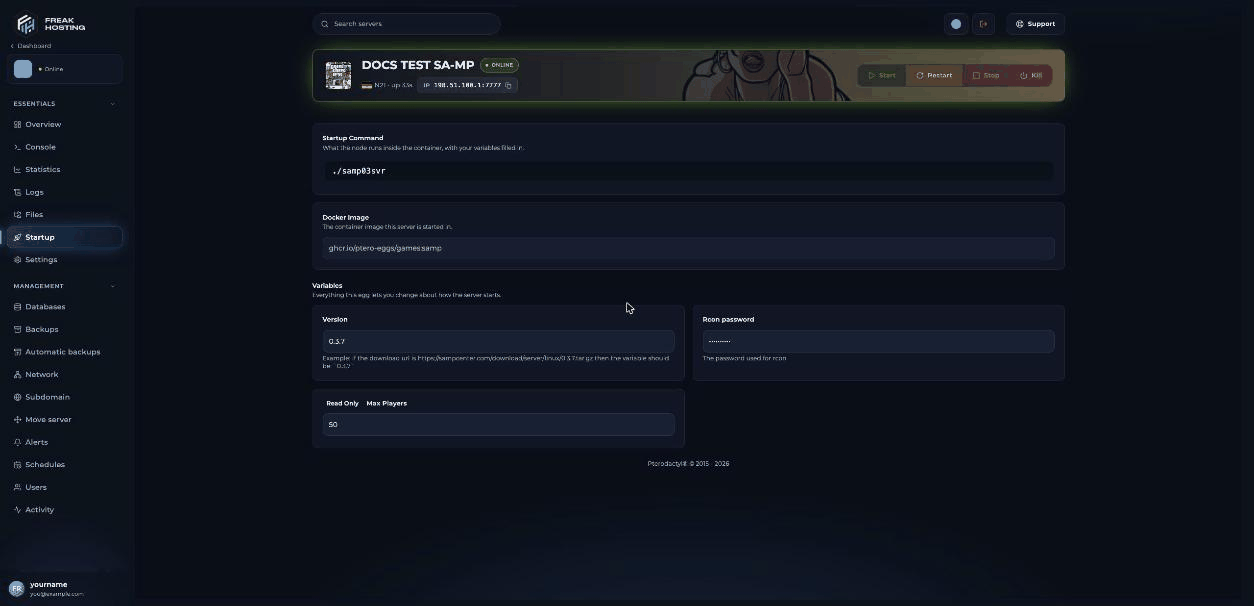
The Rcon password variable on the Startup page
Frequently asked questions
Can I make my SA-MP server private without a password?
Turn off the server list withannounce 0 so the server isn’t advertised. Players with the address can still join, so use a password for real privacy.
Does a password hide my server from the server list?
No. A server with a password can still be listed whenannounce 1 is set. Players who filter the open.mp launcher to Unpassworded Servers won’t see it.
I forgot my server password. How do I find it?
Openserver.cfg in Files and look at the password line.
Why is my old password still asked after I deleted the line?
The server readsserver.cfg only when it starts. Restart it after you save.
Related guides
SA-MP server guide
Every SA-MP page in one place.
RCON commands
Admin login and commands.
server.cfg explained
Every setting and its default.
Connect to your server
Join with the password prompt.
Tested by the FREAKHOSTING team on our Game Panel on 3 November 2026 (SA-MP 0.3.7-R2 Linux server). Password commands checked against the official open.mp documentation on 3 November 2026. Steps may differ slightly if the game changes.
Need Extra Help?
If you encounter any issues, our support team is ready to assist:- Live Chat: Quick assistance via our website.
- Support Ticket: Open a Ticket
- Discord: Join our Community
- Email: support@freakhosting.com
Last Updated: November 2026