.amx file to the gamemodes folder in Files, then change the gamemode0 line in server.cfg to the file name without .amx, for example gamemode0 mygamemode 1, and restart. The server runs only compiled .amx files, so compile the .pwn source on your own PC first.
Before you start
- Have the compiled gamemode (
.amx). If you only have the.pwnsource, compile it first with the Pawn compiler. - Note which plugins and filterscripts the gamemode needs. See plugins and filterscripts.
- Make a backup.
Which folder does each file go in?
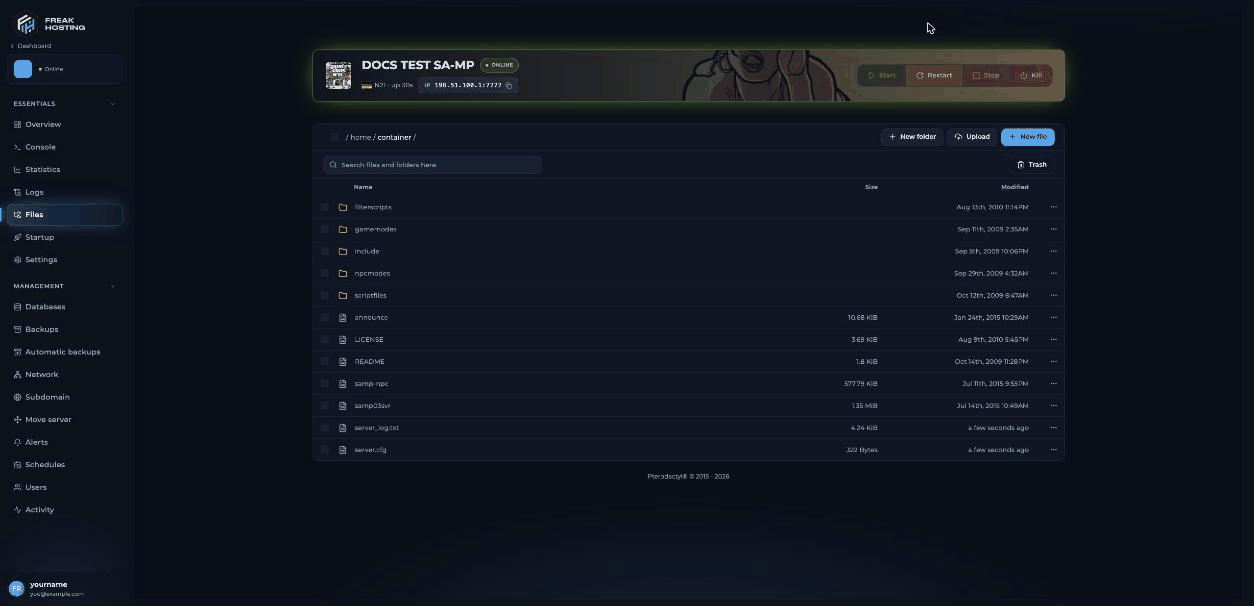
The main folder of a SA-MP server in Files
How to install your gamemode
1
Stop the server
2
Upload the .amx file
In Files, open
gamemodes and click Upload. Upload your file, for example mygamemode.amx. For many files, an archive or SFTP is quicker.3
Upload the gamemode's other files
If the gamemode comes with data files, put them in
scriptfiles. Install any plugins and filterscripts it needs.4
Edit server.cfg
Open
server.cfg and change gamemode0 grandlarc 1 to your gamemode’s name without .amx:5
Remove the Grand Larceny filterscripts if needed
The
gl_actions, gl_property and gl_realtime filterscripts belong to Grand Larceny. Remove them from the filterscripts line if your gamemode doesn’t use them.6
Save and start
Save the file, start the server and watch the console or
server_log.txt for errors.How does a gamemode rotation work?
Ingamemode0 mygamemode 1, the 0 is the gamemode’s position in the rotation, mygamemode is the file name without .amx, and the last number is how many times it plays before the server moves to the next gamemode. Add more lines to rotate:
gamemodes folder, so a file in a subfolder works too, for example gamemode0 rp/main 1.
How to switch gamemode without a restart
Log in to RCON in game (/rcon login <password>) and use:
These don’t change
server.cfg. After a restart, the server starts with gamemode0 again. See RCON commands.
Frequently asked questions
Can I upload a .pwn file instead of .amx?
No. The server runs compiled.amx files only. Compile the .pwn on your PC with the Pawn compiler and upload the .amx.
Why does my gamemode fail to load?
Usually the name ingamemode0 doesn’t match the file, or a plugin the gamemode needs isn’t loaded. See common errors.
Can I run a gamemode made for open.mp?
A gamemode compiled with open.mp’s includes is made for the open.mp server. Run it on an open.mp server instead. See SA-MP or open.mp?.How do I go back to Grand Larceny?
Setgamemode0 grandlarc 1 again, put back the gl_ filterscripts and restart.
Related guides
SA-MP server guide
Every SA-MP page in one place.
Plugins and filterscripts
What your gamemode needs.
server.cfg explained
Every setting and its default.
Common errors
Fix a gamemode that won’t load.
File Manager
Upload and edit files.
Tested by the FREAKHOSTING team on our Game Panel on 3 November 2026 (SA-MP 0.3.7-R2 Linux server).
server.cfg and RCON details checked against the official open.mp server.cfg documentation on 3 November 2026. Steps may differ slightly if the game changes.Need Extra Help?
If you encounter any issues, our support team is ready to assist:- Live Chat: Quick assistance via our website.
- Support Ticket: Open a Ticket
- Discord: Join our Community
- Email: support@freakhosting.com
Last Updated: November 2026