config_gameplay.txt, in .config/SCP Secret Laboratory/config/<port>/. On FREAKHOSTING, Game settings edits this file for you in seven sections: Server, Round rules, Respawn waves, Respawn tickets, Stamina and speed, Security and anti-cheat, and Announcements. Changes apply after a restart or after config reload in Remote Admin.
Before you start
- Game settings works once the file exists. Start the server and accept the EULA first; see getting started.
- Remote Admin roles are in a different file. See make yourself admin.
How to use Game settings
1
Open Game settings
Click Game settings under GAME SETTINGS. The Checks box lists problems with the file.
2
Find a setting
Use Search settings, or switch between All and Changed. Tick Show advanced settings (11) to see every setting.
3
Or pick a preset
Click Presets. Friendly server gives more tickets, no friendly fire and longer waves. Hard server turns friendly fire on, gives fewer tickets and slower stamina recovery. A preset only fills in the settings; nothing is saved yet.
4
Save and restart
Click Review and save to see the changes, then save. Restart the server, or run
config reload in Remote Admin. Discard throws away unsaved changes.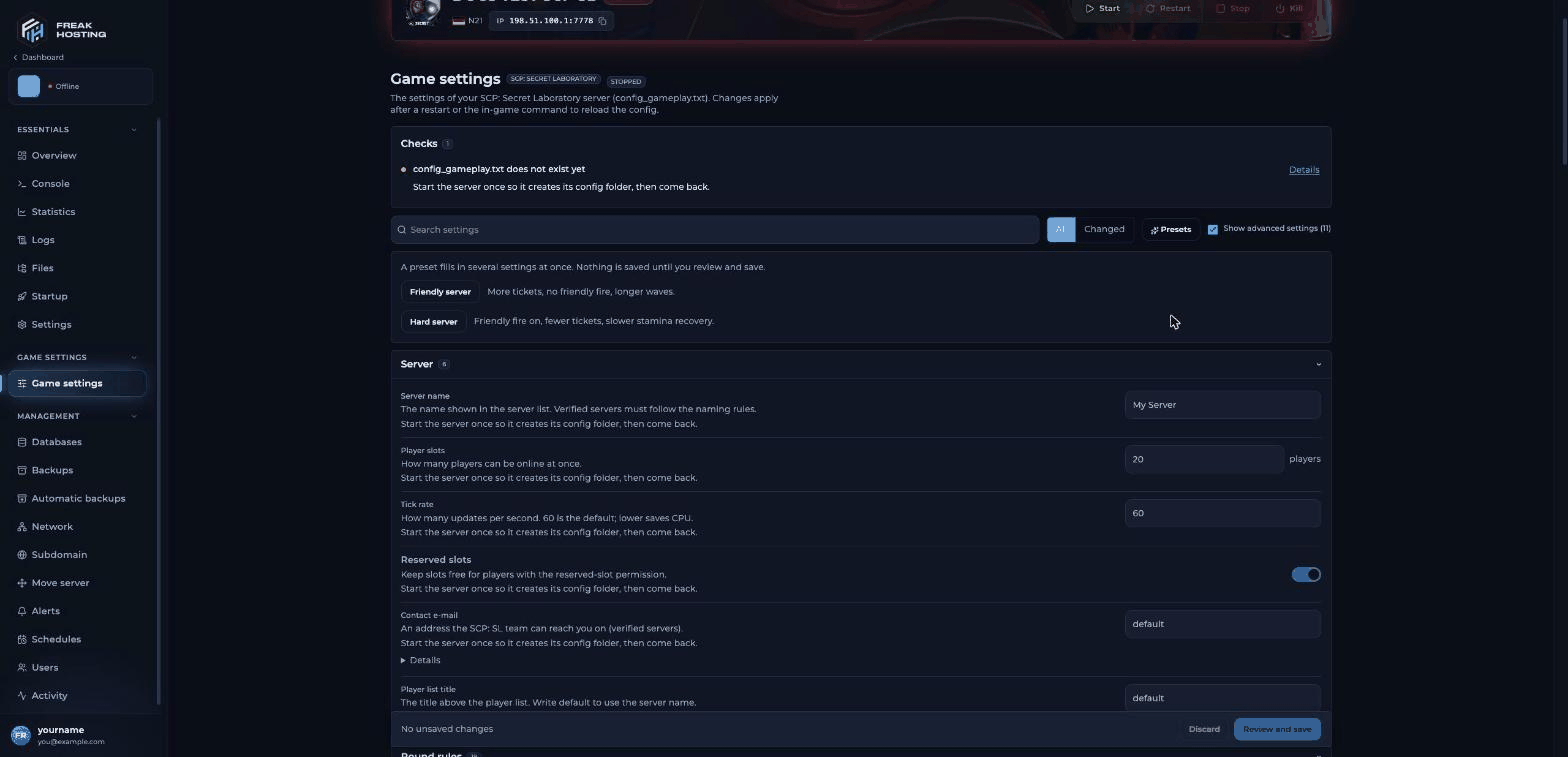
Game settings with the Presets menu open
What is in each section?
Common settings and their file names
Settings that are only in the file
Some settings are not on Game settings. Edit them in Files inconfig_gameplay.txt, keeping the key: value format, and restart.
Do not change player slot settings in the file. Use Player slots and a ticket for more slots.
Frequently asked questions
Where is config_gameplay.txt on my server?
In Files, at.config/SCP Secret Laboratory/config/<port>/config_gameplay.txt. <port> is your server’s port. The files in ConfigTemplates are templates and are not used.
Do I need to restart after changing settings?
Yes, or runconfig reload in Remote Admin (needs the ServerConfigs permission). If a change doesn’t apply, restart the server.
What do the presets change?
Friendly server: more tickets, no friendly fire and longer waves. Hard server: friendly fire on, fewer tickets and slower stamina recovery. You see every change before you save.Can I edit the file by hand?
Yes. Open it in Files. Keep a backup, and use Game settings where a setting is available so the values stay valid.Related guides
SCP:SL server guide
Every SCP:SL page in one place.
Friendly fire
Team damage and the detector.
Decontamination
Light Containment settings.
SCP health and spawns
Spawn queue and waves.
Whitelist players
The Whitelist setting.
Tested by the FREAKHOSTING team on our Game Panel on 3 November 2026 (SCP: Secret Laboratory dedicated server with EXILED). Config keys checked against the official SCP:SL Gameplay Config Setup guide. Steps may differ slightly if the game changes.
Need Extra Help?
If you encounter any issues, our support team is ready to assist:- Live Chat: Quick assistance via our website.
- Support Ticket: Open a Ticket
- Discord: Join our Community
- Email: support@freakhosting.com
Last Updated: November 2026