serverconfig.txt. On FREAKHOSTING you change them on the Game settings page. Fields tagged STARTUP (world name, difficulty, size, seed, password, message of the day, player slots, enemy smoothing) are kept on the Startup page and written into serverconfig.txt every time the server starts, so they always win. All other fields are written straight to serverconfig.txt.
Which setting wins?
Example from our test: we changed Message of the day in Game settings while the server was stopped.
serverconfig.txt showed motd= with the new text after the next start, because the Startup value is written into the file each time.
How to change a setting
1
Open Game settings
Open your server in the Game Panel and click Game settings under GAME SETTINGS. Use Search settings to find a field, or the Changed filter to see what you have changed.
2
Expand the section and edit
Expand the section first, then change the field. Tick Show advanced settings for the extra fields.
3
Review and save
Click Review and save. The Review your changes dialog lists the changes for “Startup settings (the Startup page)” and for
serverconfig.txt. Click Save changes.4
Restart
Restart the server. If it is running, the dialog says “The server is running, so the changes apply after a restart.”
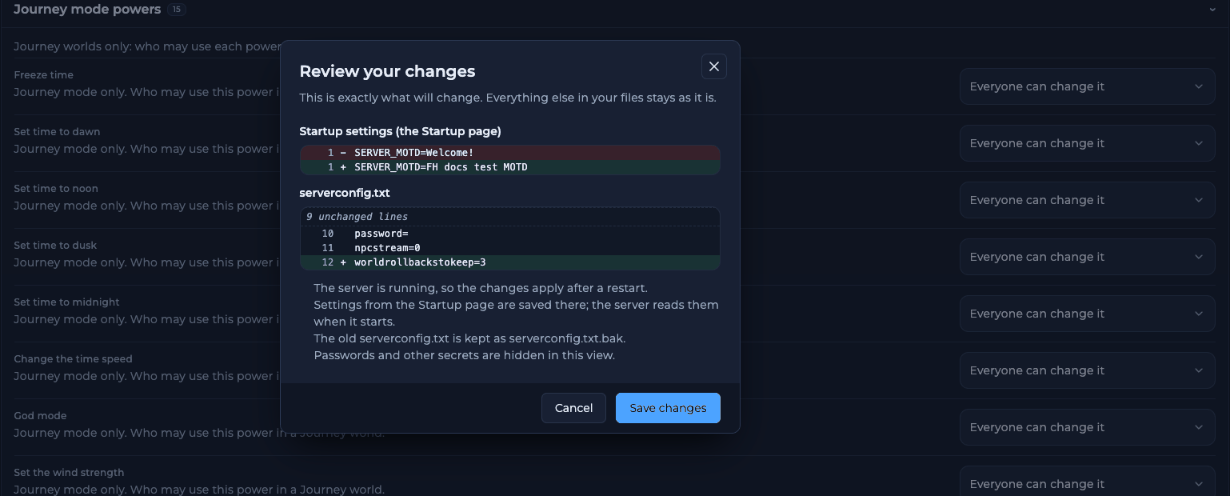
Review your changes shows Startup and serverconfig.txt changes separately
serverconfig.txt.bak. To edit the file yourself, click serverconfig.txt: open the raw file above the save bar.
Every Game settings field
Server
New world
These four only matter when a world is created. An existing world keeps its own difficulty and size.
Performance and safety
Journey mode powers (advanced)
Fifteenjourneypermission_* keys. See Journey mode settings.
Checks and presets
The Checks box flags settings worth a look. On a new server it notes “Cheat protection is off”, with Turn it on and Go to the setting buttons. Presets fill in several settings at once:Frequently asked questions
Where is serverconfig.txt?
In the main folder of your server. Open it in Files or with the raw file link in Game settings.Why did my edit in serverconfig.txt disappear?
You edited a Startup line, such asmotd or password. Change it in Game settings or on Startup instead.
Where can I see the server version?
Terraria version on the Startup page, and the console lineTerraria Server v… at start.
Should I turn on Extra cheat protection?
For a public server, yes. For friends only, it is optional.Related guides
Terraria server guide
Every Terraria page in one place.
Console commands
Commands that change settings live.
Server lag
Performance settings.
Journey mode settings
The 15 Journey powers.
Startup variables
The Startup page.
Tested by the FREAKHOSTING team on our Game Panel on 31 October 2026 (Terraria 1.4.5.6, vanilla server). Config keys checked against the official Terraria Wiki Server page. Steps may differ slightly if the game changes.
Need Extra Help?
If you encounter any issues, our support team is ready to assist:- Live Chat: Quick assistance via our website.
- Support Ticket: Open a Ticket
- Discord: Join our Community
- Email: support@freakhosting.com
Last Updated: October 2026