What is Journey mode?
Journey mode is Terraria’s creative-style difficulty. Players get a power menu with item research and duplication, time and weather control, god mode and an enemy difficulty slider. Journey mode only works with Journey characters in Journey worlds: a Journey character can’t join a Classic, Expert or Master world, and the other way round.How to get a Journey world on your server
New worlds on our servers already use Journey unless you changed it. To create one:1
Choose Journey difficulty
In Game settings, expand New world and set World difficulty to Journey.
2
Use a new World name
Enter a World name that doesn’t exist yet. Journey can’t be switched on for an existing world from the panel.
3
Save and start
Click Review and save, Save changes, then restart. The server creates the Journey world.
How to set who can use Journey powers
1
Open Game settings
Open your server in the Game Panel and click Game settings under GAME SETTINGS.
2
Show advanced settings
Tick Show advanced settings in the toolbar. The Journey mode powers section appears (“Journey worlds only: who may use each power”). Expand it.
3
Choose an option per power
Pick Locked for everyone, Only the host can change it or Everyone can change it for each power. All powers start on Everyone can change it.
4
Review, save and restart
Click Review and save, check the
serverconfig.txt changes, click Save changes and restart the server.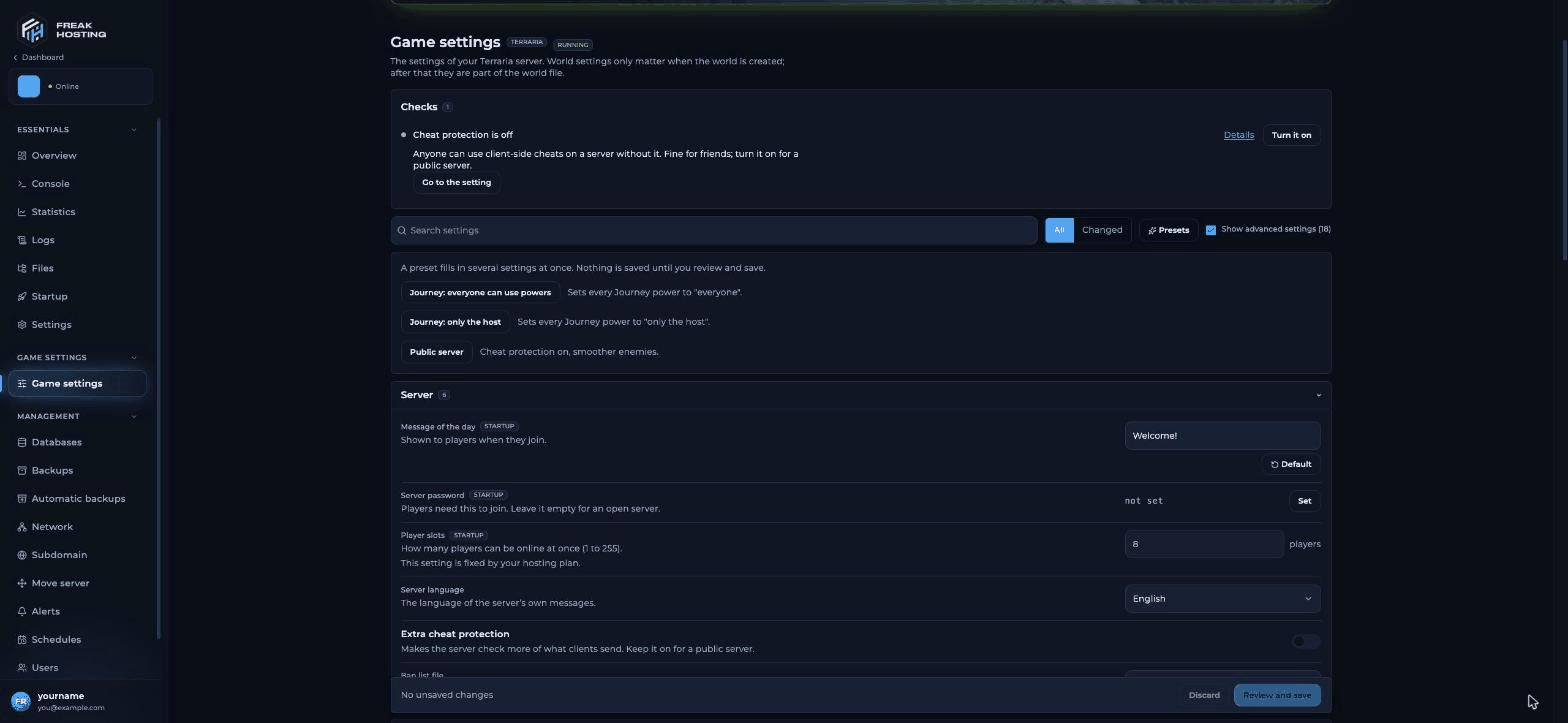
Game settings with the Presets button and the Show advanced settings checkbox
Use a Journey preset
Click Presets to set all powers at once. Nothing is saved until you review and save.The 15 Journey powers
In the file,
0 means locked for everyone, 1 host only and 2 everyone. Game settings writes these for you.
Frequently asked questions
Why can’t I join my Journey world?
Your character isn’t a Journey character. Create a Journey character, or create a Classic world for your existing characters.Can I turn an existing world into a Journey world?
Not from the panel. Difficulty is fixed when the world is created. Create a new Journey world with a new World name.My players can’t use a power. What should I check?
Check that the power isn’t Locked for everyone or host-only. Set it to Everyone can change it, save and restart.Does research carry over between characters?
No. Research is saved per character. In multiplayer, players share items that are fully researched while they are in the world.How do I stop players changing the difficulty?
Set Change the difficulty to Locked for everyone.Related guides
Terraria server guide
Every Terraria page in one place.
World size and difficulty
Create a Journey or Classic world.
Server settings explained
Every setting and where it is stored.
Trigger events
Weather and time powers for events.
Tested by the FREAKHOSTING team on our Game Panel on 31 October 2026 (Terraria 1.4.5.6, vanilla server). Journey rules checked against the official Terraria Wiki Journey Mode page. Steps may differ slightly if the game changes.
Need Extra Help?
If you encounter any issues, our support team is ready to assist:- Live Chat: Quick assistance via our website.
- Support Ticket: Open a Ticket
- Discord: Join our Community
- Email: support@freakhosting.com
Last Updated: October 2026