Before you start
- Log in to the Game Panel.
- Have a Discord account for the BeamMP Keymaster.
- Players need BeamNG.drive and the BeamMP launcher from beammp.com.
How to set up your BeamMP server
1
Get an auth key
Create a key in the Keymaster. Without it the server runs but is never listed. See get an auth key.
2
Open Startup
Open your server in the Game Panel and click Startup. BeamMP has no separate game settings page: everything you need is here.
3
Fill in the variables
Set the variables in the table below.
4
Start the server
Start the server. BeamMP starts in about a second.
5
Check the console
In the console, look for
[INFO] Vehicle data network online on port … and [INFO] Server up-to-date!. If you see Backend REFUSED the auth key, the key is wrong; see fix the key error.Which Startup variables should I set?
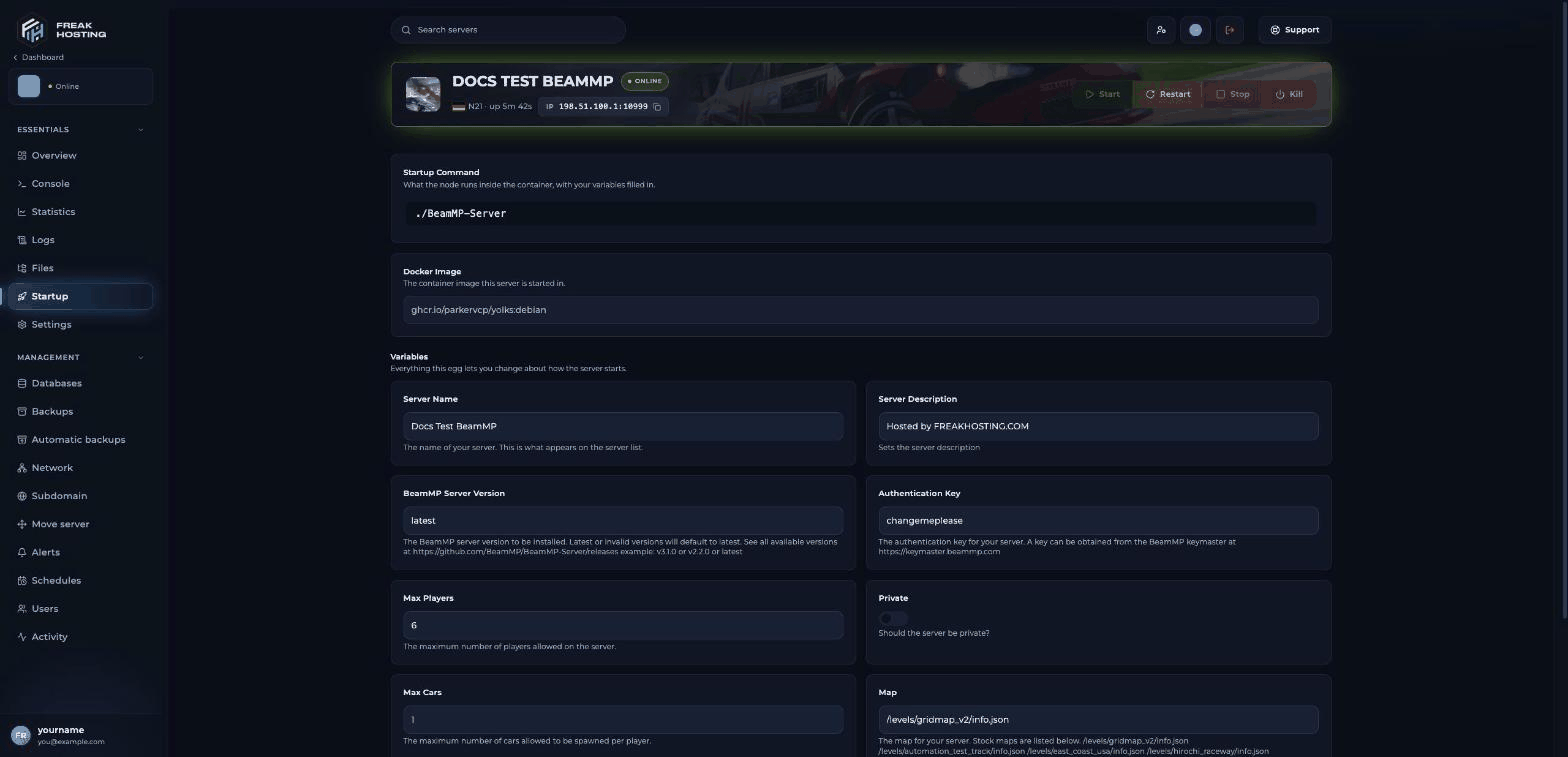
BeamMP Startup page in the FREAKHOSTING Game Panel
ServerConfig.toml every time the server starts, so change them on Startup, not in the file. Settings such as Tags and AllowGuests are kept from the file; see ServerConfig.toml explained.
How players join
Players open the BeamMP launcher, start BeamNG.drive and either search the server list for your Server Name or use Direct Connect with your IP and port, for example203.0.113.10:10999. Any mods in Resources/Client download automatically when they join. See join a BeamMP server.
Make your first backup
Once the server is set up, make a panel backup before you add mods or plugins.Frequently asked questions
What port does my BeamMP server use?
The port shown in the panel’s address. BeamMP uses it for both TCP and UDP. Don’t changePort in ServerConfig.toml.
Why does Stop take a long time?
If the server logsShutdown. but the panel still says it is stopping after a minute, click Kill.
Where is the server log?
Server.log in the main folder of Files. You can also use server logs.
How do I add mods or a custom map?
Upload.zip files to Resources/Client. See install mods and custom maps.
Related guides
BeamMP server guide
Every BeamMP page in one place.
Auth key and name
Get a key from the Keymaster.
Join a BeamMP server
Server list and Direct Connect.
Change the map
Stock maps and how to switch.
Console commands
Kick, say, list and more.
Tested by the FREAKHOSTING team on our Game Panel on 3 November 2026 (BeamMP Server v3.9.3). Steps may differ slightly if the game changes.
Need Extra Help?
If you encounter any issues, our support team is ready to assist:- Live Chat: Quick assistance via our website.
- Support Ticket: Open a Ticket
- Discord: Join our Community
- Email: support@freakhosting.com
Last Updated: November 2026