VAC secure mode is activated. Players join with connect and the address shown in the panel.
Before you start
- Log in to the Game Panel.
- Own Counter-Strike: Source on Steam (App ID 240).
- Optional: a Steam game server token (GSLT) so your server is listed and keeps the same Steam ID. See set a GSLT.
How to set up your CS:S server
1
Stop the server
Changes to
server.cfg apply on the next start, so stop the server first.2
Open Game settings
Click Game settings under GAME SETTINGS. The Checks box at the top lists anything worth a look, such as No Steam game server token.
3
Name your server
Under Server, enter a Server name. This is the name in the server browser. The default is
Hosted by FREAKHOSTING.COM.4
Choose the start map
Under Start-up, set Start map, for example
de_dust2 (the default) or cs_office. Use the map name without .bsp.5
Add a password (optional)
Set Server password to make the server private. Leave it empty for a public server.
6
Pick a preset (optional)
Click Presets and choose Competitive (friendly fire on, longer rounds, no spectators) or Casual (no friendly fire, team balance on). A preset only fills in the fields; nothing is saved yet.
7
Review and save
Click save. The review window shows the lines that change in
server.cfg and keeps the old file as server.cfg.bak. Click Save changes.8
Start the server
Start the server and watch the console. First you see
Checking for game server updates..., then the server boots in about 30 seconds. It is ready when you see VAC secure mode is activated.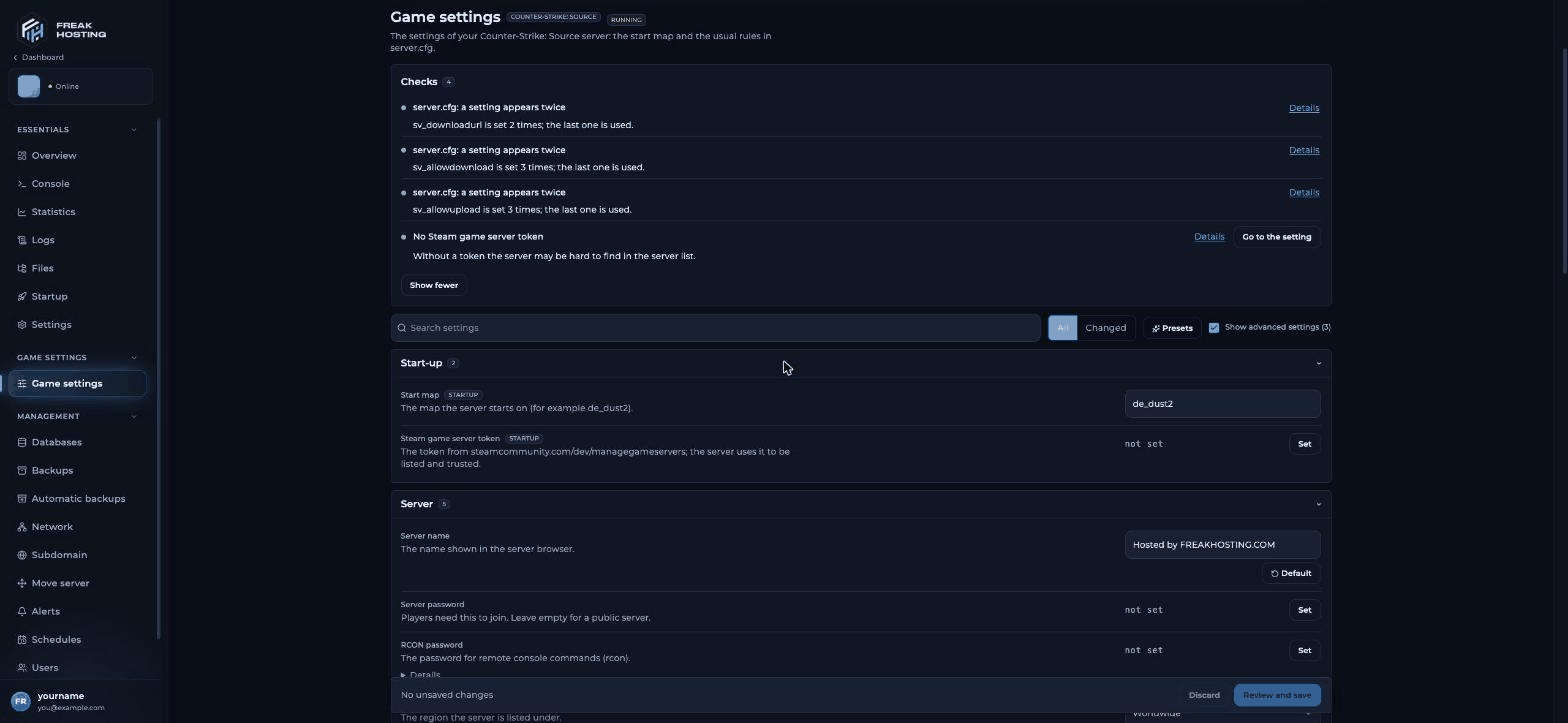
Game settings for Counter-Strike: Source in the FREAKHOSTING Game Panel
How to join your CS:S server
- In Counter-Strike: Source, open Options > Keyboard > Advanced and tick Enable developer console.
- Press the
~key to open the console. - If the server has a password, type it first:
- Connect with the address from the panel:
What happens at every start
Lines such as
Unknown command "r_decal_cullsize" or [S_API FAIL] Tried to access Steam interface ... are harmless. One or two Could not establish connection to Steam servers. lines before Connection to Steam servers successful. are normal too.
Make your first backup
Once the server is set up the way you like, make a panel backup. Do it again before you install SourceMod or plugins.Frequently asked questions
What port does a CS:S server use?
Your server’s game port is shown in the panel, usually27015. Always join with the full address from the panel, for example 203.0.113.10:27015.
How many players can join?
Max Players comes from your plan and is read-only in Startup. Bots count towards it too.How do I get admin commands?
The server has no admin system out of the box. Use the panel console, set an RCON password forrcon, or install SourceMod and add admins.
Why does the console say the server is hibernating?
An empty CS:S server goes idle to save resources. It wakes up as soon as a player connects.Related guides
CS:S server guide
Every CS:S page in one place.
Game settings
Every field explained.
Steam token (GSLT)
Get your server listed.
Install SourceMod
Plugins and admins.
Not showing in the list
Find your server.
Tested by the FREAKHOSTING team on our Game Panel on 31 October 2026 (Counter-Strike: Source dedicated server). Steps may differ slightly if the game changes.
Need Extra Help?
If you encounter any issues, our support team is ready to assist:- Live Chat: Quick assistance via our website.
- Support Ticket: Open a Ticket
- Discord: Join our Community
- Email: support@freakhosting.com
Last Updated: October 2026