VAC secure mode is activated. Players join with your server address, for example connect 203.0.113.10:27015.
Before you start
- Log in to the Game Panel.
- Own Garry’s Mod on Steam.
- Optional: create a Steam game server token (see step 5). It helps your server show in the server list.
What is installed on a new server?
How to set up your Garry’s Mod server
1
Open Game settings
Open your server and click Game settings under GAME SETTINGS. The Checks box at the top lists anything worth fixing, such as a missing Steam game server token.
2
Choose the map and gamemode
Under Start-up, enter a Start map (for example
gm_construct or gm_flatgrass) and pick a Gamemode. Sandbox and Trouble in Terrorist Town work straight away. Other gamemodes in the list must be installed first; see install a gamemode.3
Set player slots
Set Player slots to how many players can be online at once.
4
Name your server and set a password
Under Server, enter a Server name. This is what players see in the server browser. Enter a Server password only if you want a private server; leave it empty for a public one.
5
Add a Steam game server token
Create a token at steamcommunity.com/dev/managegameservers with App ID 4000 (Garry’s Mod) and paste it into Steam game server token. Use one token per server.
6
Review, save and start
Save your changes. A review dialog shows each change before anything is written; click Save changes. The panel shows a message such as “Saved 2 changes”. Start or restart the server; Start-up settings apply when the server starts.
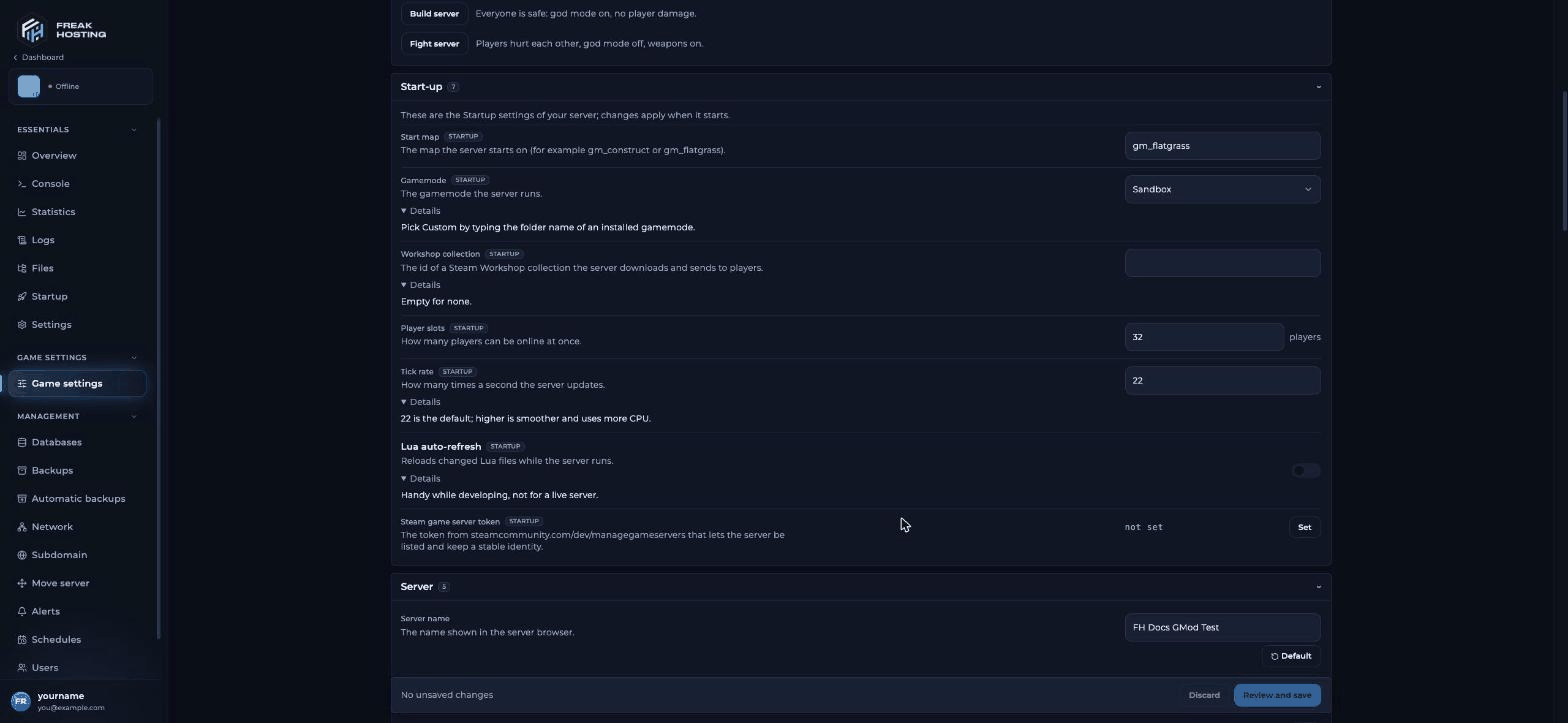
The Start-up section of Game settings for Garry's Mod
How do I know the server has started?
Every start first checks for Garry’s Mod updates (Success! App '4020' already up to date.), then loads server.cfg. Watch the console. The server is ready when it shows VAC secure mode is activated. This usually takes about 30 seconds.
How to join your Garry’s Mod server
Use the address and port shown for your server in the Game Panel.
Make your first backup
Once your server is set up, make a panel backup. You can also schedule automatic backups.Frequently asked questions
What map should I start my GMod server on?
For Sandbox,gm_flatgrass and gm_construct come with the game. For other maps, add them through a Workshop collection and enter the map name without .bsp.
How do I make my Garry’s Mod server private?
Set a Server password on Game settings and restart. Players then need the password to join.How do I become admin on my GMod server?
No admin mod is preinstalled. Install ULX and ULib, then add yourself withulx adduser from the panel console. See install ULX.
Can I change the tick rate?
Yes. Tick rate is on Game settings under Start-up. Our default is 22; higher is smoother and uses more CPU. See Game settings explained.Related guides
Garry's Mod server guide
Every Garry’s Mod page in one place.
Game settings explained
Every setting and preset.
Install addons
Workshop collections and addons.
Not showing in the list
Token, LAN and region.
Tested by the FREAKHOSTING team on our Game Panel on 31 October 2026 (Garry’s Mod dedicated server, Sandbox). Steps may differ slightly if the game changes.
Need Extra Help?
If you encounter any issues, our support team is ready to assist:- Live Chat: Quick assistance via our website.
- Support Ticket: Open a Ticket
- Discord: Join our Community
- Email: support@freakhosting.com
Last Updated: October 2026