Server.cfg is the main Squad dedicated server config file. On FREAKHOSTING it is at SquadGame/ServerConfig/Server.cfg in Files. It sets the server name, reserved slots, public queue, map rotation mode, team change rules, team-kill bans and match timers, one Key=Value per line. Keys that have a Startup variable, such as ServerName, are rewritten from Startup each time the server starts.
Which Server.cfg keys come from Startup?
Change these on Startup, not in the file. The panel writes them intoServer.cfg at each start, so edits in the file are replaced. See server settings.
Advertise Server, Allow Team Change, Prevent Team Change If Unbalanced and Record Demos also live on Startup; set them there. Player slots come from your plan, so leave
MaxPlayers alone. For more slots, open a ticket.
Squad Server.cfg settings and defaults
Edit other keys only if you know what they do, and make a backup first.
How to edit Server.cfg
1
Stop the server
2
Open the file
Click Files, go to
SquadGame/ServerConfig/ and open Server.cfg.3
Change the value
Change only the part after
=, for example PublicQueueLimit=10. Keep true and false in lower case and keep the quotes around text values such as ServerName.4
Save and start
Save the file and start the server. Check the console for errors.
What are the other files in ServerConfig?
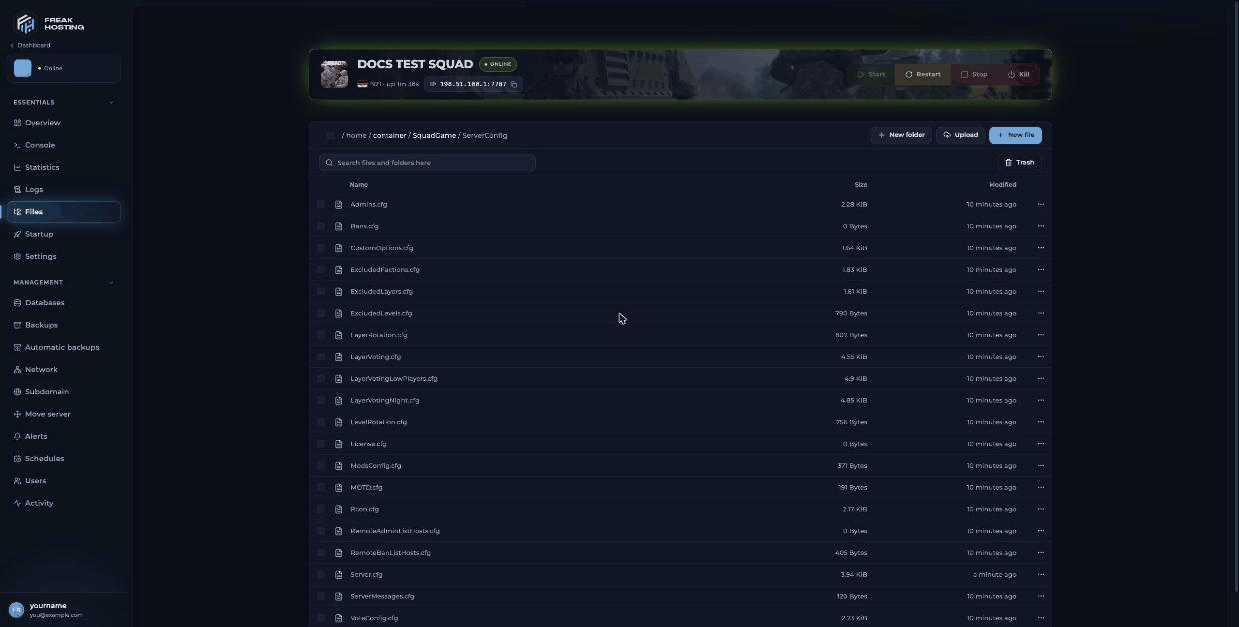
Squad ServerConfig folder in the File Manager
Frequently asked questions
Can I set a password in Server.cfg?
There is no password key in yourServer.cfg. See set a password.
What does licensed server mean in Server.cfg?
Some settings are required for servers in Offworld Industries’ server licensing programme. Your server isn’t licensed by default, so you can change them.Why did my change in Server.cfg not apply?
The server reads the file when it starts, so restart after saving. If you changed a key that has a Startup variable, change it on Startup instead.Related guides
Squad server guide
Every Squad page in one place.
Server settings
Startup variables.
Map rotation
Rotation modes and layers.
Server not starting
Fix a bad config edit.
Tested by the FREAKHOSTING team on our Game Panel on 3 November 2026 (Squad dedicated server v10.6.3). Key descriptions checked against the official Squad Wiki. Steps may differ slightly if the game changes.
Need Extra Help?
If you encounter any issues, our support team is ready to assist:- Live Chat: Quick assistance via our website.
- Support Ticket: Open a Ticket
- Discord: Join our Community
- Email: support@freakhosting.com
Last Updated: November 2026