SquadGame/ServerConfig/Server.cfg at every start, so change them on Startup, not in the file.
Before you start
- Log in to the Game Panel.
- Read how Startup variables work if you haven’t used them before.
Which Squad settings can I change on Startup?
Query Port and Beacon Port are read-only. They are set for your server and you don’t need to change them.
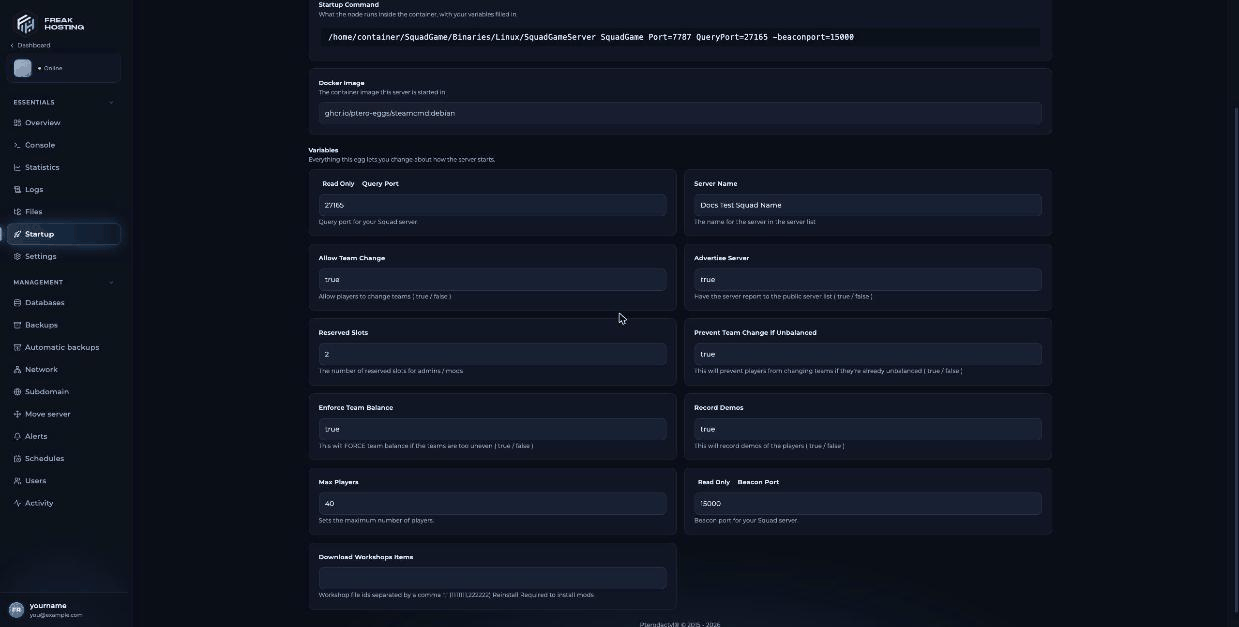
Squad Startup variables in the FREAKHOSTING Game Panel
How to change a Squad server setting
1
Open Startup
Open your server in the Game Panel and click Startup.
2
Edit the variable
Click into the field and type the new value. The true/false settings are text fields: type
true or false exactly, in lower case. The panel saves when you click out of the field.3
Restart the server
Restart the server. The panel rewrites
Server.cfg with your values when the server starts.4
Check the result
Open
SquadGame/ServerConfig/Server.cfg in Files to see the new value, for example ServerName="My Squad Server" or NumReservedSlots=2.What about player slots?
Your player slots come from your plan. You don’t need to set them yourself. If you need more slots, open a ticket.Where are the other settings?
Settings without a Startup variable are in the config files inSquadGame/ServerConfig/. Edit them in Files while the server is stopped, then start it again.
Frequently asked questions
Why did my change to ServerName in Server.cfg disappear?
The panel rewritesServer.cfg from your Startup variables each time the server starts. Change Server Name on Startup instead, then restart.
Can I use special characters in my Squad server name?
The Server Name field accepts up to 80 characters. Check how the name looks in the server browser after a restart, and simplify it if characters don’t show correctly.What happens if I type True or yes instead of true?
Squad expectstrue or false. Use exactly these lower-case words so the setting works as you expect.
How do I hide my server from the public list?
Set Advertise Server tofalse and restart. To keep strangers out of a listed server, see set a password.
Related guides
Squad server guide
Every Squad page in one place.
Server.cfg explained
Every key and default.
Getting started
First setup and joining.
Startup variables
How Startup works in the panel.
Tested by the FREAKHOSTING team on our Game Panel on 3 November 2026 (Squad dedicated server v10.6.3). Steps may differ slightly if the game changes.
Need Extra Help?
If you encounter any issues, our support team is ready to assist:- Live Chat: Quick assistance via our website.
- Support Ticket: Open a Ticket
- Discord: Join our Community
- Email: support@freakhosting.com
Last Updated: November 2026