203.0.113.10:5520.
Before you start
- Log in to the Game Panel.
- Have Hytale installed and your Hytale account ready.
- Your server runs on Java 25 and uses QUIC over UDP. You don’t need to install anything yourself.
Why does the first start need our team?
Before a Hytale server can download its files and accept players, it must be linked once to a Hytale account through Hytale’s own login. Our team does this for you. Open a ticket, give us your server’s name in the panel, and ask us to complete the first start of your Hytale server. Once it has started once, the game createsconfig.json and the rest of its files, and you can change every setting yourself.
How to set up your Hytale server
1
Open Game settings
Open your server and click Game settings under GAME SETTINGS. If you still see the check config.json does not exist yet, the first start has not finished. Reply to your ticket.
2
Name your server
Set Server name (the name shown to players) and, if you like, a Message of the day shown when players log in. See change the server name.
3
Choose who can join
For a private server, click Set next to Server password and enter a password. Or turn on Joining needs permission for a whitelist. See server password.
4
Lower the view distance
The page’s default View distance is 32 chunks. Hytale recommends 12 chunks or less for performance. Use the Light on memory preset to set 12.
5
Review, save and restart
Click Review and save, check the changes and click Save changes. Then click Restart now.
6
Copy your address
On Overview, click Copy address. This is the address players type to join, for example
203.0.113.10:5520.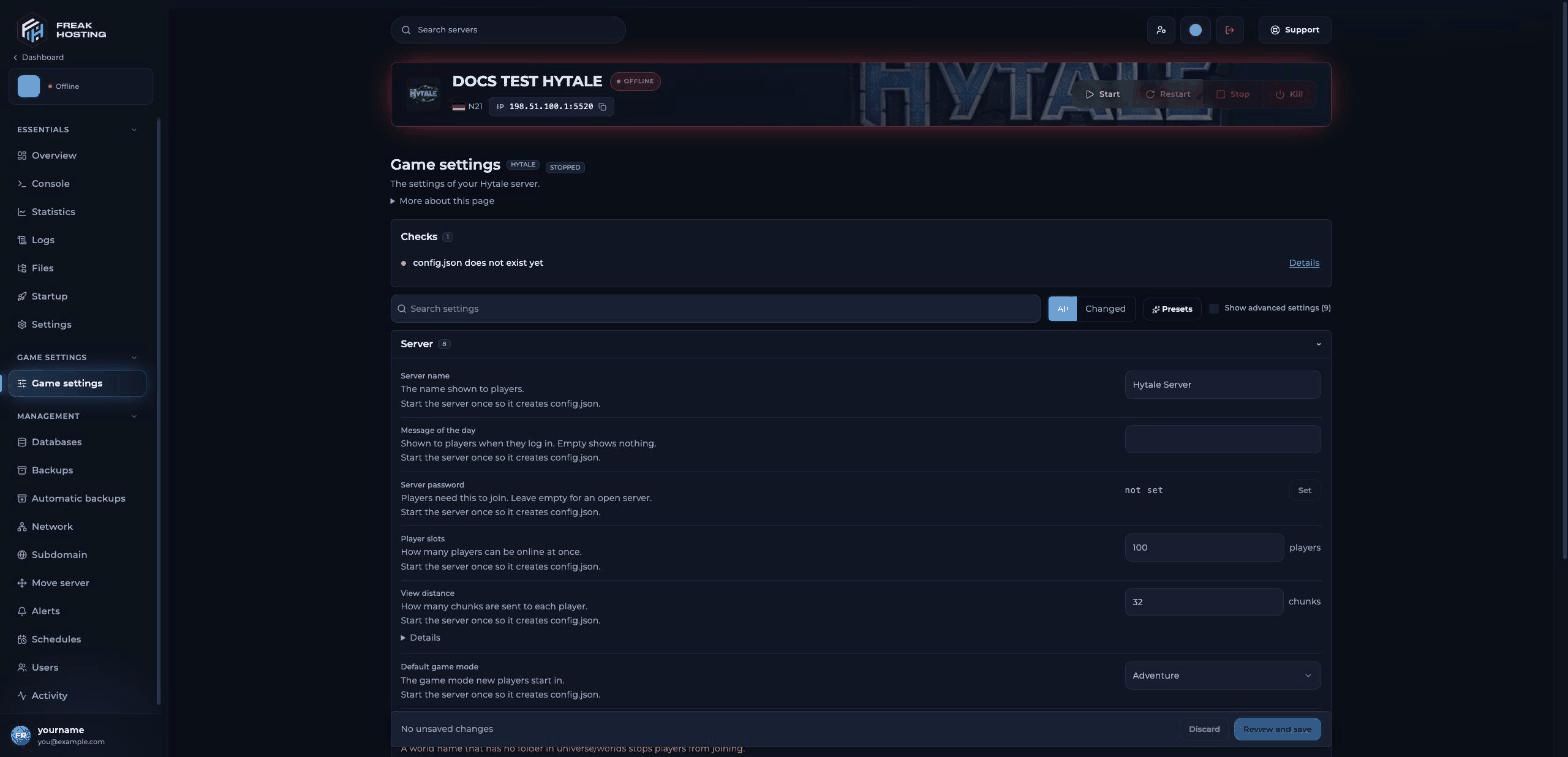
Game settings for a Hytale server
How to join your Hytale server
Start Hytale, open the multiplayer server list, add a server and enter your address. Your game must be on the same version as the server. Full steps: join your Hytale server.Make your first backup
Once your world is set up, open Backups and make a backup. Set up Automatic backups too, so you can undo a mistake or a crash. See back up your Hytale server.Quick facts about your Hytale server
Frequently asked questions
How much RAM does a Hytale server need?
Hytale needs at least 4 GB of memory. Memory use grows mainly with view distance and the loaded world area, so keep View distance at 12 chunks or less. See optimise performance.Can I play my singleplayer world on the server?
Yes. Upload the world folder touniverse/worlds and set Default world to its folder name. See upload a singleplayer world.
Will my server show up in a public server list?
Hytale’s official server discovery is planned but not available yet. Share your address with your players instead.How do I become admin?
See add an admin.Related guides
Hytale server guide
Every Hytale page in one place.
Join your server
Connect with your address.
Server settings explained
Every Game settings option.
Server not starting
What to check first.
Log in to the Game Panel
Open your server.
Checked against the official Hytale Server Manual on 3 November 2026; panel steps tested on our Game Panel on 3 November 2026 (Hytale server, Game settings and Startup pages). Steps may differ slightly if the game changes.
Need Extra Help?
If you encounter any issues, our support team is ready to assist:- Live Chat: Quick assistance via our website.
- Support Ticket: Open a Ticket
- Discord: Join our Community
- Email: support@freakhosting.com
Last Updated: November 2026