Before you start
- Log in to the Game Panel.
- Have Valheim installed on your PC (or console, for crossplay).
- Your server already has BepInEx for mods. You don’t need mods to play.
How to set up your Valheim server
1
Open Valheim settings
Open your server and click Valheim settings under VALHEIM. The Will it start? card lists anything that would stop the server from starting.
2
Name your server
Enter a Server name. This is what players see in the server list.
3
Choose the world
Enter a World name. A name that doesn’t exist yet starts a brand new world with that name. If you leave the default, the server creates a world called Dedicated the first time it starts. To use a world from your PC, see upload a local world.
4
Set a password
Enter a Password of at least 5 characters that is not part of the world name. Valheim also rejects a password that is part of the server name, so keep the two different.
5
Choose visibility and crossplay
Leave Show in the server list on to be listed, or turn it off so players can only join with the address. Turn on Crossplay if players on other platforms will join.
6
Review, save and start
Click Review and save, then start the server. Watch the console until the world has loaded.
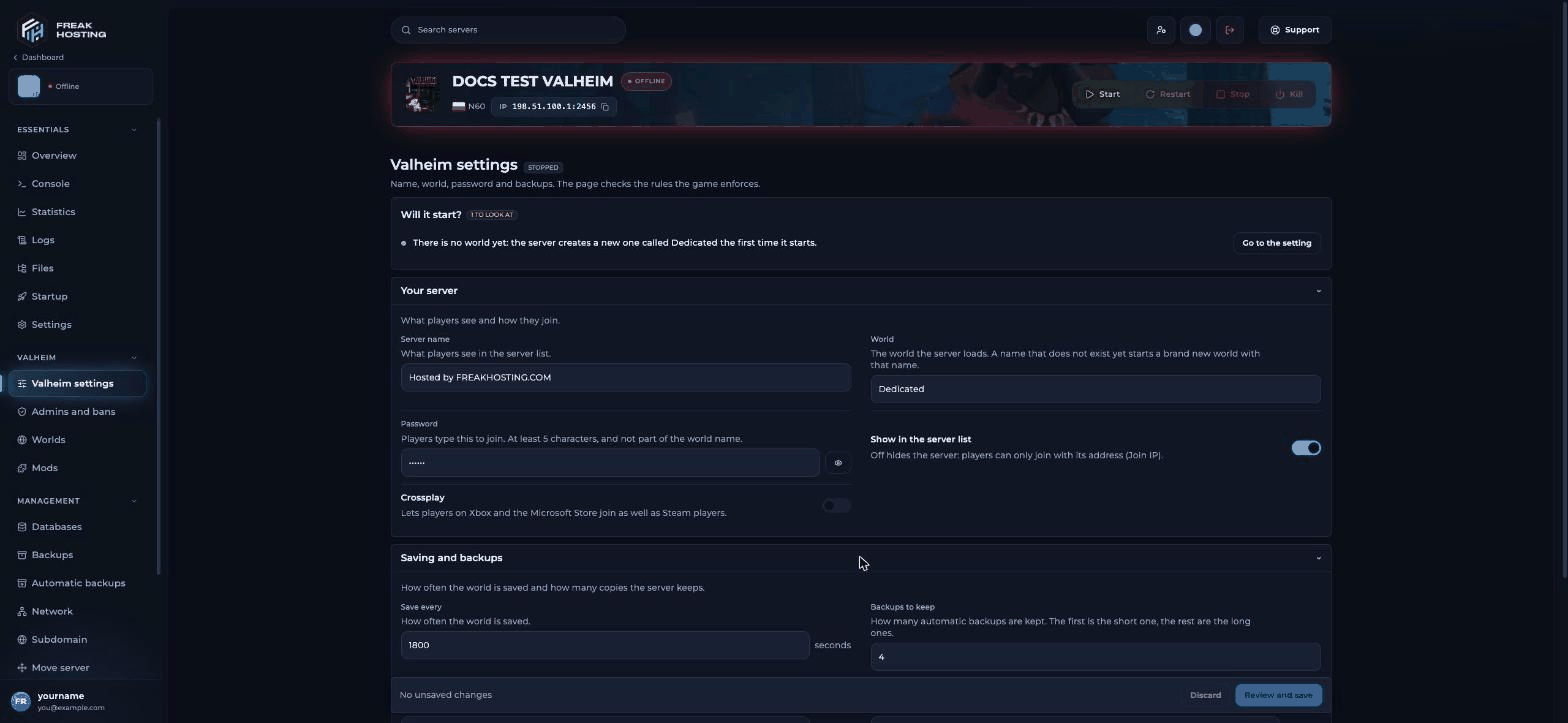
Valheim settings in the FREAKHOSTING Game Panel
How to join your Valheim server
In Valheim, choose your character, click Start, open the Join game tab and add the server by its address or join code. Enter the password when asked.
Make your first backup
Valheim keeps its own copies of the world. By default it saves every 1800 seconds and keeps 4 backups. Change this under Saving and backups in Valheim settings. Also make a full panel backup once your world is set up.Frequently asked questions
What port does a Valheim server use?
The game port is 2456 by default, and Valheim also uses the next port (2457). Join with the Join IP shown in the panel.Why won’t my Valheim server accept my password?
It must be at least 5 characters and must not be part of the world name or server name. See password not working.Can I make my Valheim server private?
Turn off Show in the server list and keep a password. For a whitelist, use the Allowed tab on Admins and bans; see whitelist players.Can I make my Valheim world easier or harder?
Yes. Open Startup, choose a World Preset (for examplecasual or hard) or set single modifiers such as Death Penalty, then restart. See world modifiers.
How do I become admin on my Valheim server?
Add your SteamID64 on Admins and bans. See the admin list.Related guides
Valheim server guide
Every Valheim page in one place.
Crossplay
PC, Xbox and console players together.
Upload a local world
Bring your world from your PC.
Admin list
Admins, bans and whitelist.
Not showing in the list
Find your server.
Tested by the FREAKHOSTING team on our Game Panel on 30 October 2026 (Valheim dedicated server with BepInEx). Steps may differ slightly if the game changes.
Need Extra Help?
If you encounter any issues, our support team is ready to assist:- Live Chat: Quick assistance via our website.
- Support Ticket: Open a Ticket
- Discord: Join our Community
- Email: support@freakhosting.com
Last Updated: October 2026