How to set world modifiers in the Game Panel
1
Open Startup
Log in to the Game Panel, open your Valheim server and click Startup.
2
Pick a preset or single modifiers
Choose a World Preset, or set Combat Difficulty, Death Penalty, Resource Rate, Raid Frequency and Portal Rules from their drop-downs. Switch No Build Cost, Passive Enemies, Player Based Raids or No Map on or off. The panel saves each change when you click away. See startup variables.
3
Restart the server
Restart your server. The modifiers apply when it starts and are saved with the world.
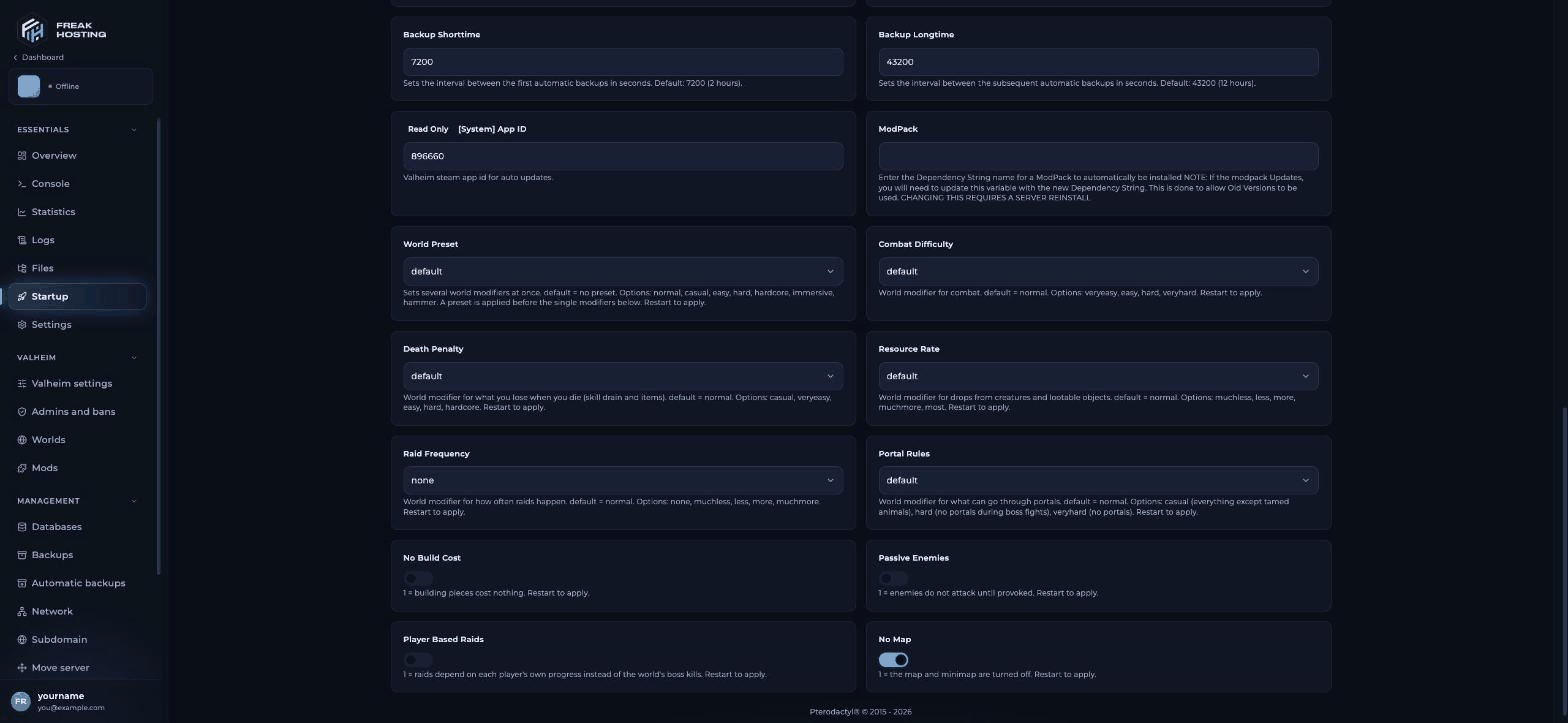
World modifier variables on the Startup page
casual with Raid Frequency none gives a Casual world with no raids.
Valheim world presets
Hammer mode makes building pieces free; Iron Gate counts it as a temporary cheat for achievements.
Every Valheim world modifier
Combat (Combat Difficulty)
Death penalty (Death Penalty)
casual, veryeasy, easy, hard, hardcore. Skill loss ranges from 1% to 100%; Normal is 5%. Full table in skill drain and death penalty.
Resources (Resource Rate)
muchless, less, more, muchmore, most (0.5x to 3x drops from creatures and lootable objects). Fish, trophies and boss drops are not affected.
Raids (Raid Frequency)
none, muchless, less, more, muchmore. Normal is a 20% chance every 46 minutes. Full table in raid frequency.
Portals (Portal Rules)
Switches
How to reset world modifiers
Modifiers are saved in the world. Setting a Startup field back to default stops the server setting it, but it does not undo a value the world has already saved. To reset:- Set the value you want explicitly in Startup and restart, or
- As an admin, run
setworldpreset defaultin the console. It resets every modifier to Normal.
Other ways to set world modifiers
- Upload a world made with them. In Valheim on your PC, create a world with a preset or modifiers, then upload the world on Worlds and set World in Valheim settings to its name.
- Change them in game as an admin. Be on Admins and bans, join, press F5 and run a command. Check the result with
listkeys.
setworldmodifier. setworldpreset default resets all of them.
Frequently asked questions
Can I change world modifiers on an existing world?
Yes. Set them in Startup and restart the server; they apply to the world it loads and are saved with it. An admin can also usesetworldmodifier or setworldpreset on the running world.
Why didn’t setting a modifier back to default change anything?
default only means the server doesn’t set that modifier. A value already saved in the world stays. Set the value you want, or runsetworldpreset default as an admin.
Do world modifiers work with mods?
Yes. Modifiers are part of the base game. A mod can still change the same thing, so check the mod’s settings inBepInEx/config.
What does No map do in Valheim?
It removes the map and minimap for everyone on the world. Switch on No Map in Startup and restart. The cartography table has nothing to show without a map.Do world modifiers block achievements?
Some do. Iron Gate says Hammer mode counts as a temporary cheat, and some modifiers block certain achievements.Related guides
Valheim server guide
Every Valheim page in one place.
Skill drain and death penalty
Skill loss from 1% to 100%.
Raid frequency
More, fewer or no raids.
Upload a local world
Bring a world with its modifiers.
Startup variables
How the Startup page works.
Console commands
Admin commands and devcommands.
Tested by the FREAKHOSTING team on our Game Panel on 30 October 2026, and checked against the Valheim Wiki world modifiers page, Iron Gate’s dedicated server guide and the Valheim 1.0 FAQ. Values may change if the game changes.
Need Extra Help?
If you encounter any issues, our support team is ready to assist:- Live Chat: Quick assistance via our website.
- Support Ticket: Open a Ticket
- Discord: Join our Community
- Email: support@freakhosting.com
Last Updated: October 2026