open 203.0.113.10:7787 in the console.
Before you start
- Log in to the Game Panel.
- Own Mordhau on Steam so you can test the server.
- Mordhau has no game settings page in the panel. You set the basics on Startup and everything else in
Game.iniwith Files.
How to set up your Mordhau server
1
Open Startup
Open your server and click Startup under ESSENTIALS. The Variables section lists everything you can change about how the server starts.
2
Name your server
Replace the default Server Name with your own (up to 40 characters). This is the name players see in the server browser.
3
Set the admin password
Enter an Admin Password of up to 20 characters. You use it in game with
adminlogin to get admin rights. Keep it private.4
Choose a join password (optional)
Enter a Server Password (up to 20 characters) to make the server private, or leave it empty so anyone can join.
5
Check the first map
DEFAULT_MAP is the first map the server loads, in the format
MAPNAME/TYPE_NAME. The default Grad/FL_Grad starts Grad in Frontline. Leave it as it is for your first start.6
Start, stop and start again
Each field saves when you click away. Start the server and watch the console. The first start installs updates and creates
Game.ini. When the console shows Session GameSession successfully created, stop the server and start it again. From this second start your Server Name and passwords are written into Game.ini.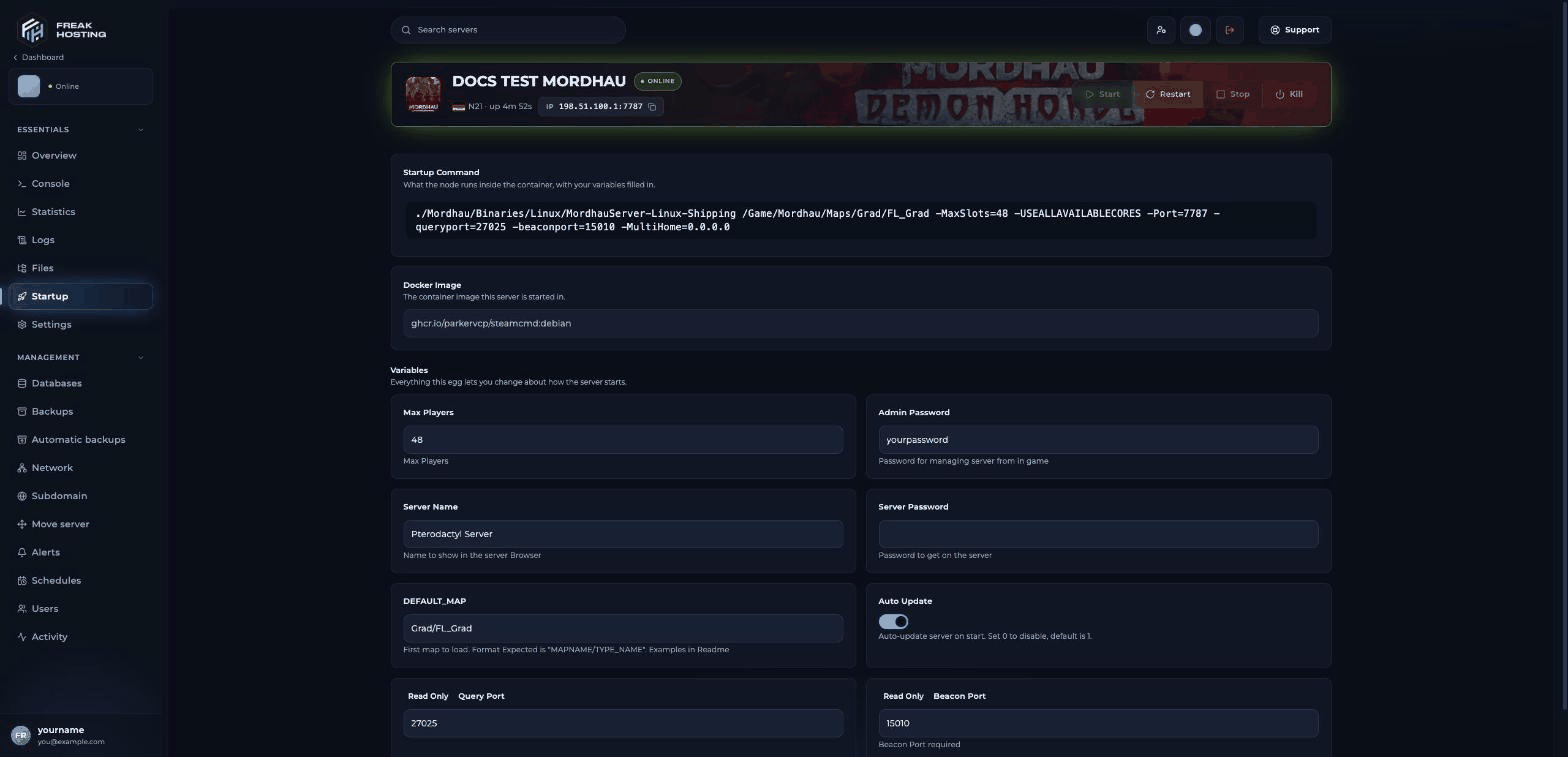
The Startup page of a Mordhau server in the FREAKHOSTING Game Panel
What do the Startup variables do?
Restart the server after any change so it applies.
How to join your Mordhau server
The address is shown in the panel header and on Overview with a copy button.
Make your first backup
Once your settings andGame.ini changes work, make a backup so you can go back if a later change breaks something. You can also turn on automatic backups.
Frequently asked questions
Where is the Mordhau server config file?
It isMordhau/Saved/Config/LinuxServer/Game.ini. Open it with Files. It appears after the first start. See Game.ini explained.
Why does my server still show the old name?
The name is written intoGame.ini when the server starts. Restart the server after changing Server Name. Also change it on Startup, not in Game.ini, because the panel replaces that line at each start.
How do I become admin on my Mordhau server?
Open the console in game with~ and type adminlogin followed by your Admin Password. See add admins.
Does my Mordhau server update itself?
Yes, while Auto Update is on. The server checks for an update every time it starts.Related guides
Mordhau server guide
Every Mordhau page in one place.
Set a password
Make your server private.
Add admins
Admin login and permanent admins.
Install mods
mod.io mods with Mods= lines.
Not showing in the list
Find your server or join by IP.
Startup variables
How the Startup page works.
Tested by the FREAKHOSTING team on our Game Panel on 3 November 2026 (Mordhau Release 26 dedicated server). Steps may differ slightly if the game changes.
Need Extra Help?
If you encounter any issues, our support team is ready to assist:- Live Chat: Quick assistance via our website.
- Support Ticket: Open a Ticket
- Discord: Join our Community
- Email: support@freakhosting.com
Last Updated: November 2026