.ini file, often called servertest.ini; on FREAKHOSTING it is named after your Server Name startup variable, <Server Name>.ini, in .cache/Server. You change them on the Game settings page: the server name and password, players and PvP, mods and map, loot respawn, safehouses, protection, backups, chat and voice. The sandbox (world rules) is a separate file. Changes apply the next time the server starts.
The Game settings page
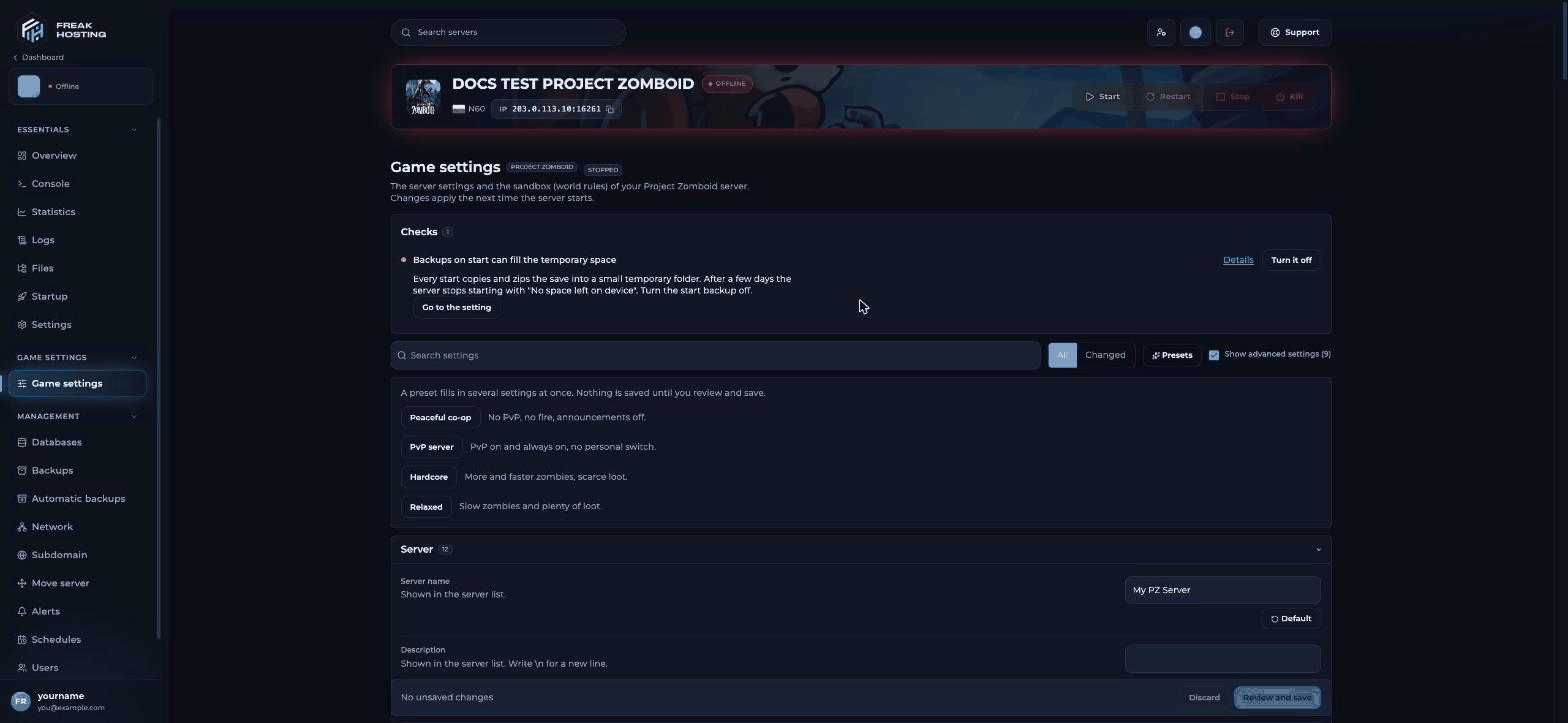
The Project Zomboid Game settings page
- Search settings finds any setting by name.
- All | Changed shows every setting or only the ones you changed.
- Presets fills in several settings: Peaceful co-op (“No PvP, no fire, announcements off.”), PvP server (“PvP on and always on, no personal switch.”), Hardcore and Relaxed.
- Show advanced settings shows the extra settings in each section.
- Checks at the top warn you about problems, such as Backups on start can fill the temporary space.
- Discard throws away unsaved changes; Review and save shows the exact change before saving.
Server
Players and PvP
Mods and map
Workshop items (Workshop links or ids), Mod ids (in load order) and Map. A wrong map name stops the server from starting; if that happens, put backMuldraugh, KY. See install mods.
Loot respawn and world
Loot respawns after (hours,0 off), No respawn above (items, default 5), Built-in buildings do not respawn loot, Items per container (0 no limit), Players can destroy with sledgehammers, Sledgehammers only in a safehouse and Minutes to read a page. See loot respawn and reading speed.
Safehouses and factions
Claiming, entry, looting, fire, respawn and removal of safehouses. See safehouse settings.Protection and limits
Backups
“Backups run in the server’s temporary space, which is small on a hosted server.” Settings: Backups to keep, Backup when the server starts, Backup after a game update and Backup every (minutes,0 off). Leave Backup when the server starts off: on a hosted server it fills the temporary space and the server stops starting. Use the panel’s Backups and Automatic backups instead.
Chat, Discord and voice
Discord chat link connects game chat to Discord. Voice chat, Voice minimum distance, Voice maximum distance (tiles) and Directional voice control in-game voice.Frequently asked questions
Where is servertest.ini on my server?
In.cache/Server, named after the Server Name startup variable. With Server Name servertest it is servertest.ini.
Do I need to restart after changing settings?
Yes. Changes apply the next time the server starts.How do I make my server private?
Set a Server password, switch off Show in the server list, and switch off Anyone can join if you want to create accounts yourself.What’s the difference between server settings and sandbox settings?
Server settings (the.ini) control access, PvP, mods and the server. Sandbox settings shape the world: zombies, loot amounts, time and more. See sandbox settings.
Related guides
Project Zomboid guide
Every Project Zomboid page in one place.
Sandbox settings
World rules, zombies and loot.
Safehouse settings
Claims and access.
Server won't start
Common start-up problems.
Tested by the FREAKHOSTING team on 30 October 2026 (Project Zomboid Build 42 on our Game Panel). Steps may differ slightly if the game or its mods change.
Need Extra Help?
If you encounter any issues, our support team is ready to assist:- Live Chat: Quick assistance via our website.
- Support Ticket: Open a Ticket
- Discord: Join our Community
- Email: support@freakhosting.com
Last Updated: October 2026