MinutesPerPage): the in-game minutes needed to read one page of a book. The Build 42 default is 2. Lower is faster: 1 halves reading time and 0.5 makes it four times faster. On a FREAKHOSTING server, open Game settings, change Minutes to read a page under Loot respawn and world, save and restart.
How to change reading speed on your Project Zomboid server
1
Open Game settings
Open your server in the Game Panel and click Game settings under GAME SETTINGS.
2
Find Minutes to read a page
Type
read in Search settings, or open the Loot respawn and world section. The setting is Minutes to read a page (“In-game minutes needed to read one page of a book.”).3
Enter a lower number
Enter a value below the default of
2, for example 1 or 0.5. Decimals are allowed.4
Review, save and restart
Click Review and save, save the change and restart the server. Every player on the server reads at the new speed.
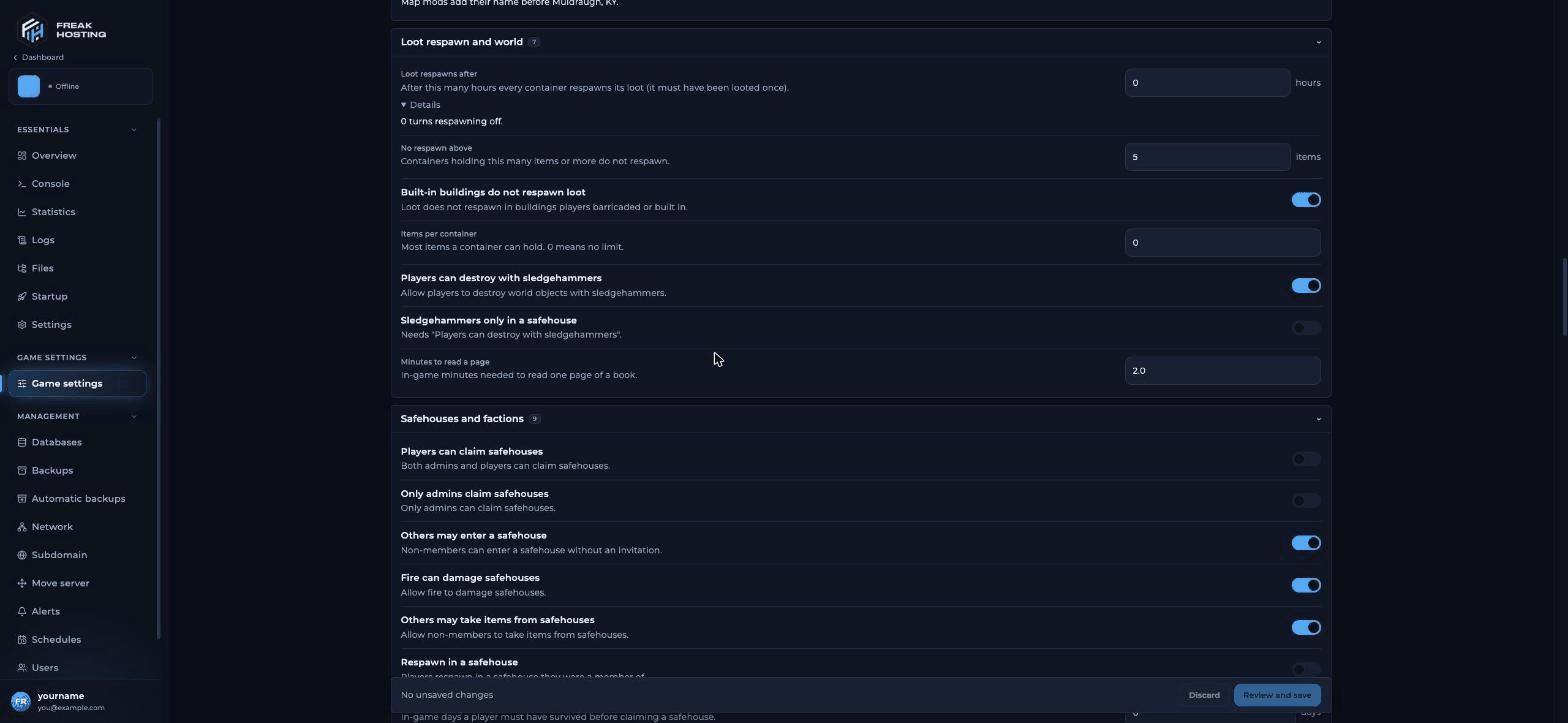
Minutes to read a page in the Loot respawn and world section
Which reading speed value should I use?
Reading time grows in a straight line with the value, so half the value means half the time.
Very low values make skill books almost instant, which speeds up skill progress for everyone. Tell your players the value before they pick traits such as Fast Reader.
How does reading speed work in multiplayer?
In single-player you can fast-forward time while you read. A multiplayer server can’t fast-forward, so a skill book takes much longer in real time. That is why server owners lower Minutes Per Skill Book Page. The value is the same for everyone on the server. Traits still apply on top: Fast Reader reads faster and Slow Reader reads slower. The length of a day also matters. A page takes a number of in-game minutes, so a longer in-game day (Length of a day in World rules (sandbox)) means more real time per page.Where is MinutesPerPage stored?
- Build 42 (your server):
MinutesPerPageis a sandbox option, shown in-game as Minutes Per Skill Book Page under the Character sandbox settings. On a dedicated server it is in.cache/Server/<Server Name>_SandboxVars.lua. The value can be from0to60. - Build 41: the option was in the server
.inifile.
Frequently asked questions
How do I make reading faster in Project Zomboid multiplayer?
Lower Minutes Per Skill Book Page on the server. On FREAKHOSTING that is Minutes to read a page in Game settings. Players can’t change it themselves; only the server owner can.What does “minutes per skill book page” mean?
It is the number of in-game minutes one page takes to read. A value of2 means two in-game minutes per page.
Why didn’t my reading speed change?
The server only reads the new value when it starts, so restart it after saving. If you edit the file by hand, stop the server first, edit and save the file, then start it.Do VHS tapes and TV shows also give XP faster?
No. Minutes Per Skill Book Page only changes reading time. See VHS tapes and XP for media XP and the Experience multiplier setting.Is there a reading speed setting for single-player?
Yes. When you start a single-player game with custom sandbox settings, Minutes Per Skill Book Page is under Character. It works the same way as on a server.Related guides
Project Zomboid guide
Every Project Zomboid page in one place.
VHS tapes and XP
Which tapes give XP.
Sandbox settings
World rules, zombies and loot.
Server settings explained
Every section of Game settings.
Tested by the FREAKHOSTING team on 30 October 2026 (Project Zomboid Build 42 on our Game Panel). Steps may differ slightly if the game or its mods change.
Need Extra Help?
If you encounter any issues, our support team is ready to assist:- Live Chat: Quick assistance via our website.
- Support Ticket: Open a Ticket
- Discord: Join our Community
- Email: support@freakhosting.com
Last Updated: October 2026