/server/rust/cfg/server.cfg). Click Review and save, check the changes and restart. The panel creates server.cfg the first time you save a setting that lives in it.
How to change a Rust server setting
1
Open Server settings
In the Game Panel, open your server and click Server settings under RUST.
2
Look at Checks
The Checks card lists things to fix, such as “The RCON password is a well-known default” or “Your server still has the default name”. Click Go to the setting to jump to the field.
3
Change the fields
Edit the fields you want. The tag next to each field shows where it is saved.
4
Review and save
Click Review and save. The dialog shows exactly what changes under Startup variables and server.cfg. Click Save changes. The old file is kept as
server.cfg.bak.5
Restart
Restart the server. Changes apply on the next start.
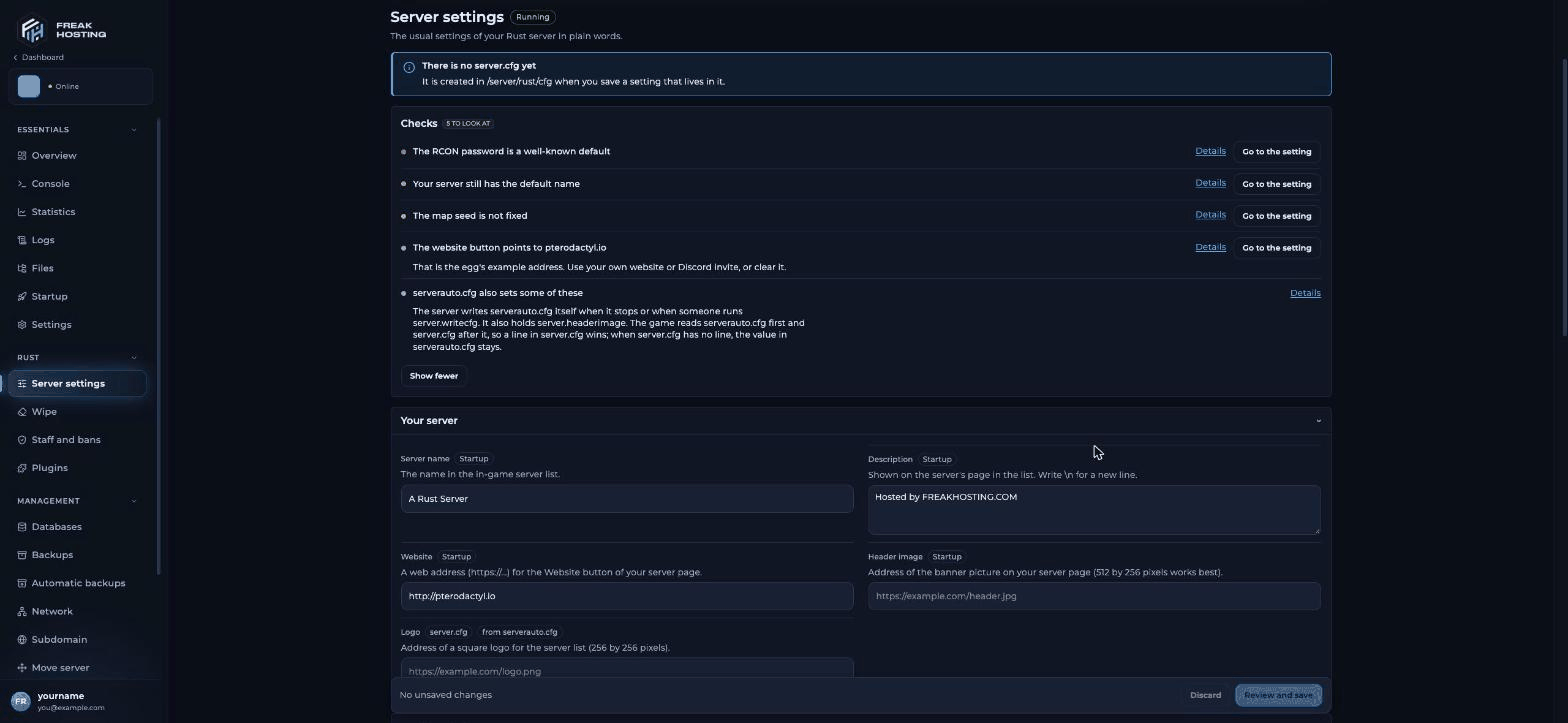
Server settings for Rust in the FREAKHOSTING Game Panel
Your server
More detail: description, header image and logo.
World and players
See map seed and size and custom maps.
Gameplay (server.cfg)
Facepunch lists the allowed server browser tags: one wipe tag (
monthly, biweekly, weekly), one difficulty tag (vanilla, hardcore, softcore), a region (NA, SA, EU, WA, EA, OC, AF) and others such as pve, roleplay or creative. Up to four tags show in the browser. Don’t set two tags from the same group.
Security and plugins
Set your own RCON password on every new server. Rust turns RCON off while the password is the well-known default, and the panel console, commands, Stop and Staff and bans all need RCON. See getting started.
What are server.cfg and serverauto.cfg?
Rust reads two files from/server/rust/cfg/:
serverauto.cfgis written by the game itself when it stops or when someone runsserver.writecfg. It also holdsserver.headerimage.server.cfgis your file. The game reads it afterserverauto.cfg, so a line inserver.cfgwins. Whenserver.cfghas no line for a setting, the value inserverauto.cfgstays.
server.cfg override command-line settings, and that convars in the file are written without the + prefix:
server.cfg in the File Manager (the page links to it under Advanced), add one convar per line and restart.
Frequently asked questions
Where is server.cfg on a Rust server?
In/server/rust/cfg/server.cfg. It doesn’t exist on a new server; the panel creates it the first time you save a setting tagged server.cfg.
Why did my server.cfg change not apply?
Rust readsserver.cfg when it starts, so restart after saving. Also check the setting isn’t one tagged Startup: those are Startup variables, not server.cfg lines.
Why does the panel say “The map seed is not fixed”?
With Map seed at 0 the server uses the random seed written at install, so your map stays the same until you wipe. Enter that number (shown on the Wipe page) to fix it for good.What does the website warning mean?
The Website field starts with an example address. Put in your own site or Discord invite, or clear it.Related guides
Rust server guide
Every Rust page in one place.
Map seed and size
Pick your map.
Description and header image
Your server page in the list.
RCON tools
RustAdmin and WebRCON.
Startup variables
How Startup variables work.
Tested by the FREAKHOSTING team on our Game Panel on 31 October 2026 (Rust dedicated server, Server settings module). Steps may differ slightly if the game changes.
Need Extra Help?
If you encounter any issues, our support team is ready to assist:- Live Chat: Quick assistance via our website.
- Support Ticket: Open a Ticket
- Discord: Join our Community
- Email: support@freakhosting.com
Last Updated: October 2026