Difficulty
Beginner
Time
4 minutes
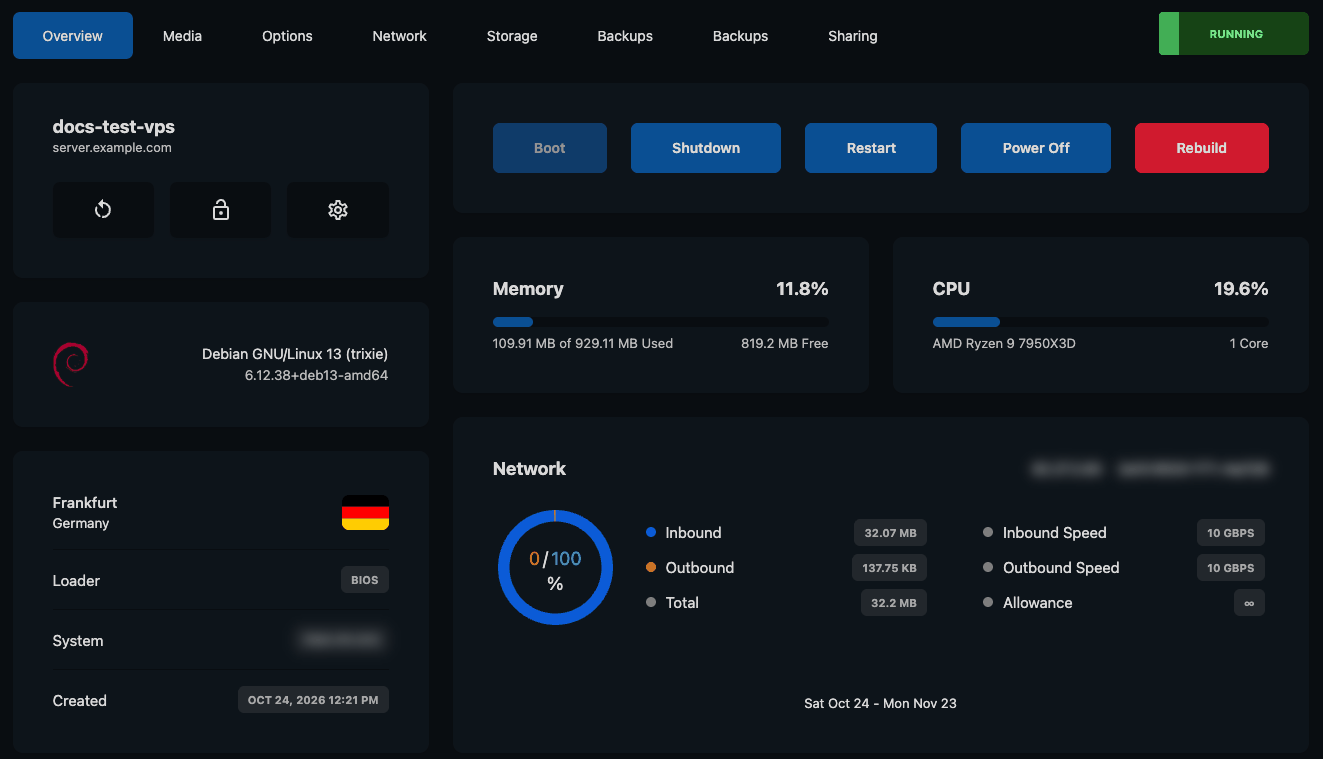
A server's Overview tab (personal details blurred)
The tabs
Some servers show two Backups tabs. The first holds your automatic backups; the second lets you choose a backup Schedule. Both are explained in How to Back Up and Restore Your VPS.
The Overview tab
Name and quick icons
Under the server’s name are three icons:Power buttons
Boot, Shutdown, Restart, Power Off and the red Rebuild button. Buttons that don’t apply right now are greyed out, for example Boot while the server is already running. See How to Start, Stop and Restart Your VPS and How to Reinstall Your VPS.Information cards
Memory, CPU and operating system details come from a small helper inside your server called the QEMU guest agent. It’s included in our operating system images. If you remove it, these cards may stay empty.
Statistics and the task log
Click the arrow next to Statistics to open live graphs for network traffic, CPU, disk and memory. See How to Monitor Your VPS’s Resource Usage. At the bottom of every tab, the task log lists recent actions on the server. See Understanding the Task Log.Need Extra Help?
If you encounter any issues, our support team is ready to assist:- Live Chat: Quick assistance via our website.
- Support Ticket: Open a Ticket
- Discord: Join our Community
- Email: support@freakhosting.com
Last Updated: October 2026