How to Install Swiftly (SwiftlyS2) on a CS2 Server
Install Swiftly on CS2: open Frameworks, click Install SwiftlyS2 and restart, or download the Linux build from GitHub and add it to gameinfo.gi.
SwiftlyS2 is a C# plugin framework for Counter-Strike 2 and the Swiftly framework the Game Panel installs. To install it on a FREAKHOSTING CS2 server, open Frameworks, click Install SwiftlyS2, confirm, and restart the server. SwiftlyS2 does not need Metamod:Source. To install it by hand, copy its addons folder into game/csgo, add Game csgo/addons/swiftlys2 to gameinfo.gi and restart.
Difficulty
Time
Works on
Panel pages
Beginner (panel) / Intermediate (manual)
5 to 15 minutes
Every FREAKHOSTING CS2 server
Frameworks, Plugins
What is SwiftlyS2?
SwiftlyS2 is a server modification for Counter-Strike 2, built in C++, that runs plugins written in C#. It is open source (GPLv3), with documentation at swiftlys2.net/docs and source code on GitHub.According to the official installation guide:
There are builds for Linux and Windows. FREAKHOSTING CS2 servers run Linux.
On a first install, use the build with runtimes. It contains the runtimes SwiftlyS2 needs, so you don’t install them separately.
SwiftlyS2 loads through its own loader line in gameinfo.gi. Metamod:Source is not required. If Metamod:Source is also installed, the SwiftlyS2 line goes after the Metamod line.
SwiftlyS2 or CounterStrikeSharp?
SwiftlyS2
CounterStrikeSharp
Plugin language
C#
C#
Needs Metamod:Source
No
Yes (the panel installs it)
Plugins
Made for SwiftlyS2
Made for CounterStrikeSharp, including MatchZy and CS2-SimpleAdmin
A plugin only works on the framework it was made for. If a plugin page says SwiftlyS2, install SwiftlyS2. If you are not sure, most popular CS2 plugins are made for CounterStrikeSharp.
How to install SwiftlyS2 in the Game Panel
1
Make a backup
Click Backups, then Create backup, so you can go back if something goes wrong.
2
Open Frameworks
Open your server and click Frameworks under COUNTER-STRIKE 2 in the sidebar. The SwiftlyS2 card shows NOT INSTALLED (“Plugin framework for C# plugins. It does not need Metamod:Source.”).
The SwiftlyS2 card on the Frameworks page
3
Click Install SwiftlyS2
Confirm the install. A progress log shows each step.
4
Restart the server
When the install is done, restart the server to load SwiftlyS2.
Only one change runs at a time. If you see Another change is running. Wait for it to finish., wait and try again. Click Details on the card for more about it.
How to install SwiftlyS2 manually
Use this if you prefer to upload SwiftlyS2 yourself, or if you run CS2 on your own VPS. On a FREAKHOSTING game server, the one-click install above does the same job.
1
Make a backup
Click Backups, then Create backup. You change gameinfo.gi in a later step, so a backup lets you undo it.
2
Download the Linux build with runtimes
Open the SwiftlyS2 releases on GitHub and download the Linux file whose name ends in -with-runtimes.zip. At the time of writing the latest stable release is v1.5.0 (23 October 2026), so the file is swiftlys2-linux-v1.5.0-with-runtimes.zip (56.6 MB). Pick a release without a beta tag unless you need a fix that is only in a beta.
3
Stop the server
Stop the server before you change its files.
4
Upload the addons folder to game/csgo
The archive contains an addons folder. Copy it into your server’s game/csgo folder, so SwiftlyS2 ends up in game/csgo/addons/swiftlys2. If an addons folder is already there (for example from Metamod:Source), merge the two.
File Manager: open game/csgo, click Upload and pick the .zip file, then use Unarchive on it and delete the .zip afterwards. See how to use the file manager.
SFTP: extract the .zip on your computer and upload the addons folder into game/csgo. See how to connect via SFTP.
5
Add SwiftlyS2 to gameinfo.gi
Open game/csgo/gameinfo.gi and find this line:
Game_LowViolence csgo_lv
Add this line directly below it:
Game csgo/addons/swiftlys2
If Metamod:Source is also installed, put the SwiftlyS2 line after the Metamod line:
If SwiftlyS2 is loaded, it prints its version. Typing sw on its own shows the list of SwiftlyS2 commands. If the console says the command is unknown, check the gameinfo.gi line and that game/csgo/addons/swiftlys2 exists.
A Counter-Strike 2 update can reset gameinfo.gi and switch the frameworks off. On the Game Panel, the gameinfo.gi card on Frameworks shows this and Repair gameinfo.gi puts the lines back. On your own VPS, add the Game csgo/addons/swiftlys2 line again after each update.
Where SwiftlyS2 keeps its files
Folder
What it holds
game/csgo/addons/swiftlys2/plugins
Your SwiftlyS2 plugins, one folder per plugin
game/csgo/addons/swiftlys2/configs
SwiftlyS2’s own settings, such as core, database and permissions (shipped as .example.jsonc files)
game/csgo/addons/swiftlys2/translations
Language files
game/csgo/addons/swiftlys2/gamedata
Game data SwiftlyS2 needs to work with CS2
How to add SwiftlyS2 plugins
1
Download a SwiftlyS2 plugin
Get it from its official page or the SwiftlyS2 forum. Check that it says it is made for SwiftlyS2.
2
Upload it to the plugins folder
Put the plugin’s folder into game/csgo/addons/swiftlys2/plugins with Files or SFTP, following the plugin’s instructions. Create the plugins folder if it isn’t there yet. The folder name must match the plugin’s main .dll, for example plugins/MyPlugin/MyPlugin.dll. See how to use the file manager.
3
Restart and check
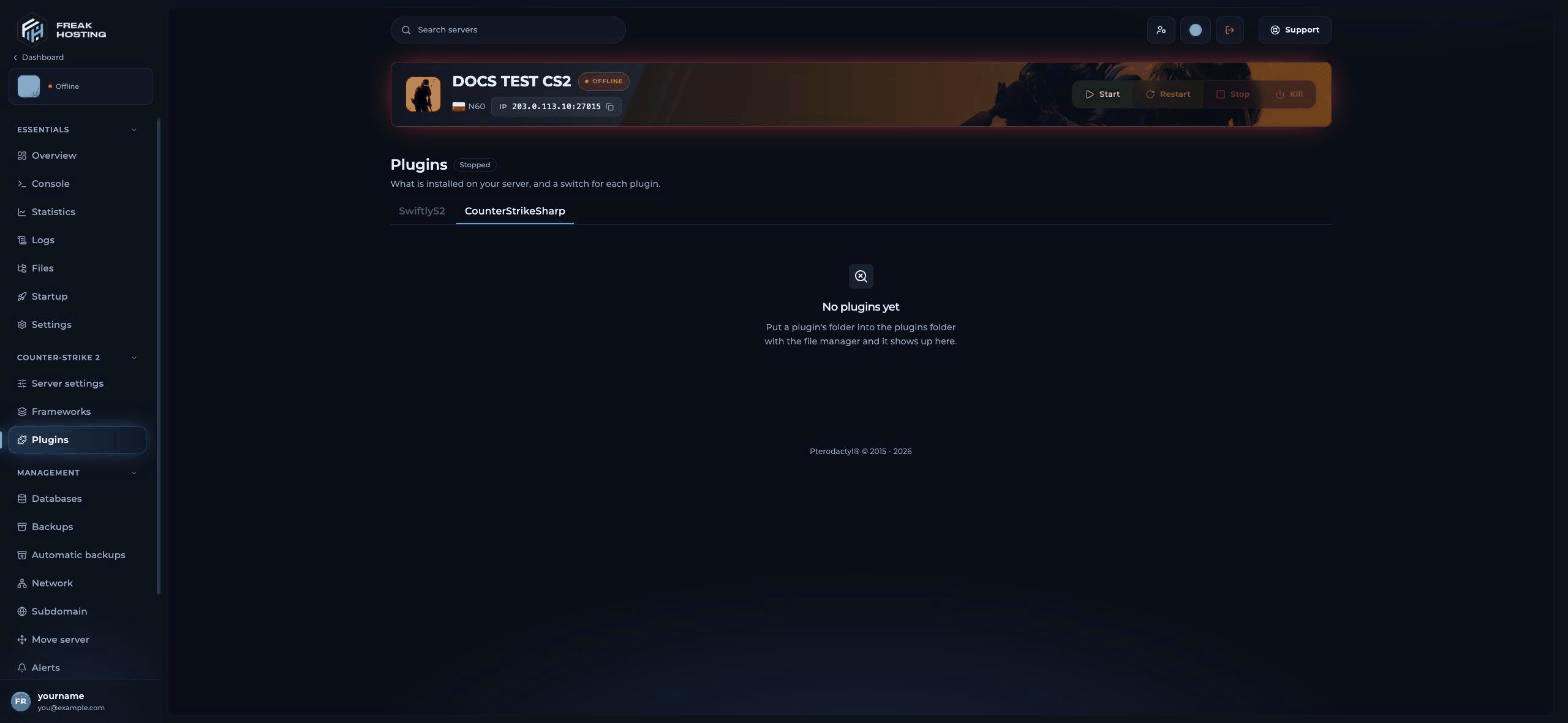
Restart the server. Open Plugins and click the SwiftlyS2 tab. Your plugin shows there with a switch. In the Console, sw plugins list lists the loaded plugins.
The Plugins page with its SwiftlyS2 and CounterStrikeSharp tabs
SwiftlyS2 skips a plugin folder named disabled or starting with _ (for example _MyPlugin), so renaming a folder that way turns a plugin off without deleting it.
How to update SwiftlyS2
Game Panel: click Reinstall on the SwiftlyS2 card, then restart.
Manually: make a backup, stop the server, download the newer Linux release from GitHub and copy its addons folder over game/csgo/addons again, then start the server and run sw version to check the new version.
If SwiftlyS2 stops loading after a CS2 update, check the Checks box on Frameworks, then reinstall it once a fixed SwiftlyS2 release is out. The SwiftlyS2 releases page lists what changed in each version.
Frequently asked questions
Is Swiftly still supported on CS2?
Yes. SwiftlyS2 is actively developed: version 1.5.0 came out on 23 October 2026. Its documentation is at swiftlys2.net and its source code is on GitHub. Use plugins made for SwiftlyS2.
Do I need Metamod for SwiftlyS2?
No. SwiftlyS2 loads through its own Game csgo/addons/swiftlys2 line in gameinfo.gi. If you also run Metamod:Source, the SwiftlyS2 line goes after the Metamod line.
Where do I download Swiftly for CS2?
From the official GitHub releases, linked from swiftlys2.net. For a Linux server, take the file ending in -with-runtimes.zip the first time you install it.
Can I use CounterStrikeSharp plugins with SwiftlyS2?
No. Each plugin only works on the framework it was made for. Install CounterStrikeSharp for those.
My SwiftlyS2 plugin doesn’t appear. What now?
Check that the plugin is made for SwiftlyS2, that its folder is in game/csgo/addons/swiftlys2/plugins with a .dll of the same name, and that you restarted. Read the Console output during the start for errors.
Related guides
CS2 server guide
Every Counter-Strike 2 page in one place.
Install CS2 plugins
Upload plugins and switch them on.
Install CounterStrikeSharp
The most used CS2 framework.
Repair gameinfo.gi
Fix plugins after a CS2 update.
Tested by the FREAKHOSTING team on our Game Panel on 29 October 2026 (Counter-Strike 2 with CounterStrikeSharp 1.0.378 and Metamod:Source build 1483). Manual steps checked against the official SwiftlyS2 documentation on 5 November 2026 (SwiftlyS2 v1.5.0). Steps may differ slightly if the game or its plugins change.
Need Extra Help?
If you encounter any issues, our support team is ready to assist:
Ready to upgrade your hosting? Use code KB20 at checkout for 20% off your first order!
Last Updated: November 2026
Was this page helpful?
{"docsConfig":{"theme":"mint","$schema":"https://mintlify.com/docs.json","name":"FREAKHOSTING","colors":{"primary":"#1a6fd1","light":"#4da3ff","dark":"#1a6fd1"},"favicon":"https://cdn.freakhosting.com/website/favicon.ico","appearance":{"default":"dark","strict":false},"background":{"color":{"light":"#ffffff","dark":"#0a0e17"}},"seo":{"metatags":{"og:image":"https://cdn.freakhosting.com/core/assets/heldesk-main.png","og:site_name":"FREAKHOSTING Help Center","og:locale":"en_GB","twitter:site":"@freakhosting","twitter:card":"summary_large_image","author":"FREAKHOSTING LTD","robots":"index, follow, max-image-preview:large, max-snippet:-1, max-video-preview:-1","copyright":"Copyright 2018-2026 FREAKHOSTING LTD","theme-color":"#0a0e17","color-scheme":"light dark"},"organization":{"id":"https://freakhosting.com/#organization","name":"FREAKHOSTING","legalName":"FREAKHOSTING LTD","url":"https://freakhosting.com","logo":"https://cdn.freakhosting.com/core/assets/img/logo-footer.png","sameAs":["https://x.com/freakhosting","https://discord.gg/freakhosting","https://github.com/freakhosting"]},"indexing":"all"},"integrations":{"ga4":{"measurementId":"G-TSY6L544EM"}},"contextual":{"options":["copy","view","chatgpt","claude","perplexity",{"title":"Order a Server","description":"Browse our game server hosting plans","icon":"server","href":"https://freakhosting.com"},{"title":"Submit a Ticket","description":"Contact our 24/7 support team","icon":"ticket","href":"https://freakhosting.com/clientarea/submitticket.php"},{"title":"Join Discord","description":"Get community support and updates","icon":"discord","href":"https://discord.gg/freakhosting"}],"display":"header"},"interaction":{"drilldown":false},"styling":{"latex":false},"navigation":{"pages":[]}},"deployment":{"deploymentMetadataValue":{"subdomain":"freakhostingltd","hasAudioNarration":false,"actualSubdomain":"freakhostingltd","customDomains":["help.freakhosting.com"],"gitSource":{"type":"github","owner":"freakhosting","repo":"help.freakhosting.com","deployBranch":"main","contentDirectory":"","isPrivate":true,"mountPath":"","label":""},"feedback":{"thumbs":true},"entitlements":{},"buildId":"6aecadf81f2bb168c88a53ac","clientVersion":"0.0.4177","searchFilterCounts":[{"language":"default","tag":"Games","count":763},{"language":"default","tag":"Game Panel guides","count":225},{"language":"default","tag":"Other","count":208},{"language":"default","tag":"Survival Games","count":192},{"language":"default","tag":"Commands \u0026 settings","count":186},{"language":"default","tag":"Popular Games","count":179},{"language":"default","tag":"Guides \u0026 tips","count":169},{"language":"default","tag":"Shooters","count":136},{"language":"default","tag":"Troubleshooting","count":94},{"language":"default","tag":"Start here","count":93}]},"assistantConfig":{"enableAskAiButton":false,"enableStarterQuestions":false,"enableAskAiSearchBar":true},"basePath":"","hasChatPermissions":false,"hasWebMcpPermissions":false,"toggles":[{"name":"kill-isr","enabled":true,"variant":{"name":"disabled","enabled":false,"feature_enabled":true},"impressionData":false},{"name":"custom-rbac-roles","enabled":true,"variant":{"name":"disabled","enabled":false,"feature_enabled":true},"impressionData":false},{"name":"agent-mintlify-slack","enabled":true,"variant":{"name":"disabled","enabled":false,"feature_enabled":true},"impressionData":false},{"name":"agent-integrations-settings","enabled":true,"variant":{"name":"disabled","enabled":false,"feature_enabled":true},"impressionData":false},{"name":"rbac-expansion","enabled":true,"variant":{"name":"disabled","enabled":false,"feature_enabled":true},"impressionData":false},{"name":"automations-pr-grouping","enabled":true,"variant":{"name":"disabled","enabled":false,"feature_enabled":true},"impressionData":false},{"name":"custom-prefix","enabled":true,"variant":{"name":"disabled","enabled":false,"feature_enabled":true},"impressionData":false},{"name":"analytics-v7","enabled":true,"variant":{"name":"disabled","enabled":false,"feature_enabled":true},"impressionData":false},{"name":"user-flows-analytics","enabled":true,"variant":{"name":"disabled","enabled":false,"feature_enabled":true},"impressionData":false},{"name":"no-publish-flow","enabled":true,"variant":{"name":"disabled","enabled":false,"feature_enabled":true},"impressionData":false},{"name":"workos-onboarding","enabled":true,"variant":{"name":"disabled","enabled":false,"feature_enabled":true},"impressionData":false},{"name":"snapshot-serving-live","enabled":true,"variant":{"name":"disabled","enabled":false,"feature_enabled":true},"impressionData":false},{"name":"stripTemperatureMiddleware","enabled":true,"variant":{"name":"disabled","enabled":false,"feature_enabled":true},"impressionData":false},{"name":"support-platform-pylon-zendesk","enabled":true,"variant":{"name":"disabled","enabled":false,"feature_enabled":true},"impressionData":false},{"name":"snapshot-serving","enabled":true,"variant":{"name":"disabled","enabled":false,"feature_enabled":true},"impressionData":false},{"name":"instant-rollback","enabled":true,"variant":{"name":"disabled","enabled":false,"feature_enabled":true},"impressionData":false},{"name":"granular-notifications-server","enabled":true,"variant":{"name":"disabled","enabled":false,"feature_enabled":true},"impressionData":false},{"name":"granular-notifications","enabled":true,"variant":{"name":"disabled","enabled":false,"feature_enabled":true},"impressionData":false},{"name":"automations-fable","enabled":true,"variant":{"name":"disabled","enabled":false,"feature_enabled":true},"impressionData":false},{"name":"fixed-ai-action-pricing","enabled":true,"variant":{"name":"disabled","enabled":false,"feature_enabled":true},"impressionData":false},{"name":"automation-resolve-merge-conflict","enabled":true,"variant":{"name":"disabled","enabled":false,"feature_enabled":true},"impressionData":false},{"name":"scoped-publishing","enabled":true,"variant":{"name":"disabled","enabled":false,"feature_enabled":true},"impressionData":false},{"name":"mintql","enabled":true,"variant":{"name":"disabled","enabled":false,"feature_enabled":true},"impressionData":false},{"name":"page-level-analytics","enabled":true,"variant":{"name":"disabled","enabled":false,"feature_enabled":true},"impressionData":false},{"name":"editor-version-history-v2","enabled":true,"variant":{"name":"disabled","enabled":false,"feature_enabled":true},"impressionData":false},{"name":"billing-page-v2","enabled":true,"variant":{"name":"disabled","enabled":false,"feature_enabled":true},"impressionData":false},{"name":"full-page-search","enabled":true,"variant":{"name":"disabled","enabled":false,"feature_enabled":true},"impressionData":false},{"name":"workspace-projects","enabled":true,"variant":{"name":"disabled","enabled":false,"feature_enabled":true},"impressionData":false},{"name":"assistant-v5","enabled":true,"variant":{"name":"disabled","enabled":false,"feature_enabled":true},"impressionData":false},{"name":"fork-pr-previews","enabled":true,"variant":{"name":"disabled","enabled":false,"feature_enabled":true},"impressionData":false},{"name":"revalidation-jwt","enabled":true,"variant":{"name":"disabled","enabled":false,"feature_enabled":true},"impressionData":false},{"name":"workos-sso-scim","enabled":true,"variant":{"name":"disabled","enabled":false,"feature_enabled":true},"impressionData":false},{"name":"hobby-abuse-scan","enabled":true,"variant":{"name":"disabled","enabled":false,"feature_enabled":true},"impressionData":false},{"name":"dashboard-inbox","enabled":true,"variant":{"name":"disabled","enabled":false,"feature_enabled":true},"impressionData":false},{"name":"workos-signup","enabled":true,"variant":{"name":"disabled","enabled":false,"feature_enabled":true},"impressionData":false},{"name":"turbopuffer-dual-write","enabled":true,"variant":{"name":"disabled","enabled":false,"feature_enabled":true},"impressionData":false},{"name":"workos-enabled","enabled":true,"variant":{"name":"disabled","enabled":false,"feature_enabled":true},"impressionData":false},{"name":"approve-review-flow","enabled":true,"variant":{"name":"disabled","enabled":false,"feature_enabled":true},"impressionData":false},{"name":"editor-metadata","enabled":true,"variant":{"name":"disabled","enabled":false,"feature_enabled":true},"impressionData":false},{"name":"sso-setup-deadline-banner","enabled":true,"variant":{"name":"disabled","enabled":false,"feature_enabled":true},"impressionData":false},{"name":"turbopuffer-serve","enabled":true,"variant":{"name":"disabled","enabled":false,"feature_enabled":true},"impressionData":false},{"name":"live-agents","enabled":true,"variant":{"name":"disabled","enabled":false,"feature_enabled":true},"impressionData":false},{"name":"starter-pricing","enabled":true,"variant":{"name":"control","enabled":true,"payload":{"type":"string","value":"control"},"feature_enabled":true},"impressionData":false},{"name":"llms-txt-v2","enabled":true,"variant":{"name":"disabled","enabled":false,"feature_enabled":true},"impressionData":false},{"name":"wildcard-email-auth","enabled":true,"variant":{"name":"disabled","enabled":false,"feature_enabled":true},"impressionData":false}],"googleFontsInlined":false},"customCss":[],"page":{"pagePath":"games/counter-strike-2/how-to-install-swiftly-on-a-counter-strike-2-server","slug":"/games/counter-strike-2/how-to-install-swiftly-on-a-counter-strike-2-server","pageMetadata":{"title":"How to Install Swiftly (SwiftlyS2) on a CS2 Server","sidebarTitle":"Install SwiftlyS2","description":"Install Swiftly on CS2: open Frameworks, click Install SwiftlyS2 and restart, or download the Linux build from GitHub and add it to gameinfo.gi.","keywords":["swiftly cs2","swiftlys2","install swiftly cs2","swiftlys2 install","swiftly cs2 download","swiftly framework","swiftly plugins cs2","cs2 swiftly","swiftly vs counterstrikesharp","cs2 c# plugin framework","Counter-Strike 2","FREAKHOSTING"],"og:title":"How to Install Swiftly (SwiftlyS2) on a CS2 Server","og:description":"Install Swiftly on CS2: open Frameworks, click Install SwiftlyS2 and restart, or download the Linux build from GitHub and add it to gameinfo.gi.","href":"/games/counter-strike-2/how-to-install-swiftly-on-a-counter-strike-2-server"},"description":{"compiledSource":"\"use strict\";\nconst {jsx: _jsx} = arguments[0];\nconst {useMDXComponents: _provideComponents} = arguments[0];\nfunction _createMdxContent(props) {\n const _components = {\n p: \"p\",\n ..._provideComponents(),\n ...props.components\n };\n return _jsx(_components.p, {\n children: \"Install Swiftly on CS2: open Frameworks, click Install SwiftlyS2 and restart, or download the Linux build from GitHub and add it to gameinfo.gi.\"\n });\n}\nfunction MDXContent(props = {}) {\n const {wrapper: MDXLayout} = {\n ..._provideComponents(),\n ...props.components\n };\n return MDXLayout ? _jsx(MDXLayout, {\n ...props,\n children: _jsx(_createMdxContent, {\n ...props\n })\n }) : _createMdxContent(props);\n}\nreturn {\n default: MDXContent\n};\n","frontmatter":{},"scope":{}},"pageType":"default","mdx":{"mdxSource":{"compiledSource":"\"use strict\";const{Fragment:_Fragment,jsx:_jsx,jsxs:_jsxs}=arguments[0];const{useMDXComponents:_provideComponents}=arguments[0];function _createMdxContent(props){const _components={a:`a`,code:`code`,hr:`hr`,li:`li`,p:`p`,pre:`pre`,span:`span`,strong:`strong`,tbody:`tbody`,td:`td`,th:`th`,thead:`thead`,tr:`tr`,ul:`ul`,..._provideComponents(),...props.components},{Card,CardGroup,CodeBlock,Frame,Heading,Info,Note,OptimizedImage,Step,Steps,Table,Tip,Warning}=_components;if(!Card)_missingMdxReference(`Card`,true);if(!CardGroup)_missingMdxReference(`CardGroup`,true);if(!CodeBlock)_missingMdxReference(`CodeBlock`,true);if(!Frame)_missingMdxReference(`Frame`,true);if(!Heading)_missingMdxReference(`Heading`,true);if(!Info)_missingMdxReference(`Info`,true);if(!Note)_missingMdxReference(`Note`,true);if(!OptimizedImage)_missingMdxReference(`OptimizedImage`,true);if(!Step)_missingMdxReference(`Step`,true);if(!Steps)_missingMdxReference(`Steps`,true);if(!Table)_missingMdxReference(`Table`,true);if(!Tip)_missingMdxReference(`Tip`,true);if(!Warning)_missingMdxReference(`Warning`,true);return _jsxs(_Fragment,{children:[_jsxs(_components.p,{children:[`SwiftlyS2 is a C# plugin framework for Counter-Strike 2 and the Swiftly framework the Game Panel installs. To install it on a FREAKHOSTING CS2 server, open `,_jsx(_components.strong,{children:`Frameworks`}),`, click `,_jsx(_components.strong,{children:`Install SwiftlyS2`}),`, confirm, and restart the server. SwiftlyS2 does not need Metamod:Source. To install it by hand, copy its `,_jsx(_components.code,{children:`addons`}),` folder into `,_jsx(_components.code,{children:`game/csgo`}),`, add `,_jsx(_components.code,{children:`Game csgo/addons/swiftlys2`}),` to `,_jsx(_components.code,{children:`gameinfo.gi`}),` and restart.`]}),`\n`,_jsxs(Table,{children:[_jsx(_components.thead,{children:_jsxs(_components.tr,{children:[_jsx(_components.th,{children:`Difficulty`}),_jsx(_components.th,{children:`Time`}),_jsx(_components.th,{children:`Works on`}),_jsx(_components.th,{children:`Panel pages`})]})}),_jsx(_components.tbody,{children:_jsxs(_components.tr,{children:[_jsx(_components.td,{children:`Beginner (panel) / Intermediate (manual)`}),_jsx(_components.td,{children:`5 to 15 minutes`}),_jsx(_components.td,{children:`Every FREAKHOSTING CS2 server`}),_jsxs(_components.td,{children:[_jsx(_components.strong,{children:`Frameworks`}),`, `,_jsx(_components.strong,{children:`Plugins`})]})]})})]}),`\n`,_jsx(Heading,{level:`2`,id:`what-is-swiftlys2`,children:`What is SwiftlyS2?`}),`\n`,_jsxs(_components.p,{children:[`SwiftlyS2 is a server modification for Counter-Strike 2, built in C++, that runs plugins written in C#. It is open source (GPLv3), with documentation at `,_jsx(_components.a,{href:`https://swiftlys2.net/docs`,children:`swiftlys2.net/docs`}),` and source code on `,_jsx(_components.a,{href:`https://github.com/swiftly-solution/swiftlys2`,children:`GitHub`}),`.`]}),`\n`,_jsxs(_components.p,{children:[`According to the `,_jsx(_components.a,{href:`https://swiftlys2.net/docs/installation`,children:`official installation guide`}),`:`]}),`\n`,_jsxs(_components.ul,{children:[`\n`,_jsxs(_components.li,{children:[`There are builds for `,_jsx(_components.strong,{children:`Linux`}),` and `,_jsx(_components.strong,{children:`Windows`}),`. FREAKHOSTING CS2 servers run Linux.`]}),`\n`,_jsxs(_components.li,{children:[`On a first install, use the build `,_jsx(_components.strong,{children:`with runtimes`}),`. It contains the runtimes SwiftlyS2 needs, so you don’t install them separately.`]}),`\n`,_jsxs(_components.li,{children:[`SwiftlyS2 loads through its own loader line in `,_jsx(_components.code,{children:`gameinfo.gi`}),`. Metamod:Source is not required. If Metamod:Source is also installed, the SwiftlyS2 line goes after the Metamod line.`]}),`\n`]}),`\n`,_jsx(Heading,{level:`2`,id:`swiftlys2-or-counterstrikesharp`,children:`SwiftlyS2 or CounterStrikeSharp?`}),`\n`,_jsxs(Table,{children:[_jsx(_components.thead,{children:_jsxs(_components.tr,{children:[_jsx(_components.th,{}),_jsx(_components.th,{children:`SwiftlyS2`}),_jsx(_components.th,{children:`CounterStrikeSharp`})]})}),_jsxs(_components.tbody,{children:[_jsxs(_components.tr,{children:[_jsx(_components.td,{children:`Plugin language`}),_jsx(_components.td,{children:`C#`}),_jsx(_components.td,{children:`C#`})]}),_jsxs(_components.tr,{children:[_jsx(_components.td,{children:`Needs Metamod:Source`}),_jsx(_components.td,{children:`No`}),_jsx(_components.td,{children:`Yes (the panel installs it)`})]}),_jsxs(_components.tr,{children:[_jsx(_components.td,{children:`Plugins`}),_jsx(_components.td,{children:`Made for SwiftlyS2`}),_jsx(_components.td,{children:`Made for CounterStrikeSharp, including MatchZy and CS2-SimpleAdmin`})]})]})]}),`\n`,_jsxs(_components.p,{children:[`A plugin only works on the framework it was made for. If a plugin page says SwiftlyS2, install SwiftlyS2. If you are not sure, most popular CS2 plugins are made for `,_jsx(_components.a,{href:`/games/counter-strike-2/installing-metamod-and-counterstrikesharp-on-cs2`,children:`CounterStrikeSharp`}),`.`]}),`\n`,_jsx(Heading,{level:`2`,id:`how-to-install-swiftlys2-in-the-game-panel`,children:`How to install SwiftlyS2 in the Game Panel`}),`\n`,_jsxs(Steps,{children:[_jsx(Step,{title:`Make a backup`,children:_jsxs(_components.p,{children:[`Click `,_jsx(_components.strong,{children:`Backups`}),`, then `,_jsx(_components.strong,{children:`Create backup`}),`, so you can go back if something goes wrong.`]})}),_jsxs(Step,{title:`Open Frameworks`,children:[_jsxs(_components.p,{children:[`Open your server and click `,_jsx(_components.strong,{children:`Frameworks`}),` under `,_jsx(_components.strong,{children:`COUNTER-STRIKE 2`}),` in the sidebar. The `,_jsx(_components.strong,{children:`SwiftlyS2`}),` card shows `,_jsx(_components.strong,{children:`NOT INSTALLED`}),` (“Plugin framework for C# plugins. It does not need Metamod:Source.”).`]}),_jsx(Frame,{caption:`The SwiftlyS2 card on the Frameworks page`,children:_jsx(OptimizedImage,{src:`https://mintcdn.com/freakhostingltd/oRNjFa_9Ix118Tkc/images/games/counter-strike-2/cs2-frameworks.png?fit=max\u0026auto=format\u0026n=oRNjFa_9Ix118Tkc\u0026q=85\u0026s=9b112a29dd16631d71ab831cc916747f`,alt:`CS2 Frameworks page with the SwiftlyS2 card marked Not installed and an Install SwiftlyS2 button, next to the CounterStrikeSharp, Metamod:Source and gameinfo.gi cards`,\"data-og-width\":`1568`,width:`1568`,\"data-og-height\":`723`,height:`723`,\"data-path\":`images/games/counter-strike-2/cs2-frameworks.png`,\"data-optimize\":`true`,\"data-opv\":`3`,srcset:`https://mintcdn.com/freakhostingltd/oRNjFa_9Ix118Tkc/images/games/counter-strike-2/cs2-frameworks.png?w=280\u0026fit=max\u0026auto=format\u0026n=oRNjFa_9Ix118Tkc\u0026q=85\u0026s=76a0e9b799f3b95e298bf400999337f7 280w, https://mintcdn.com/freakhostingltd/oRNjFa_9Ix118Tkc/images/games/counter-strike-2/cs2-frameworks.png?w=560\u0026fit=max\u0026auto=format\u0026n=oRNjFa_9Ix118Tkc\u0026q=85\u0026s=7365dcd65cd287d564dec369ae372aee 560w, https://mintcdn.com/freakhostingltd/oRNjFa_9Ix118Tkc/images/games/counter-strike-2/cs2-frameworks.png?w=840\u0026fit=max\u0026auto=format\u0026n=oRNjFa_9Ix118Tkc\u0026q=85\u0026s=0b69ea5dc9ab706e3bb16a8c7b284118 840w, https://mintcdn.com/freakhostingltd/oRNjFa_9Ix118Tkc/images/games/counter-strike-2/cs2-frameworks.png?w=1100\u0026fit=max\u0026auto=format\u0026n=oRNjFa_9Ix118Tkc\u0026q=85\u0026s=a7ba203ceb528e037af37439cb6ba71f 1100w, https://mintcdn.com/freakhostingltd/oRNjFa_9Ix118Tkc/images/games/counter-strike-2/cs2-frameworks.png?w=1650\u0026fit=max\u0026auto=format\u0026n=oRNjFa_9Ix118Tkc\u0026q=85\u0026s=48a40970da74bf6771ac680f6482985f 1650w, https://mintcdn.com/freakhostingltd/oRNjFa_9Ix118Tkc/images/games/counter-strike-2/cs2-frameworks.png?w=2500\u0026fit=max\u0026auto=format\u0026n=oRNjFa_9Ix118Tkc\u0026q=85\u0026s=e1731727610a6a71f4a090dce5f198df 2500w`})})]}),_jsx(Step,{title:`Click Install SwiftlyS2`,children:_jsx(_components.p,{children:`Confirm the install. A progress log shows each step.`})}),_jsx(Step,{title:`Restart the server`,children:_jsx(_components.p,{children:`When the install is done, restart the server to load SwiftlyS2.`})})]}),`\n`,_jsxs(_components.p,{children:[`Only one change runs at a time. If you see `,_jsx(_components.strong,{children:`Another change is running. Wait for it to finish.`}),`, wait and try again. Click `,_jsx(_components.strong,{children:`Details`}),` on the card for more about it.`]}),`\n`,_jsx(Heading,{level:`2`,id:`how-to-install-swiftlys2-manually`,children:`How to install SwiftlyS2 manually`}),`\n`,_jsx(_components.p,{children:`Use this if you prefer to upload SwiftlyS2 yourself, or if you run CS2 on your own VPS. On a FREAKHOSTING game server, the one-click install above does the same job.`}),`\n`,_jsxs(Steps,{children:[_jsx(Step,{title:`Make a backup`,children:_jsxs(_components.p,{children:[`Click `,_jsx(_components.strong,{children:`Backups`}),`, then `,_jsx(_components.strong,{children:`Create backup`}),`. You change `,_jsx(_components.code,{children:`gameinfo.gi`}),` in a later step, so a backup lets you undo it.`]})}),_jsx(Step,{title:`Download the Linux build with runtimes`,children:_jsxs(_components.p,{children:[`Open the `,_jsx(_components.a,{href:`https://github.com/swiftly-solution/swiftlys2/releases`,children:`SwiftlyS2 releases on GitHub`}),` and download the Linux file whose name ends in `,_jsx(_components.code,{children:`-with-runtimes.zip`}),`. At the time of writing the latest stable release is v1.5.0 (23 October 2026), so the file is `,_jsx(_components.code,{children:`swiftlys2-linux-v1.5.0-with-runtimes.zip`}),` (56.6 MB). Pick a release without a `,_jsx(_components.code,{children:`beta`}),` tag unless you need a fix that is only in a beta.`]})}),_jsx(Step,{title:`Stop the server`,children:_jsx(_components.p,{children:`Stop the server before you change its files.`})}),_jsxs(Step,{title:`Upload the addons folder to game/csgo`,children:[_jsxs(_components.p,{children:[`The archive contains an `,_jsx(_components.code,{children:`addons`}),` folder. Copy it into your server’s `,_jsx(_components.code,{children:`game/csgo`}),` folder, so SwiftlyS2 ends up in `,_jsx(_components.code,{children:`game/csgo/addons/swiftlys2`}),`. If an `,_jsx(_components.code,{children:`addons`}),` folder is already there (for example from Metamod:Source), merge the two.`]}),_jsxs(_components.ul,{children:[`\n`,_jsxs(_components.li,{children:[_jsx(_components.strong,{children:`File Manager:`}),` open `,_jsx(_components.code,{children:`game/csgo`}),`, click `,_jsx(_components.strong,{children:`Upload`}),` and pick the `,_jsx(_components.code,{children:`.zip`}),` file, then use `,_jsx(_components.strong,{children:`Unarchive`}),` on it and delete the `,_jsx(_components.code,{children:`.zip`}),` afterwards. See `,_jsx(_components.a,{href:`/portals/game-panel/how-to-use-the-file-manager`,children:`how to use the file manager`}),`.`]}),`\n`,_jsxs(_components.li,{children:[_jsx(_components.strong,{children:`SFTP:`}),` extract the `,_jsx(_components.code,{children:`.zip`}),` on your computer and upload the `,_jsx(_components.code,{children:`addons`}),` folder into `,_jsx(_components.code,{children:`game/csgo`}),`. See `,_jsx(_components.a,{href:`/portals/game-panel/how-to-connect-via-sftp`,children:`how to connect via SFTP`}),`.`]}),`\n`]})]}),_jsxs(Step,{title:`Add SwiftlyS2 to gameinfo.gi`,children:[_jsxs(_components.p,{children:[`Open `,_jsx(_components.code,{children:`game/csgo/gameinfo.gi`}),` and find this line:`]}),_jsx(CodeBlock,{filename:``,numberOfLines:`2`,language:`text`,children:_jsx(_components.pre,{className:`shiki shiki-themes github-light-default dark-plus`,style:{backgroundColor:`#ffffff`,\"--shiki-dark-bg\":`#0B0C0E`,color:`#1f2328`,\"--shiki-dark\":`#D4D4D4`},language:`text`,children:_jsxs(_components.code,{language:`text`,numberOfLines:`2`,children:[_jsx(_components.span,{className:`line`,children:_jsx(_components.span,{children:`Game_LowViolence csgo_lv`})}),`\n`,_jsx(_components.span,{className:`line`,children:_jsx(_components.span,{})})]})})}),_jsx(_components.p,{children:`Add this line directly below it:`}),_jsx(CodeBlock,{filename:``,numberOfLines:`2`,language:`text`,children:_jsx(_components.pre,{className:`shiki shiki-themes github-light-default dark-plus`,style:{backgroundColor:`#ffffff`,\"--shiki-dark-bg\":`#0B0C0E`,color:`#1f2328`,\"--shiki-dark\":`#D4D4D4`},language:`text`,children:_jsxs(_components.code,{language:`text`,numberOfLines:`2`,children:[_jsx(_components.span,{className:`line`,children:_jsx(_components.span,{children:`Game csgo/addons/swiftlys2`})}),`\n`,_jsx(_components.span,{className:`line`,children:_jsx(_components.span,{})})]})})}),_jsx(_components.p,{children:`If Metamod:Source is also installed, put the SwiftlyS2 line after the Metamod line:`}),_jsx(CodeBlock,{filename:``,numberOfLines:`4`,language:`text`,children:_jsx(_components.pre,{className:`shiki shiki-themes github-light-default dark-plus`,style:{backgroundColor:`#ffffff`,\"--shiki-dark-bg\":`#0B0C0E`,color:`#1f2328`,\"--shiki-dark\":`#D4D4D4`},language:`text`,children:_jsxs(_components.code,{language:`text`,numberOfLines:`4`,children:[_jsx(_components.span,{className:`line`,children:_jsx(_components.span,{children:`Game_LowViolence csgo_lv`})}),`\n`,_jsx(_components.span,{className:`line`,children:_jsx(_components.span,{children:`Game csgo/addons/metamod`})}),`\n`,_jsx(_components.span,{className:`line`,children:_jsx(_components.span,{children:`Game csgo/addons/swiftlys2`})}),`\n`,_jsx(_components.span,{className:`line`,children:_jsx(_components.span,{})})]})})}),_jsx(_components.p,{children:`Save the file.`})]}),_jsxs(Step,{title:`Start the server and check it loaded`,children:[_jsxs(_components.p,{children:[`Start the server, open `,_jsx(_components.strong,{children:`Console`}),` and run:`]}),_jsx(CodeBlock,{filename:``,numberOfLines:`2`,language:`text`,children:_jsx(_components.pre,{className:`shiki shiki-themes github-light-default dark-plus`,style:{backgroundColor:`#ffffff`,\"--shiki-dark-bg\":`#0B0C0E`,color:`#1f2328`,\"--shiki-dark\":`#D4D4D4`},language:`text`,children:_jsxs(_components.code,{language:`text`,numberOfLines:`2`,children:[_jsx(_components.span,{className:`line`,children:_jsx(_components.span,{children:`sw version`})}),`\n`,_jsx(_components.span,{className:`line`,children:_jsx(_components.span,{})})]})})}),_jsxs(_components.p,{children:[`If SwiftlyS2 is loaded, it prints its version. Typing `,_jsx(_components.code,{children:`sw`}),` on its own shows the list of SwiftlyS2 commands. If the console says the command is unknown, check the `,_jsx(_components.code,{children:`gameinfo.gi`}),` line and that `,_jsx(_components.code,{children:`game/csgo/addons/swiftlys2`}),` exists.`]})]})]}),`\n`,_jsx(Warning,{children:_jsxs(_components.p,{children:[`A Counter-Strike 2 update can reset `,_jsx(_components.code,{children:`gameinfo.gi`}),` and switch the frameworks off. On the Game Panel, the `,_jsx(_components.strong,{children:`gameinfo.gi`}),` card on `,_jsx(_components.strong,{children:`Frameworks`}),` shows this and `,_jsx(_components.strong,{children:`Repair gameinfo.gi`}),` puts the lines back. On your own VPS, add the `,_jsx(_components.code,{children:`Game csgo/addons/swiftlys2`}),` line again after each update.`]})}),`\n`,_jsx(Heading,{level:`2`,id:`where-swiftlys2-keeps-its-files`,children:`Where SwiftlyS2 keeps its files`}),`\n`,_jsxs(Table,{children:[_jsx(_components.thead,{children:_jsxs(_components.tr,{children:[_jsx(_components.th,{children:`Folder`}),_jsx(_components.th,{children:`What it holds`})]})}),_jsxs(_components.tbody,{children:[_jsxs(_components.tr,{children:[_jsx(_components.td,{children:_jsx(_components.code,{children:`game/csgo/addons/swiftlys2/plugins`})}),_jsx(_components.td,{children:`Your SwiftlyS2 plugins, one folder per plugin`})]}),_jsxs(_components.tr,{children:[_jsx(_components.td,{children:_jsx(_components.code,{children:`game/csgo/addons/swiftlys2/configs`})}),_jsxs(_components.td,{children:[`SwiftlyS2’s own settings, such as `,_jsx(_components.code,{children:`core`}),`, `,_jsx(_components.code,{children:`database`}),` and `,_jsx(_components.code,{children:`permissions`}),` (shipped as `,_jsx(_components.code,{children:`.example.jsonc`}),` files)`]})]}),_jsxs(_components.tr,{children:[_jsx(_components.td,{children:_jsx(_components.code,{children:`game/csgo/addons/swiftlys2/translations`})}),_jsx(_components.td,{children:`Language files`})]}),_jsxs(_components.tr,{children:[_jsx(_components.td,{children:_jsx(_components.code,{children:`game/csgo/addons/swiftlys2/gamedata`})}),_jsx(_components.td,{children:`Game data SwiftlyS2 needs to work with CS2`})]})]})]}),`\n`,_jsx(Heading,{level:`2`,id:`how-to-add-swiftlys2-plugins`,children:`How to add SwiftlyS2 plugins`}),`\n`,_jsxs(Steps,{children:[_jsx(Step,{title:`Download a SwiftlyS2 plugin`,children:_jsxs(_components.p,{children:[`Get it from its official page or the `,_jsx(_components.a,{href:`https://forum.swiftlys2.net/`,children:`SwiftlyS2 forum`}),`. Check that it says it is made for SwiftlyS2.`]})}),_jsx(Step,{title:`Upload it to the plugins folder`,children:_jsxs(_components.p,{children:[`Put the plugin’s folder into `,_jsx(_components.code,{children:`game/csgo/addons/swiftlys2/plugins`}),` with `,_jsx(_components.strong,{children:`Files`}),` or SFTP, following the plugin’s instructions. Create the `,_jsx(_components.code,{children:`plugins`}),` folder if it isn’t there yet. The folder name must match the plugin’s main `,_jsx(_components.code,{children:`.dll`}),`, for example `,_jsx(_components.code,{children:`plugins/MyPlugin/MyPlugin.dll`}),`. See `,_jsx(_components.a,{href:`/portals/game-panel/how-to-use-the-file-manager`,children:`how to use the file manager`}),`.`]})}),_jsx(Step,{title:`Restart and check`,children:_jsxs(_components.p,{children:[`Restart the server. Open `,_jsx(_components.strong,{children:`Plugins`}),` and click the `,_jsx(_components.strong,{children:`SwiftlyS2`}),` tab. Your plugin shows there with a switch. In the `,_jsx(_components.strong,{children:`Console`}),`, `,_jsx(_components.code,{children:`sw plugins list`}),` lists the loaded plugins.`]})})]}),`\n`,_jsx(Frame,{caption:`The Plugins page with its SwiftlyS2 and CounterStrikeSharp tabs`,children:_jsx(OptimizedImage,{src:`https://mintcdn.com/freakhostingltd/oRNjFa_9Ix118Tkc/images/games/counter-strike-2/cs2-plugins.png?fit=max\u0026auto=format\u0026n=oRNjFa_9Ix118Tkc\u0026q=85\u0026s=6a1a97c6574fe867a02e0df00f2d987b`,alt:`CS2 Plugins page with SwiftlyS2 and CounterStrikeSharp tabs and the message No plugins yet`,\"data-og-width\":`1568`,width:`1568`,\"data-og-height\":`723`,height:`723`,\"data-path\":`images/games/counter-strike-2/cs2-plugins.png`,\"data-optimize\":`true`,\"data-opv\":`3`,srcset:`https://mintcdn.com/freakhostingltd/oRNjFa_9Ix118Tkc/images/games/counter-strike-2/cs2-plugins.png?w=280\u0026fit=max\u0026auto=format\u0026n=oRNjFa_9Ix118Tkc\u0026q=85\u0026s=f88cf960ab7321129db782fc0e0c9d1d 280w, https://mintcdn.com/freakhostingltd/oRNjFa_9Ix118Tkc/images/games/counter-strike-2/cs2-plugins.png?w=560\u0026fit=max\u0026auto=format\u0026n=oRNjFa_9Ix118Tkc\u0026q=85\u0026s=a763b20cab4461339474589630af231e 560w, https://mintcdn.com/freakhostingltd/oRNjFa_9Ix118Tkc/images/games/counter-strike-2/cs2-plugins.png?w=840\u0026fit=max\u0026auto=format\u0026n=oRNjFa_9Ix118Tkc\u0026q=85\u0026s=9a44e09e1c30bd79d54a3d62f4fd4cbb 840w, https://mintcdn.com/freakhostingltd/oRNjFa_9Ix118Tkc/images/games/counter-strike-2/cs2-plugins.png?w=1100\u0026fit=max\u0026auto=format\u0026n=oRNjFa_9Ix118Tkc\u0026q=85\u0026s=10acee55432fea3e1ef7894922cb4b15 1100w, https://mintcdn.com/freakhostingltd/oRNjFa_9Ix118Tkc/images/games/counter-strike-2/cs2-plugins.png?w=1650\u0026fit=max\u0026auto=format\u0026n=oRNjFa_9Ix118Tkc\u0026q=85\u0026s=b5a867bd05222ac39d95b2a4bcd863ba 1650w, https://mintcdn.com/freakhostingltd/oRNjFa_9Ix118Tkc/images/games/counter-strike-2/cs2-plugins.png?w=2500\u0026fit=max\u0026auto=format\u0026n=oRNjFa_9Ix118Tkc\u0026q=85\u0026s=4282f2f1ebb8bdcc325307646dd2288e 2500w`})}),`\n`,_jsxs(_components.p,{children:[`SwiftlyS2 skips a plugin folder named `,_jsx(_components.code,{children:`disabled`}),` or starting with `,_jsx(_components.code,{children:`_`}),` (for example `,_jsx(_components.code,{children:`_MyPlugin`}),`), so renaming a folder that way turns a plugin off without deleting it.`]}),`\n`,_jsx(Heading,{level:`2`,id:`how-to-update-swiftlys2`,children:`How to update SwiftlyS2`}),`\n`,_jsxs(_components.ul,{children:[`\n`,_jsxs(_components.li,{children:[_jsx(_components.strong,{children:`Game Panel:`}),` click `,_jsx(_components.strong,{children:`Reinstall`}),` on the `,_jsx(_components.strong,{children:`SwiftlyS2`}),` card, then restart.`]}),`\n`,_jsxs(_components.li,{children:[_jsx(_components.strong,{children:`Manually:`}),` make a backup, stop the server, download the newer Linux release from `,_jsx(_components.a,{href:`https://github.com/swiftly-solution/swiftlys2/releases`,children:`GitHub`}),` and copy its `,_jsx(_components.code,{children:`addons`}),` folder over `,_jsx(_components.code,{children:`game/csgo/addons`}),` again, then start the server and run `,_jsx(_components.code,{children:`sw version`}),` to check the new version.`]}),`\n`]}),`\n`,_jsxs(_components.p,{children:[`If SwiftlyS2 stops loading after a CS2 update, check the `,_jsx(_components.strong,{children:`Checks`}),` box on `,_jsx(_components.strong,{children:`Frameworks`}),`, then reinstall it once a fixed SwiftlyS2 release is out. The `,_jsx(_components.a,{href:`https://swiftlys2.net/releases`,children:`SwiftlyS2 releases page`}),` lists what changed in each version.`]}),`\n`,_jsx(Heading,{level:`2`,id:`frequently-asked-questions`,children:`Frequently asked questions`}),`\n`,_jsx(Heading,{level:`3`,id:`is-swiftly-still-supported-on-cs2`,children:`Is Swiftly still supported on CS2?`}),`\n`,_jsxs(_components.p,{children:[`Yes. SwiftlyS2 is actively developed: version 1.5.0 came out on 23 October 2026. Its documentation is at `,_jsx(_components.a,{href:`https://swiftlys2.net/docs`,children:`swiftlys2.net`}),` and its source code is on `,_jsx(_components.a,{href:`https://github.com/swiftly-solution/swiftlys2`,children:`GitHub`}),`. Use plugins made for SwiftlyS2.`]}),`\n`,_jsx(Heading,{level:`3`,id:`do-i-need-metamod-for-swiftlys2`,children:`Do I need Metamod for SwiftlyS2?`}),`\n`,_jsxs(_components.p,{children:[`No. SwiftlyS2 loads through its own `,_jsx(_components.code,{children:`Game csgo/addons/swiftlys2`}),` line in `,_jsx(_components.code,{children:`gameinfo.gi`}),`. If you also run Metamod:Source, the SwiftlyS2 line goes after the Metamod line.`]}),`\n`,_jsx(Heading,{level:`3`,id:`where-do-i-download-swiftly-for-cs2`,children:`Where do I download Swiftly for CS2?`}),`\n`,_jsxs(_components.p,{children:[`From the official `,_jsx(_components.a,{href:`https://github.com/swiftly-solution/swiftlys2/releases`,children:`GitHub releases`}),`, linked from `,_jsx(_components.a,{href:`https://swiftlys2.net/`,children:`swiftlys2.net`}),`. For a Linux server, take the file ending in `,_jsx(_components.code,{children:`-with-runtimes.zip`}),` the first time you install it.`]}),`\n`,_jsx(Heading,{level:`3`,id:`can-i-use-counterstrikesharp-plugins-with-swiftlys2`,children:`Can I use CounterStrikeSharp plugins with SwiftlyS2?`}),`\n`,_jsxs(_components.p,{children:[`No. Each plugin only works on the framework it was made for. Install `,_jsx(_components.a,{href:`/games/counter-strike-2/how-to-install-counterstrikesharp-on-a-counter-strike-2-server`,children:`CounterStrikeSharp`}),` for those.`]}),`\n`,_jsx(Heading,{level:`3`,id:`my-swiftlys2-plugin-doesn’t-appear-what-now`,children:`My SwiftlyS2 plugin doesn’t appear. What now?`}),`\n`,_jsxs(_components.p,{children:[`Check that the plugin is made for SwiftlyS2, that its folder is in `,_jsx(_components.code,{children:`game/csgo/addons/swiftlys2/plugins`}),` with a `,_jsx(_components.code,{children:`.dll`}),` of the same name, and that you restarted. Read the `,_jsx(_components.strong,{children:`Console`}),` output during the start for errors.`]}),`\n`,_jsx(Heading,{level:`2`,id:`related-guides`,children:`Related guides`}),`\n`,_jsxs(CardGroup,{cols:2,children:[_jsx(Card,{title:`CS2 server guide`,icon:`book`,href:`/games/counter-strike-2/cs2-server-hosting-guide`,children:_jsx(_components.p,{children:`Every Counter-Strike 2 page in one place.`})}),_jsx(Card,{title:`Install CS2 plugins`,icon:`puzzle-piece`,href:`/games/counter-strike-2/how-to-install-cs2-plugins`,children:_jsx(_components.p,{children:`Upload plugins and switch them on.`})}),_jsx(Card,{title:`Install CounterStrikeSharp`,icon:`code`,href:`/games/counter-strike-2/how-to-install-counterstrikesharp-on-a-counter-strike-2-server`,children:_jsx(_components.p,{children:`The most used CS2 framework.`})}),_jsx(Card,{title:`Repair gameinfo.gi`,icon:`screwdriver-wrench`,href:`/games/counter-strike-2/how-to-repair-gameinfo-gi-after-a-cs2-update`,children:_jsx(_components.p,{children:`Fix plugins after a CS2 update.`})})]}),`\n`,_jsx(_components.hr,{}),`\n`,_jsx(Info,{children:_jsxs(_components.p,{children:[_jsx(_components.strong,{children:`Tested by the FREAKHOSTING team`}),` on our Game Panel on 29 October 2026 (Counter-Strike 2 with CounterStrikeSharp 1.0.378 and Metamod:Source build 1483). Manual steps checked against the `,_jsx(_components.a,{href:`https://swiftlys2.net/docs/installation`,children:`official SwiftlyS2 documentation`}),` on 5 November 2026 (SwiftlyS2 v1.5.0). Steps may differ slightly if the game or its plugins change.`]})}),`\n`,_jsxs(Note,{children:[_jsx(Heading,{level:`3`,id:`need-extra-help`,children:`Need Extra Help?`}),_jsx(_components.p,{children:`If you encounter any issues, our support team is ready to assist:`}),_jsxs(_components.ul,{children:[`\n`,_jsxs(_components.li,{children:[_jsx(_components.strong,{children:`Live Chat:`}),` Quick assistance via our website.`]}),`\n`,_jsxs(_components.li,{children:[_jsx(_components.strong,{children:`Support Ticket:`}),` `,_jsx(_components.a,{href:`https://freakhosting.com/clientarea/submitticket.php`,children:`Open a Ticket`})]}),`\n`,_jsxs(_components.li,{children:[_jsx(_components.strong,{children:`Discord:`}),` `,_jsx(_components.a,{href:`https://discord.gg/freakhosting`,children:`Join our Community`})]}),`\n`,_jsxs(_components.li,{children:[_jsx(_components.strong,{children:`Email:`}),` `,_jsx(_components.a,{href:`mailto:support@freakhosting.com`,children:`support@freakhosting.com`})]}),`\n`]})]}),`\n`,_jsxs(Tip,{children:[_jsx(Heading,{level:`3`,id:`save-on-your-hosting`,children:`Save on Your Hosting`}),_jsxs(_components.p,{children:[`Ready to upgrade your hosting? Use code `,_jsx(_components.strong,{children:`KB20`}),` at checkout for `,_jsx(_components.strong,{children:`20% off`}),` your first order!`]})]}),`\n`,_jsx(_components.hr,{}),`\n`,_jsx(`div`,{align:`center`,children:_jsxs(_components.p,{children:[_jsx(_components.strong,{children:`Last Updated:`}),` November 2026`]})})]})}function MDXContent(props={}){const{wrapper:MDXLayout}={..._provideComponents(),...props.components};return MDXLayout?_jsx(MDXLayout,{...props,children:_jsx(_createMdxContent,{...props})}):_createMdxContent(props)}return{default:MDXContent};function _missingMdxReference(id,component){throw new Error(`Expected `+(component?`component`:`object`)+\" `\"+id+\"` to be defined: you likely forgot to import, pass, or provide it.\")}","frontmatter":{},"scope":{"config":{},"pageMetadata":{"title":"How to Install Swiftly (SwiftlyS2) on a CS2 Server","sidebarTitle":"Install SwiftlyS2","description":"Install Swiftly on CS2: open Frameworks, click Install SwiftlyS2 and restart, or download the Linux build from GitHub and add it to gameinfo.gi.","keywords":["swiftly cs2","swiftlys2","install swiftly cs2","swiftlys2 install","swiftly cs2 download","swiftly framework","swiftly plugins cs2","cs2 swiftly","swiftly vs counterstrikesharp","cs2 c# plugin framework","Counter-Strike 2","FREAKHOSTING"],"og:title":"How to Install Swiftly (SwiftlyS2) on a CS2 Server","og:description":"Install Swiftly on CS2: open Frameworks, click Install SwiftlyS2 and restart, or download the Linux build from GitHub and add it to gameinfo.gi.","href":"/games/counter-strike-2/how-to-install-swiftly-on-a-counter-strike-2-server"}}},"mdxSourceWithNoJs":null},"mdxExtracts":{"tableOfContents":[{"title":"What is SwiftlyS2?","slug":"what-is-swiftlys2","depth":2,"children":[]},{"title":"SwiftlyS2 or CounterStrikeSharp?","slug":"swiftlys2-or-counterstrikesharp","depth":2,"children":[]},{"title":"How to install SwiftlyS2 in the Game Panel","slug":"how-to-install-swiftlys2-in-the-game-panel","depth":2,"children":[]},{"title":"How to install SwiftlyS2 manually","slug":"how-to-install-swiftlys2-manually","depth":2,"children":[]},{"title":"Where SwiftlyS2 keeps its files","slug":"where-swiftlys2-keeps-its-files","depth":2,"children":[]},{"title":"How to add SwiftlyS2 plugins","slug":"how-to-add-swiftlys2-plugins","depth":2,"children":[]},{"title":"How to update SwiftlyS2","slug":"how-to-update-swiftlys2","depth":2,"children":[]},{"title":"Frequently asked questions","slug":"frequently-asked-questions","depth":2,"children":[{"title":"Is Swiftly still supported on CS2?","slug":"is-swiftly-still-supported-on-cs2","depth":3,"children":[]},{"title":"Do I need Metamod for SwiftlyS2?","slug":"do-i-need-metamod-for-swiftlys2","depth":3,"children":[]},{"title":"Where do I download Swiftly for CS2?","slug":"where-do-i-download-swiftly-for-cs2","depth":3,"children":[]},{"title":"Can I use CounterStrikeSharp plugins with SwiftlyS2?","slug":"can-i-use-counterstrikesharp-plugins-with-swiftlys2","depth":3,"children":[]},{"title":"My SwiftlyS2 plugin doesn’t appear. What now?","slug":"my-swiftlys2-plugin-doesn’t-appear-what-now","depth":3,"children":[]}]},{"title":"Related guides","slug":"related-guides","depth":2,"children":[{"title":"Need Extra Help?","slug":"need-extra-help","depth":3,"children":[]},{"title":"Save on Your Hosting","slug":"save-on-your-hosting","depth":3,"children":[]}]}],"codeExamples":{}},"jsLinks":[],"subdomain":"freakhostingltd","siteName":"FREAKHOSTING","title":"How to Install Swiftly (SwiftlyS2) on a CS2 Server","navMaps":{"firstHrefInVersion":{},"firstHrefInLanguage":{}},"lastModified":"2026-11-05T16:26:03.143Z","originalFileLocation":"games/counter-strike-2/how-to-install-swiftly-on-a-counter-strike-2-server.mdx"},"headHtml":"\u003cscript data-mint-head>(function(){var d=document.documentElement,p=null;if(!p){try{p=localStorage.getItem(\"isDarkMode\")}catch(e){}if(p==='true')p='dark';else if(p==='false')p='light';if(p!=='light'\u0026\u0026p!=='dark'\u0026\u0026p!=='system')p=\"dark\"}var r=p==='system'?(matchMedia(\"(prefers-color-scheme: dark)\").matches?'dark':'light'):p;d.classList.remove(r==='dark'?'light':'dark');d.classList.add(r);d.setAttribute(\"data-theme-preference\",p)})();\u003c/script>\u003cmeta data-mint-head name=\"description\" content=\"Install Swiftly on CS2: open Frameworks, click Install SwiftlyS2 and restart, or download the Linux build from GitHub and add it to gameinfo.gi.\">\u003cmeta data-mint-head name=\"application-name\" content=\"FREAKHOSTING\">\u003cmeta data-mint-head name=\"generator\" content=\"Mintlify\">\u003cmeta data-mint-head name=\"robots\" content=\"index, follow, max-image-preview:large, max-snippet:-1, max-video-preview:-1\">\u003clink data-mint-head rel=\"apple-touch-icon\" type=\"image/x-icon\" sizes=\"180x180\" href=\"https://cdn.freakhosting.com/website/favicon.ico\">\u003clink data-mint-head rel=\"icon\" type=\"image/x-icon\" sizes=\"32x32\" href=\"https://cdn.freakhosting.com/website/favicon.ico\">\u003clink data-mint-head rel=\"icon\" type=\"image/x-icon\" sizes=\"16x16\" href=\"https://cdn.freakhosting.com/website/favicon.ico\">\u003clink data-mint-head rel=\"shortcut icon\" type=\"image/x-icon\" href=\"https://cdn.freakhosting.com/website/favicon.ico\">\u003cmeta data-mint-head property=\"og:title\" content=\"How to Install Swiftly (SwiftlyS2) on a CS2 Server\">\u003cmeta data-mint-head property=\"og:description\" content=\"Install Swiftly on CS2: open Frameworks, click Install SwiftlyS2 and restart, or download the Linux build from GitHub and add it to gameinfo.gi.\">\u003cmeta data-mint-head property=\"og:site_name\" content=\"FREAKHOSTING Help Center\">\u003cmeta data-mint-head property=\"og:url\" content=\"https://help.freakhosting.com/games/counter-strike-2/how-to-install-swiftly-on-a-counter-strike-2-server\">\u003cmeta data-mint-head property=\"og:type\" content=\"website\">\u003cmeta data-mint-head property=\"og:image\" content=\"https://cdn.freakhosting.com/core/assets/heldesk-main.png\">\u003cmeta data-mint-head property=\"og:image:width\" content=\"1200\">\u003cmeta data-mint-head property=\"og:image:height\" content=\"630\">\u003cmeta data-mint-head name=\"twitter:card\" content=\"summary_large_image\">\u003cmeta data-mint-head name=\"twitter:title\" content=\"How to Install Swiftly (SwiftlyS2) on a CS2 Server\">\u003cmeta data-mint-head name=\"twitter:description\" content=\"Install Swiftly on CS2: open Frameworks, click Install SwiftlyS2 and restart, or download the Linux build from GitHub and add it to gameinfo.gi.\">\u003cmeta data-mint-head name=\"twitter:image\" content=\"https://cdn.freakhosting.com/core/assets/heldesk-main.png\">\u003cmeta data-mint-head name=\"twitter:image:width\" content=\"1200\">\u003cmeta data-mint-head name=\"twitter:image:height\" content=\"630\">\u003cmeta data-mint-head name=\"msapplication-config\" content=\"https://mintlify.s3.us-west-1.amazonaws.com/freakhostingltd/_generated/favicon/browserconfig.xml?v=3\">\u003cmeta data-mint-head name=\"apple-mobile-web-app-title\" content=\"FREAKHOSTING\">\u003cmeta data-mint-head name=\"msapplication-TileColor\" content=\"#1a6fd1\">\u003cmeta data-mint-head name=\"og:locale\" content=\"en_GB\">\u003cmeta data-mint-head name=\"author\" content=\"FREAKHOSTING LTD\">\u003cmeta data-mint-head name=\"copyright\" content=\"Copyright 2018-2026 FREAKHOSTING LTD\">\u003cmeta data-mint-head name=\"theme-color\" content=\"#0a0e17\">\u003cmeta data-mint-head name=\"color-scheme\" content=\"light dark\">\u003clink data-mint-head rel=\"canonical\" href=\"https://help.freakhosting.com/games/counter-strike-2/how-to-install-swiftly-on-a-counter-strike-2-server\">\u003clink data-mint-head rel=\"alternate\" type=\"application/xml\" href=\"/sitemap.xml\">\u003clink data-mint-head rel=\"alternate\" type=\"text/markdown\" href=\"/games/counter-strike-2/how-to-install-swiftly-on-a-counter-strike-2-server.md\">\u003cscript data-mint-head type=\"application/ld+json\">{\"@context\":\"https://schema.org\",\"@graph\":[{\"@type\":\"Organization\",\"@id\":\"https://freakhosting.com/#organization\",\"name\":\"FREAKHOSTING\",\"legalName\":\"FREAKHOSTING LTD\",\"url\":\"https://freakhosting.com\",\"logo\":{\"@type\":\"ImageObject\",\"url\":\"https://cdn.freakhosting.com/core/assets/img/logo-footer.png\"},\"sameAs\":[\"https://x.com/freakhosting\",\"https://discord.gg/freakhosting\",\"https://github.com/freakhosting\"]},{\"@type\":\"WebSite\",\"@id\":\"https://help.freakhosting.com#website\",\"name\":\"FREAKHOSTING\",\"url\":\"https://help.freakhosting.com\",\"publisher\":{\"@id\":\"https://freakhosting.com/#organization\"}},{\"@type\":\"WebPage\",\"@id\":\"https://help.freakhosting.com/games/counter-strike-2/how-to-install-swiftly-on-a-counter-strike-2-server#webpage\",\"url\":\"https://help.freakhosting.com/games/counter-strike-2/how-to-install-swiftly-on-a-counter-strike-2-server\",\"name\":\"How to Install Swiftly (SwiftlyS2) on a CS2 Server\",\"description\":\"Install Swiftly on CS2: open Frameworks, click Install SwiftlyS2 and restart, or download the Linux build from GitHub and add it to gameinfo.gi.\",\"dateModified\":\"2026-11-05T16:26:03.143Z\",\"isPartOf\":{\"@id\":\"https://help.freakhosting.com#website\"},\"breadcrumb\":{\"@id\":\"https://help.freakhosting.com/games/counter-strike-2/how-to-install-swiftly-on-a-counter-strike-2-server#breadcrumb\"}},{\"@type\":\"BreadcrumbList\",\"@id\":\"https://help.freakhosting.com/games/counter-strike-2/how-to-install-swiftly-on-a-counter-strike-2-server#breadcrumb\",\"itemListElement\":[{\"@type\":\"ListItem\",\"position\":1,\"name\":\"Popular Games\",\"item\":\"https://help.freakhosting.com/games/fivem/fivem-server-hosting-guide\"},{\"@type\":\"ListItem\",\"position\":2,\"name\":\"Counter Strike 2\",\"item\":\"https://help.freakhosting.com/games/counter-strike-2/cs2-server-hosting-guide\"},{\"@type\":\"ListItem\",\"position\":3,\"name\":\"Game Panel guides\",\"item\":\"https://help.freakhosting.com/games/counter-strike-2/how-to-change-your-server-name-on-a-counter-strike-2-server\"},{\"@type\":\"ListItem\",\"position\":4,\"name\":\"How to Install Swiftly (SwiftlyS2) on a CS2 Server\",\"item\":\"https://help.freakhosting.com/games/counter-strike-2/how-to-install-swiftly-on-a-counter-strike-2-server\"}]},{\"@type\":[\"Article\",\"TechArticle\"],\"@id\":\"https://help.freakhosting.com/games/counter-strike-2/how-to-install-swiftly-on-a-counter-strike-2-server#article\",\"headline\":\"How to Install Swiftly (SwiftlyS2) on a CS2 Server\",\"name\":\"How to Install Swiftly (SwiftlyS2) on a CS2 Server\",\"description\":\"Install Swiftly on CS2: open Frameworks, click Install SwiftlyS2 and restart, or download the Linux build from GitHub and add it to gameinfo.gi.\",\"url\":\"https://help.freakhosting.com/games/counter-strike-2/how-to-install-swiftly-on-a-counter-strike-2-server\",\"mainEntityOfPage\":{\"@id\":\"https://help.freakhosting.com/games/counter-strike-2/how-to-install-swiftly-on-a-counter-strike-2-server#webpage\"},\"image\":\"https://cdn.freakhosting.com/core/assets/heldesk-main.png\",\"dateModified\":\"2026-11-05T16:26:03.143Z\",\"keywords\":\"swiftly cs2, swiftlys2, install swiftly cs2, swiftlys2 install, swiftly cs2 download, swiftly framework, swiftly plugins cs2, cs2 swiftly, swiftly vs counterstrikesharp, cs2 c# plugin framework, Counter-Strike 2, FREAKHOSTING\",\"publisher\":{\"@id\":\"https://freakhosting.com/#organization\"},\"isPartOf\":{\"@id\":\"https://help.freakhosting.com#website\"}}]}\u003c/script>\u003cscript data-mint-head type=\"application/ld+json\">{\"@context\":\"https://schema.org\",\"@type\":\"WebSite\",\"name\":\"FREAKHOSTING\",\"publisher\":{\"@type\":\"Organization\",\"name\":\"FREAKHOSTING\"},\"provider\":{\"@type\":\"Organization\",\"name\":\"Mintlify\",\"url\":\"https://mintlify.com\"}}\u003c/script>","agentPointerHref":"/games/counter-strike-2/how-to-install-swiftly-on-a-counter-strike-2-server.md","siteName":"FREAKHOSTING","nav":{"global":null,"tabs":[{"tab":"Get Started","icon":"rocket","pages":[{"title":"Get Started","href":"/get-started/welcome"}]},{"tab":"Billing Area","icon":"credit-card","pages":[{"title":"Billing Area","href":"/portals/billing/how-to-login-and-access-the-billing-panel"}]},{"tab":"Game Panel","icon":"gamepad","pages":[{"title":"Game Panel","href":"/portals/game-panel/how-to-login-and-access-the-game-panel"}]},{"tab":"VPS Panel","icon":"server","pages":[{"title":"VPS Panel","href":"/portals/vps-panel/how-to-login-and-access-the-vps-control-panel"}]},{"tab":"Web Panel","icon":"globe","pages":[{"title":"Web Panel","href":"/portals/web-panel/web-panel-overview-and-dashboard"}]},{"tab":"Firewall Panel","icon":"shield","pages":[{"title":"Firewall Panel","href":"/portals/firewall/firewall-panel-overview"}]},{"tab":"Games","icon":"dice","groups":[{"group":"Getting Started","pages":[{"title":"Game Server Hosting Guides and Tutorials","href":"/games/getting-started"}]},{"group":"Popular Games","icon":"fire","expanded":false,"pages":[{"group":"Fivem","pages":[{"group":"Start here","pages":[{"title":"FiveM Server Guide: Set Up, Configure and Fix Your Server","sidebarTitle":"FiveM Server Guide","href":"/games/fivem/fivem-server-hosting-guide"},{"title":"How to Set Up a FiveM Server (Step by Step)","sidebarTitle":"Set Up Your Server","href":"/games/fivem/getting-started-with-your-fivem-server"},{"title":"How to Get a FiveM License Key (Cfx.re Portal)","sidebarTitle":"Get a Licence Key","href":"/games/fivem/setting-up-a-fivem-license-key"}]},{"group":"Game Panel guides","pages":[{"title":"How to Change Your FiveM License Key (Keymaster Is Now the Cfx.re Portal)","sidebarTitle":"Change Licence Key","href":"/games/fivem/how-to-change-server-license-key-on-your-fivem-server"},{"title":"How to Set Up txAdmin on Your FiveM Server","sidebarTitle":"Set Up txAdmin","href":"/games/fivem/how-to-install-txadmin-on-fivem"},{"title":"How to Edit server.cfg on Your FiveM Server","sidebarTitle":"Edit server.cfg","href":"/games/fivem/configuring-servercfg-for-fivem"},{"title":"How to Update FiveM Server Artifacts (FXServer Build)","sidebarTitle":"Update Artifacts","href":"/games/fivem/how-to-update-your-fivem-server-artifact"},{"title":"How to Change the Game Build on Your FiveM Server (sv_enforceGameBuild)","sidebarTitle":"Change Game Build","href":"/games/fivem/how-to-change-game-build-on-your-fivem-server"},{"title":"How to Change Max Players (Slots) on Your FiveM Server","sidebarTitle":"Change Player Slots","href":"/games/fivem/how-to-change-slots-on-your-fivem-server"},{"title":"How to Add a Server Logo to Your FiveM Server (96×96 Icon Size)","sidebarTitle":"Add a Server Logo","href":"/games/fivem/how-to-add-a-custom-logo-to-your-fivem-server"},{"title":"How to Set a Steam Web API Key on Your FiveM Server","sidebarTitle":"Steam Web API Key","href":"/games/fivem/how-to-set-your-fivem-server-steam-web-api-key"},{"title":"How to Add Cars to Your FiveM Server","sidebarTitle":"Add Cars","href":"/games/fivem/adding-resources-and-cars-to-your-fivem-server"},{"title":"How to Install Mods and Resources on Your FiveM Server","sidebarTitle":"Install Mods","href":"/games/fivem/how-to-install-mods-on-your-fivem-server"},{"title":"How to Set Up a Database on Your FiveM Server (oxmysql)","sidebarTitle":"Set Up a Database","href":"/games/fivem/how-to-setup-your-database-on-your-fivem-server"},{"title":"How to Import an SQL File into Your FiveM Database with HeidiSQL","sidebarTitle":"Import SQL (HeidiSQL)","href":"/games/fivem/setting-up-a-mysql-database"}]},{"group":"Guides \u0026 tips","pages":[{"title":"How to Install QBCore or ESX on Your FiveM Server","sidebarTitle":"Install QBCore or ESX","href":"/games/fivem/how-to-install-qbcore-or-esx-on-fivem"},{"title":"How to Install vMenu on Your FiveM Server","sidebarTitle":"Install vMenu","href":"/games/fivem/installing-vmenu-server-sided-menu"},{"title":"How to Load IPLs and Interiors on a FiveM Server (bob74_ipl)","sidebarTitle":"Load IPLs and Interiors","href":"/games/fivem/loading-map-interiors-ipls"},{"title":"How to Add Custom Maps (YMAPs) to Your FiveM Server","sidebarTitle":"Add Custom Maps (YMAPs)","href":"/games/fivem/how-to-add-custom-maps-ymaps"},{"title":"How to Install EUP (Emergency Uniforms Pack) on FiveM","sidebarTitle":"Install EUP Uniforms","href":"/games/fivem/how-to-install-eup-emergency-uniforms-pack"},{"title":"How to Make a Custom Loading Screen for Your FiveM Server","sidebarTitle":"Custom Loading Screen","href":"/games/fivem/creating-a-custom-loading-screen"},{"title":"How to Set Up FiveM Voice Chat (Mumble VoIP and pma-voice)","sidebarTitle":"Voice Chat (pma-voice)","href":"/games/fivem/configuring-mumble-voice-chat"},{"title":"How to Edit handling.meta for FiveM Vehicle Handling","sidebarTitle":"Tune Car Handling","href":"/games/fivem/tuning-custom-cars-handling-meta"},{"title":"What Is OneSync in FiveM? On vs Legacy vs Off Explained","sidebarTitle":"OneSync Explained","href":"/games/fivem/understanding-onesync-infinity-vs-legacy"},{"title":"How to Set Up a FiveM Discord Whitelist with Roles","sidebarTitle":"Discord Role Whitelist","href":"/games/fivem/whitelisting-with-discord-roles"}]},{"group":"Commands \u0026 settings","pages":[{"title":"FiveM server.cfg Ensure Order: Resource Start Order Explained","sidebarTitle":"Resource Start Order","href":"/games/fivem/fivem-resource-start-order"},{"title":"FiveM Server Commands: Console Commands List with Examples","sidebarTitle":"Server Console Commands","href":"/games/fivem/fivem-server-console-commands"}]},{"group":"Troubleshooting","pages":[{"title":"How to Clear the FiveM Server Cache and Client Cache","sidebarTitle":"Clear the FiveM Cache","href":"/games/fivem/clearing-the-fivem-server-cache"},{"title":"How to Fix the FiveM Server Thread Hitch Warning","sidebarTitle":"Server Thread Hitch Warning","href":"/games/fivem/fixing-server-thread-hitch-warnings-in-fivem"},{"title":"FiveM Network Thread Hitch Warning: Meaning and Fixes","sidebarTitle":"Network Thread Hitch Warning","href":"/games/fivem/troubleshooting-network-thread-hitch-warning-in-fivem-servers"},{"title":"How to Fix \"Couldn't Find Resource\" on a FiveM Server","sidebarTitle":"Couldn't Find Resource","href":"/games/fivem/fivem-couldnt-find-resource"},{"title":"FiveM Server Not Showing in the Server List? How to Fix It","sidebarTitle":"Not in the Server List","href":"/games/fivem/fivem-server-not-showing-in-server-list"},{"title":"FiveM Failed to Connect or Connection Timed Out: How to Fix","sidebarTitle":"Failed to Connect","href":"/games/fivem/fivem-failed-to-connect-to-server"}]}]},{"group":"Minecraft","pages":[{"group":"Start here","pages":[{"title":"Minecraft Server Guide: Set Up, Run and Fix Your Server","sidebarTitle":"Minecraft Server Guide","href":"/games/minecraft/minecraft-server-hosting-guide"},{"title":"How to Set Up a Minecraft Server: First Steps on FREAKHOSTING","sidebarTitle":"Set Up Your Server","href":"/games/minecraft/getting-started-with-your-minecraft-server"}]},{"group":"Game Panel guides","pages":[{"title":"How to Install Paper on Your Minecraft Server","sidebarTitle":"Install Paper","href":"/games/minecraft/how-to-install-minecraft-paper"},{"title":"How to Change Your Minecraft Server Version","sidebarTitle":"Change Server Version","href":"/games/minecraft/changing-your-minecraft-server-version"},{"title":"How to Install a Modpack on a Minecraft Server","sidebarTitle":"Install a Modpack","href":"/games/minecraft/how-to-install-a-minecraft-modpack"},{"title":"How to Install Plugins on a Minecraft Server","sidebarTitle":"Install Plugins","href":"/games/minecraft/how-to-install-plugins"},{"title":"How to Install Mods on a Minecraft Server","sidebarTitle":"Install Mods","href":"/games/minecraft/how-to-install-mods-on-a-minecraft-server"},{"title":"How to Add Your Own World to a Minecraft Server","sidebarTitle":"Upload Your World","href":"/games/minecraft/how-to-upload-a-custom-world-to-minecraft"},{"title":"How to Download and Install Minecraft Maps on Your Server","sidebarTitle":"Install a Map or World","href":"/games/minecraft/how-to-install-a-minecraft-map-or-world"},{"title":"How to Reset Your Minecraft Server World","sidebarTitle":"Reset Your World","href":"/games/minecraft/how-to-reset-your-minecraft-world"},{"title":"How to Op Someone on a Minecraft Server (and Deop)","sidebarTitle":"Give and Remove Op","href":"/games/minecraft/how-to-give-and-remove-op-on-your-minecraft-server"},{"title":"How to Set Up a Minecraft Server Whitelist","sidebarTitle":"Set Up a Whitelist","href":"/games/minecraft/how-to-set-up-a-minecraft-whitelist"},{"title":"How to Ban Someone on a Minecraft Server","sidebarTitle":"Ban Players","href":"/games/minecraft/how-to-ban-players-on-your-minecraft-server"},{"title":"How to Change Your Minecraft Server MOTD (With Colours)","sidebarTitle":"Customise the MOTD","href":"/games/minecraft/how-to-customize-the-motd-on-your-minecraft-server"},{"title":"How to Add a Custom Minecraft Server Icon (64×64)","sidebarTitle":"Add a Server Icon","href":"/games/minecraft/how-to-add-a-custom-minecraft-server-icon"},{"title":"How to Make a Cracked Minecraft Server (Offline Mode)","sidebarTitle":"Allow Cracked Players","href":"/games/minecraft/how-to-allow-non-premium-players-to-join-your-minecraft-server"},{"title":"How to Enable Command Blocks on a Minecraft Server","sidebarTitle":"Enable Command Blocks","href":"/games/minecraft/how-to-enable-command-blocks-on-your-minecraft-server"},{"title":"How to Use a Custom Seed on Your Minecraft Server","sidebarTitle":"Use a Custom Seed","href":"/games/minecraft/how-to-use-a-custom-world-seed-on-your-minecraft-server"},{"title":"How to Create a MySQL Database for Minecraft Plugins","sidebarTitle":"MySQL for Plugins","href":"/games/minecraft/how-to-create-a-mysql-database-for-plugins"}]},{"group":"Guides \u0026 tips","pages":[{"title":"Paper vs Purpur vs Fabric vs Forge: Which Minecraft Server?","sidebarTitle":"Choose a Server Type","href":"/games/minecraft/paper-vs-purpur-vs-fabric-vs-forge"},{"title":"How Much RAM Do I Need for a Modded Minecraft Server?","sidebarTitle":"RAM for Modded Servers","href":"/games/minecraft/how-much-ram-do-i-need-for-my-modded-minecraft-server"},{"title":"Best Minecraft Server Plugins in 2026 (Free and Essential)","sidebarTitle":"Best Plugins","href":"/games/minecraft/recommended-plugins"},{"title":"Best Minecraft Modpacks for a Server in 2026","sidebarTitle":"Best Modpacks","href":"/games/minecraft/best-minecraft-modpacks-for-servers"},{"title":"GeyserMC: How to Let Bedrock Players Join Your Java Server","sidebarTitle":"GeyserMC Crossplay","href":"/games/minecraft/how-to-install-configure-geysermc-on-your-minecraft-server"},{"title":"Dynmap vs BlueMap: Which Minecraft Web Map Should You Use?","sidebarTitle":"Dynmap vs BlueMap","href":"/games/minecraft/setting-up-a-web-map-dynmap-vs-bluemap"},{"title":"How to Install Dynmap on Your Minecraft Server","sidebarTitle":"Install Dynmap","href":"/games/minecraft/how-to-install-configure-dynmap-on-your-minecraft-server"},{"title":"NuVotifier Setup: How to Add Voting to Your Minecraft Server","sidebarTitle":"NuVotifier Setup","href":"/games/minecraft/how-to-install-configure-votifier-on-your-minecraft-server"},{"title":"GriefPrevention Setup: Land Claims for Your Minecraft Server","sidebarTitle":"GriefPrevention Setup","href":"/games/minecraft/claims-and-land-protection-griefprevention"},{"title":"ViaVersion: Let Newer and Older Clients Join Your Server","sidebarTitle":"ViaVersion","href":"/games/minecraft/allow-older-clients-to-join-viaversion"},{"title":"Velocity Proxy Setup: Link Minecraft Servers into a Network","sidebarTitle":"Velocity Proxy Setup","href":"/games/minecraft/setting-up-bungeecord-velocity-proxy-network"},{"title":"How to Fix Minecraft Server Lag: A Step-by-Step Checklist","sidebarTitle":"Fix Server Lag","href":"/games/minecraft/optimizing-minecraft-server-performance-lag-fixes"},{"title":"How to Pre-Generate Your Minecraft World with Chunky","sidebarTitle":"Pre-Generate with Chunky","href":"/games/minecraft/pre-generating-your-world-to-prevent-lag-chunky"},{"title":"spark Profiler: How to Find Minecraft Server Lag","sidebarTitle":"spark Profiler","href":"/games/minecraft/profiling-server-lag-with-spark"}]},{"group":"Commands \u0026 settings","pages":[{"title":"Minecraft server.properties Explained: Every Setting","sidebarTitle":"server.properties Explained","href":"/games/minecraft/server-properties-explained"},{"title":"Minecraft Server Commands: The Admin Commands List","sidebarTitle":"Server Commands","href":"/games/minecraft/minecraft-server-commands-list"},{"title":"Minecraft Gamerules List: Names, Defaults and Examples","sidebarTitle":"Gamerules List","href":"/games/minecraft/minecraft-gamerules-list"},{"title":"bukkit.yml Optimization: Best Settings for Less Lag","sidebarTitle":"bukkit.yml Settings","href":"/games/minecraft/optimizing-bukkityml"},{"title":"spigot.yml Optimization: Best Settings for Less Lag","sidebarTitle":"spigot.yml Settings","href":"/games/minecraft/optimizing-spigotyml"},{"title":"Aikar's Flags: Minecraft Startup Flags and Java Version","sidebarTitle":"Startup Flags and Java","href":"/games/minecraft/optimizing-server-startup-flags"}]},{"group":"Troubleshooting","pages":[{"title":"You Need to Agree to the EULA in Order to Run the Server: Fix","sidebarTitle":"Accept the EULA","href":"/games/minecraft/how-to-accept-the-minecraft-eula"},{"title":"Failed to Verify Username on a Minecraft Server: How to Fix","sidebarTitle":"Failed to Verify Username","href":"/games/minecraft/failed-to-verify-username"},{"title":"Outdated Server or Outdated Client in Minecraft: How to Fix","sidebarTitle":"Outdated Client or Server","href":"/games/minecraft/outdated-client-or-server-error"},{"title":"UnsupportedClassVersionError on a Minecraft Server: Fix","sidebarTitle":"UnsupportedClassVersionError","href":"/games/minecraft/unsupportedclassversionerror-java-version"},{"title":"Can't Connect to Your Minecraft Server? How to Fix It","sidebarTitle":"Can't Connect","href":"/games/minecraft/cant-connect-to-your-minecraft-server"},{"title":"Minecraft Server Keeps Crashing or Out of Memory: How to Fix","sidebarTitle":"Crashing or Out of Memory","href":"/games/minecraft/minecraft-server-crashing-or-out-of-memory"}]}]},{"group":"Rust","pages":[{"group":"Start here","pages":[{"title":"Rust Server Hosting Guide: Setup, Wipes, Plugins and Fixes","sidebarTitle":"Rust Server Guide","href":"/games/rust/rust-server-hosting-guide"},{"title":"How to Set Up a Rust Server (Getting Started)","sidebarTitle":"Getting Started","href":"/games/rust/getting-started-with-your-rust-server"}]},{"group":"Game Panel guides","pages":[{"title":"How to Wipe Your Rust Server (Map Wipe or Blueprint Wipe)","sidebarTitle":"Wipe Your Server","href":"/games/rust/how-to-wipe-your-rust-server-map-blueprints"},{"title":"Rust Wipe Schedule: Forced Wipe Day and Automatic Restarts","sidebarTitle":"Wipe Schedule and Restarts","href":"/games/rust/setting-up-automatic-restarts-and-wipe-schedules"},{"title":"How to Add Admins and Moderators to Your Rust Server","sidebarTitle":"Admins and Moderators","href":"/games/rust/setting-up-rust-server-admins-and-moderators"},{"title":"How to Install Oxide (uMod) and Plugins on Your Rust Server","sidebarTitle":"Install Oxide and Plugins","href":"/games/rust/installing-oxideumod-on-your-rust-server"}]},{"group":"Guides \u0026 tips","pages":[{"title":"Oxide vs Carbon: Which Rust Modding Framework Should I Use?","sidebarTitle":"Oxide vs Carbon","href":"/games/rust/oxide-vs-carbon-for-rust-servers"},{"title":"How to Change Rust Loot Tables with BetterLoot","sidebarTitle":"BetterLoot Loot Tables","href":"/games/rust/configuring-loot-tables-betterloot"},{"title":"How to Create Starter Kits and VIP Kits on a Rust Server","sidebarTitle":"Starter and VIP Kits","href":"/games/rust/creating-start-kits-and-vip-kits"},{"title":"How to Set Up an In-Game Shop on Your Rust Server (GUI Shop)","sidebarTitle":"Server Shop","href":"/games/rust/setting-up-a-server-shop"},{"title":"How to Set Up the Remover Tool Plugin on a Rust Server","sidebarTitle":"Remover Tool","href":"/games/rust/setting-up-remover-tool"},{"title":"How to Set Up Discord Authentication on a Rust Server","sidebarTitle":"Discord Authentication","href":"/games/rust/rust-discord-authentication"},{"title":"How to Install a Custom Map (RustEdit) on Your Rust Server","sidebarTitle":"Custom Maps (RustEdit)","href":"/games/rust/how-to-install-custom-maps-rustedit"},{"title":"How to Set Up the Rust+ App on Your Rust Server","sidebarTitle":"Rust+ App","href":"/games/rust/setting-up-rust-plus-on-your-server"},{"title":"How to Improve Rust Server Performance and Memory Use","sidebarTitle":"Performance and Memory","href":"/games/rust/rust-server-performance-and-memory"}]},{"group":"Commands \u0026 settings","pages":[{"title":"Rust server.cfg Settings Explained (and Where to Change Them)","sidebarTitle":"Server Settings","href":"/games/rust/rust-server-cfg-settings-explained"},{"title":"How to Change the Map Seed and Size on a Rust Server","sidebarTitle":"Map Seed and Size","href":"/games/rust/changing-the-map-seed-and-size-in-rust"},{"title":"How to Set Your Rust Server Description, Header Image and Logo","sidebarTitle":"Description and Banner","href":"/games/rust/configuring-server-description-and-header-image"},{"title":"How to Connect RustAdmin and Other RCON Tools to Your Rust Server","sidebarTitle":"RCON Tools (RustAdmin)","href":"/games/rust/connecting-rcon-tools-rustadmin"},{"title":"How to Ban a Player on a Rust Server (SteamID64)","sidebarTitle":"Ban Players","href":"/games/rust/banning-players-by-steamid-and-ip"}]},{"group":"Troubleshooting","pages":[{"title":"How to Fix Steam Auth Failed and Steam Auth Timeout in Rust","sidebarTitle":"Fix Steam Auth Errors","href":"/games/rust/resolving-steam-auth-timeout-errors-in-rust"},{"title":"Rust Server Not Showing in the Server List? How to Fix It","sidebarTitle":"Not Showing in List","href":"/games/rust/rust-server-not-showing-in-list"},{"title":"Rust Console Stuck on \"Waiting for RCON\"? How to Fix It","sidebarTitle":"Console Not Working","href":"/games/rust/rust-console-not-working-waiting-for-rcon"}]}]},{"group":"Counter Strike 2","pages":[{"group":"Start here","pages":[{"title":"CS2 Server Guide: Set Up and Run a Counter-Strike 2 Server","sidebarTitle":"CS2 Server Guide","href":"/games/counter-strike-2/cs2-server-hosting-guide"},{"title":"How to Set Up a CS2 Dedicated Server (First Steps)","sidebarTitle":"Getting Started","href":"/games/counter-strike-2/getting-started-with-your-cs2-server"},{"title":"How to Get and Set a CS2 GSLT Token on Your Server","sidebarTitle":"Set the GSLT Token","href":"/games/counter-strike-2/how-to-set-the-gslt-steam-token-on-a-counter-strike-2-server"},{"title":"How to Connect to a CS2 Server with the Console","sidebarTitle":"Connect to Your Server","href":"/games/counter-strike-2/how-to-connect-to-a-counter-strike-2-server"}]},{"group":"Game Panel guides","pages":[{"title":"How to Change Your CS2 Server Name (Hostname)","sidebarTitle":"Change Server Name","href":"/games/counter-strike-2/how-to-change-your-server-name-on-a-counter-strike-2-server"},{"title":"How to Set a CS2 Server Password (sv_password)","sidebarTitle":"Add a Server Password","href":"/games/counter-strike-2/how-to-add-a-password-on-a-counter-strike-2-server"},{"title":"CS2 Change Gamemode Command and Game Mode Settings","sidebarTitle":"Change the Game Mode","href":"/games/counter-strike-2/how-to-change-the-gamemodegametype-on-a-counter-strike-2-server"},{"title":"CS2 Change Map Command: How to Change the Map on Your Server","sidebarTitle":"Change the Map","href":"/games/counter-strike-2/how-to-change-the-map-on-a-counter-strike-2-server"},{"title":"How to Disable Bots in CS2 (Commands and Panel Setting)","sidebarTitle":"Disable Bots","href":"/games/counter-strike-2/how-to-disable-bots-on-a-counter-strike-2-server"},{"title":"CS2 Voice Chat and All Chat: Let Both Teams Talk","sidebarTitle":"Voice Chat and All Talk","href":"/games/counter-strike-2/how-to-enable-enemy-voice-chat-on-a-counter-strike-2-server"},{"title":"CS2 Tags: How to Set sv_tags on Your Server","sidebarTitle":"Change Server Tags","href":"/games/counter-strike-2/how-to-change-server-tags-in-your-counter-strike-2-server"},{"title":"How to Install CounterStrikeSharp and Metamod on a CS2 Server","sidebarTitle":"Install Metamod + CS#","href":"/games/counter-strike-2/installing-metamod-and-counterstrikesharp-on-cs2"},{"title":"CS2 Metamod Install: Add Metamod:Source to Your Server","sidebarTitle":"Install Metamod:Source","href":"/games/counter-strike-2/how-to-install-metamod-on-a-counter-strike-2-server"},{"title":"How to Install CounterStrikeSharp on a CS2 Server","sidebarTitle":"Install CounterStrikeSharp","description":"Install CounterStrikeSharp on your CS2 server from the Frameworks page, restart, and check it with meta list and css_plugins list. Update it with Reinstall.","href":"/games/counter-strike-2/how-to-install-counterstrikesharp-on-a-counter-strike-2-server"},{"title":"How to Install Swiftly (SwiftlyS2) on a CS2 Server","sidebarTitle":"Install SwiftlyS2","href":"/games/counter-strike-2/how-to-install-swiftly-on-a-counter-strike-2-server"},{"title":"How to Install CS2 Plugins on Your Server","sidebarTitle":"Install CS2 Plugins","description":"How to install CS2 plugins: install CounterStrikeSharp on Frameworks, upload the plugin folder with Files, restart, and switch it on Plugins.","href":"/games/counter-strike-2/how-to-install-cs2-plugins"},{"title":"How to Host a CS2 Workshop Collection on Your Server","sidebarTitle":"Workshop Collections","href":"/games/counter-strike-2/configuring-workshop-collections"},{"title":"How to Play a Workshop Map on a CS2 Server (host_workshop_map)","sidebarTitle":"Play Workshop Maps","href":"/games/counter-strike-2/how-to-play-workshop-maps-on-a-cs2-server"}]},{"group":"Guides \u0026 tips","pages":[{"title":"How to Add Admins on a CS2 Server with an Admin Plugin","sidebarTitle":"Add Admins","href":"/games/counter-strike-2/how-to-add-admins-in-cs2"},{"title":"How to Install CS2-SimpleAdmin on a Counter-Strike 2 Server","sidebarTitle":"Install CS2-SimpleAdmin","href":"/games/counter-strike-2/how-to-install-cs2-simpleadmin-on-a-counter-strike-2-server"},{"title":"MatchZy: How to Run CS2 Scrims and Matches on Your Server","sidebarTitle":"MatchZy Scrims","href":"/games/counter-strike-2/setting-up-competitive-scrims-with-matchzy"},{"title":"How to Set Up a CS2 Retakes Server with the Retakes Plugin","sidebarTitle":"Retakes Server","href":"/games/counter-strike-2/setting-up-a-cs2-retakes-server"},{"title":"How to Set Up a CS2 Practice Server: Config, Nades and Ammo","sidebarTitle":"Practice Server","href":"/games/counter-strike-2/setting-up-a-cs2-practice-server-grenade-cams-infinite-ammo"},{"title":"How to Set Up a CS2 Map Rotation on Your Server","sidebarTitle":"Map Rotation","href":"/games/counter-strike-2/managing-map-rotations-in-cs2"},{"title":"How to Record CS2 GOTV (CSTV) Demos Automatically","sidebarTitle":"Record GOTV Demos","href":"/games/counter-strike-2/how-to-record-gotv-demos-automatically"},{"title":"CS2 Advertisement Plugin: Show Chat and Centre Messages","sidebarTitle":"Server Advertisements","href":"/games/counter-strike-2/displaying-advertisements-chat-center"},{"title":"What Is CS2Fixes and How to Install It on Your CS2 Server","sidebarTitle":"CS2Fixes","href":"/games/counter-strike-2/using-cs2fixes-for-server-stability"},{"title":"Does CS2 Use FastDL? Workshop Downloads Explained","sidebarTitle":"FastDL vs Workshop","href":"/games/counter-strike-2/setting-up-fastdl-vs-workshopdl"},{"title":"How to Add Custom Sounds to a CS2 Server","sidebarTitle":"Custom Sounds","href":"/games/counter-strike-2/adding-custom-sounds-round-end"}]},{"group":"Commands \u0026 settings","pages":[{"title":"CS2 Grenade Camera Command: Turn On the Grenade Cam","sidebarTitle":"Grenade Camera Command","href":"/games/counter-strike-2/cs2-grenade-camera-command"},{"title":"How to Exec a Config on Your CS2 Server (Practice and Live)","sidebarTitle":"Exec Custom Configs","href":"/games/counter-strike-2/executing-custom-configs-practice-live"},{"title":"How to Enable sv_cheats on a CS2 Server","sidebarTitle":"Enable sv_cheats","href":"/games/counter-strike-2/how-to-enable-svcheats-on-a-counter-strike-2-server"},{"title":"CS2 Game Modes List: game_type and game_mode Values","sidebarTitle":"Game Modes List","href":"/games/counter-strike-2/cs2-game-modes-list"},{"title":"CS2 Server Commands List: Console Commands for Admins","sidebarTitle":"Server Commands List","href":"/games/counter-strike-2/cs2-server-console-commands"}]},{"group":"Troubleshooting","pages":[{"title":"CS2 Plugins Not Working After an Update? Repair gameinfo.gi","sidebarTitle":"Repair gameinfo.gi","href":"/games/counter-strike-2/how-to-repair-gameinfo-gi-after-a-cs2-update"},{"title":"CS2 sv_pure and File Consistency Errors: How to Fix Them","sidebarTitle":"sv_pure and File Errors","href":"/games/counter-strike-2/fixing-svpure-errors-on-modded-servers"},{"title":"CS2 Server Not Showing in the Server Browser? How to Fix It","sidebarTitle":"Not in Server Browser","href":"/games/counter-strike-2/cs2-server-not-showing-in-server-browser"}]}]},{"group":"Palworld","pages":[{"group":"Start here","pages":[{"title":"Palworld Dedicated Server Guide: Setup, Settings and Fixes","sidebarTitle":"Palworld Server Guide","href":"/games/palworld/palworld-server-hosting-guide"},{"title":"How to Set Up a Palworld Dedicated Server (First Steps)","sidebarTitle":"Getting Started","href":"/games/palworld/getting-started-with-your-palworld-server"}]},{"group":"Game Panel guides","pages":[{"title":"How to Change Palworld World Settings (XP Rate, Capture Rate)","sidebarTitle":"World Settings and XP","href":"/games/palworld/how-to-configure-palworld-world-settings-xp-capture-rate"},{"title":"Palworld Save Files: How to Back Up, Download and Upload a World","sidebarTitle":"Save Files and Backups","href":"/games/palworld/managing-save-files-and-backups-in-palworld"},{"title":"How to Set a Palworld Server Password (Join and Admin)","sidebarTitle":"Server Password","href":"/games/palworld/setting-up-a-password-for-your-palworld-server"}]},{"group":"Guides \u0026 tips","pages":[{"title":"PalGuard (PalDefender): Palworld Anti-Cheat on Your Server","sidebarTitle":"PalGuard Anti-Cheat","href":"/games/palworld/using-palguard-anti-cheat"},{"title":"UE4SS for Palworld: Can You Install It on a Dedicated Server?","sidebarTitle":"UE4SS on Palworld","href":"/games/palworld/how-to-install-ue4ss-modding-framework"}]},{"group":"Commands \u0026 settings","pages":[{"title":"How to Speed Up Breeding in Palworld (Server Settings)","sidebarTitle":"Speed Up Breeding","href":"/games/palworld/optimizing-breeding-settings-for-speed"},{"title":"How to Turn Off Base Decay in Palworld (Structure Deterioration)","sidebarTitle":"Base Decay","href":"/games/palworld/managing-abandoned-bases-auto-decay"},{"title":"Palworld Player Limit: Max Players, Guild Size and Base Limits","sidebarTitle":"Player and Guild Limits","href":"/games/palworld/increasing-the-32-player-limit-guild-limit"},{"title":"How to Set Up Palworld RCON and the REST API on Your Server","sidebarTitle":"RCON and REST API","href":"/games/palworld/configuring-rcon-and-admin-tools-for-palworld"},{"title":"Palworld Admin Commands: Full List for Dedicated Servers","sidebarTitle":"Admin Commands","href":"/games/palworld/admin-commands-list-for-palworld"},{"title":"Palworld Death Penalty: How to Keep Inventory on Your Server","sidebarTitle":"Death Penalty","href":"/games/palworld/configuring-death-penalties-keep-inventory"},{"title":"Palworld PvP Server Settings: How to Turn On PvP","sidebarTitle":"PvP Settings","href":"/games/palworld/palworld-pvp-settings"},{"title":"Palworld Crossplay Dedicated Server: Steam, Xbox, PS5 and Mac","sidebarTitle":"Crossplay","href":"/games/palworld/palworld-crossplay-server"},{"title":"Palworld Server Settings Explained (PalWorldSettings.ini)","sidebarTitle":"Server Settings Explained","href":"/games/palworld/palworld-server-settings-explained"}]},{"group":"Troubleshooting","pages":[{"title":"How to Fix a Corrupted Save on a Palworld Server","sidebarTitle":"Fix a Corrupted Save","href":"/games/palworld/fixing-corrupted-saves"},{"title":"Palworld Password Prompt Not Showing When Joining a Server","sidebarTitle":"No Password Prompt","href":"/games/palworld/fixing-the-no-password-prompt-connection-bug"},{"title":"Palworld Server Memory Leak: How to Stop RAM Climbing","sidebarTitle":"Memory and Restarts","href":"/games/palworld/understanding-palworld-memory-leaks-and-auto-restarts"}]}]},{"group":"Garrys Mod","pages":[{"group":"Start here","pages":[{"title":"Garry's Mod Server Hosting Guide: Setup, Addons, Admins and Fixes","sidebarTitle":"Garry's Mod Server Guide","href":"/games/garrys-mod/garrys-mod-server-hosting-guide"},{"title":"How to Set Up a Garry's Mod Server (Getting Started)","sidebarTitle":"Getting Started","href":"/games/garrys-mod/getting-started-with-your-garrys-mod-server"}]},{"group":"Game Panel guides","pages":[{"title":"Garry's Mod Server Settings Explained (server.cfg)","sidebarTitle":"Game Settings Explained","href":"/games/garrys-mod/garrys-mod-game-settings-explained"},{"title":"How to Install Addons on Your Garry's Mod Server (Workshop)","sidebarTitle":"Install Addons","href":"/games/garrys-mod/how-to-install-addons-on-your-garrys-mod-server"},{"title":"How to Install a Gamemode on a Garry's Mod Server","sidebarTitle":"Install a Gamemode","href":"/games/garrys-mod/how-to-install-a-custom-gamemode-on-garrys-mod"},{"title":"How to Install DarkRP on Your Garry's Mod Server","sidebarTitle":"Set Up DarkRP","href":"/games/garrys-mod/setting-up-darkrp-gamemode"},{"title":"How to Set Up a GMod TTT Server (Trouble in Terrorist Town)","sidebarTitle":"Set Up a TTT Server","href":"/games/garrys-mod/setting-up-a-ttt-server"},{"title":"How to Install ULX Admin Mod and Add Yourself as Superadmin","sidebarTitle":"Install ULX Admin Mod","href":"/games/garrys-mod/configuring-ulx-admin-mod"},{"title":"GMod FastDL: How Fast Download Works on Your Server","sidebarTitle":"FastDL for GMod","href":"/games/garrys-mod/how-to-create-a-fastdl-collection-for-gmod"}]},{"group":"Guides \u0026 tips","pages":[{"title":"GMod Server Weapon Packs: M9K, CW 2.0, ArcCW and ARC9","sidebarTitle":"Add Weapon Packs","href":"/games/garrys-mod/adding-weapon-packs-m9k-cw2"},{"title":"How to Set Up Falco's Prop Protection (FPP) on a GMod Server","sidebarTitle":"Falco's Prop Protection","href":"/games/garrys-mod/setting-up-falcos-prop-protection"},{"title":"How to Install and Restrict Wiremod on a GMod Server","sidebarTitle":"Install Wiremod","href":"/games/garrys-mod/installing-and-restricting-wiremod"},{"title":"How to Add and Edit DarkRP Jobs (jobs.lua)","sidebarTitle":"DarkRP Jobs","href":"/games/garrys-mod/configuring-darkrp-jobs"},{"title":"WorkshopDL vs FastDL: Which GMod Download Method to Use","sidebarTitle":"WorkshopDL vs FastDL","href":"/games/garrys-mod/using-collection-loader-vs-manual-fastdl"},{"title":"How to Force Players to Download Content on a GMod Server","sidebarTitle":"Force Client Downloads","href":"/games/garrys-mod/how-to-force-server-clients-to-download-content"},{"title":"How to Mount CS:S Content on Your GMod Server (mount.cfg)","sidebarTitle":"Mount CS:S Content","href":"/games/garrys-mod/mounting-css-content-on-your-gmod-server"}]},{"group":"Commands \u0026 settings","pages":[{"title":"ULX Commands, Groups and Permissions for GMod Servers","sidebarTitle":"ULX Commands and Groups","href":"/games/garrys-mod/configuring-ulx-groups-and-permissions"},{"title":"gmod_physiterations, sv_turbophysics and server.cfg Performance","sidebarTitle":"Physics and server.cfg","href":"/games/garrys-mod/optimizing-servercfg-for-high-player-counts"},{"title":"Garry's Mod Server Commands for the Console","sidebarTitle":"Server Commands","href":"/games/garrys-mod/garrys-mod-server-commands"}]},{"group":"Troubleshooting","pages":[{"title":"GMod Missing Textures: Fix Purple Checkerboards and ERROR Models","sidebarTitle":"Missing Textures","href":"/games/garrys-mod/installing-css-content"},{"title":"Garry's Mod Server Not Showing in the Server List: Fixes","sidebarTitle":"Not Showing in List","href":"/games/garrys-mod/garrys-mod-server-not-showing-in-list"},{"title":"How to Fix Garry's Mod Server Lag","sidebarTitle":"Fix Server Lag","href":"/games/garrys-mod/fixing-garrys-mod-server-lag"}]}]}]},{"group":"Survival Games","icon":"tent","expanded":false,"pages":[{"group":"7 Days To Die","pages":[{"group":"Start here","pages":[{"title":"7 Days to Die Server Guide: Setup, Settings, Mods and Fixes","sidebarTitle":"7 Days to Die Server Guide","href":"/games/7-days-to-die/7-days-to-die-server-hosting-guide"},{"title":"How to Set Up a 7 Days to Die Dedicated Server (Getting Started)","sidebarTitle":"Getting Started","href":"/games/7-days-to-die/getting-started-with-your-7-days-to-die-server"}]},{"group":"Game Panel guides","pages":[{"title":"7 Days to Die serverconfig.xml Explained (Game Settings Guide)","sidebarTitle":"serverconfig.xml Explained","href":"/games/7-days-to-die/configuring-serverconfigxml-for-7d2d"},{"title":"How to Use Telnet on a 7 Days to Die Server (Remote Admin)","sidebarTitle":"Telnet and Remote Admin","href":"/games/7-days-to-die/enabling-telnet-for-remote-admin"},{"title":"How to Add an Admin on Your 7 Days to Die Server","sidebarTitle":"Add an Admin","href":"/games/7-days-to-die/how-to-add-an-admin-on-your-7-days-to-die-server"},{"title":"How to Install Mods on a 7 Days to Die Server","sidebarTitle":"Install Mods","href":"/games/7-days-to-die/how-to-install-mods-on-7-days-to-die"},{"title":"How to Install Alloc's Server Fixes on a 7 Days to Die Server","sidebarTitle":"Alloc's Server Fixes","href":"/games/7-days-to-die/installing-allocs-server-fixes"},{"title":"How to Use a Custom Map on a 7 Days to Die Server (RWG and KingGen)","sidebarTitle":"Custom Maps and RWG","href":"/games/7-days-to-die/using-custom-maps-kinggen"},{"title":"How to Reset Your 7 Days to Die Server World (Wipe)","sidebarTitle":"Reset Your World","href":"/games/7-days-to-die/how-to-reset-your-7-days-to-die-world"},{"title":"How to Update Your 7 Days to Die Server (Version and Beta Branch)","sidebarTitle":"Update and Versions","href":"/games/7-days-to-die/how-to-update-your-7-days-to-die-server"}]},{"group":"Guides \u0026 tips","pages":[{"title":"7 Days to Die Battery Bank and Solar Bank: How to Use Them","sidebarTitle":"Battery and Solar Banks","href":"/games/7-days-to-die/electricity-101-solar-and-battery-banks"},{"title":"7 Days to Die Farming: Seeds, Harvests and Growth Explained","sidebarTitle":"Farming and Seeds","href":"/games/7-days-to-die/farming-2-0-seed-mechanics"},{"title":"7 Days to Die Gyrocopter: How to Get, Spawn and Find Vehicles","sidebarTitle":"Gyrocopter and Vehicles","href":"/games/7-days-to-die/gyrocopter-spawning-and-vehicle-limits"},{"title":"How to Use 7 Days to Die Twitch Integration on a Server","sidebarTitle":"Twitch Integration","href":"/games/7-days-to-die/enabling-twitch-integration-on-server"}]},{"group":"Commands \u0026 settings","pages":[{"title":"7 Days to Die Admin Commands for Dedicated Servers","sidebarTitle":"Admin Commands","href":"/games/7-days-to-die/admin-commands-for-7-days-to-die"},{"title":"How to Use a Sandbox Code on a 7 Days to Die Dedicated Server","sidebarTitle":"Sandbox Code","href":"/games/7-days-to-die/how-to-use-a-sandbox-code-on-your-7-days-to-die-server"},{"title":"7 Days to Die Blood Moon Settings: Change Horde Night on a Server","sidebarTitle":"Blood Moon Settings","href":"/games/7-days-to-die/tuning-horde-night-difficulty"},{"title":"7 Days to Die Land Claim Block: Size, Hardness and Server Settings","sidebarTitle":"Land Claim Block","href":"/games/7-days-to-die/land-claim-block-keystone-hardening"},{"title":"7 Days to Die Trader Hours and Trader Protection Explained","sidebarTitle":"Trader Hours and Protection","href":"/games/7-days-to-die/trader-protection-and-opening-hours"}]},{"group":"Troubleshooting","pages":[{"title":"7 Days to Die Server Not Showing in the Server Browser: Fixes","sidebarTitle":"Not Showing in List","href":"/games/7-days-to-die/7-days-to-die-server-not-showing-in-list"},{"title":"7 Days to Die Server Not Starting: Read the Log and Fix It","sidebarTitle":"Server Not Starting","href":"/games/7-days-to-die/7-days-to-die-server-not-starting"}]}]},{"group":"Dayz","pages":[{"group":"Start here","pages":[{"title":"DayZ Server Hosting Guide: Every DayZ Help Page","sidebarTitle":"DayZ Server Guide","href":"/games/dayz/dayz-server-hosting-guide"},{"title":"How to Set Up a DayZ Server (First Steps)","sidebarTitle":"Getting Started","href":"/games/dayz/getting-started-with-your-dayz-server"}]},{"group":"Game Panel guides","pages":[{"title":"How to Install Mods on a DayZ Server","sidebarTitle":"Install Mods","href":"/games/dayz/how-to-install-mods-on-dayz-standalone"},{"title":"How to Whitelist Players on a DayZ Server","sidebarTitle":"Whitelist Players","href":"/games/dayz/whitelisting-players-on-dayz"}]},{"group":"Guides \u0026 tips","pages":[{"title":"DayZ Code Lock vs Combination Lock: How to Use Each","sidebarTitle":"Code and Combination Locks","href":"/games/dayz/using-codelock-vs-combination-lock"},{"title":"CFTools Cloud for DayZ: Connect Your Server","sidebarTitle":"CFTools Cloud","href":"/games/dayz/how-to-admin-your-server-with-cftools"},{"title":"DayZ Party Mod: Add Groups to Your DayZ Server","sidebarTitle":"Party and Group Mods","href":"/games/dayz/setting-up-a-party-group-system"},{"title":"DayZ Custom Loading Screen for Your Server","sidebarTitle":"Custom Loading Screen","href":"/games/dayz/setting-up-a-custom-loading-screen-mod"},{"title":"How to Open VPP Admin Tools in DayZ (Install and Log In)","sidebarTitle":"VPP Admin Tools","href":"/games/dayz/accessing-vpp-admin-tools"},{"title":"DayZ Trader Mod: Set Up Traders on Your Server","sidebarTitle":"Trader Mods","href":"/games/dayz/installing-and-configuring-trader-mod"},{"title":"How to Install DayZ Expansion on Your Server","sidebarTitle":"Install DayZ Expansion","href":"/games/dayz/how-to-install-dayz-expansion"},{"title":"DayZ Server Performance: Tips to Raise Server FPS","sidebarTitle":"Server Performance","href":"/games/dayz/dayz-server-performance-tuning"}]},{"group":"Commands \u0026 settings","pages":[{"title":"DayZ Unlimited Stamina: cfggameplay.json Settings","sidebarTitle":"Unlimited Stamina","href":"/games/dayz/configuring-unlimited-stamina"},{"title":"DayZ Spawn Loadouts and Spawn Points on Your Server","sidebarTitle":"Spawn Gear and Loadouts","href":"/games/dayz/configuring-spawn-select-loadouts"},{"title":"DayZ types.xml Explained: Change Loot on Your Server","sidebarTitle":"types.xml Loot","href":"/games/dayz/configuring-typesxml-for-loot-spawns-in-dayz"},{"title":"DayZ Mission Files: Change the Map and Mission Folder","sidebarTitle":"Mission Files and Maps","href":"/games/dayz/setting-up-dayz-server-mission-files"},{"title":"DayZ serverDZ.cfg Explained: Every Server Setting","sidebarTitle":"Server Settings Explained","href":"/games/dayz/dayz-server-settings-explained"},{"title":"DayZ Admin Commands: #login, #kick, #exec ban and More","sidebarTitle":"Admin Commands","href":"/games/dayz/dayz-admin-commands"}]},{"group":"Troubleshooting","pages":[{"title":"DayZ Signature Check Failed: Fix Kicks on Modded Servers","sidebarTitle":"Fix Signature Errors","href":"/games/dayz/fixing-verify-signatures-errors-for-players"}]}]},{"group":"Valheim","pages":[{"group":"Start here","pages":[{"title":"Valheim Dedicated Server Guide: Setup, Settings, Mods and Fixes","sidebarTitle":"Valheim Server Guide","href":"/games/valheim/valheim-server-hosting-guide"},{"title":"How to Set Up a Valheim Dedicated Server (Getting Started)","sidebarTitle":"Getting Started","href":"/games/valheim/getting-started-with-your-valheim-server"}]},{"group":"Game Panel guides","pages":[{"title":"How to Restore a Valheim Backup (Corrupted World Fix)","sidebarTitle":"Restore a Backup","href":"/games/valheim/restoring-a-backup"},{"title":"How to Add a Local World to Your Valheim Server (Upload a World)","sidebarTitle":"Upload a Local World","href":"/games/valheim/how-to-upload-a-local-world-to-your-valheim-server"},{"title":"How to Install Mods on a Valheim Server (BepInEx, Thunderstore)","sidebarTitle":"Install Mods","href":"/games/valheim/installing-bepinex-and-mods-on-valheim"},{"title":"How to Install a Valheim Modpack on Your Server","sidebarTitle":"Install a Modpack","href":"/games/valheim/how-to-install-a-valheim-modpack"},{"title":"How to Add Admins to Your Valheim Server (adminlist.txt)","sidebarTitle":"Admin List","href":"/games/valheim/managing-the-valheim-admin-list"},{"title":"How to Whitelist Players on Your Valheim Server (permittedlist)","sidebarTitle":"Whitelist Players","href":"/games/valheim/how-to-whitelist-players-on-valheim"},{"title":"How to Set Up a Valheim Crossplay Server (Xbox, PC and Console)","sidebarTitle":"Crossplay","href":"/games/valheim/setting-up-valheim-crossplay-xbox-pc"}]},{"group":"Guides \u0026 tips","pages":[{"title":"Valheim Eitr Refinery: How to Use It and Stop Its Damage","sidebarTitle":"Eitr Refinery","href":"/games/valheim/eitr-refinery-and-marble-mistlands"},{"title":"How to Share Your Map in Valheim and See Other Players","sidebarTitle":"Share the Map","href":"/games/valheim/using-the-cartography-table-map-sharing"},{"title":"Valheim BepInEx Config: Mod Settings, Logs and Disabling Mods","sidebarTitle":"BepInEx Configuration","href":"/games/valheim/advanced-bepinex-configuration"},{"title":"Valheim Vulkan: Is It a Server Setting? (How to Use Vulkan)","sidebarTitle":"Vulkan","href":"/games/valheim/using-vulkan-for-valheim-server"},{"title":"Valheim Wards and PvP: Protect Your Base on a Server","sidebarTitle":"Wards and PvP","href":"/games/valheim/ward-settings-and-pvp"}]},{"group":"Commands \u0026 settings","pages":[{"title":"Valheim Skill Drain and Death Penalty: How to Turn Off Skill Loss","sidebarTitle":"Skill Drain on Death","href":"/games/valheim/configuring-skill-drain-on-death"},{"title":"Valheim Raid Frequency: How Often Raids Happen and How to Set It","sidebarTitle":"Raid Frequency","href":"/games/valheim/configuring-raid-frequency"},{"title":"Valheim World Modifiers on a Dedicated Server: Every Option","sidebarTitle":"World Modifiers","href":"/games/valheim/world-modifiers-no-map-hardcore"},{"title":"Valheim Ghost Mode and Debug Fly: Commands and Server Limits","sidebarTitle":"Ghost Mode and Fly","href":"/games/valheim/using-ghost-mode-and-debugfly"},{"title":"Valheim Console Commands and Devcommands List for Servers","sidebarTitle":"Console Commands","href":"/games/valheim/valheim-console-commands"}]},{"group":"Troubleshooting","pages":[{"title":"Valheim Incompatible Version Error When Joining a Server: Fixes","sidebarTitle":"Incompatible Version","href":"/games/valheim/fixing-incompatible-version-errors-in-valheim"},{"title":"Valheim Server Password Not Working: Incorrect Password Fixes","sidebarTitle":"Password Not Working","href":"/games/valheim/valheim-server-password-not-working"},{"title":"Valheim Dedicated Server Not Showing in the Server List: Fixes","sidebarTitle":"Not Showing in List","href":"/games/valheim/valheim-server-not-showing-in-list"}]}]},{"group":"Project Zomboid","pages":[{"group":"Start here","pages":[{"title":"Project Zomboid Dedicated Server Guide (Build 42)","sidebarTitle":"Project Zomboid Guide","href":"/games/project-zomboid/project-zomboid-server-hosting-guide"},{"title":"How to Set Up a Project Zomboid Server (Build 42)","sidebarTitle":"Getting Started","href":"/games/project-zomboid/getting-started-with-your-project-zomboid-server"}]},{"group":"Game Panel guides","pages":[{"title":"Project Zomboid RAM Allocation: How Much Memory Java Gets","sidebarTitle":"RAM Allocation","href":"/games/project-zomboid/optimizing-ram-allocation"},{"title":"Project Zomboid Soft Reset: Refresh or Wipe Your Server Map","sidebarTitle":"Soft Reset","href":"/games/project-zomboid/soft-resetting-a-project-zomboid-server"},{"title":"Project Zomboid Sandbox Settings: How to Change Them","sidebarTitle":"Sandbox Settings","href":"/games/project-zomboid/how-to-configure-sandbox-variables-in-project-zomboid"},{"title":"How to Install Mods on a Project Zomboid Server (Workshop)","sidebarTitle":"Install Mods","href":"/games/project-zomboid/installing-mods-to-a-project-zomboid-server"}]},{"group":"Guides \u0026 tips","pages":[{"title":"Project Zomboid Stress and Panic: Causes and How to Reduce Them","sidebarTitle":"Stress and Panic","href":"/games/project-zomboid/managing-panic-and-stress"},{"title":"Brita's Weapon Pack: Requirements, Mod IDs and Build 42 Status","sidebarTitle":"Brita's Weapon Pack","href":"/games/project-zomboid/installing-britas-weapon-pack"},{"title":"Project Zomboid VHS Tapes That Give XP (and How to Play Them)","sidebarTitle":"VHS Tapes and XP","href":"/games/project-zomboid/vhs-tapes-and-xp-boosts"},{"title":"Project Zomboid Cryogenic Winter and Winter Servers","sidebarTitle":"Cryogenic Winter","href":"/games/project-zomboid/winter-is-coming-cryogenic-winter"}]},{"group":"Commands \u0026 settings","pages":[{"title":"Project Zomboid Reading Speed Setting: How to Read Faster","sidebarTitle":"Reading Speed","href":"/games/project-zomboid/skill-book-reading-speed"},{"title":"Project Zomboid Erosion Speed: ErosionSpeed and ErosionDays","sidebarTitle":"Erosion Speed","href":"/games/project-zomboid/configuring-erosion-and-nature-takeover"},{"title":"How to Add Spawn Regions in Project Zomboid (Server Spawn Points)","sidebarTitle":"Spawn Regions","href":"/games/project-zomboid/setting-custom-spawn-regions"},{"title":"Project Zomboid Car Settings: Vehicles, Hotwiring and Easy Use","sidebarTitle":"Car Settings","href":"/games/project-zomboid/car-mechanics-and-hotwiring-settings"},{"title":"Project Zomboid Admin Commands (Build 42): Full List","sidebarTitle":"Admin Commands","href":"/games/project-zomboid/admin-commands-and-invisible-mode"},{"title":"Project Zomboid Safehouse Settings for Your Server","sidebarTitle":"Safehouses and Factions","href":"/games/project-zomboid/setting-up-safehouses-and-factions"},{"title":"Project Zomboid Server Settings Explained (servertest.ini)","sidebarTitle":"Server Settings Explained","href":"/games/project-zomboid/project-zomboid-server-settings-explained"},{"title":"Project Zomboid Loot Respawn Settings for Your Server","sidebarTitle":"Loot Respawn","href":"/games/project-zomboid/project-zomboid-loot-respawn-settings"},{"title":"Project Zomboid Zombie Population Settings for Your Server","sidebarTitle":"Zombie Population","href":"/games/project-zomboid/project-zomboid-zombie-population-settings"}]},{"group":"Troubleshooting","pages":[{"title":"Fix \"Workshop Item Version Is Different\" in Project Zomboid","sidebarTitle":"Workshop Mod Errors","href":"/games/project-zomboid/project-zomboid-workshop-mod-errors"},{"title":"Project Zomboid Server Not Starting? Causes and Fixes","sidebarTitle":"Server Won't Start","href":"/games/project-zomboid/project-zomboid-server-wont-start"}]}]},{"group":"Enshrouded","pages":[{"group":"Start here","pages":[{"title":"Enshrouded Dedicated Server Guide: Setup, Settings and Fixes","sidebarTitle":"Enshrouded Server Guide","href":"/games/enshrouded/enshrouded-server-hosting-guide"},{"title":"How to Set Up an Enshrouded Dedicated Server (Getting Started)","sidebarTitle":"Getting Started","href":"/games/enshrouded/getting-started-with-your-enshrouded-server"}]},{"group":"Game Panel guides","pages":[{"title":"How to Change Enshrouded Server Settings in the Game Panel","sidebarTitle":"Game Settings","href":"/games/enshrouded/how-to-change-enshrouded-game-settings"},{"title":"How to Change Your Enshrouded Server Name and Password","sidebarTitle":"Server Name and Password","href":"/games/enshrouded/changing-server-password-and-name"},{"title":"How to Set a Password on Your Enshrouded Dedicated Server","sidebarTitle":"Set a Server Password","href":"/games/enshrouded/setting-up-an-enshrouded-dedicated-server-password"},{"title":"Where Are Enshrouded Save Files? Server and PC Locations","sidebarTitle":"Locate Save Files","href":"/games/enshrouded/locating-save-files-for-backup"},{"title":"How to Manage Save Games on Your Enshrouded Server","sidebarTitle":"Manage Save Games","href":"/games/enshrouded/how-to-manage-save-games-in-enshrouded"},{"title":"How to Wipe and Reset Your Enshrouded Server World","sidebarTitle":"World Wipe","href":"/games/enshrouded/performing-a-world-wipe"},{"title":"How to Update Your Enshrouded Dedicated Server","sidebarTitle":"Update the Server","href":"/games/enshrouded/updating-the-enshrouded-server"}]},{"group":"Guides \u0026 tips","pages":[{"title":"Enshrouded Multiplayer Quest Progression: Shared or Personal?","sidebarTitle":"Quest Progression","href":"/games/enshrouded/quest-progression-shared-vs-personal"},{"title":"Does Terrain Regenerate in Enshrouded? How Terrain Resets Work","sidebarTitle":"Does Terrain Regenerate?","href":"/games/enshrouded/restoring-terrain-voxels"},{"title":"Enshrouded Flame Altar Limit: How Many Altars Can You Have?","sidebarTitle":"Flame Altar Limit","href":"/games/enshrouded/increasing-flame-altar-limits"}]},{"group":"Commands \u0026 settings","pages":[{"title":"How to Make Yourself Admin on an Enshrouded Server (Roles)","sidebarTitle":"Roles and Admin","href":"/games/enshrouded/enshrouded-server-roles-and-admin-permissions"},{"title":"Does Enshrouded Have a Server Whitelist? Control Who Joins","sidebarTitle":"Whitelist and Access","href":"/games/enshrouded/whitelisting-players-and-passwords"},{"title":"enshrouded_server.json Explained: Every Enshrouded Server Setting","sidebarTitle":"Settings File Explained","href":"/games/enshrouded/enshrouded-server-settings-explained"}]},{"group":"Troubleshooting","pages":[{"title":"Enshrouded Lost Connection to Server? Connection Issues Fixed","sidebarTitle":"Connection Issues","href":"/games/enshrouded/troubleshooting-connection-issues-in-enshrouded"},{"title":"Enshrouded Server Not Showing in the List? How to Find It","sidebarTitle":"Not Showing in the List","href":"/games/enshrouded/enshrouded-server-not-showing-in-list"},{"title":"Enshrouded Server Password Not Working? Wrong Password Fixes","sidebarTitle":"Password Not Working","href":"/games/enshrouded/enshrouded-server-password-not-working"},{"title":"Enshrouded Server Lag? How to Improve Server Performance","sidebarTitle":"Server Performance","href":"/games/enshrouded/performance-optimization"},{"title":"How to Read Enshrouded Server Logs and Debug Crashes","sidebarTitle":"Read Logs and Crashes","href":"/games/enshrouded/reading-logs-and-debugging-crashes"}]}]},{"group":"V Rising","pages":[{"group":"Start here","pages":[{"title":"V Rising Dedicated Server Guide: Setup, Settings and Fixes","sidebarTitle":"V Rising Server Guide","href":"/games/v-rising/v-rising-server-hosting-guide"},{"title":"How to Set Up a V Rising Dedicated Server (Getting Started)","sidebarTitle":"Getting Started","href":"/games/v-rising/getting-started-with-your-v-rising-server"}]},{"group":"Game Panel guides","pages":[{"title":"How to Become Admin on Your V Rising Server","sidebarTitle":"Become Admin","href":"/games/v-rising/how-to-become-admin-in-v-rising"},{"title":"How to Manage V Rising Save Files and Upload a Local Save","sidebarTitle":"Save Files","href":"/games/v-rising/managing-save-files-in-v-rising"}]},{"group":"Guides \u0026 tips","pages":[{"title":"V Rising Vampire Lockbox: What It Does and How to Raise the Limit","sidebarTitle":"Vampire Lockbox","href":"/games/v-rising/usage-of-vampire-lockbox"},{"title":"How to Reset Your V Rising World or Clear Abandoned Castles","sidebarTitle":"Reset the World","href":"/games/v-rising/resetting-map-chunks"}]},{"group":"Commands \u0026 settings","pages":[{"title":"V Rising Server Settings Explained: ServerGameSettings.json","sidebarTitle":"Server Settings Explained","href":"/games/v-rising/v-rising-server-settings-explained"},{"title":"V Rising Loot, Resource Yield and Crafting Rate Settings","sidebarTitle":"Loot and Crafting Rates","href":"/games/v-rising/changing-game-settings-in-v-rising-items-sunlight"},{"title":"V Rising Servant Hunt Time Setting: Can You Speed Up Missions?","sidebarTitle":"Servant Hunts and Missions","href":"/games/v-rising/configuring-servant-missions"},{"title":"How to Enable Teleport With Resources on a V Rising Server","sidebarTitle":"Teleport With Resources","href":"/games/v-rising/enabling-teleport-with-resources"},{"title":"How to Change the Clan Size on a V Rising Server","sidebarTitle":"Clan Size","href":"/games/v-rising/managing-clans-and-group-limits"},{"title":"How to Reduce Sun Damage on a V Rising Server","sidebarTitle":"Sun Damage","href":"/games/v-rising/reducing-sun-damage-easy-mode"},{"title":"How to Change Castle Decay on a V Rising Server","sidebarTitle":"Castle Decay","href":"/games/v-rising/tuning-castle-decay-rate"},{"title":"How to Set PvP and Raid Times on a V Rising Server","sidebarTitle":"PvP and Raid Times","href":"/games/v-rising/configuring-pvp-protection-and-raid-times"},{"title":"How to Stop Offline Raiding on a V Rising Server","sidebarTitle":"Offline Raiding","href":"/games/v-rising/offline-raiding-settings"},{"title":"How to Use Admin Spectator Mode in V Rising","sidebarTitle":"Admin Spectator Mode","href":"/games/v-rising/using-admin-spectator-mode"}]},{"group":"Troubleshooting","pages":[{"title":"V Rising Server Not Showing in the Server List: Fixes","sidebarTitle":"Not Showing in List","href":"/games/v-rising/v-rising-server-not-showing-in-list"},{"title":"V Rising Server Settings Not Working or Resetting: Fixes","sidebarTitle":"Settings Not Applying","href":"/games/v-rising/v-rising-server-settings-not-applying"}]}]},{"group":"Sons Of The Forest","pages":[{"group":"Start here","pages":[{"title":"Sons of the Forest Dedicated Server Guide","sidebarTitle":"Server Guide","href":"/games/sons-of-the-forest/sons-of-the-forest-server-hosting-guide"},{"title":"How to Set Up a Sons of the Forest Dedicated Server","sidebarTitle":"Getting Started","href":"/games/sons-of-the-forest/getting-started-with-your-sons-of-the-forest-server"}]},{"group":"Game Panel guides","pages":[{"title":"Sons of the Forest Save Slots: New World or Upload Your Save","sidebarTitle":"Save Slots","href":"/games/sons-of-the-forest/managing-save-slots-in-sons-of-the-forest"},{"title":"Sons of the Forest dedicatedserver.cfg Explained: Every Setting","sidebarTitle":"dedicatedserver.cfg","href":"/games/sons-of-the-forest/dedicated-server-admin-config"},{"title":"How to Change Difficulty on a Sons of the Forest Server","sidebarTitle":"Change Difficulty","href":"/games/sons-of-the-forest/how-to-change-difficulty-and-season-length-in-sons-of-the-forest"},{"title":"How to Add an Admin on a Sons of the Forest Dedicated Server","sidebarTitle":"Set Up Admins","href":"/games/sons-of-the-forest/setting-up-admins-for-sons-of-the-forest"}]},{"group":"Guides \u0026 tips","pages":[{"title":"Kelvin and Virginia in Sons of the Forest: Orders and Respawning","sidebarTitle":"Kelvin and Virginia","href":"/games/sons-of-the-forest/managing-kelvin-and-virginia"}]},{"group":"Commands \u0026 settings","pages":[{"title":"Sons of the Forest Teleport Player to Me Command and Teleporter","sidebarTitle":"Teleport Players","href":"/games/sons-of-the-forest/teleporting-players"},{"title":"How Long Does Winter Last in Sons of the Forest? Season Length","sidebarTitle":"Season Length","href":"/games/sons-of-the-forest/configuring-season-length"},{"title":"Sons of the Forest Infinite Log Command (loghack and buildhack)","sidebarTitle":"Infinite Logs","href":"/games/sons-of-the-forest/infinite-logs-and-build-hacks"},{"title":"Sons of the Forest Item IDs and How to Spawn Items","sidebarTitle":"Item IDs","href":"/games/sons-of-the-forest/item-spawning-ids"},{"title":"How to Change Enemy Aggression in Sons of the Forest","sidebarTitle":"Enemy Aggression","href":"/games/sons-of-the-forest/tuning-enemy-aggression"},{"title":"How Sleep Works in Sons of the Forest Multiplayer","sidebarTitle":"Sleep in Multiplayer","href":"/games/sons-of-the-forest/multiplayer-sleep-settings"},{"title":"How to Turn On Tree Regrowth in Sons of the Forest","sidebarTitle":"Tree Regrowth","href":"/games/sons-of-the-forest/enabling-tree-regrowth"},{"title":"Sons of the Forest Console Commands: Cheatstick on a Server","sidebarTitle":"Console Commands","href":"/games/sons-of-the-forest/console-commands-cheatstick"}]},{"group":"Troubleshooting","pages":[{"title":"Sons of the Forest Dedicated Server Not Showing? How to Fix It","sidebarTitle":"Server Not Showing","href":"/games/sons-of-the-forest/sons-of-the-forest-server-not-showing"}]}]},{"group":"Icarus","pages":[{"group":"Start here","pages":[{"title":"Icarus Dedicated Server Guide: Setup, Settings, Prospects and Fixes","sidebarTitle":"Icarus Server Guide","href":"/games/icarus/icarus-server-hosting-guide"},{"title":"How to Set Up an Icarus Dedicated Server (Getting Started)","sidebarTitle":"Getting Started","href":"/games/icarus/getting-started-with-your-icarus-server"}]},{"group":"Game Panel guides","pages":[{"title":"How to Update Your Icarus Dedicated Server (Automatic Updates)","sidebarTitle":"Server Updates","href":"/games/icarus/automatic-server-updates"},{"title":"How to Upload a Prospect or Open World to Your Icarus Server","sidebarTitle":"Upload a Prospect","href":"/games/icarus/how-to-upload-a-prospect-to-your-icarus-server"},{"title":"How to Set a Password on Your Icarus Dedicated Server","sidebarTitle":"Set a Password","href":"/games/icarus/how-to-set-a-password-on-your-icarus-server"},{"title":"How to Become Admin on Your Icarus Dedicated Server","sidebarTitle":"Become Admin","href":"/games/icarus/how-to-become-admin-on-your-icarus-server"},{"title":"How to Resume a Prospect on Your Icarus Dedicated Server","sidebarTitle":"Resume Prospects","href":"/games/icarus/resuming-prospects"}]},{"group":"Guides \u0026 tips","pages":[{"title":"Icarus Open World vs Styx: Which Map Should You Play?","sidebarTitle":"Open World vs Styx","href":"/games/icarus/open-world-vs-styx-map"},{"title":"How to Farm Exotics in Icarus (Deposits, Extractors, Respawns)","sidebarTitle":"Farm Exotics","href":"/games/icarus/exotics-farming-settings"},{"title":"Icarus Dropship and Extraction: How to Return to Orbit","sidebarTitle":"Dropships and Extraction","href":"/games/icarus/calling-dropships-and-extraction"},{"title":"Icarus Fire Settings: How to Stop Fire Destroying Your Base","sidebarTitle":"Fire and Destruction","href":"/games/icarus/fire-settings-and-destruction"}]},{"group":"Commands \u0026 settings","pages":[{"title":"Icarus ServerSettings.ini Explained: Every Server Setting","sidebarTitle":"ServerSettings.ini Explained","href":"/games/icarus/icarus-serversettings-ini-explained"},{"title":"How to Create, Load and Delete Prospects on an Icarus Server","sidebarTitle":"Prospect Settings","href":"/games/icarus/icarus-configuring-prospect-settings"},{"title":"Icarus Dedicated Server Admin Commands (RCON List)","sidebarTitle":"Admin Commands","href":"/games/icarus/icarus-admin-commands"},{"title":"How to Change Difficulty in Icarus (Open World and Hardcore)","sidebarTitle":"Difficulty and Hardcore","href":"/games/icarus/editing-difficulty-hardcore"},{"title":"Icarus Insurance and Hardcore Permadeath: How They Work","sidebarTitle":"Insurance and Permadeath","href":"/games/icarus/configuring-insurance-and-permadeath"}]},{"group":"Troubleshooting","pages":[{"title":"How to Delete a Character in Icarus (Can't Delete Fix)","sidebarTitle":"Delete a Character","href":"/games/icarus/deleting-glitched-characters"},{"title":"Icarus Dedicated Server Not Showing in the Server List: Fixes","sidebarTitle":"Not Showing in the List","href":"/games/icarus/icarus-server-not-showing-in-list"},{"title":"Icarus Dedicated Server Stuck in Lobby Selection Mode: Fix","sidebarTitle":"Stuck in the Lobby","href":"/games/icarus/icarus-server-stuck-in-lobby"},{"title":"Icarus Dedicated Server Console Errors Explained (Harmless or Not)","sidebarTitle":"Console Errors Explained","href":"/games/icarus/icarus-server-console-errors-explained"}]}]},{"group":"Ark Survival Evolved","pages":[{"group":"Start here","pages":[{"title":"ARK: Survival Evolved Server Guide: Setup, Settings and Fixes","sidebarTitle":"ARK Server Guide","href":"/games/ark-survival-evolved/ark-survival-evolved-server-hosting-guide"},{"title":"How to Set Up an ARK: Survival Evolved Server (Getting Started)","sidebarTitle":"Getting Started","href":"/games/ark-survival-evolved/getting-started-with-your-ark-survival-evolved-server"}]},{"group":"Game Panel guides","pages":[{"title":"How to Install Mods on an ARK: Survival Evolved Server","sidebarTitle":"Install Mods","href":"/games/ark-survival-evolved/how-to-install-mods-on-ark-survival-evolved"},{"title":"How to Change ARK Server Multipliers: Taming, Harvest, XP","sidebarTitle":"Rates and Multipliers","href":"/games/ark-survival-evolved/changing-ark-server-settings-multipliers-rates"},{"title":"How to Change the Map on Your ARK: Survival Evolved Server","sidebarTitle":"Change the Map","href":"/games/ark-survival-evolved/how-to-change-the-map-on-your-ark-survival-evolved-server"},{"title":"How to Set a Password on Your ARK: Survival Evolved Server","sidebarTitle":"Server Password","href":"/games/ark-survival-evolved/how-to-set-a-password-on-your-ark-survival-evolved-server"},{"title":"How to Become Admin on Your ARK: Survival Evolved Server","sidebarTitle":"Become Admin","href":"/games/ark-survival-evolved/how-to-become-admin-on-your-ark-survival-evolved-server"},{"title":"How to Restore a Corrupt ARK World Save on Your Server","sidebarTitle":"Restore a Corrupt Save","href":"/games/ark-survival-evolved/restoring-a-corrupt-world-save"},{"title":"How to Upload a Save to Your ARK: Survival Evolved Server","sidebarTitle":"Upload a Save","href":"/games/ark-survival-evolved/how-to-upload-a-save-to-your-ark-survival-evolved-server"},{"title":"ARK Crossplay: How to Let Steam and Epic Games Players Join","sidebarTitle":"Steam and Epic Crossplay","href":"/games/ark-survival-evolved/enabling-epic-games-crossplay"},{"title":"How to Set Up an ARK Cluster for Cross-Server Transfers","sidebarTitle":"ARK Cluster","href":"/games/ark-survival-evolved/setting-up-an-ark-cluster"}]},{"group":"Guides \u0026 tips","pages":[{"title":"How to Configure Custom ARK Loot Drops with Beacon","sidebarTitle":"Custom Drops with Beacon","href":"/games/ark-survival-evolved/configuring-custom-drops-with-beacon-app"},{"title":"ARK Genesis Hexagon Shop: Server Settings and Admin Commands","sidebarTitle":"Genesis Hexagon Shop","href":"/games/ark-survival-evolved/configuring-genesis-hex-shop"},{"title":"How to Summon ARK Bosses with Admin Commands","sidebarTitle":"Summon Bosses","href":"/games/ark-survival-evolved/manually-summoning-bosses"},{"title":"ARK Server API and Plugins: Can I Use Them on My Server?","sidebarTitle":"ARK Server API","href":"/games/ark-survival-evolved/installing-ark-server-api-and-plugins"}]},{"group":"Commands \u0026 settings","pages":[{"title":"ARK Admin Commands: How to Use Them on Your Server","sidebarTitle":"Admin Commands","href":"/games/ark-survival-evolved/admin-commands-guide-for-ark"},{"title":"ARK GameUserSettings.ini and Game.ini Explained","sidebarTitle":"Config Files Explained","href":"/games/ark-survival-evolved/ark-gameusersettings-ini-and-game-ini-explained"},{"title":"ARK Breeding Settings: Hatching, Maturation, Imprint, Mutations","sidebarTitle":"Breeding and Mutations","href":"/games/ark-survival-evolved/detailed-breeding-and-mutation-settings"},{"title":"How to Set a Custom Level Ramp on Your ARK Server","sidebarTitle":"Custom Level Ramp","href":"/games/ark-survival-evolved/configuring-custom-level-ramp"},{"title":"ARK Event Colors: How to Turn On an Event on Your Server","sidebarTitle":"Event Colours","href":"/games/ark-survival-evolved/enabling-event-colors"}]},{"group":"Troubleshooting","pages":[{"title":"ARK Server Not Showing in the List? How to Find and Join It","sidebarTitle":"Not Showing in the List","href":"/games/ark-survival-evolved/ark-survival-evolved-server-not-showing-in-list"},{"title":"ARK Server Not Starting? Normal Messages and Real Errors","sidebarTitle":"Server Not Starting","href":"/games/ark-survival-evolved/ark-survival-evolved-server-not-starting"}]}]},{"group":"Ark 2","pages":[{"title":"ARK 2 Server Hosting: Release Status and Dedicated Servers","sidebarTitle":"ARK 2 Server Status","href":"/games/ark-2/ark-2-preparing-for-ark-2-server-hosting"}]},{"group":"Don't Starve Together","pages":[{"group":"Start here","pages":[{"title":"Don't Starve Together Server Guide: Setup, Token, Mods and Fixes","sidebarTitle":"DST Server Guide","href":"/games/dont-starve-together/dont-starve-together-server-hosting-guide"},{"title":"How to Set Up a Don't Starve Together Dedicated Server","sidebarTitle":"Getting Started","href":"/games/dont-starve-together/getting-started-with-your-dont-starve-together-server"}]},{"group":"Game Panel guides","pages":[{"title":"How to Get a Klei Cluster Token for Your DST Server","sidebarTitle":"Klei Cluster Token","href":"/games/dont-starve-together/how-to-get-a-klei-cluster-token-for-dont-starve-together"},{"title":"How to Change Your DST Server Name and Password","sidebarTitle":"Name and Password","href":"/games/dont-starve-together/how-to-change-dont-starve-together-server-name-and-password"},{"title":"How to Change the Game Mode on a DST Server","sidebarTitle":"Change Game Mode","href":"/games/dont-starve-together/how-to-change-the-game-mode-on-a-dont-starve-together-server"},{"title":"How to Configure DST Dedicated Server World Settings","sidebarTitle":"World Settings","href":"/games/dont-starve-together/how-to-configure-dont-starve-together-world-settings"},{"title":"How to Install Mods on a Don't Starve Together Server","sidebarTitle":"Install Mods","href":"/games/dont-starve-together/how-to-install-mods-on-a-dont-starve-together-server"},{"title":"How to Add Admins to a Don't Starve Together Server","sidebarTitle":"Add Admins","href":"/games/dont-starve-together/how-to-add-admins-to-a-dont-starve-together-server"}]},{"group":"Commands \u0026 settings","pages":[{"title":"DST cluster.ini Settings Explained (Dedicated Server)","sidebarTitle":"cluster.ini Explained","href":"/games/dont-starve-together/dont-starve-together-cluster-ini-settings-explained"},{"title":"Don't Starve Together Server Console Commands (Admin List)","sidebarTitle":"Console Commands","href":"/games/dont-starve-together/dont-starve-together-server-console-commands"}]},{"group":"Troubleshooting","pages":[{"title":"Fix E_INVALID_TOKEN: DST Server Will Not Start","sidebarTitle":"Fix E_INVALID_TOKEN","href":"/games/dont-starve-together/fixing-e-invalid-token-dont-starve-together"},{"title":"DST Dedicated Server Not Showing in Browse Games: Fixes","sidebarTitle":"Not Showing in List","href":"/games/dont-starve-together/dont-starve-together-server-not-showing-in-browse-games"}]}]}]},{"group":"GTA \u0026 RDR Multiplayer","icon":"car","expanded":false,"pages":[{"group":"alt:V","pages":[{"title":"alt:V Server Hosting Has Ended: Move to FiveM","sidebarTitle":"alt:V has shut down","href":"/games/altv/altv-server-hosting-guide"}]},{"group":"Redm","pages":[{"group":"Start here","pages":[{"title":"RedM Server Hosting Guide: Setup, OneSync, VORP and Fixes","sidebarTitle":"RedM Server Guide","href":"/games/redm/redm-server-hosting-guide"},{"title":"How to Set Up a RedM Server (Getting Started)","sidebarTitle":"Getting Started","href":"/games/redm/getting-started-with-your-redm-server"},{"title":"RedM Server Setup: Licence Key, Ports, Artifacts and Framework","sidebarTitle":"What a RedM Server Needs","href":"/games/redm/redm-setting-up-a-redm-peak-server"},{"title":"How to Join Your RedM Server (Direct Connect and Server List)","sidebarTitle":"Join Your Server","href":"/games/redm/how-to-join-your-redm-server"}]},{"group":"Game Panel guides","pages":[{"title":"How to Get a RedM License Key (Cfx.re Portal, ex-Keymaster)","sidebarTitle":"Get a Licence Key","href":"/games/redm/how-to-get-a-redm-license-key"},{"title":"How to Edit server.cfg on Your RedM Server","sidebarTitle":"Edit server.cfg","href":"/games/redm/configuring-servercfg-for-redm"},{"title":"How to Install Resources and Scripts on Your RedM Server","sidebarTitle":"Install Resources","href":"/games/redm/how-to-install-resources-on-your-redm-server"},{"title":"How to Update RedM Server Artifacts (FXServer Build)","sidebarTitle":"Update Artifacts","href":"/games/redm/how-to-update-your-redm-server-artifacts"},{"title":"How to Set Up txAdmin on Your RedM Server","sidebarTitle":"Set Up txAdmin","href":"/games/redm/how-to-set-up-txadmin-on-redm"},{"title":"How to Set Up a Database for oxmysql on Your RedM Server","sidebarTitle":"Database Setup","href":"/games/redm/database-setup-mariadb"}]},{"group":"Guides \u0026 tips","pages":[{"title":"How to Install VORP Core on Your RedM Server","sidebarTitle":"Install VORP Core","href":"/games/redm/installing-vorp-core-and-resources"},{"title":"RedM Banking and Economy: Money, Gold and Banks with VORP","sidebarTitle":"Banking and Economy","href":"/games/redm/banking-and-economy"},{"title":"RedM Horse Stables: How to Add Horse Ownership to Your Server","sidebarTitle":"Horse Stables","href":"/games/redm/horse-stables-and-ownership"},{"title":"How to Add Trains to Your RedM Server (bcc-train)","sidebarTitle":"Trains","href":"/games/redm/configuring-trains-and-trolleys"},{"title":"RedM Telegrams: How to Add a Mail and Telegram System","sidebarTitle":"Telegrams and Mail","href":"/games/redm/sending-telegrams-mail-system"},{"title":"RedM Jail and Justice System: Police, Sisika and Fines with VORP","sidebarTitle":"Jails and Justice","href":"/games/redm/judiciary-system-courts-and-jails"}]},{"group":"Commands \u0026 settings","pages":[{"title":"RedM OneSync: How to Turn It On and Get Past 32 Players","sidebarTitle":"OneSync","href":"/games/redm/configuring-onesync"},{"title":"How to Change the Game Build on Your RedM Server (1491)","sidebarTitle":"Change Game Build","href":"/games/redm/how-to-change-the-game-build-on-your-redm-server"},{"title":"RedM Admin Menu: How to Make Yourself Admin and Open a Menu","sidebarTitle":"Admins and Admin Menu","href":"/games/redm/admin-menu-setup"}]},{"group":"Troubleshooting","pages":[{"title":"RedM Server Not Starting: \"Does Not Have a License Key Specified\"","sidebarTitle":"Server Not Starting","href":"/games/redm/redm-server-not-starting"}]}]},{"group":"Rage Multiplayer","pages":[{"title":"RAGE Multiplayer Server Hosting Has Ended: Move to FiveM","sidebarTitle":"RAGE:MP has shut down","href":"/games/rage-multiplayer/rage-multiplayer-server-hosting-guide"}]},{"group":"Multi Theft Auto","pages":[{"group":"Start here","pages":[{"title":"MTA:SA Server Hosting Guide: Setup, Settings and Fixes","sidebarTitle":"MTA Server Guide","href":"/games/multi-theft-auto/multi-theft-auto-server-hosting-guide"},{"title":"How to Set Up Your MTA:SA Server (First Steps)","sidebarTitle":"Getting Started","href":"/games/multi-theft-auto/getting-started-with-your-multi-theft-auto-server"}]},{"group":"Game Panel guides","pages":[{"title":"How to Change the FPS Limit on Your MTA Server","sidebarTitle":"FPS Limit","href":"/games/multi-theft-auto/configuring-fps-limit"},{"title":"How to Change MTA Server Settings (mtaserver.conf) in the Panel","sidebarTitle":"Change Server Settings","href":"/games/multi-theft-auto/how-to-change-mta-server-settings"},{"title":"How to Set a Password on Your MTA Server","sidebarTitle":"Server Password","href":"/games/multi-theft-auto/setting-a-server-password"}]},{"group":"Guides \u0026 tips","pages":[{"title":"How to Install Resources on Your MTA:SA Server","sidebarTitle":"Install Resources","href":"/games/multi-theft-auto/multi-theft-auto-installing-resources-on-mtasa"},{"title":"How to Change the Default Gamemode on Your MTA Server","sidebarTitle":"Default Gamemode","href":"/games/multi-theft-auto/setting-the-default-gamemode"},{"title":"How to Make Yourself Admin on Your MTA Server","sidebarTitle":"Make Yourself Admin","href":"/games/multi-theft-auto/how-to-make-yourself-admin-on-mta-server"},{"title":"How to Use MySQL and Install Modules on Your MTA Server","sidebarTitle":"MySQL and Modules","href":"/games/multi-theft-auto/installing-modules-mysql"},{"title":"MTA Server Lag: Sync and Bandwidth Settings Explained","sidebarTitle":"Lag and Sync Settings","href":"/games/multi-theft-auto/reducing-lag-sync-and-bandwidth-settings"}]},{"group":"Commands \u0026 settings","pages":[{"title":"MTA acl.xml Explained: Groups, Rights and ACL Requests","sidebarTitle":"acl.xml Explained","href":"/games/multi-theft-auto/configuring-acl-xml"},{"title":"mtaserver.conf Explained: Every MTA Server Setting","sidebarTitle":"mtaserver.conf Explained","href":"/games/multi-theft-auto/mtaserver-conf-explained"},{"title":"MTA Server Console Commands: Full List With Examples","sidebarTitle":"Console Commands","href":"/games/multi-theft-auto/mta-server-console-commands"},{"title":"MTA Server Ports: 22003, 22005 and 22126 Explained","sidebarTitle":"Server Ports","href":"/games/multi-theft-auto/mta-server-ports-explained"},{"title":"MTA Anti-Cheat Settings: disableac, enablesd and Custom Skins","sidebarTitle":"Anti-Cheat Settings","href":"/games/multi-theft-auto/mta-anti-cheat-settings"}]},{"group":"Troubleshooting","pages":[{"title":"MTA Server Not Showing in the Server List: How to Fix It","sidebarTitle":"Not Showing in List","href":"/games/multi-theft-auto/mta-server-not-showing-in-server-list"},{"title":"MTA Client Version Too Old? Oldest Allowed Client Explained","sidebarTitle":"Client Versions","href":"/games/multi-theft-auto/mta-client-version-requirements"},{"title":"MTA Resources Not Downloading: Fix Stuck Downloads on Join","sidebarTitle":"Resources Not Downloading","href":"/games/multi-theft-auto/mta-resources-not-downloading"},{"title":"MTA Server Console Warnings Explained (ip2c, ACL, Owner E-mail)","sidebarTitle":"Console Warnings","href":"/games/multi-theft-auto/common-mta-server-console-warnings"}]}]},{"group":"SA-MP","pages":[{"group":"Start here","pages":[{"title":"SA-MP Server Hosting Guide: Setup, server.cfg, RCON and Fixes","sidebarTitle":"SA-MP Server Guide","href":"/games/samp/samp-server-hosting-guide"},{"title":"How to Set Up a SA-MP Server (Getting Started)","sidebarTitle":"Getting Started","href":"/games/samp/getting-started-with-your-samp-server"}]},{"group":"Game Panel guides","pages":[{"title":"How to Install a Gamemode on Your SA-MP Server","sidebarTitle":"Install a Gamemode","href":"/games/samp/how-to-install-a-samp-gamemode"},{"title":"How to Install Plugins and Filterscripts on a SA-MP Server","sidebarTitle":"Plugins and Filterscripts","href":"/games/samp/how-to-install-samp-plugins-and-filterscripts"},{"title":"How to Set a Password on Your SA-MP Server","sidebarTitle":"Set a Server Password","href":"/games/samp/how-to-set-a-password-on-your-samp-server"}]},{"group":"Guides \u0026 tips","pages":[{"title":"How to Join a SA-MP Server by IP Address","sidebarTitle":"Connect to Your Server","href":"/games/samp/how-to-connect-to-a-samp-server"},{"title":"SA-MP vs open.mp: Which Server Should You Use?","sidebarTitle":"SA-MP or open.mp?","href":"/games/samp/samp-vs-open-mp"}]},{"group":"Commands \u0026 settings","pages":[{"title":"SA-MP server.cfg Explained: Every Setting and Default","sidebarTitle":"server.cfg Explained","href":"/games/samp/samp-server-cfg-explained"},{"title":"SA-MP RCON Commands: How to Log In as Admin","sidebarTitle":"RCON Commands","href":"/games/samp/samp-rcon-commands"},{"title":"How to Ban and Unban Players on a SA-MP Server","sidebarTitle":"Ban and Unban Players","href":"/games/samp/how-to-ban-and-unban-players-on-samp"}]},{"group":"Troubleshooting","pages":[{"title":"SA-MP Server Not Showing in the Server List? How to Fix It","sidebarTitle":"Not Showing in the List","href":"/games/samp/samp-server-not-showing-in-list"},{"title":"SA-MP Server Not Starting? Common Errors and Fixes","sidebarTitle":"Common Errors","href":"/games/samp/samp-server-common-errors"}]}]},{"group":"open.mp","pages":[{"group":"Start here","pages":[{"title":"open.mp Server Hosting Guide: Setup, Settings, RCON and Fixes","sidebarTitle":"open.mp Server Guide","href":"/games/open-mp/open-mp-server-hosting-guide"},{"title":"How to Set Up an open.mp Server (Getting Started)","sidebarTitle":"Getting Started","href":"/games/open-mp/getting-started-with-your-open-mp-server"}]},{"group":"Game Panel guides","pages":[{"title":"How to Change Your open.mp Server Settings in the Game Panel","sidebarTitle":"Change Server Settings","href":"/games/open-mp/how-to-change-open-mp-server-settings"},{"title":"How to Set a Password on Your open.mp Server","sidebarTitle":"Set a Password","href":"/games/open-mp/how-to-set-a-password-on-your-open-mp-server"},{"title":"How to Install or Change a Gamemode on Your open.mp Server","sidebarTitle":"Install a Gamemode","href":"/games/open-mp/how-to-install-a-gamemode-and-filterscripts-on-open-mp"},{"title":"How to Install Plugins and Components on an open.mp Server","sidebarTitle":"Plugins and Components","href":"/games/open-mp/how-to-install-plugins-and-components-on-open-mp"}]},{"group":"Guides \u0026 tips","pages":[{"title":"How to Migrate a SA-MP Server to open.mp","sidebarTitle":"Migrate from SA-MP","href":"/games/open-mp/how-to-migrate-a-samp-server-to-open-mp"}]},{"group":"Commands \u0026 settings","pages":[{"title":"open.mp config.json Explained: Every Main Setting","sidebarTitle":"config.json Explained","href":"/games/open-mp/open-mp-config-json-explained"},{"title":"open.mp RCON Commands and How to Log In as Admin","sidebarTitle":"RCON and Admin Login","href":"/games/open-mp/open-mp-rcon-commands-and-admin-login"},{"title":"How to Ban and Unban Players on an open.mp Server","sidebarTitle":"Ban and Unban Players","href":"/games/open-mp/how-to-ban-and-unban-players-on-open-mp"}]},{"group":"Troubleshooting","pages":[{"title":"open.mp Server Not Showing in the Server List: Fixes","sidebarTitle":"Not Showing in List","href":"/games/open-mp/open-mp-server-not-showing-in-server-list"},{"title":"open.mp Server Not Starting or Gamemode Not Loading: Fixes","sidebarTitle":"Server Not Starting","href":"/games/open-mp/open-mp-server-not-starting-gamemode-not-loading"}]}]}]},{"group":"Racing \u0026 Simulation","icon":"flag-checkered","expanded":false,"pages":[{"group":"Assetto Corsa","pages":[{"group":"Start here","pages":[{"title":"Assetto Corsa Server Guide: Setup, CSP, Content and Fixes","sidebarTitle":"Assetto Corsa Server Guide","href":"/games/assetto-corsa/assetto-corsa-server-hosting-guide"},{"title":"How to Set Up an Assetto Corsa Server (Getting Started)","sidebarTitle":"Getting Started","href":"/games/assetto-corsa/getting-started-with-your-assetto-corsa-server"}]},{"group":"Game Panel guides","pages":[{"title":"How to Upload a Content Manager Server Preset to Your Server","sidebarTitle":"Content Manager Server Presets","href":"/games/assetto-corsa/using-ac-server-wrapper-content-manager"},{"title":"How to Add Tracks to Assetto Corsa and Your Server","sidebarTitle":"Custom Tracks","href":"/games/assetto-corsa/setting-up-a-custom-track-in-assetto-corsa"},{"title":"How to Add Custom Cars to Your Assetto Corsa Server","sidebarTitle":"Custom Cars","href":"/games/assetto-corsa/how-to-add-custom-cars-to-your-assetto-corsa-server"},{"title":"How to Set a Password on Your Assetto Corsa Server","sidebarTitle":"Server and Admin Password","href":"/games/assetto-corsa/how-to-set-a-password-on-your-assetto-corsa-server"}]},{"group":"Guides \u0026 tips","pages":[{"title":"How to Install Content Manager and CSP for Assetto Corsa","sidebarTitle":"Install Content Manager and CSP","href":"/games/assetto-corsa/how-to-install-content-manager-csp-for-assetto-corsa"},{"title":"Missing CSP Features in Assetto Corsa: Fix It and Require CSP","sidebarTitle":"Missing CSP Features","href":"/games/assetto-corsa/enabling-content-manager-features-csp"},{"title":"Sol and Pure Weather in Assetto Corsa: Install and Server Weather","sidebarTitle":"Sol and Pure Weather","href":"/games/assetto-corsa/installing-sol-pure-weather"},{"title":"How AI Traffic Works on Assetto Corsa Servers (SRP and No Hesi)","sidebarTitle":"AI Traffic","href":"/games/assetto-corsa/setting-up-ai-traffic"},{"title":"Assetto Corsa Server Plugins: How UDP Plugins Work","sidebarTitle":"Server Plugins","href":"/games/assetto-corsa/installing-server-plugins"}]},{"group":"Commands \u0026 settings","pages":[{"title":"Assetto Corsa Admin Commands for Your Server","sidebarTitle":"Admin Commands","href":"/games/assetto-corsa/server-admin-commands"},{"title":"How to Ban and Unban Players on an Assetto Corsa Server","sidebarTitle":"Blacklist and Bans","href":"/games/assetto-corsa/managing-server-blacklist"},{"title":"How to Set Up Practice, Qualifying and Race Sessions in Assetto Corsa","sidebarTitle":"Practice, Qualifying and Race","href":"/games/assetto-corsa/configuring-practice-qualifying-and-race-sessions"},{"title":"How to Configure Dynamic Track Grip in Assetto Corsa","sidebarTitle":"Dynamic Track Grip","href":"/games/assetto-corsa/configuring-dynamic-track-rubbering-in"},{"title":"How to Change Tyre Wear, Fuel and Damage on an Assetto Corsa Server","sidebarTitle":"Tyre Wear, Fuel and Damage","href":"/games/assetto-corsa/tweaking-physics-and-tyre-wear"},{"title":"Assetto Corsa entry_list.ini Explained: Car Slots and Skins","sidebarTitle":"entry_list.ini Explained","href":"/games/assetto-corsa/understanding-entrylistini"},{"title":"Assetto Corsa server_cfg.ini Explained: Every Setting","sidebarTitle":"server_cfg.ini Explained","href":"/games/assetto-corsa/assetto-corsa-server-cfg-ini-explained"}]},{"group":"Troubleshooting","pages":[{"title":"Assetto Corsa Server Not Showing or Can't Connect: Fixes","sidebarTitle":"Not Showing in Lobby","href":"/games/assetto-corsa/assetto-corsa-server-not-showing-in-lobby"}]}]},{"group":"Beammp","pages":[{"group":"Start here","pages":[{"title":"BeamMP Server Guide: Auth Key, Setup, Mods, Maps and Fixes","sidebarTitle":"BeamMP Server Guide","href":"/games/beammp/beammp-server-hosting-guide"},{"title":"How to Set Up a BeamMP Server (Getting Started)","sidebarTitle":"Getting Started","href":"/games/beammp/getting-started-with-your-beammp-server"},{"title":"How to Join a BeamMP Server (Server List and Direct Connect)","sidebarTitle":"Join a Server","href":"/games/beammp/how-to-join-a-beammp-server"}]},{"group":"Game Panel guides","pages":[{"title":"BeamMP Keymaster: How to Get an Auth Key for Your Server","sidebarTitle":"Auth Key and Name","href":"/games/beammp/setting-server-name-and-auth-key"},{"title":"How to Make a Private BeamMP Server (and Can You Set a Password?)","sidebarTitle":"Private Server","href":"/games/beammp/setting-a-private-server-password"},{"title":"How to Change Max Players on Your BeamMP Server","sidebarTitle":"Max Players","href":"/games/beammp/changing-max-players"},{"title":"How to Install Mods on a BeamMP Server","sidebarTitle":"Install Mods","href":"/games/beammp/beammp-how-to-install-mods-on-beammp-server"},{"title":"How to Install a Custom Map on Your BeamMP Server","sidebarTitle":"Custom Maps","href":"/games/beammp/installing-custom-maps"},{"title":"How to Change the Map on Your BeamMP Server (Map List)","sidebarTitle":"Change the Map","href":"/games/beammp/how-to-change-the-map-on-your-beammp-server"}]},{"group":"Guides \u0026 tips","pages":[{"title":"BeamMP Anti-Grief: How to Stop Griefers on Your Server","sidebarTitle":"Anti-Grief Protection","href":"/games/beammp/anti-grief-protection-no-collision"},{"title":"How to Optimise Bandwidth on a BeamMP Server","sidebarTitle":"Optimise Bandwidth","href":"/games/beammp/optimizing-bandwidth-for-beammp"}]},{"group":"Commands \u0026 settings","pages":[{"title":"BeamMP Server Console Commands (Full List)","sidebarTitle":"Console Commands","href":"/games/beammp/beammp-console-commands"},{"title":"How to Add Chat Commands to Your BeamMP Server (Lua)","sidebarTitle":"Add Chat Commands","href":"/games/beammp/adding-chat-commands"},{"title":"BeamMP ServerConfig.toml Explained: Every Setting","sidebarTitle":"ServerConfig.toml","href":"/games/beammp/beammp-serverconfig-toml-explained"},{"title":"How to Restrict Vehicles on a BeamMP Server (Vehicle Allowlist)","sidebarTitle":"Restrict Vehicles","href":"/games/beammp/restricting-vehicles-allowlist"},{"title":"BeamMP Lua Plugins: How to Use Server Events","sidebarTitle":"Lua Server Events","href":"/games/beammp/creating-server-events-lua"}]},{"group":"Troubleshooting","pages":[{"title":"BeamMP Server Not Showing in the Server List: Fixes","sidebarTitle":"Not Showing in List","href":"/games/beammp/beammp-server-not-showing-in-list"},{"title":"BeamMP \"Backend REFUSED the Auth Key\": How to Fix It","sidebarTitle":"Auth Key Refused","href":"/games/beammp/beammp-backend-refused-the-auth-key"},{"title":"BeamMP Lag and Desync: Is There a Lag Compensation Setting?","sidebarTitle":"Lag and Desync","href":"/games/beammp/lag-compensation-settings"}]}]},{"group":"Euro Truck Simulator 2","pages":[{"group":"Start here","pages":[{"title":"Euro Truck Simulator 2 Server Hosting Guide: Convoy, Mods and Fixes","sidebarTitle":"ETS2 Server Guide","href":"/games/euro-truck-simulator-2/euro-truck-simulator-2-server-hosting-guide"},{"title":"How to Set Up an ETS2 Dedicated Server (Getting Started)","sidebarTitle":"Getting Started","href":"/games/euro-truck-simulator-2/getting-started-with-your-euro-truck-simulator-2-server"},{"title":"How to Set Up an ETS2 Convoy Dedicated Server","sidebarTitle":"Convoy Dedicated Server","href":"/games/euro-truck-simulator-2/how-to-set-up-a-dedicated-convoy-server-ets2"}]},{"group":"Game Panel guides","pages":[{"title":"ETS2 server_config.sii Explained: Every Server Setting","sidebarTitle":"server_config.sii Explained","href":"/games/euro-truck-simulator-2/ets2-server-config-sii-explained"},{"title":"How to Set a Password on Your ETS2 Server","sidebarTitle":"Set a Password","href":"/games/euro-truck-simulator-2/how-to-set-a-password-on-your-ets2-server"},{"title":"How to Set a Steam Logon Token for Your ETS2 Server","sidebarTitle":"Steam Logon Token","href":"/games/euro-truck-simulator-2/how-to-set-a-steam-logon-token-for-your-ets2-server"},{"title":"How to Export server_packages for Your ETS2 Server (DLC and Mods)","sidebarTitle":"Export Server Packages","href":"/games/euro-truck-simulator-2/how-to-export-server-packages-for-ets2"},{"title":"How to Use Mods on an ETS2 Dedicated Server (Convoy)","sidebarTitle":"Mods on the Server","href":"/games/euro-truck-simulator-2/managing-mods-for-ets2-server"},{"title":"ETS2 Dedicated Server DLC: Adding DLC and Missing DLC Fixes","sidebarTitle":"DLC on the Server","href":"/games/euro-truck-simulator-2/handling-missing-dlcs"},{"title":"How to Install ProMods for ETS2 and Use It on Your Convoy Server","sidebarTitle":"ProMods","href":"/games/euro-truck-simulator-2/installing-promods"}]},{"group":"Guides \u0026 tips","pages":[{"title":"How to Add Radio Stations to ETS2 (live_streams.sii)","sidebarTitle":"Custom Radio Streams","href":"/games/euro-truck-simulator-2/adding-custom-radio-streams"},{"title":"How to Save Edit in ETS2 Safely (g_save_format 2)","sidebarTitle":"Save Editing","href":"/games/euro-truck-simulator-2/safe-save-editing-for-multiplayer"},{"title":"World of Trucks Jobs on an ETS2 Convoy Dedicated Server","sidebarTitle":"World of Trucks in Convoy","href":"/games/euro-truck-simulator-2/world-of-trucks-events-on-dedicated-servers"}]},{"group":"Commands \u0026 settings","pages":[{"title":"How to Teleport in ETS2: goto Command and Developer Console","sidebarTitle":"Teleport and Console","href":"/games/euro-truck-simulator-2/creating-a-teleport-hack-developer-console"},{"title":"ETS2 Console Commands: Developer Console List and How to Enable It","sidebarTitle":"Console Commands","href":"/games/euro-truck-simulator-2/ets2-developer-console-commands"},{"title":"How to Change Traffic Density in ETS2 (g_traffic Command)","sidebarTitle":"AI Traffic Density","href":"/games/euro-truck-simulator-2/configuring-ai-traffic-density"},{"title":"ETS2 Convoy Max Players: Why the Limit Is 8 Players","sidebarTitle":"Max Players","href":"/games/euro-truck-simulator-2/increasing-convoy-max-players"},{"title":"ETS2 Server Admin Commands and Moderators (moderator_list)","sidebarTitle":"Moderators and Commands","href":"/games/euro-truck-simulator-2/admin-commands-and-moderation"},{"title":"ETS2 Convoy Hardcore Settings: Speed Limiter, Damage and GPS","sidebarTitle":"Hardcore Convoy Settings","href":"/games/euro-truck-simulator-2/disabling-gps-and-hardcore-mode"}]},{"group":"Troubleshooting","pages":[{"title":"ETS2 Server Not Showing in the Convoy List: Fixes","sidebarTitle":"Not Showing in Convoy List","href":"/games/euro-truck-simulator-2/ets2-server-not-showing-in-convoy-list"},{"title":"ETS2 Server Won't Start or Settings Reset: Fixes","sidebarTitle":"Won't Start or Settings Reset","href":"/games/euro-truck-simulator-2/ets2-server-wont-start-or-config-resets"}]}]},{"group":"American Truck Simulator","pages":[{"group":"Start here","pages":[{"title":"American Truck Simulator Server Guide: Setup, Mods and Fixes","sidebarTitle":"ATS Server Guide","href":"/games/american-truck-simulator/american-truck-simulator-server-hosting-guide"},{"title":"How to Set Up an American Truck Simulator Dedicated Server","sidebarTitle":"Getting Started","href":"/games/american-truck-simulator/getting-started-with-your-american-truck-simulator-server"},{"title":"ATS Server: How an American Truck Simulator Convoy Server Works","sidebarTitle":"Convoy Server Explained","href":"/games/american-truck-simulator/american-truck-simulator-setting-up-an-ats-convoy-server"}]},{"group":"Game Panel guides","pages":[{"title":"ATS server_config.sii Explained: Every Setting and Default","sidebarTitle":"server_config.sii Explained","href":"/games/american-truck-simulator/ats-server-config-sii-explained"},{"title":"How to Change Max Players on Your ATS Server","sidebarTitle":"Change Max Players","href":"/games/american-truck-simulator/how-to-change-max-players-on-your-ats-server"},{"title":"How to Set a Password on Your ATS Server","sidebarTitle":"Set a Password","href":"/games/american-truck-simulator/how-to-set-a-password-on-your-ats-server"},{"title":"How to Set a Steam Logon Token for Your ATS Server","sidebarTitle":"Steam Logon Token","href":"/games/american-truck-simulator/how-to-set-a-steam-logon-token-for-your-ats-server"},{"title":"How to Install Mods in American Truck Simulator (and on a Server)","sidebarTitle":"Install Mods","href":"/games/american-truck-simulator/installing-truck-mods"},{"title":"How to Export Server Packages for Your ATS Server (DLC and Mods)","sidebarTitle":"Export Server Packages","href":"/games/american-truck-simulator/how-to-export-server-packages-for-ats"},{"title":"How to Set Up Optional Mods on Your ATS Convoy Server","sidebarTitle":"Optional Mods","href":"/games/american-truck-simulator/setting-up-optional-mods"},{"title":"How to Use the Coast to Coast (C2C) Map on Your ATS Server","sidebarTitle":"Coast to Coast Map","href":"/games/american-truck-simulator/installing-coast-to-coast-map"},{"title":"How to Use a Winter Mod (Frosty) in ATS and on Your Server","sidebarTitle":"Winter Weather Mods","href":"/games/american-truck-simulator/installing-winter-mods-frosty"}]},{"group":"Guides \u0026 tips","pages":[{"title":"American Truck Simulator Triple Monitor Setup (r_multimon_mode)","sidebarTitle":"Triple Monitor Setup","href":"/games/american-truck-simulator/triple-monitor-configuration"},{"title":"ATS Force Feedback Settings: Where to Change Them","sidebarTitle":"Force Feedback Settings","href":"/games/american-truck-simulator/force-feedback-settings-on-server"}]},{"group":"Commands \u0026 settings","pages":[{"title":"ATS Admin Commands: How to Add Moderators to Your Server","sidebarTitle":"Moderators and Commands","href":"/games/american-truck-simulator/admin-commands-for-ats"},{"title":"How to Change the Time of Day in ATS (g_set_time and /set_time)","sidebarTitle":"Change Time of Day","href":"/games/american-truck-simulator/rapid-time-cycle-day-night"},{"title":"How to Reset the Economy in ATS (g_force_economy_reset)","sidebarTitle":"Reset the Economy","href":"/games/american-truck-simulator/resetting-economy-and-jobs"},{"title":"How to Force the Speed Limiter on Your ATS Server (and Police Fines)","sidebarTitle":"Speed Limiter and Police","href":"/games/american-truck-simulator/configuring-speed-limiters-and-police"},{"title":"How to Enable the ATS Developer Console and Use Its Commands","sidebarTitle":"Developer Console","href":"/games/american-truck-simulator/ats-developer-console-commands"}]},{"group":"Troubleshooting","pages":[{"title":"ATS Server Not Showing in the Convoy List? How to Find It","sidebarTitle":"Not Showing in the List","href":"/games/american-truck-simulator/ats-server-not-showing-in-convoy-list"},{"title":"ATS Server Won't Start or server_config.sii Settings Reset","sidebarTitle":"Won't Start or Resets","href":"/games/american-truck-simulator/ats-server-wont-start-or-config-resets"}]}]}]},{"group":"Shooters","icon":"crosshairs","expanded":false,"pages":[{"group":"Counter Strike Source","pages":[{"group":"Start here","pages":[{"title":"Counter-Strike: Source Server Guide: Setup, SourceMod, Maps and Fixes","sidebarTitle":"CS:S Server Guide","href":"/games/counter-strike-source/counter-strike-source-server-hosting-guide"},{"title":"How to Set Up a Counter-Strike: Source Server (Getting Started)","sidebarTitle":"Getting Started","href":"/games/counter-strike-source/getting-started-with-your-counter-strike-source-server"}]},{"group":"Game Panel guides","pages":[{"title":"How to Change Your CS:S Server Settings in Game Settings","sidebarTitle":"Game Settings","href":"/games/counter-strike-source/configuring-css-game-settings"},{"title":"How to Set a Steam Game Server Token (GSLT) on a CS:S Server","sidebarTitle":"Steam Token (GSLT)","href":"/games/counter-strike-source/setting-a-steam-game-server-token-gslt-for-css"},{"title":"How to Change the Map on a Counter-Strike: Source Server","sidebarTitle":"Change the Map","href":"/games/counter-strike-source/how-to-change-the-map-on-your-css-server"},{"title":"How to Set a Password on a Counter-Strike: Source Server","sidebarTitle":"Server Password","href":"/games/counter-strike-source/setting-a-password-on-your-css-server"},{"title":"How FastDL Works on Your Counter-Strike: Source Server","sidebarTitle":"FastDL","href":"/games/counter-strike-source/using-fastdl-on-your-css-server"}]},{"group":"Guides \u0026 tips","pages":[{"title":"How to Install Metamod:Source and SourceMod on a CS:S Server","sidebarTitle":"Install SourceMod","href":"/games/counter-strike-source/installing-sourcemod-for-css"},{"title":"How to Add Admins on a CS:S Server with SourceMod","sidebarTitle":"Add Admins","href":"/games/counter-strike-source/adding-sourcemod-admins-in-css"},{"title":"How to Install SourceMod Plugins on a Counter-Strike: Source Server","sidebarTitle":"Install Plugins","href":"/games/counter-strike-source/installing-sourcemod-plugins-in-css"},{"title":"How to Add Custom Skins and Player Models in Counter-Strike: Source","sidebarTitle":"Custom Skins","href":"/games/counter-strike-source/how-to-add-custom-skins"},{"title":"How to Set Up an HTML MOTD (motd.txt) on a CS:S Server","sidebarTitle":"HTML MOTD","href":"/games/counter-strike-source/configuring-motdtxt-html"},{"title":"How to Set Up a CS:S Surf Server","sidebarTitle":"Surf Server","href":"/games/counter-strike-source/setting-up-a-surf-server"},{"title":"How to Set Up a CS:S War Server for Clan Matches","sidebarTitle":"War Server","href":"/games/counter-strike-source/cs-source-setting-up-a-css-war-server"},{"title":"How to Add and Remove Bots on a Counter-Strike: Source Server","sidebarTitle":"Bots","href":"/games/counter-strike-source/adding-bots-to-your-css-server"}]},{"group":"Commands \u0026 settings","pages":[{"title":"Counter-Strike: Source Server Console Commands and Cvars","sidebarTitle":"Console Commands","href":"/games/counter-strike-source/css-server-console-commands-and-cvars"},{"title":"CS:S Server Tickrate and Rates: 66 Tick and Update Rate Settings","sidebarTitle":"Tickrate and Rates","href":"/games/counter-strike-source/css-tickrate-and-rates-settings"},{"title":"CS:S server.cfg Explained: Where It Is and What Each Line Does","sidebarTitle":"server.cfg Explained","href":"/games/counter-strike-source/css-server-cfg-explained"}]},{"group":"Troubleshooting","pages":[{"title":"How to Fix \"Missing Map ... Disconnecting\" Errors in CS:S","sidebarTitle":"Missing Map Errors","href":"/games/counter-strike-source/fixing-missing-map-errors-in-css"},{"title":"CS:S Server Not Showing in the Server Browser: Fixes","sidebarTitle":"Not Showing in List","href":"/games/counter-strike-source/css-server-not-showing-in-server-list"}]}]},{"group":"Counter Strike 1.6","pages":[{"group":"Start here","pages":[{"title":"Counter-Strike 1.6 Server Guide: Setup, Settings, Mods and Fixes","sidebarTitle":"CS 1.6 Server Guide","href":"/games/counter-strike-16/counter-strike-16-server-hosting-guide"},{"title":"How to Set Up a Counter-Strike 1.6 Server (First Steps)","sidebarTitle":"Getting Started","href":"/games/counter-strike-16/getting-started-with-your-counter-strike-16-server"}]},{"group":"Game Panel guides","pages":[{"title":"How to Change CS 1.6 Server Settings with Game Settings","sidebarTitle":"Game Settings","href":"/games/counter-strike-16/how-to-use-cs-16-game-settings"},{"title":"How to Change the Map on Your CS 1.6 Server","sidebarTitle":"Change the Map","href":"/games/counter-strike-16/how-to-change-your-cs-16-server-map"},{"title":"How to Set a Password on Your CS 1.6 Server (and RCON)","sidebarTitle":"Server and RCON Password","href":"/games/counter-strike-16/how-to-set-a-password-on-your-cs-16-server"},{"title":"How to Add an Admin on Your CS 1.6 Server (AMX Mod X users.ini)","sidebarTitle":"Add Admins","href":"/games/counter-strike-16/how-to-add-admins-to-your-cs-16-server"}]},{"group":"Guides \u0026 tips","pages":[{"title":"Metamod on CS 1.6: Check, Configure and Update It","sidebarTitle":"Metamod","href":"/games/counter-strike-16/how-to-install-metamod"},{"title":"AMX Mod X on CS 1.6: Check, Configure and Update It","sidebarTitle":"AMX Mod X","href":"/games/counter-strike-16/cs-16-installing-amx-mod-x-on-cs-16"},{"title":"Reunion and ReHLDS on CS 1.6: Check, Configure and Update","sidebarTitle":"Reunion and ReHLDS","href":"/games/counter-strike-16/installing-reunion-and-rehlds"},{"title":"How to Install AMX Mod X Plugins on Your CS 1.6 Server","sidebarTitle":"AMX Mod X Plugins","href":"/games/counter-strike-16/using-amx-mod-x-plugins"},{"title":"How FastDL (sv_downloadurl) Works on Your CS 1.6 Server","sidebarTitle":"Fast Download (FastDL)","href":"/games/counter-strike-16/setting-up-fast-download-http"},{"title":"Should You Compress CS 1.6 FastDL Files as .bz2?","sidebarTitle":"FastDL and .bz2 Files","href":"/games/counter-strike-16/compressing-fastdl-files-bz2"}]},{"group":"Commands \u0026 settings","pages":[{"title":"CS 1.6 sys_ticrate, Pingboost and Rates (1000 FPS Server)","sidebarTitle":"sys_ticrate and Rates","href":"/games/counter-strike-16/configuring-servercfg-rates-1000-fps"},{"title":"CS 1.6 server.cfg Explained: Default Settings and Cvars","sidebarTitle":"server.cfg Explained","href":"/games/counter-strike-16/cs-16-server-cfg-explained"},{"title":"How to Turn On VAC (Secure Mode) on a CS 1.6 Server","sidebarTitle":"VAC and Startup Settings","href":"/games/counter-strike-16/cs-16-vac-secure-mode-and-startup-settings"},{"title":"CS 1.6 Admin Commands: AMX Mod X and Server Console List","sidebarTitle":"Admin and Console Commands","href":"/games/counter-strike-16/cs-16-admin-and-console-commands"}]},{"group":"Troubleshooting","pages":[{"title":"CS 1.6 Server Not Showing in the Server List: Fixes","sidebarTitle":"Not Showing in List","href":"/games/counter-strike-16/cs-16-server-not-showing-in-list"},{"title":"Can't Connect to Your CS 1.6 Server? Fixes","sidebarTitle":"Can't Connect","href":"/games/counter-strike-16/cs-16-cant-connect-to-server"}]}]},{"group":"Left 4 Dead 2","pages":[{"group":"Start here","pages":[{"title":"Left 4 Dead 2 Dedicated Server Guide (L4D2 Hosting)","sidebarTitle":"L4D2 Server Guide","href":"/games/left-4-dead-2/left-4-dead-2-server-hosting-guide"},{"title":"How to Set Up a L4D2 Dedicated Server (First Steps)","sidebarTitle":"Getting Started","href":"/games/left-4-dead-2/getting-started-with-your-left-4-dead-2-server"}]},{"group":"Game Panel guides","pages":[{"title":"How to Install SourceMod on a L4D2 Server","sidebarTitle":"Install SourceMod","href":"/games/left-4-dead-2/how-to-install-sourcemod-on-left-4-dead-2"}]},{"group":"Guides \u0026 tips","pages":[{"title":"How to Install Left4DHooks on a L4D2 Server","sidebarTitle":"Install Left4DHooks","href":"/games/left-4-dead-2/how-to-install-left-4-dhooks"},{"title":"L4D2 SuperVersus: Host More Than 4 Survivors","sidebarTitle":"SuperVersus (8+ Players)","href":"/games/left-4-dead-2/setting-up-8-player-servers-superversus"},{"title":"How to Install ZoneMod on a L4D2 Server","sidebarTitle":"ZoneMod Configs","href":"/games/left-4-dead-2/setting-up-competitive-configs"},{"title":"L4D2 Tickrate: How to Run a 100 Tick Server","sidebarTitle":"100 Tickrate","href":"/games/left-4-dead-2/unlocking-100-tickrate"},{"title":"How to Add L4D2 Custom Campaigns to Your Server","sidebarTitle":"Custom Campaigns","href":"/games/left-4-dead-2/installing-custom-campaigns"},{"title":"How to Set Up a L4D2 Versus Server (4v4 and Competitive)","sidebarTitle":"Versus Server","href":"/games/left-4-dead-2/left-4-dead-2-setting-up-a-versus-competitive-server"},{"title":"How to Add an RPG or Perk Mod to a L4D2 Server","sidebarTitle":"RPG and Perk Mods","href":"/games/left-4-dead-2/using-perk-mods-rpg"}]},{"group":"Commands \u0026 settings","pages":[{"title":"How to Use Sprays in L4D2 (and Fix Sprays Not Showing)","sidebarTitle":"Sprays","href":"/games/left-4-dead-2/enabling-spray-logos"},{"title":"L4D2 SourceMod Admin: Add Admins and Use the Admin Menu","sidebarTitle":"SourceMod Admin Menu","href":"/games/left-4-dead-2/sourcemod-admin-menu-basics"},{"title":"L4D2 Vote Settings: Control Vote Kick and Callvote","sidebarTitle":"Vote Settings","href":"/games/left-4-dead-2/configuring-vote-permissions"},{"title":"L4D2 Server Commands and Cvars (Console List)","sidebarTitle":"Server Commands","href":"/games/left-4-dead-2/left-4-dead-2-server-commands"}]},{"group":"Troubleshooting","pages":[{"title":"Server Is Enforcing Consistency for This File (L4D2 Fix)","sidebarTitle":"Fix Consistency Errors","href":"/games/left-4-dead-2/fixing-consistency-errors"},{"title":"L4D2 Dedicated Server Not Showing or Can't Connect","sidebarTitle":"Can't Connect","href":"/games/left-4-dead-2/l4d2-server-not-showing-or-cant-connect"}]}]},{"group":"Killing Floor 2","pages":[{"group":"Start here","pages":[{"title":"Killing Floor 2 Server Guide: Setup, Settings, Mods and Fixes","sidebarTitle":"KF2 Server Guide","href":"/games/killing-floor-2/killing-floor-2-server-hosting-guide"},{"title":"How to Set Up a Killing Floor 2 Dedicated Server","sidebarTitle":"Getting Started","href":"/games/killing-floor-2/getting-started-with-your-killing-floor-2-server"}]},{"group":"Game Panel guides","pages":[{"title":"How to Install Mutators on a Killing Floor 2 Server","sidebarTitle":"Install Mutators","href":"/games/killing-floor-2/installing-mutators"},{"title":"How to Use KF2 WebAdmin on Your Killing Floor 2 Server","sidebarTitle":"WebAdmin","href":"/games/killing-floor-2/accessing-kf2-webadmin"},{"title":"How to Change the Server Name and MOTD on a KF2 Server","sidebarTitle":"Server Name and MOTD","href":"/games/killing-floor-2/configuring-server-name-and-motd"},{"title":"How to Set a Server Password on a Killing Floor 2 Server","sidebarTitle":"Server Password","href":"/games/killing-floor-2/setting-a-server-password"},{"title":"How to Add Workshop Maps to a Killing Floor 2 Server","sidebarTitle":"Workshop Maps","href":"/games/killing-floor-2/how-to-setup-custom-mapsworkshop-in-kf2"},{"title":"How to Change the Map and Map Cycle on a KF2 Server","sidebarTitle":"Change the Map","href":"/games/killing-floor-2/changing-the-map-and-map-cycle-in-kf2"}]},{"group":"Guides \u0026 tips","pages":[{"title":"KF2 Custom Redirect and FastDL: How Players Get Custom Content","sidebarTitle":"Redirect and Downloads","href":"/games/killing-floor-2/setting-up-fastdl-redirect"},{"title":"How to Install Controlled Difficulty on a KF2 Server","sidebarTitle":"Controlled Difficulty","href":"/games/killing-floor-2/installing-controlled-difficulty"},{"title":"Can You Force Seasonal Events on a KF2 Server?","sidebarTitle":"Seasonal Events","href":"/games/killing-floor-2/forcing-seasonal-events"},{"title":"KF2 Prestige and Perk XP: Keep Your Server Ranked","sidebarTitle":"Prestige and Perk XP","href":"/games/killing-floor-2/enabling-prestige-leveling"},{"title":"How to Add Custom Music to a Killing Floor 2 Server","sidebarTitle":"Custom Music","href":"/games/killing-floor-2/adding-custom-music"}]},{"group":"Commands \u0026 settings","pages":[{"title":"Killing Floor 2 Max Players: How Many Can Play on a Server?","sidebarTitle":"Max Players","href":"/games/killing-floor-2/setting-max-players-to-100"},{"title":"How to Change Difficulty and Game Mode on a KF2 Server","sidebarTitle":"Difficulty and Game Modes","href":"/games/killing-floor-2/configuring-gamemodes-and-difficulty-in-kf2"},{"title":"KF2 Admin Commands: How to Log In as Admin and Use Them","sidebarTitle":"Admin Commands","href":"/games/killing-floor-2/kf2-admin-commands-and-admin-login"},{"title":"KF2 Server Config Files Explained: LinuxServer-KFGame.ini and More","sidebarTitle":"Config Files Explained","href":"/games/killing-floor-2/kf2-server-config-files-explained"}]},{"group":"Troubleshooting","pages":[{"title":"KF2 Server Not Showing in the Server Browser: How to Fix It","sidebarTitle":"Not Showing in Browser","href":"/games/killing-floor-2/kf2-server-not-showing-in-browser"}]}]},{"group":"Arma 3","pages":[{"group":"Start here","pages":[{"title":"Arma 3 Dedicated Server Guide: Setup, Mods, Admin and Fixes","sidebarTitle":"Arma 3 Server Guide","href":"/games/arma-3/arma-3-server-hosting-guide"},{"title":"How to Set Up an Arma 3 Dedicated Server (Getting Started)","sidebarTitle":"Getting Started","href":"/games/arma-3/getting-started-with-your-arma-3-server"}]},{"group":"Game Panel guides","pages":[{"title":"Arma 3 Server Startup Parameters Explained (Startup Variables)","sidebarTitle":"Startup Parameters","href":"/games/arma-3/understanding-startup-parameters"},{"title":"How to Install Mods on an Arma 3 Server (modlist.html)","sidebarTitle":"Install Mods","href":"/games/arma-3/installing-mods-and-mission-files-in-arma-3"},{"title":"How to Add a Mission to Your Arma 3 Server (mpmissions)","sidebarTitle":"Add Missions","href":"/games/arma-3/how-to-add-missions-to-your-arma-3-server"},{"title":"How to Install Creator DLC (CDLC) on an Arma 3 Server","sidebarTitle":"Creator DLC","href":"/games/arma-3/how-to-install-creator-dlcs"},{"title":"How to Set Up a Headless Client on an Arma 3 Server","sidebarTitle":"Headless Clients","href":"/games/arma-3/setting-up-a-headless-client"},{"title":"How to Set a Password on Your Arma 3 Server","sidebarTitle":"Server Password","href":"/games/arma-3/how-to-set-a-password-on-your-arma-3-server"},{"title":"How to Set Up BattlEye RCon on Your Arma 3 Server","sidebarTitle":"BattlEye RCon","href":"/games/arma-3/how-to-set-up-battleye-rcon-on-arma-3"}]},{"group":"Guides \u0026 tips","pages":[{"title":"How to Install Task Force Radio (TFAR) on an Arma 3 Server","sidebarTitle":"Task Force Radio (TFAR)","href":"/games/arma-3/installing-task-force-radio-tfar"},{"title":"How to Set Up extDB3 on an Arma 3 Server (MySQL Database)","sidebarTitle":"extDB3 Database","href":"/games/arma-3/setting-up-extdb3-database"},{"title":"How to Set Up an Altis Life Server on Arma 3","sidebarTitle":"Altis Life Server","href":"/games/arma-3/setting-up-an-altis-life-server"}]},{"group":"Commands \u0026 settings","pages":[{"title":"Arma 3 server.cfg Explained: Settings, Defaults and Examples","sidebarTitle":"server.cfg Explained","href":"/games/arma-3/configuring-servercfg-for-arma-3"},{"title":"How to Become Admin on Your Arma 3 Server (#login)","sidebarTitle":"Become Admin","href":"/games/arma-3/how-to-become-admin-on-your-arma-3-server"},{"title":"Arma 3 Server Admin Commands: Full List With Examples","sidebarTitle":"Admin Commands","href":"/games/arma-3/arma-3-server-admin-commands"},{"title":"How to Set Custom Difficulty and AI Skill on an Arma 3 Server","sidebarTitle":"Custom Difficulty","href":"/games/arma-3/configuring-custom-difficulty-and-ai-skill"},{"title":"How to Check and Improve Arma 3 Server FPS","sidebarTitle":"Server FPS","href":"/games/arma-3/monitoring-server-fps"}]},{"group":"Troubleshooting","pages":[{"title":"Arma 3 Signature Mismatch: Fix Mod Keys and verifySignatures","sidebarTitle":"Signature Errors","href":"/games/arma-3/enforcing-v2-signatures"},{"title":"Arma 3 BattlEye Script Restriction Kicks: How to Fix Filters","sidebarTitle":"BattlEye Filters","href":"/games/arma-3/managing-battleye-filters-script-restrictions"},{"title":"Arma 3 Server Not Showing in the Server List? How to Fix It","sidebarTitle":"Not Showing in List","href":"/games/arma-3/arma-3-server-not-showing-in-list"},{"title":"Arma 3 Server Mods Not Loading? How to Fix modlist.html Errors","sidebarTitle":"Mods Not Loading","href":"/games/arma-3/fixing-arma-3-mods-not-loading"}]}]},{"group":"Scp Secret Laboratory","pages":[{"group":"Start here","pages":[{"title":"SCP: Secret Laboratory Server Guide: Setup, Admin, Plugins and Fixes","sidebarTitle":"SCP:SL Server Guide","href":"/games/scp-secret-laboratory/scp-secret-laboratory-server-hosting-guide"},{"title":"How to Set Up an SCP: Secret Laboratory Server (Getting Started)","sidebarTitle":"Getting Started","href":"/games/scp-secret-laboratory/getting-started-with-your-scp-secret-laboratory-server"}]},{"group":"Game Panel guides","pages":[{"title":"How to Install EXILED Plugins on Your SCP: Secret Laboratory Server","sidebarTitle":"Install EXILED Plugins","href":"/games/scp-secret-laboratory/how-to-install-exiled-plugins-on-scp-secret-laboratory"},{"title":"How to Update EXILED and SCP: Secret Laboratory on Your Server","sidebarTitle":"Update EXILED and SCP:SL","href":"/games/scp-secret-laboratory/how-to-update-exiled-and-scp-secret-laboratory"},{"title":"How to Make Yourself Admin in SCP: Secret Laboratory (Remote Admin)","sidebarTitle":"Make Yourself Admin (RA)","href":"/games/scp-secret-laboratory/scp-secret-laboratory-configuring-remoteadmin-ra"},{"title":"How to Whitelist Players on Your SCP: Secret Laboratory Server","sidebarTitle":"Whitelist Players","href":"/games/scp-secret-laboratory/how-to-whitelist-players-on-scp-secret-laboratory"}]},{"group":"Guides \u0026 tips","pages":[{"title":"SCP-914 Recipes in SCP:SL: Settings, Keycard Upgrades and 914 Mode","sidebarTitle":"SCP-914 Recipes","href":"/games/scp-secret-laboratory/configuring-scp-914-recipes"},{"title":"SCP:SL Doors and Keycard Access: Which Card Opens Which Door","sidebarTitle":"Doors and Keycards","href":"/games/scp-secret-laboratory/door-access-permissions"},{"title":"SCP:SL Grenade Chain Reactions: How Grenades Set Each Other Off","sidebarTitle":"Grenade Chain Reactions","href":"/games/scp-secret-laboratory/grenade-chain-reactions"},{"title":"How to Verify Your SCP: Secret Laboratory Server (Get Listed)","sidebarTitle":"Verify Your Server","href":"/games/scp-secret-laboratory/how-to-verify-your-scp-secret-laboratory-server"}]},{"group":"Commands \u0026 settings","pages":[{"title":"SCP:SL Remote Admin Permissions: Every Permission Node Explained","sidebarTitle":"RA Permissions","href":"/games/scp-secret-laboratory/remoteadmin-config-permissions"},{"title":"SCP: Secret Laboratory Remote Admin Commands (Full List)","sidebarTitle":"Remote Admin Commands","href":"/games/scp-secret-laboratory/scp-secret-laboratory-remote-admin-commands"},{"title":"SCP: Secret Laboratory config_gameplay.txt Settings Explained","sidebarTitle":"Game Settings Explained","href":"/games/scp-secret-laboratory/scp-secret-laboratory-game-settings-explained"},{"title":"How to Turn On Friendly Fire in SCP: Secret Laboratory","sidebarTitle":"Friendly Fire","href":"/games/scp-secret-laboratory/configuring-friendly-fire"},{"title":"SCP:SL Light Containment Decontamination: Timer and How to Turn It Off","sidebarTitle":"LCZ Decontamination","href":"/games/scp-secret-laboratory/adjusting-light-containment-decontamination"},{"title":"SCP:SL Intercom Cooldown and Speech Time: Defaults and How to Change","sidebarTitle":"Intercom Settings","href":"/games/scp-secret-laboratory/intercom-cooldowns-and-speech-time"},{"title":"How to Customise the SCP:SL Lobby and Waiting for Players Screen","sidebarTitle":"Lobby Waiting Screen","href":"/games/scp-secret-laboratory/customizing-the-lobby-waiting-screen"},{"title":"SCP:SL SCP Health and Spawns: How Many SCPs Spawn and How to Change It","sidebarTitle":"SCP Health and Spawns","href":"/games/scp-secret-laboratory/scp-health-and-spawn-scaling"}]},{"group":"Troubleshooting","pages":[{"title":"SCP:SL Server Not Showing in the Server List? How to Fix It","sidebarTitle":"Not Showing in List","href":"/games/scp-secret-laboratory/scp-secret-laboratory-server-not-showing-in-list"},{"title":"SCP:SL Server Errors: Authentication, Start and Plugin Problems Fixed","sidebarTitle":"Connection and Start Errors","href":"/games/scp-secret-laboratory/scp-secret-laboratory-server-connection-errors"}]}]},{"group":"CS:GO (Legacy)","pages":[{"group":"Start here","pages":[{"title":"CS:GO Dedicated Server Guide: Setup, GSLT, Config and Fixes","sidebarTitle":"CS:GO Server Guide","href":"/games/csgo/csgo-server-hosting-guide"},{"title":"How to Set Up a CS:GO Dedicated Server (Getting Started)","sidebarTitle":"Getting Started","href":"/games/csgo/getting-started-with-your-csgo-server"}]},{"group":"Game Panel guides","pages":[{"title":"How to Add a GSLT (Steam Game Server Token) to Your CS:GO Server","sidebarTitle":"Add a GSLT","href":"/games/csgo/how-to-add-a-gslt-to-your-csgo-server"},{"title":"How to Set Up RCON on Your CS:GO Server (rcon_password)","sidebarTitle":"Set Up RCON","href":"/games/csgo/how-to-set-up-rcon-on-your-csgo-server"},{"title":"How to Set a Password on Your CS:GO Server (sv_password)","sidebarTitle":"Set a Password","href":"/games/csgo/how-to-set-a-password-on-your-csgo-server"},{"title":"How to Change the Map on Your CS:GO Server","sidebarTitle":"Change the Map","href":"/games/csgo/how-to-change-the-map-on-your-csgo-server"}]},{"group":"Guides \u0026 tips","pages":[{"title":"Can You Still Host a CS:GO Server in 2026? CS:GO Legacy vs CS2","sidebarTitle":"CS:GO Legacy vs CS2","href":"/games/csgo/csgo-legacy-server-vs-cs2"}]},{"group":"Commands \u0026 settings","pages":[{"title":"CS:GO server.cfg Explained: Location, Default Settings and Overrides","sidebarTitle":"server.cfg Explained","href":"/games/csgo/csgo-server-cfg-explained"},{"title":"CS:GO Server Game Modes: game_type and game_mode Values","sidebarTitle":"Game Modes","href":"/games/csgo/csgo-game-modes-game-type-and-game-mode"}]},{"group":"Troubleshooting","pages":[{"title":"CS:GO Server Stuck on Starting: How to Fix It","sidebarTitle":"Stuck on Starting","href":"/games/csgo/csgo-server-stuck-on-starting"},{"title":"CS:GO Server Not Showing in the Server Browser: Fixes","sidebarTitle":"Not Showing in List","href":"/games/csgo/csgo-server-not-showing-in-server-list"}]}]},{"group":"Squad","pages":[{"group":"Start here","pages":[{"title":"Squad Dedicated Server Guide: Setup, Config, Admins and Fixes","sidebarTitle":"Squad Server Guide","href":"/games/squad/squad-server-hosting-guide"},{"title":"How to Set Up a Squad Dedicated Server (Getting Started)","sidebarTitle":"Getting Started","href":"/games/squad/getting-started-with-your-squad-server"}]},{"group":"Game Panel guides","pages":[{"title":"How to Change Squad Server Settings in the Game Panel","sidebarTitle":"Server Settings","href":"/games/squad/how-to-change-squad-server-settings-in-the-game-panel"},{"title":"How to Add Admins to Your Squad Server (Admins.cfg)","sidebarTitle":"Add Admins","href":"/games/squad/how-to-add-admins-to-your-squad-server"},{"title":"How to Set Up RCON on Your Squad Server (Rcon.cfg)","sidebarTitle":"Set Up RCON","href":"/games/squad/how-to-set-up-rcon-on-your-squad-server"},{"title":"How to Change the Map Rotation on Your Squad Server","sidebarTitle":"Map Rotation","href":"/games/squad/how-to-change-the-map-rotation-on-your-squad-server"},{"title":"How to Set a Squad Server MOTD and Rotating Server Messages","sidebarTitle":"MOTD and Messages","href":"/games/squad/how-to-set-a-squad-server-motd-and-server-messages"}]},{"group":"Guides \u0026 tips","pages":[{"title":"How to Set a Password on Your Squad Server","sidebarTitle":"Set a Password","href":"/games/squad/how-to-set-a-password-on-your-squad-server"}]},{"group":"Commands \u0026 settings","pages":[{"title":"Squad Server.cfg Explained: Every Setting and Default","sidebarTitle":"Server.cfg Explained","href":"/games/squad/squad-server-cfg-explained"},{"title":"Squad Admin Commands List for Server Admins","sidebarTitle":"Admin Commands","href":"/games/squad/squad-admin-commands-list"}]},{"group":"Troubleshooting","pages":[{"title":"Squad Server Not Showing in the Server Browser: Fixes","sidebarTitle":"Not Showing in Browser","href":"/games/squad/squad-server-not-showing-in-server-browser"},{"title":"Squad Server Not Starting or Stuck on Starting: Fixes","sidebarTitle":"Server Not Starting","href":"/games/squad/squad-server-not-starting"}]}]}]},{"group":"Sandbox \u0026 Building","icon":"cube","expanded":false,"pages":[{"group":"Terraria","pages":[{"group":"Start here","pages":[{"title":"Terraria Server Hosting Guide: Setup, Worlds, Settings and Fixes","sidebarTitle":"Terraria Server Guide","href":"/games/terraria/terraria-server-hosting-guide"},{"title":"How to Set Up a Terraria Server (Getting Started)","sidebarTitle":"Getting Started","href":"/games/terraria/getting-started-with-your-terraria-server"}]},{"group":"Game Panel guides","pages":[{"title":"How to Set Up a Terraria Server Password","sidebarTitle":"Server Password","href":"/games/terraria/setting-up-a-terraria-server-password"},{"title":"How to Change World Size and Difficulty on a Terraria Server","sidebarTitle":"World Size and Difficulty","href":"/games/terraria/changing-world-size-and-difficulty-in-terraria"},{"title":"How to Upload a Terraria World to Your Server","sidebarTitle":"Upload a World","href":"/games/terraria/uploading-a-custom-terraria-world"},{"title":"How to Download Your Terraria Server World","sidebarTitle":"Download Your World","href":"/games/terraria/how-to-download-your-terraria-world"},{"title":"How to Use a World Seed on Your Terraria Server","sidebarTitle":"Use a World Seed","href":"/games/terraria/how-to-use-a-world-seed-on-your-terraria-server"},{"title":"How to Configure Journey Mode on a Terraria Server","sidebarTitle":"Journey Mode Settings","href":"/games/terraria/configuring-journey-mode-settings"},{"title":"Terraria Server Autosave Interval and World Backups","sidebarTitle":"Autosave and Backups","href":"/games/terraria/configuring-auto-backup-interval"},{"title":"How to Use TEdit with a Terraria Server World","sidebarTitle":"Edit with TEdit","href":"/games/terraria/using-tedit-with-dedicated-server-worlds"}]},{"group":"Guides \u0026 tips","pages":[{"title":"Terraria Seed Viewer and Map Viewer: How to Use TerraMap","sidebarTitle":"Seed and Map Viewer","href":"/games/terraria/seed-map-viewer-terramap"},{"title":"Terraria Expert and Master Mode Drops: Bags, Relics and Rates","sidebarTitle":"Expert and Master Drops","href":"/games/terraria/expert-and-master-mode-drop-rates"},{"title":"How to Trigger Events in Terraria (Invasions, Moons and Weather)","sidebarTitle":"Trigger Events","href":"/games/terraria/manually-triggering-events"},{"title":"Terraria Class Setups and Equipment Loadouts on a Server","sidebarTitle":"Classes and Loadouts","href":"/games/terraria/class-setup-and-loadout-plugins"}]},{"group":"Commands \u0026 settings","pages":[{"title":"Terraria Server Console Commands and Admin (Full List)","sidebarTitle":"Console Commands and Admin","href":"/games/terraria/terraria-server-console-commands"},{"title":"Terraria serverconfig.txt and Server Settings Explained","sidebarTitle":"Server Settings Explained","href":"/games/terraria/terraria-server-settings-explained"},{"title":"How to Kick, Ban and Unban Players on a Terraria Server","sidebarTitle":"Bans and Guests","href":"/games/terraria/managing-bans-and-guests-in-terraria"},{"title":"How to Install TShock on a Terraria Server","sidebarTitle":"Install TShock","href":"/games/terraria/how-to-install-tshock-on-terraria"},{"title":"How to Install TShock Plugins on a Terraria Server","sidebarTitle":"TShock Plugins","href":"/games/terraria/installing-tshock-plugins"},{"title":"How to Configure TShock Groups and Permissions in Terraria","sidebarTitle":"TShock Groups and Permissions","href":"/games/terraria/configuring-tshock-groups-and-permissions"}]},{"group":"Troubleshooting","pages":[{"title":"Terraria Pylon Not Working? Fix the Pylon Network on a Server","sidebarTitle":"Pylons Not Working","href":"/games/terraria/troubleshooting-pylon-network-on-servers"},{"title":"Can't Connect to Your Terraria Server? Fixes That Work","sidebarTitle":"Can't Connect","href":"/games/terraria/cant-connect-to-terraria-server"},{"title":"How to Fix Terraria Server Lag and Rubber-Banding Enemies","sidebarTitle":"Server Lag","href":"/games/terraria/fixing-terraria-server-lag"}]}]},{"group":"Satisfactory","pages":[{"group":"Start here","pages":[{"title":"Satisfactory Dedicated Server Guide: Setup, Saves and Fixes","sidebarTitle":"Satisfactory Server Guide","href":"/games/satisfactory/satisfactory-server-hosting-guide"},{"title":"How to Set Up a Satisfactory Dedicated Server (Getting Started)","sidebarTitle":"Getting Started","href":"/games/satisfactory/getting-started-with-your-satisfactory-server"}]},{"group":"Game Panel guides","pages":[{"title":"How to Upload Your Save to a Satisfactory Server","sidebarTitle":"Upload Your Save","href":"/games/satisfactory/how-to-upload-your-save-to-a-satisfactory-server"},{"title":"How to Install Mods on a Satisfactory Dedicated Server","sidebarTitle":"Install Mods","href":"/games/satisfactory/how-to-install-mods-on-a-satisfactory-server"},{"title":"How to Switch Your Satisfactory Server to the Experimental Branch","sidebarTitle":"Experimental Branch","href":"/games/satisfactory/switching-to-the-satisfactory-experimental-branch"},{"title":"Satisfactory Dedicated Server Admin Password and Admin Management","sidebarTitle":"Admin Management","href":"/games/satisfactory/admin-management-in-satisfactory"}]},{"group":"Guides \u0026 tips","pages":[{"title":"SCIM Save Editor: Edit a Satisfactory Server Save on the Map","sidebarTitle":"SCIM Save Editor","href":"/games/satisfactory/using-map-editors-scim"},{"title":"How to Unlock All Milestones in Satisfactory (Dedicated Server)","sidebarTitle":"Unlock All Milestones","href":"/games/satisfactory/unlocking-all-milestones"},{"title":"Satisfactory Blueprints on a Dedicated Server: Files and Sharing","sidebarTitle":"Blueprints on Servers","href":"/games/satisfactory/understanding-blueprints-on-dedicated-servers"},{"title":"Satisfactory Pipeline Problems: Flow Rates, Head Lift and Pumps","sidebarTitle":"Pipes and Fluids","href":"/games/satisfactory/fluid-dynamics-and-pipeline-issues"},{"title":"How to Fix Satisfactory Server Lag and Improve Performance","sidebarTitle":"Performance and Lag","href":"/games/satisfactory/satisfactory-server-performance-and-lag"}]},{"group":"Commands \u0026 settings","pages":[{"title":"Satisfactory Server Settings Explained: Panel and Server Manager","sidebarTitle":"Server Settings Explained","href":"/games/satisfactory/satisfactory-server-settings-explained"},{"title":"Satisfactory Server Ports: 7777 TCP/UDP and 8888 TCP","sidebarTitle":"Server Ports","href":"/games/satisfactory/satisfactory-server-ports"},{"title":"Satisfactory Dedicated Server Max Players: Why the Limit Is 4","sidebarTitle":"Max Players","href":"/games/satisfactory/satisfactory-server-max-players"},{"title":"Satisfactory Creative Mode Options on a Dedicated Server","sidebarTitle":"Creative Mode Options","href":"/games/satisfactory/creative-mode-options"},{"title":"Fix Satisfactory Belt Stutter: Server Network Quality Settings","sidebarTitle":"Belt Stutter and Network Quality","href":"/games/satisfactory/changing-server-quality-settings-for-belts-satisfactory"}]},{"group":"Troubleshooting","pages":[{"title":"Can't Connect to Your Satisfactory Server? Fixes for Common Errors","sidebarTitle":"Connection Problems","href":"/games/satisfactory/satisfactory-server-connection-problems"},{"title":"Satisfactory Save Not Loading on Your Dedicated Server? Fixes","sidebarTitle":"Save Not Loading","href":"/games/satisfactory/satisfactory-save-not-loading-on-server"}]}]},{"group":"Unturned","pages":[{"group":"Start here","pages":[{"title":"Unturned Server Hosting Guide: Setup, Commands, Mods and Fixes","sidebarTitle":"Unturned Server Guide","href":"/games/unturned/unturned-server-hosting-guide"},{"title":"How to Set Up an Unturned Server (First Steps)","sidebarTitle":"Getting Started","href":"/games/unturned/getting-started-with-your-unturned-server"}]},{"group":"Game Panel guides","pages":[{"title":"Unturned Server Settings Explained (Commands.dat and Config.txt)","sidebarTitle":"Game Settings Explained","href":"/games/unturned/unturned-game-settings-explained"},{"title":"How to Set a Steam Game Server Token (GSLT) on Unturned","sidebarTitle":"Steam Token (GSLT)","href":"/games/unturned/how-to-set-a-gslt-on-your-unturned-server"},{"title":"How to Add Workshop Maps to an Unturned Server","sidebarTitle":"Add Workshop Maps","href":"/games/unturned/how-to-add-workshop-maps-to-unturned"},{"title":"How to Add Steam Workshop Mods and Collections to an Unturned Server","sidebarTitle":"Workshop Mods and Collections","href":"/games/unturned/workshop-collections-auto-subscribe"},{"title":"How to Set Up Permissions in RocketMod on Unturned","sidebarTitle":"Set Up Permissions","href":"/games/unturned/setting-up-permissions-in-rocketmod-unturned"}]},{"group":"Guides \u0026 tips","pages":[{"title":"RocketMod on Unturned: Already Installed on Your Server","sidebarTitle":"RocketMod on Unturned","href":"/games/unturned/installing-rocketmod-on-unturned"},{"title":"Unturned Server Plugins: Where to Get RocketMod and OpenMod Plugins","sidebarTitle":"Rocket and OpenMod Plugins","href":"/games/unturned/plugin-repositories-openmod-rocket"},{"title":"Unturned Maps List: Official and Curated Maps for Your Server","sidebarTitle":"Curated Maps List","href":"/games/unturned/popular-curated-maps-list"},{"title":"How to Set Up Arena Mode (Battle Royale) on an Unturned Server","sidebarTitle":"Arena Mode","href":"/games/unturned/configuring-arena-mode-battle-royale"},{"title":"How to Whitelist Players on an Unturned Server","sidebarTitle":"Whitelist Players","href":"/games/unturned/whitelisting-via-steam-group"}]},{"group":"Commands \u0026 settings","pages":[{"title":"How to Spawn Vehicles in Unturned (Commands and Vehicle IDs)","sidebarTitle":"Spawn Vehicles","href":"/games/unturned/spawning-vehicles"},{"title":"Unturned Item IDs and How to Spawn Items on Your Server","sidebarTitle":"Item IDs and Spawning","href":"/games/unturned/item-ids-and-spawning"},{"title":"How to Change Loot Spawn Rate and Respawn Time in Unturned","sidebarTitle":"Loot Spawn Rate","href":"/games/unturned/configuring-loot-tables"},{"title":"How to Become Admin on Your Unturned Server","sidebarTitle":"Become Admin","href":"/games/unturned/how-to-become-admin-on-your-unturned-server"},{"title":"Unturned Server Commands: Console, Admin and RocketMod List","sidebarTitle":"Server Commands","href":"/games/unturned/unturned-server-commands"},{"title":"RocketMod Permission Groups Explained (Permissions.config.xml)","sidebarTitle":"Permission Groups","href":"/games/unturned/rocketmod-permission-groups-detailed"},{"title":"RocketMod Translations and Chat Colours on Unturned","sidebarTitle":"Translations and Colours","href":"/games/unturned/rocketmod-translation-and-colors"}]},{"group":"Troubleshooting","pages":[{"title":"Unturned Server Not Showing in the Server List: Fixes","sidebarTitle":"Not Showing in List","href":"/games/unturned/unturned-server-not-showing-in-list"},{"title":"Unturned Server Stuck on Starting or Not Starting: Fixes","sidebarTitle":"Stuck on Starting","href":"/games/unturned/unturned-server-stuck-on-starting"}]}]},{"group":"Hytale","pages":[{"group":"Start here","pages":[{"title":"Hytale Server Hosting Guide: Setup, Settings, Mods and Fixes","sidebarTitle":"Hytale Server Guide","href":"/games/hytale/hytale-server-hosting-guide"},{"title":"How to Set Up a Hytale Server (Getting Started)","sidebarTitle":"Getting Started","href":"/games/hytale/getting-started-with-your-hytale-server"},{"title":"How to Join Your Hytale Server","sidebarTitle":"Join Your Server","href":"/games/hytale/how-to-join-your-hytale-server"}]},{"group":"Game Panel guides","pages":[{"title":"Hytale Server Settings: config.json and Best Settings Explained","sidebarTitle":"Server Settings Explained","href":"/games/hytale/advanced-server-configuration"},{"title":"How to Change the Name of Your Hytale Server","sidebarTitle":"Change Server Name","href":"/games/hytale/how-to-change-the-name-of-your-server"},{"title":"How to Add a Password to Your Hytale Server","sidebarTitle":"Server Password","href":"/games/hytale/how-to-add-a-password-to-your-server"},{"title":"How to Enable and Manage a Whitelist on Your Hytale Server","sidebarTitle":"Whitelist","href":"/games/hytale/how-to-enable-and-manage-a-whitelist"},{"title":"How to Add an Admin (Operator) to Your Hytale Server","sidebarTitle":"Add an Admin","href":"/games/hytale/how-to-add-an-admin-to-your-server"},{"title":"How to Upload a Singleplayer World to Your Hytale Server","sidebarTitle":"Upload a World","href":"/games/hytale/how-to-upload-a-singleplayer-world-to-your-server"},{"title":"How to Import Player Data from Singleplayer to Your Hytale Server","sidebarTitle":"Import Player Data","href":"/games/hytale/how-to-import-player-data-from-singleplayer"},{"title":"How to Install Mods on Your Hytale Server","sidebarTitle":"Install Mods","href":"/games/hytale/how-to-install-mods-on-your-hytale-server"},{"title":"How to Back Up Your Hytale Server and World","sidebarTitle":"Back Up Your Server","href":"/games/hytale/how-to-back-up-your-hytale-server"},{"title":"How to Update Your Hytale Server to the Latest Version","sidebarTitle":"Update Your Server","href":"/games/hytale/how-to-update-your-hytale-server"}]},{"group":"Guides \u0026 tips","pages":[{"title":"How to Optimise Your Hytale Server Performance (Lag and RAM)","sidebarTitle":"Optimise Performance","href":"/games/hytale/how-to-optimize-your-hytale-server-performance"},{"title":"Does Hytale Need a Proxy? Multiserver Networks Explained","sidebarTitle":"Multiserver and Proxy","href":"/games/hytale/hytale-multiserver-networks-without-a-proxy"}]},{"group":"Commands \u0026 settings","pages":[{"title":"What Port Does a Hytale Server Use? (UDP 5520 and QUIC)","sidebarTitle":"Port and Firewall","href":"/games/hytale/hytale-server-port-and-firewall"},{"title":"Hytale World Settings: How to Turn On PvP and Fall Damage","sidebarTitle":"World Settings (PvP)","href":"/games/hytale/hytale-world-settings-pvp-and-fall-damage"}]},{"group":"Troubleshooting","pages":[{"title":"Hytale QUIC Handshake Failed or World Not Loading: How to Fix It","sidebarTitle":"Slow Connection / QUIC Fix","href":"/games/hytale/slow-connection-and-world-not-loading-fix"},{"title":"Hytale Server Not Starting? How to Find and Fix the Cause","sidebarTitle":"Server Not Starting","href":"/games/hytale/hytale-server-not-starting"}]}]}]},{"group":"Other Games","icon":"gamepad","expanded":false,"pages":[{"group":"Mordhau","pages":[{"group":"Start here","pages":[{"title":"Mordhau Dedicated Server Guide: Setup, Mods, Admins and Fixes","sidebarTitle":"Mordhau Server Guide","href":"/games/mordhau/mordhau-server-hosting-guide"},{"title":"How to Set Up a Mordhau Dedicated Server (Getting Started)","sidebarTitle":"Getting Started","href":"/games/mordhau/getting-started-with-your-mordhau-server"}]},{"group":"Game Panel guides","pages":[{"title":"How to Install mod.io Mods on Your Mordhau Server","sidebarTitle":"Install Mods (mod.io)","href":"/games/mordhau/installing-mods-modio"},{"title":"How to Install Custom Maps on Your Mordhau Server (mod.io)","sidebarTitle":"Install Custom Maps","href":"/games/mordhau/installing-custom-maps"},{"title":"How to Add Admins to Your Mordhau Server","sidebarTitle":"Add Admins","href":"/games/mordhau/managing-admins"},{"title":"How to Set a Password on Your Mordhau Server","sidebarTitle":"Set a Password","href":"/games/mordhau/setting-a-password-for-your-mordhau-server"},{"title":"How to Change Your Mordhau Server Name (and Add Colours?)","sidebarTitle":"Server Name and MOTD","href":"/games/mordhau/adding-colors-to-server-name"},{"title":"How to Unban a Player on Your Mordhau Server","sidebarTitle":"Unban Players","href":"/games/mordhau/unbanning-players"},{"title":"How to Enable RCON on Your Mordhau Server","sidebarTitle":"Enable RCON","href":"/games/mordhau/using-rcon-for-mordhau"}]},{"group":"Commands \u0026 settings","pages":[{"title":"Mordhau Admin Commands List (Kick, Ban, Bots and More)","sidebarTitle":"Admin Commands","href":"/games/mordhau/advanced-admin-management"},{"title":"How to Change the Map Rotation on Your Mordhau Server","sidebarTitle":"Map Rotation","href":"/games/mordhau/configuring-map-rotation"},{"title":"How to Change the Game Mode on Your Mordhau Server","sidebarTitle":"Game Modes","href":"/games/mordhau/mordhau-configuring-map-rotation-and-gamemodes"},{"title":"How to Change the Tick Rate and Max Players on a Mordhau Server","sidebarTitle":"Tick Rate and Max Players","href":"/games/mordhau/configuring-tickrate-and-max-players"},{"title":"Mordhau Server Combat Settings: Camera, Damage and Respawn","sidebarTitle":"Camera, Damage, Respawn","href":"/games/mordhau/tweak-physics-and-arrow-cam"},{"title":"Mordhau Game.ini Explained: Server Config File Settings","sidebarTitle":"Game.ini Explained","href":"/games/mordhau/mordhau-game-ini-settings-explained"}]},{"group":"Troubleshooting","pages":[{"title":"Mordhau Server Not Showing in the Server Browser? How to Fix It","sidebarTitle":"Not Showing in the List","href":"/games/mordhau/mordhau-server-not-showing-in-list"},{"title":"Mordhau Server Not Starting or Crashing? How to Fix It","sidebarTitle":"Server Not Starting","href":"/games/mordhau/mordhau-server-not-starting"}]}]},{"group":"Risk Of Rain 2","pages":[{"group":"Start here","pages":[{"title":"Risk of Rain 2 Dedicated Server Guide: Setup, Settings and Modes","sidebarTitle":"RoR2 Server Guide","href":"/games/risk-of-rain-2/risk-of-rain-2-server-hosting-guide"},{"title":"How to Set Up a Risk of Rain 2 Dedicated Server (Getting Started)","sidebarTitle":"Getting Started","href":"/games/risk-of-rain-2/getting-started-with-your-risk-of-rain-2-server"}]},{"group":"Game Panel guides","pages":[{"title":"How to Join a Risk of Rain 2 Dedicated Server","sidebarTitle":"Join Your Server","href":"/games/risk-of-rain-2/how-to-join-a-risk-of-rain-2-dedicated-server"},{"title":"How to Set a Password on Your Risk of Rain 2 Server","sidebarTitle":"Set a Password","href":"/games/risk-of-rain-2/setting-a-password-on-your-risk-of-rain-2-server"}]},{"group":"Guides \u0026 tips","pages":[{"title":"Risk of Rain 2 Eclipse Mode: How It Works in Multiplayer","sidebarTitle":"Eclipse Mode","href":"/games/risk-of-rain-2/playing-eclipse-mode-on-dedicated-server"},{"title":"Risk of Rain 2 Scavengers and Secret Bosses: How to Find Them","sidebarTitle":"Scavengers and Bosses","href":"/games/risk-of-rain-2/enabling-scavengers-and-secret-bosses"},{"title":"Can You Host Prismatic Trials on a Risk of Rain 2 Server?","sidebarTitle":"Prismatic Trials","href":"/games/risk-of-rain-2/hosting-prismatic-trials"},{"title":"Risk of Rain 2 Mods on a Dedicated Server: What You Need to Know","sidebarTitle":"Mods","href":"/games/risk-of-rain-2/risk-of-rain-2-mods-on-a-dedicated-server"}]},{"group":"Commands \u0026 settings","pages":[{"title":"Risk of Rain 2 server.cfg Explained: Every Setting","sidebarTitle":"server.cfg Explained","href":"/games/risk-of-rain-2/risk-of-rain-2-server-cfg-explained"},{"title":"How to Set Server Browser Tags on a Risk of Rain 2 Server","sidebarTitle":"Server Browser Tags","href":"/games/risk-of-rain-2/configuring-server-browser-tags"},{"title":"Risk of Rain 2 Server Ping Limits and Kicking Players","sidebarTitle":"Ping and Kicking","href":"/games/risk-of-rain-2/ping-limits-and-kick-settings"}]},{"group":"Troubleshooting","pages":[{"title":"Risk of Rain 2 Server Not Showing in the Server List? How to Fix","sidebarTitle":"Not Showing in List","href":"/games/risk-of-rain-2/risk-of-rain-2-server-not-showing-in-list"}]}]}]}]},{"tab":"Other","icon":"ellipsis","pages":[{"title":"Other","href":"/portals/other/vps-and-dedicated-server-guides"}]}]},"basePath":"","title":"How to Install Swiftly (SwiftlyS2) on a CS2 Server","deploymentId":"dpl_HhUetB7eHHDAmK9T1Teip38TgFx9","buildId":"dpl_HhUetB7eHHDAmK9T1Teip38TgFx9","dynamics":["07c022d89b","a74be98ba7"],"chunks":["Frame-DevImLcx.js","DynamicMarkdown-BGHukeRM.js","zoom-image-lightbox-DQG3o8Eu.js","lightbox-handle-r17bVUz3.js"]}