game/csgo/addons/counterstrikesharp/plugins/ and restart the server. The plugin appears on the Plugins page with an on/off switch, and css_plugins list in the console shows it is loaded.
Before you start
- Install the framework the plugin is made for: CounterStrikeSharp, SwiftlyS2 or Metamod:Source.
- Make a backup before you add or update plugins.
- Download plugins only from their official page, usually GitHub.
How to install a CounterStrikeSharp plugin
1
Download the plugin
Download the plugin’s latest release and unzip it on your computer. Check which CounterStrikeSharp version it needs.
2
Open the plugins folder
In the panel, click Files and go to
game/csgo/addons/counterstrikesharp/plugins/.3
Upload the plugin's folder
Each plugin has its own folder,
plugins/<PluginName>/, with the plugin’s .dll inside. Click Upload, or upload the .zip and use Unarchive from the file’s menu. See how to use the file manager.4
Restart the server
Restart so CounterStrikeSharp loads the plugin. Its config file is created on the first start under
game/csgo/addons/counterstrikesharp/configs/plugins/<PluginName>/.5
Check it loaded
Type
css_plugins list in the Console, or open Plugins and the CounterStrikeSharp tab.How to use the Plugins page
Click Plugins under COUNTER-STRIKE 2. It shows what is installed on your server, with a switch for each plugin. Use the SwiftlyS2 and CounterStrikeSharp tabs to switch between frameworks.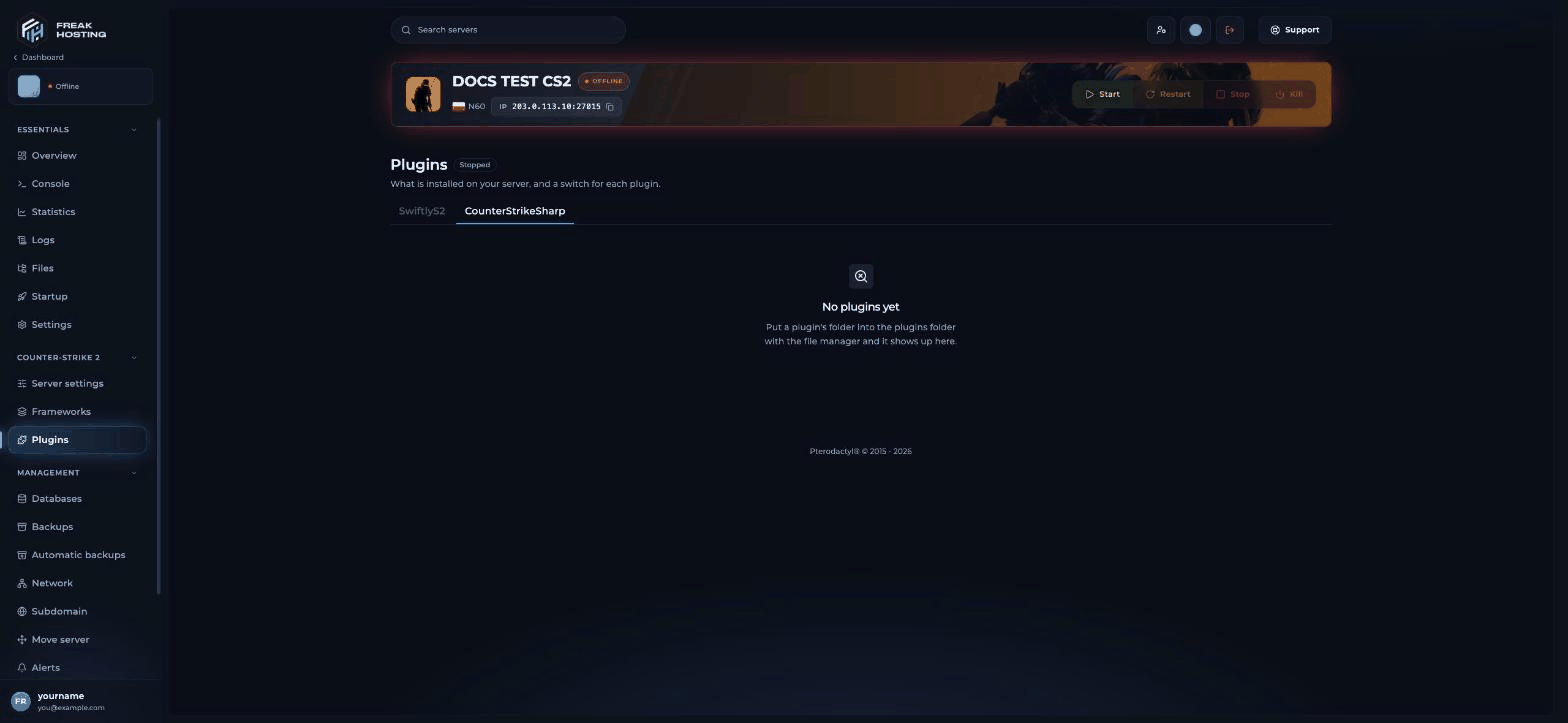
The Plugins page before any plugin is added
Metamod and SwiftlyS2 plugins
Metamod plugins don’t appear on the Plugins page.
Popular CS2 plugins
If a plugin needs MySQL, create one on the Databases page and use the host shown on its card, not
127.0.0.1. See how to manage databases.
Frequently asked questions
Why doesn’t my CS2 plugin load?
Check that its framework is installed, that the plugin’s folder sits directly inplugins/ with the .dll inside, and that you restarted. Read the Console during the start for errors.
My plugins stopped working after a CS2 update. What now?
Click Repair gameinfo.gi on Frameworks and restart. See repair gameinfo.gi.Can I install SourceMod plugins?
No. The Frameworks page offers CounterStrikeSharp, SwiftlyS2 and Metamod:Source. Use plugins made for one of those.How do I remove a plugin?
Switch it off on Plugins, or delete its folder in Files, then restart.Related guides
CS2 server guide
Every Counter-Strike 2 page in one place.
Install Metamod + CounterStrikeSharp
The framework most plugins need.
Add admins
Give players admin rights.
Repair gameinfo.gi
Fix plugins after a CS2 update.
Databases
MySQL for your plugins.
Tested by the FREAKHOSTING team on our Game Panel on 29 October 2026 (Counter-Strike 2 with CounterStrikeSharp 1.0.378 and Metamod:Source build 1483). Steps may differ slightly if the game or its plugins change.
Need Extra Help?
If you encounter any issues, our support team is ready to assist:- Live Chat: Quick assistance via our website.
- Support Ticket: Open a Ticket
- Discord: Join our Community
- Email: support@freakhosting.com
Last Updated: October 2026