serverconfig/dedicatedserver.cfg (world settings) and serverconfig/ownerswhitelist.txt (owners). New servers have no join password, so set one first. World settings such as season length, enemy aggression and cheats apply only when the server creates a new world.
Most asked
- Is there a teleport player to me command? No:
goto x y zmoves only you, and the Teleporter takes you to its pad. - How long does winter last? 5 in-game days by default, 3 on Short, 10 on Long, 90 on Realistic.
- What is the infinite log command?
loghack onin the F1 console. - Item IDs for additem: shovel
485, rope gun522, rebreather444. - How do I change enemy aggression?
GameSetting.Vail.EnemyAggressionin a custom world. - How does sleep work in multiplayer? Everyone has to sleep at the same time.
- How do I turn on tree regrowth?
"Gameplay.TreeRegrowth": trueinGameSettings. - How do I use console commands on a server? Create a custom world with
GameSetting.Multiplayer.Cheatson, then typecheatstickand press F1.
How settings work on a Sons of the Forest server
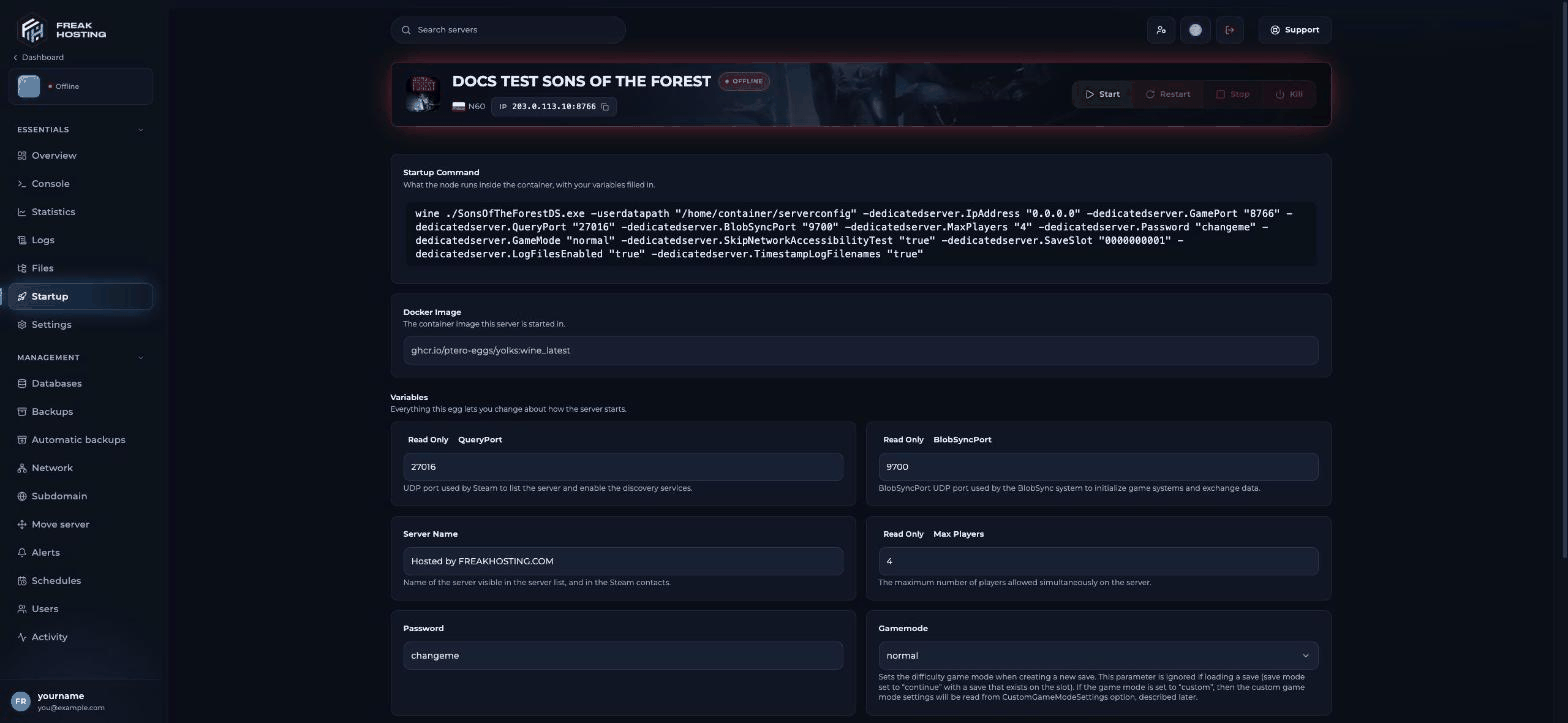
The Startup page of a Sons of the Forest server
Your first 10 minutes
- Set Password on Startup (it shows
none, meaning no password) if you don’t want strangers joining. - Set Server Name and choose Gamemode before the first start.
- Start the server and wait for the Console to finish.
- Join from Multiplayer > Join with the source set to Dedicated.
- Add your SteamID64 to
ownerswhitelist.txtand restart, so you can kick and ban. - Create a backup in Backups.
Start here
Set up your server
Password, name, game mode, first start and joining.
Game Panel guides
Change difficulty
Gamemode and the custom game mode.
dedicatedserver.cfg explained
Every setting in the server config file.
Save slots
New worlds and uploading your save.
Set up admins
ownerswhitelist.txt, kick and ban.
Commands and settings
Teleport players
goto and the Teleporter.
Console commands
cheatstick and cheats on a server.
Item IDs
Spawn items with additem.
Infinite logs
loghack, buildhack and instant building.
Season length
How long winter lasts and how to change it.
Enemy aggression
Enemy settings for custom worlds.
Sleep in multiplayer
How sleeping skips time.
Tree regrowth
Let cut trees grow back.
Guides and tips
Kelvin and Virginia
Companion orders and respawning.
Troubleshooting
Server not showing
Fix a server that isn’t in the list.
Frequently asked questions
Where is dedicatedserver.cfg on my server?
In Files, in theserverconfig folder. See dedicatedserver.cfg explained.
Do cheats work on a Sons of the Forest dedicated server?
Yes, on a world created in the custom game mode with"GameSetting.Multiplayer.Cheats": true. See console commands.
Can I change the difficulty of my current world?
No. Game mode and custom settings apply to new worlds. Only tree regrowth and building damage change on an existing world.How do I back up my world?
Use Backups in the Game Panel, or set up automatic backups.Related guides
File Manager
Open and edit dedicatedserver.cfg.
Startup variables
How the Startup page works.
Backups
Create and restore backups.
Server console
Watch your server start.
Tested by the FREAKHOSTING team on our Game Panel on 30 October 2026 (Sons of the Forest dedicated server on our Game Panel). Settings checked against the official dedicated server guide. Steps may differ slightly if the game changes.
Need Extra Help?
If you encounter any issues, our support team is ready to assist:- Live Chat: Quick assistance via our website.
- Support Ticket: Open a Ticket
- Discord: Join our Community
- Email: support@freakhosting.com
Last Updated: October 2026