resources with SFTP, start them in the order its instructions give (menu library, clothing, then menu) and restart. Players then pick police, EMS and fire uniforms in-game.
Before you start
- Make a backup.
- Install an SFTP client such as FileZilla or WinSCP. EUP is large.
- Download EUP only from its official release and read the release page first. It lists the parts you need, the menu it uses and any requirements.
What is EUP?
EUP (Emergency Uniforms Pack) is a clothing pack for GTA V with law enforcement and emergency service uniforms. Its two best-known parts are Law & Order (police and other law enforcement) and Serve & Rescue (EMS, fire and rescue). On a FiveM server, EUP usually comes as separate resources:
Folder names differ between releases. Use the names from the release you download.
How to install EUP on your FiveM server
1
Unzip the release
Unzip EUP on your computer. Each part must be a folder with
fxmanifest.lua directly inside it.2
Upload with SFTP
Connect with SFTP and upload the folders into
resources. You can group them in a category folder, for example resources/[eup].3
Add them in the right order
Go to Server config, click Advanced: open the raw file and add the The library must start before the menu. If Start at boot on Resources already added lines for these resources, move them into this order instead of adding them twice.
ensure lines in the order the release gives. A typical order is:4
Restart
Restart the server and join. The first join takes longer while FiveM downloads the uniforms.
5
Open the menu
Use the command or key from the menu’s readme to open the outfit menu.
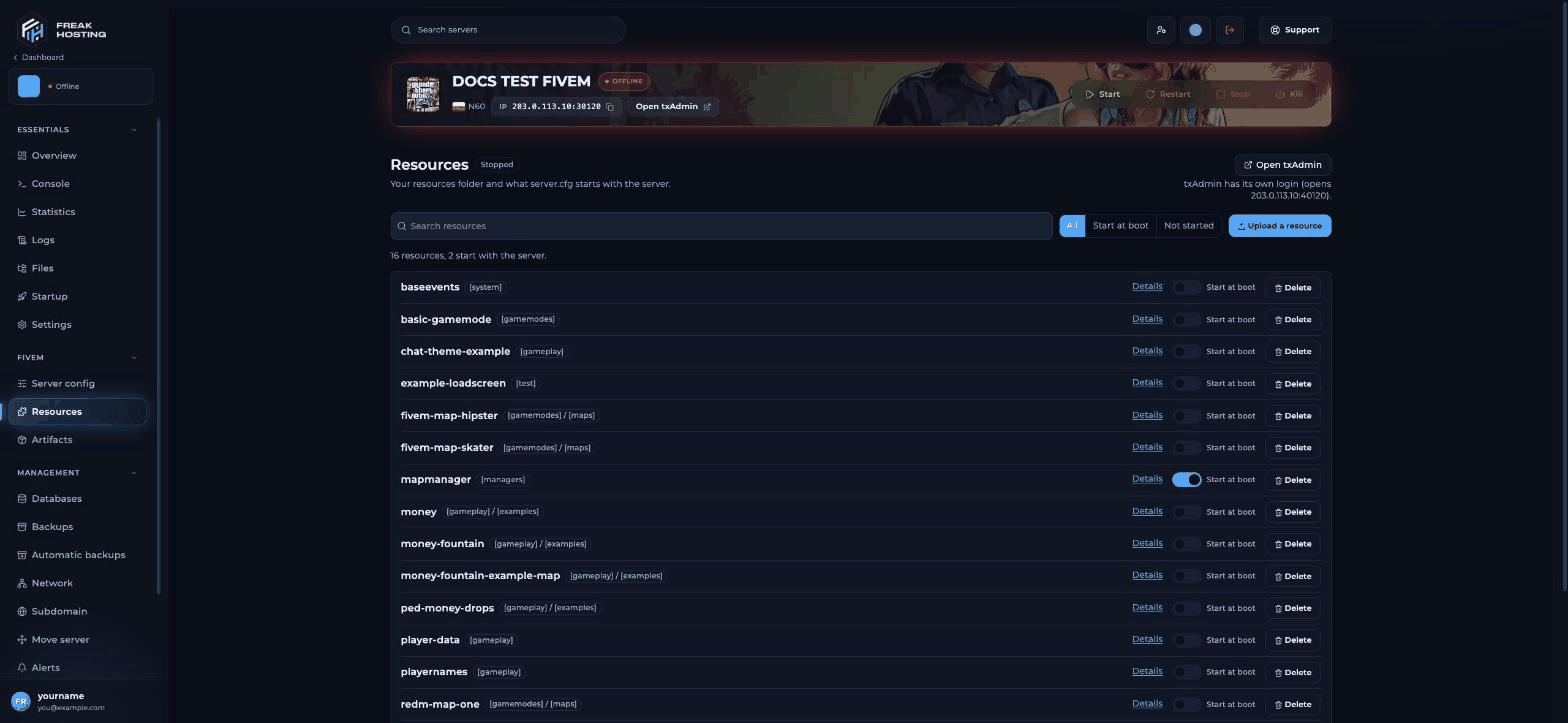
Check on the Resources page that every EUP part starts with the server
How do I use EUP with QBCore or ESX?
Frameworks often have their own clothing or outfit menu. If yours does, you may only need the clothing (stream) part of EUP and can add the outfits to your framework’s clothing script. Follow that script’s documentation and don’t run two outfit menus at once.How to update EUP
- Make a backup, so you can go back if the new version doesn’t work.
- Download the new release and read its changes. Folder names or the menu can change between versions.
- Stop the server and replace the old EUP folders with the new ones over SFTP. Keep any config files you changed, such as outfit lists, unless the release says otherwise.
- Check the
ensurelines still match the folder names, then start the server. - Ask players to clear their FiveM cache if they see old or broken clothing.
How much space does EUP need?
EUP’s clothing files take a lot of disk space and download time. Check Disk on the Console page or the Overview before and after the upload. Players download the clothing the first time they join, so a smaller pack means faster first joins. If you only need police uniforms, check whether the release offers separate parts and install only those.How do I check that EUP loaded?
After the restart, look at the Console from the top. Each EUP resource should start without a red error. On Resources, filter by Start at boot and check every EUP part is listed. In-game, open the outfit menu and try one uniform from each department you installed.Frequently asked questions
Why do players see invisible body parts or default clothes?
The clothing resource didn’t load, or loaded after the menu. Check the console for errors, the start order and your game build. Ask players to clear their FiveM cache.Can I upload EUP on the Resources page?
The Upload a resource button takes zips up to 100 MB with afxmanifest.lua inside. The clothing part of EUP is usually bigger, so use SFTP.
Where do I download EUP for FiveM?
From the official EUP release for FiveM servers. Avoid re-uploads on other sites: they are often outdated or changed.Does EUP make my server lag?
EUP mostly affects players’ PCs: they download and load the clothing files. Large clothing packs can cause texture loss on weaker PCs. Remove packs you don’t use.Can I use the single-player EUP installer?
No. Single-player installers change the game files on your own PC. A FiveM server needs the release that is packed as server resources.Related guides
FiveM server guide
Every FiveM guide in one place.
Install mods and resources
Uploads, SFTP and Start at boot.
Resource start order
Libraries before the scripts that use them.
Clear the FiveM cache
Fix missing textures and old files.
Install QBCore or ESX
Set up a roleplay framework.
Reviewed by the FREAKHOSTING team on 29 October 2026. Game Panel steps were checked on our panel (FXServer build 35245 (Recommended) with txAdmin); game and plugin details follow their official documentation. Steps may differ slightly if FiveM, txAdmin or the resource change.
Need Extra Help?
If you encounter any issues, our support team is ready to assist:- Live Chat: Quick assistance via our website.
- Support Ticket: Open a Ticket
- Discord: Join our Community
- Email: support@freakhosting.com
Last Updated: October 2026