Add SSH keys or set an SSH password in the FREAKHOSTING Web Panel, then connect to your website’s files with SSH, SFTP or FileZilla.
SSH gives you a command line on your website, which is handy for tools such as WP-CLI, Composer or Git. SFTP uses the same login to transfer files over an encrypted connection. You can sign in with an SSH key or a password.
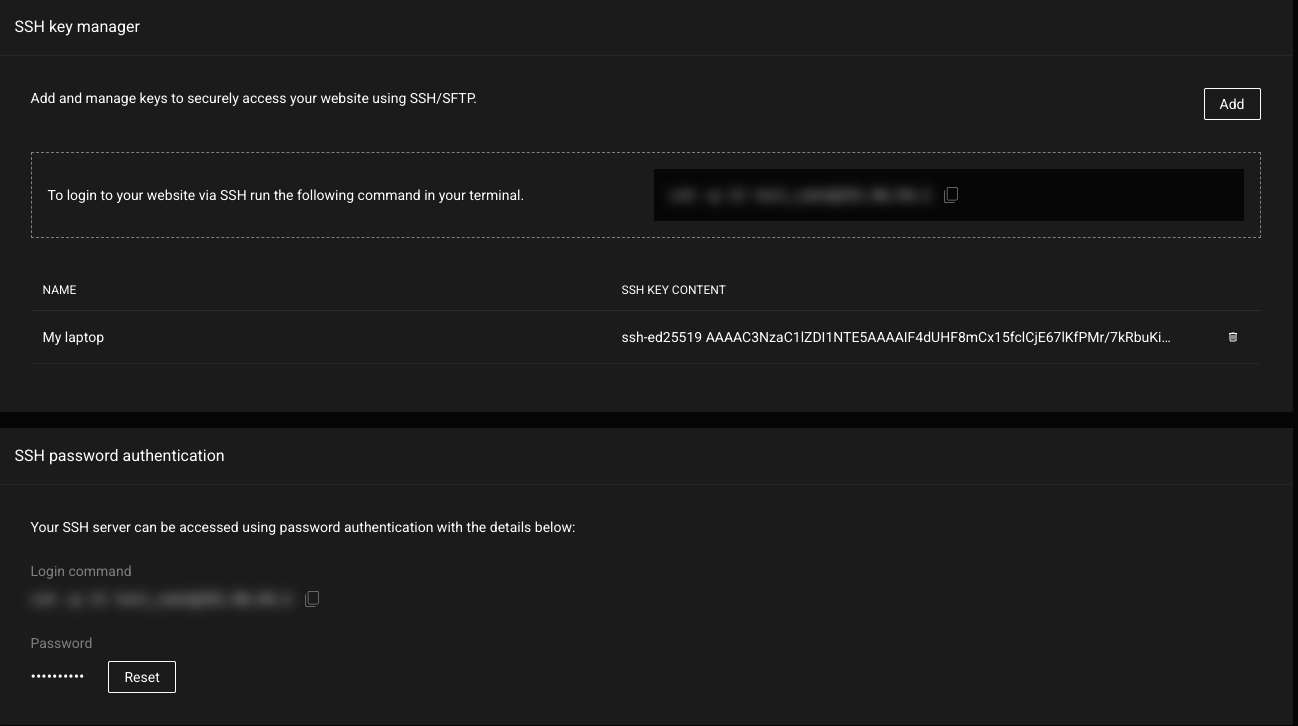
Open Advanced in the top menu and choose Developer tools. Scroll down to SSH key manager and SSH password authentication.
SSH key manager and password authentication
Both cards show your login command with a copy button. It looks like ssh -p 22 username@server-ip. Copy it from the panel rather than typing it.
An SSH key or password applies to the whole website, not to one folder. If you only want to give someone access to part of your files, create an FTP account limited to a folder instead.
Keys are safer than passwords and you won’t need to type anything to log in.
1
Create a key on your computer if you don't have one
On Windows 10/11, macOS or Linux, open a terminal and run ssh-keygen -t ed25519, then press Enter to accept the defaults. Your public key is saved in a file ending in .pub, usually ~/.ssh/id_ed25519.pub.
2
Click Add in the SSH key manager
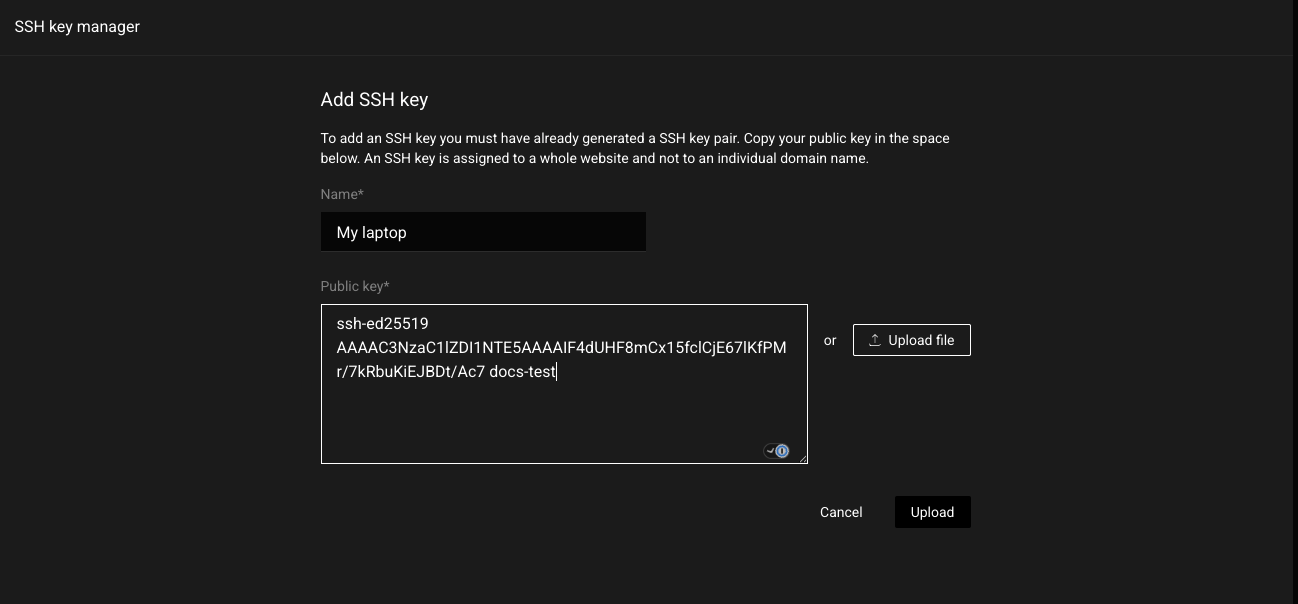
Enter a Name you’ll recognise, such as My laptop.
3
Paste the public key
Open the .pub file in a text editor, copy the single line that starts with ssh-ed25519 or ssh-rsa, and paste it into Public key. You can also click Upload file and choose the .pub file.
Add an SSH key
4
Click Upload
You’ll see ‘My laptop’ SSH key added and the key appears in the list.
Only ever paste the public key (the .pub file). Never share your private key with anyone, including us.
The key or password wasn’t accepted. Check you pasted the public key and are connecting from the computer that has the matching private key, or set a new password with Reset. Make sure the username in your command matches the one shown in the panel.
My SSH session was disconnected
Restarting the website container closes all SSH sessions. See Restart container. Reconnect once it’s back.
Connection timed out
Check you’re using port 22 and the exact server address from the login command. Some workplace networks block outgoing SSH; try another network.
WARNING: REMOTE HOST IDENTIFICATION HAS CHANGED
This can appear if your website was moved to another server. If you’re expecting it, remove the old entry with ssh-keygen -R followed by the server address, then connect again. If you weren’t expecting a change, open a ticket before continuing.
Ready to upgrade your hosting? Use code KB20 at checkout for 20% off your first order!
Last Updated: October 2026
Was this page helpful?
{"docsConfig":{"theme":"mint","$schema":"https://mintlify.com/docs.json","name":"FREAKHOSTING","colors":{"primary":"#1a6fd1","light":"#4da3ff","dark":"#1a6fd1"},"favicon":"https://cdn.freakhosting.com/website/favicon.ico","appearance":{"default":"dark","strict":false},"background":{"color":{"light":"#ffffff","dark":"#0a0e17"}},"seo":{"metatags":{"og:image":"https://cdn.freakhosting.com/core/assets/heldesk-main.png","og:site_name":"FREAKHOSTING HELPDESK","og:locale":"en_US","twitter:site":"@freakhosting","twitter:card":"summary_large_image","keywords":"game server hosting, FiveM hosting, Minecraft server hosting, CS2 server, Rust server hosting, Palworld server, dedicated game servers, VPS hosting, DDoS protection, game panel, server management, FREAKHOSTING","author":"FREAKHOSTING LTD","robots":"index, follow, max-image-preview:large, max-snippet:-1, max-video-preview:-1","googlebot":"index, follow","bingbot":"index, follow","revisit-after":"3 days","language":"en","distribution":"global","coverage":"Worldwide","category":"Technology","rating":"general","copyright":"Copyright 2018-2026 FREAKHOSTING LTD","reply-to":"support@freakhosting.com","theme-color":"#0a0e17","color-scheme":"light dark"},"indexing":"all"},"integrations":{"ga4":{"measurementId":"G-TSY6L544EM"}},"contextual":{"options":["copy","view","chatgpt","claude","perplexity",{"title":"Order a Server","description":"Browse our game server hosting plans","icon":"server","href":"https://freakhosting.com"},{"title":"Submit a Ticket","description":"Contact our 24/7 support team","icon":"ticket","href":"https://freakhosting.com/clientarea/submitticket.php"},{"title":"Join Discord","description":"Get community support and updates","icon":"discord","href":"https://discord.gg/freakhosting"}],"display":"header"},"interaction":{"drilldown":false},"styling":{"latex":false},"navigation":{"pages":[]}},"deployment":{"deploymentMetadataValue":{"subdomain":"freakhostingltd","hasAudioNarration":false,"actualSubdomain":"freakhostingltd","customDomains":["help.freakhosting.com"],"gitSource":{"type":"github","owner":"freakhosting","repo":"help.freakhosting.com","deployBranch":"main","contentDirectory":"","isPrivate":true,"mountPath":"","label":""},"chroma":{"liveDeploymentHistoryId":"6adce3756fc254ddb8b5ce54","collectionId":"ce4e5cbd-4c84-4efc-9bbd-4b2a9c066ef5","schemaVersion":"v3","latestBuiltDeploymentHistoryId":"6adce3756fc254ddb8b5ce54"},"feedback":{"thumbs":true},"entitlements":{},"buildId":"6adce4a7939c74940da67471","clientVersion":"0.0.3964","searchFilterCounts":[{"language":"default","tag":"Games","count":444},{"language":"default","tag":"Popular Games","count":124},{"language":"default","tag":"Survival Games","count":120},{"language":"default","tag":"Shooters","count":59},{"language":"default","tag":"Racing \u0026 Simulation","count":47},{"language":"default","tag":"Sandbox \u0026 Building","count":45},{"language":"default","tag":"Billing Area","count":38},{"language":"default","tag":"GTA \u0026 RDR Multiplayer","count":32},{"language":"default","tag":"Firewall Panel","count":30},{"language":"default","tag":"Counter Strike 2","count":28}]},"assistantConfig":{"enableAskAiButton":false,"enableStarterQuestions":false,"enableAskAiSearchBar":true},"hasChatPermissions":false,"hasWebMcpPermissions":false,"toggles":[{"name":"kill-isr","enabled":true,"variant":{"name":"disabled","enabled":false,"feature_enabled":true},"impressionData":false},{"name":"agent-mintlify-slack","enabled":true,"variant":{"name":"disabled","enabled":false,"feature_enabled":true},"impressionData":false},{"name":"editor-v7-file-tree","enabled":true,"variant":{"name":"disabled","enabled":false,"feature_enabled":true},"impressionData":false},{"name":"agent-integrations-settings","enabled":true,"variant":{"name":"disabled","enabled":false,"feature_enabled":true},"impressionData":false},{"name":"automations-pr-grouping","enabled":true,"variant":{"name":"disabled","enabled":false,"feature_enabled":true},"impressionData":false},{"name":"custom-prefix","enabled":true,"variant":{"name":"disabled","enabled":false,"feature_enabled":true},"impressionData":false},{"name":"analytics-v7","enabled":true,"variant":{"name":"disabled","enabled":false,"feature_enabled":true},"impressionData":false},{"name":"user-flows-analytics","enabled":true,"variant":{"name":"disabled","enabled":false,"feature_enabled":true},"impressionData":false},{"name":"no-publish-flow","enabled":true,"variant":{"name":"disabled","enabled":false,"feature_enabled":true},"impressionData":false},{"name":"workos-onboarding","enabled":true,"variant":{"name":"disabled","enabled":false,"feature_enabled":true},"impressionData":false},{"name":"llms-txt-v2","enabled":true,"variant":{"name":"disabled","enabled":false,"feature_enabled":true},"impressionData":false},{"name":"pause-universal-search-reconcile","enabled":true,"variant":{"name":"disabled","enabled":false,"feature_enabled":true},"impressionData":false},{"name":"snapshot-serving-live","enabled":true,"variant":{"name":"disabled","enabled":false,"feature_enabled":true},"impressionData":false},{"name":"stripTemperatureMiddleware","enabled":true,"variant":{"name":"disabled","enabled":false,"feature_enabled":true},"impressionData":false},{"name":"per-site-search-delta","enabled":true,"variant":{"name":"disabled","enabled":false,"feature_enabled":true},"impressionData":false},{"name":"support-platform-pylon-zendesk","enabled":true,"variant":{"name":"disabled","enabled":false,"feature_enabled":true},"impressionData":false},{"name":"snapshot-serving","enabled":true,"variant":{"name":"disabled","enabled":false,"feature_enabled":true},"impressionData":false},{"name":"instant-rollback","enabled":true,"variant":{"name":"disabled","enabled":false,"feature_enabled":true},"impressionData":false},{"name":"granular-notifications-server","enabled":true,"variant":{"name":"disabled","enabled":false,"feature_enabled":true},"impressionData":false},{"name":"granular-notifications","enabled":true,"variant":{"name":"disabled","enabled":false,"feature_enabled":true},"impressionData":false},{"name":"editor-private-page-search","enabled":true,"variant":{"name":"disabled","enabled":false,"feature_enabled":true},"impressionData":false},{"name":"automations-fable","enabled":true,"variant":{"name":"disabled","enabled":false,"feature_enabled":true},"impressionData":false},{"name":"fixed-ai-action-pricing","enabled":true,"variant":{"name":"disabled","enabled":false,"feature_enabled":true},"impressionData":false},{"name":"automation-resolve-merge-conflict","enabled":true,"variant":{"name":"disabled","enabled":false,"feature_enabled":true},"impressionData":false},{"name":"scoped-publishing","enabled":true,"variant":{"name":"disabled","enabled":false,"feature_enabled":true},"impressionData":false},{"name":"mintql","enabled":true,"variant":{"name":"disabled","enabled":false,"feature_enabled":true},"impressionData":false},{"name":"page-level-analytics","enabled":true,"variant":{"name":"disabled","enabled":false,"feature_enabled":true},"impressionData":false},{"name":"editor-version-history-v2","enabled":true,"variant":{"name":"disabled","enabled":false,"feature_enabled":true},"impressionData":false},{"name":"editor-nav-generations","enabled":true,"variant":{"name":"disabled","enabled":false,"feature_enabled":true},"impressionData":false},{"name":"billing-page-v2","enabled":true,"variant":{"name":"disabled","enabled":false,"feature_enabled":true},"impressionData":false},{"name":"workspace-projects","enabled":true,"variant":{"name":"disabled","enabled":false,"feature_enabled":true},"impressionData":false},{"name":"assistant-v5","enabled":true,"variant":{"name":"disabled","enabled":false,"feature_enabled":true},"impressionData":false},{"name":"byok-sep-25","enabled":true,"variant":{"name":"disabled","enabled":false,"feature_enabled":true},"impressionData":false},{"name":"fork-pr-previews","enabled":true,"variant":{"name":"disabled","enabled":false,"feature_enabled":true},"impressionData":false},{"name":"revalidation-jwt","enabled":true,"variant":{"name":"disabled","enabled":false,"feature_enabled":true},"impressionData":false},{"name":"vite-origin","enabled":true,"variant":{"name":"disabled","enabled":false,"feature_enabled":true},"impressionData":false},{"name":"editor-agent-model-picker","enabled":true,"variant":{"name":"disabled","enabled":false,"feature_enabled":true},"impressionData":false},{"name":"billing-updated-9-15","enabled":true,"variant":{"name":"disabled","enabled":false,"feature_enabled":true},"impressionData":false},{"name":"hobby-abuse-scan","enabled":true,"variant":{"name":"disabled","enabled":false,"feature_enabled":true},"impressionData":false},{"name":"dashboard-inbox","enabled":true,"variant":{"name":"disabled","enabled":false,"feature_enabled":true},"impressionData":false}],"isAtlas":false,"googleFontsInlined":false},"customCss":[],"page":{"pagePath":"portals/web-panel/how-to-connect-with-ssh-and-sftp","slug":"/portals/web-panel/how-to-connect-with-ssh-and-sftp","pageMetadata":{"title":"How to Connect to Your Website with SSH and SFTP","sidebarTitle":"SSH \u0026 SFTP Access","description":"Add SSH keys or set an SSH password in the FREAKHOSTING Web Panel, then connect to your website's files with SSH, SFTP or FileZilla.","keywords":["FREAKHOSTING","web panel","SSH","SFTP","SSH key","terminal","FileZilla","WP-CLI","developer tools"],"href":"/portals/web-panel/how-to-connect-with-ssh-and-sftp"},"description":{"compiledSource":"\"use strict\";\nconst {jsx: _jsx} = arguments[0];\nconst {useMDXComponents: _provideComponents} = arguments[0];\nfunction _createMdxContent(props) {\n const _components = {\n p: \"p\",\n ..._provideComponents(),\n ...props.components\n };\n return _jsx(_components.p, {\n children: \"Add SSH keys or set an SSH password in the FREAKHOSTING Web Panel, then connect to your website’s files with SSH, SFTP or FileZilla.\"\n });\n}\nfunction MDXContent(props = {}) {\n const {wrapper: MDXLayout} = {\n ..._provideComponents(),\n ...props.components\n };\n return MDXLayout ? _jsx(MDXLayout, {\n ...props,\n children: _jsx(_createMdxContent, {\n ...props\n })\n }) : _createMdxContent(props);\n}\nreturn {\n default: MDXContent\n};\n","frontmatter":{},"scope":{}},"pageType":"default","mdx":{"mdxSource":{"compiledSource":"\"use strict\";const{Fragment:_Fragment,jsx:_jsx,jsxs:_jsxs}=arguments[0];const{useMDXComponents:_provideComponents}=arguments[0];function _createMdxContent(props){const _components={a:`a`,code:`code`,em:`em`,hr:`hr`,li:`li`,p:`p`,strong:`strong`,tbody:`tbody`,td:`td`,th:`th`,thead:`thead`,tr:`tr`,ul:`ul`,..._provideComponents(),...props.components},{Accordion,AccordionGroup,Card,CardGroup,Frame,Heading,Info,Note,OptimizedImage,Step,Steps,Table,Tip,Warning}=_components;if(!Accordion)_missingMdxReference(`Accordion`,true);if(!AccordionGroup)_missingMdxReference(`AccordionGroup`,true);if(!Card)_missingMdxReference(`Card`,true);if(!CardGroup)_missingMdxReference(`CardGroup`,true);if(!Frame)_missingMdxReference(`Frame`,true);if(!Heading)_missingMdxReference(`Heading`,true);if(!Info)_missingMdxReference(`Info`,true);if(!Note)_missingMdxReference(`Note`,true);if(!OptimizedImage)_missingMdxReference(`OptimizedImage`,true);if(!Step)_missingMdxReference(`Step`,true);if(!Steps)_missingMdxReference(`Steps`,true);if(!Table)_missingMdxReference(`Table`,true);if(!Tip)_missingMdxReference(`Tip`,true);if(!Warning)_missingMdxReference(`Warning`,true);return _jsxs(_Fragment,{children:[_jsxs(_components.p,{children:[_jsx(_components.strong,{children:`SSH`}),` gives you a command line on your website, which is handy for tools such as WP-CLI, Composer or Git. `,_jsx(_components.strong,{children:`SFTP`}),` uses the same login to transfer files over an encrypted connection. You can sign in with an `,_jsx(_components.strong,{children:`SSH key`}),` or a `,_jsx(_components.strong,{children:`password`}),`.`]}),`\n`,_jsxs(CardGroup,{cols:2,children:[_jsx(Card,{title:`Difficulty`,icon:`gauge`,children:_jsx(_components.p,{children:`Intermediate`})}),_jsx(Card,{title:`Time`,icon:`clock`,children:_jsx(_components.p,{children:`10 minutes`})})]}),`\n`,_jsx(_components.hr,{}),`\n`,_jsx(Heading,{level:`2`,id:`open-the-ssh-settings`,children:`Open the SSH settings`}),`\n`,_jsxs(Steps,{children:[_jsx(Step,{title:`Open your website`,children:_jsxs(_components.p,{children:[`Go to `,_jsx(_components.a,{href:`https://web.freakhosting.com/websites`,children:_jsx(_components.strong,{children:`Websites`})}),` and click your website.`]})}),_jsx(Step,{title:`Open Developer tools`,children:_jsxs(_components.p,{children:[`Open `,_jsx(_components.strong,{children:`Advanced`}),` in the top menu and choose `,_jsx(_components.strong,{children:`Developer tools`}),`. Scroll down to `,_jsx(_components.strong,{children:`SSH key manager`}),` and `,_jsx(_components.strong,{children:`SSH password authentication`}),`.`]})})]}),`\n`,_jsx(Frame,{caption:`SSH key manager and password authentication`,children:_jsx(OptimizedImage,{src:`https://mintcdn.com/freakhostingltd/p0TGPFhMJ61UBHgI/images/web-panel/ssh-keys-password.png?fit=max\u0026auto=format\u0026n=p0TGPFhMJ61UBHgI\u0026q=85\u0026s=ca2bf55b813415026fa76c5776bb8fe6`,alt:`SSH key manager with an Add button, the SSH login command (hidden) with a copy icon, a key named My laptop, and below it SSH password authentication with the login command and a password Reset button`,\"data-og-width\":`1298`,width:`1298`,\"data-og-height\":`726`,height:`726`,\"data-path\":`images/web-panel/ssh-keys-password.png`,\"data-optimize\":`true`,\"data-opv\":`3`,srcset:`https://mintcdn.com/freakhostingltd/p0TGPFhMJ61UBHgI/images/web-panel/ssh-keys-password.png?w=280\u0026fit=max\u0026auto=format\u0026n=p0TGPFhMJ61UBHgI\u0026q=85\u0026s=915cd42bd4f77d0d1964eab379de39c6 280w, https://mintcdn.com/freakhostingltd/p0TGPFhMJ61UBHgI/images/web-panel/ssh-keys-password.png?w=560\u0026fit=max\u0026auto=format\u0026n=p0TGPFhMJ61UBHgI\u0026q=85\u0026s=ee6105c70b0bc88d022fbd065d470b82 560w, https://mintcdn.com/freakhostingltd/p0TGPFhMJ61UBHgI/images/web-panel/ssh-keys-password.png?w=840\u0026fit=max\u0026auto=format\u0026n=p0TGPFhMJ61UBHgI\u0026q=85\u0026s=d3f133c1330dceef94943026181ad0b5 840w, https://mintcdn.com/freakhostingltd/p0TGPFhMJ61UBHgI/images/web-panel/ssh-keys-password.png?w=1100\u0026fit=max\u0026auto=format\u0026n=p0TGPFhMJ61UBHgI\u0026q=85\u0026s=e6e90eb023b74046a632898c9735ea69 1100w, https://mintcdn.com/freakhostingltd/p0TGPFhMJ61UBHgI/images/web-panel/ssh-keys-password.png?w=1650\u0026fit=max\u0026auto=format\u0026n=p0TGPFhMJ61UBHgI\u0026q=85\u0026s=62188d8460e1764b97ae5f5e0f55a4c1 1650w, https://mintcdn.com/freakhostingltd/p0TGPFhMJ61UBHgI/images/web-panel/ssh-keys-password.png?w=2500\u0026fit=max\u0026auto=format\u0026n=p0TGPFhMJ61UBHgI\u0026q=85\u0026s=98672963ed9044b46d7aed072771944b 2500w`})}),`\n`,_jsxs(_components.p,{children:[`Both cards show your `,_jsx(_components.strong,{children:`login command`}),` with a copy button. It looks like `,_jsx(_components.code,{children:`ssh -p 22 username@server-ip`}),`. Copy it from the panel rather than typing it.`]}),`\n`,_jsx(Info,{children:_jsxs(_components.p,{children:[`An SSH key or password applies to the whole website, not to one folder. If you only want to give someone access to part of your files, create an `,_jsx(_components.a,{href:`/portals/web-panel/how-to-create-and-manage-ftp-accounts`,children:`FTP account`}),` limited to a folder instead.`]})}),`\n`,_jsx(_components.hr,{}),`\n`,_jsx(Heading,{level:`2`,id:`option-1-sign-in-with-an-ssh-key-recommended`,children:`Option 1: Sign in with an SSH key (recommended)`}),`\n`,_jsx(_components.p,{children:`Keys are safer than passwords and you won’t need to type anything to log in.`}),`\n`,_jsxs(Steps,{children:[_jsx(Step,{title:`Create a key on your computer if you don't have one`,children:_jsxs(_components.p,{children:[`On Windows 10/11, macOS or Linux, open a terminal and run `,_jsx(_components.code,{children:`ssh-keygen -t ed25519`}),`, then press Enter to accept the defaults. Your public key is saved in a file ending in `,_jsx(_components.code,{children:`.pub`}),`, usually `,_jsx(_components.code,{children:`~/.ssh/id_ed25519.pub`}),`.`]})}),_jsx(Step,{title:`Click Add in the SSH key manager`,children:_jsxs(_components.p,{children:[`Enter a `,_jsx(_components.strong,{children:`Name`}),` you’ll recognise, such as `,_jsx(_components.code,{children:`My laptop`}),`.`]})}),_jsxs(Step,{title:`Paste the public key`,children:[_jsxs(_components.p,{children:[`Open the `,_jsx(_components.code,{children:`.pub`}),` file in a text editor, copy the single line that starts with `,_jsx(_components.code,{children:`ssh-ed25519`}),` or `,_jsx(_components.code,{children:`ssh-rsa`}),`, and paste it into `,_jsx(_components.strong,{children:`Public key`}),`. You can also click `,_jsx(_components.strong,{children:`Upload file`}),` and choose the `,_jsx(_components.code,{children:`.pub`}),` file.`]}),_jsx(Frame,{caption:`Add an SSH key`,children:_jsx(OptimizedImage,{src:`https://mintcdn.com/freakhostingltd/p0TGPFhMJ61UBHgI/images/web-panel/ssh-add-key.png?fit=max\u0026auto=format\u0026n=p0TGPFhMJ61UBHgI\u0026q=85\u0026s=b191cfe12defd7725a21c367f24e3113`,alt:`Add SSH key form with a Name field, a Public key box, an Upload file button and Cancel and Upload buttons`,\"data-og-width\":`1298`,width:`1298`,\"data-og-height\":`604`,height:`604`,\"data-path\":`images/web-panel/ssh-add-key.png`,\"data-optimize\":`true`,\"data-opv\":`3`,srcset:`https://mintcdn.com/freakhostingltd/p0TGPFhMJ61UBHgI/images/web-panel/ssh-add-key.png?w=280\u0026fit=max\u0026auto=format\u0026n=p0TGPFhMJ61UBHgI\u0026q=85\u0026s=01559274d8c5d5c7531607c650ef2c18 280w, https://mintcdn.com/freakhostingltd/p0TGPFhMJ61UBHgI/images/web-panel/ssh-add-key.png?w=560\u0026fit=max\u0026auto=format\u0026n=p0TGPFhMJ61UBHgI\u0026q=85\u0026s=ae3b7de311a27b9929ea56e0ecb9c1cb 560w, https://mintcdn.com/freakhostingltd/p0TGPFhMJ61UBHgI/images/web-panel/ssh-add-key.png?w=840\u0026fit=max\u0026auto=format\u0026n=p0TGPFhMJ61UBHgI\u0026q=85\u0026s=abcb2960ef612f11a5bbc668adf85ddf 840w, https://mintcdn.com/freakhostingltd/p0TGPFhMJ61UBHgI/images/web-panel/ssh-add-key.png?w=1100\u0026fit=max\u0026auto=format\u0026n=p0TGPFhMJ61UBHgI\u0026q=85\u0026s=632d6836a763d7b49e342d67c074dbfb 1100w, https://mintcdn.com/freakhostingltd/p0TGPFhMJ61UBHgI/images/web-panel/ssh-add-key.png?w=1650\u0026fit=max\u0026auto=format\u0026n=p0TGPFhMJ61UBHgI\u0026q=85\u0026s=69084dcab82153e9684a696daf7d6976 1650w, https://mintcdn.com/freakhostingltd/p0TGPFhMJ61UBHgI/images/web-panel/ssh-add-key.png?w=2500\u0026fit=max\u0026auto=format\u0026n=p0TGPFhMJ61UBHgI\u0026q=85\u0026s=5d3452bac8e95abd1a742a630cd2f962 2500w`})})]}),_jsx(Step,{title:`Click Upload`,children:_jsxs(_components.p,{children:[`You’ll see `,_jsx(_components.em,{children:`‘My laptop’ SSH key added`}),` and the key appears in the list.`]})})]}),`\n`,_jsx(Warning,{children:_jsxs(_components.p,{children:[`Only ever paste the `,_jsx(_components.strong,{children:`public`}),` key (the `,_jsx(_components.code,{children:`.pub`}),` file). Never share your private key with anyone, including us.`]})}),`\n`,_jsx(_components.p,{children:`To remove a key, click the bin icon next to it.`}),`\n`,_jsx(_components.hr,{}),`\n`,_jsx(Heading,{level:`2`,id:`option-2-sign-in-with-a-password`,children:`Option 2: Sign in with a password`}),`\n`,_jsxs(Steps,{children:[_jsx(Step,{title:`Click Reset`,children:_jsxs(_components.p,{children:[`In `,_jsx(_components.strong,{children:`SSH password authentication`}),`, click `,_jsx(_components.strong,{children:`Reset`}),` next to `,_jsx(_components.strong,{children:`Password`}),`.`]})}),_jsxs(Step,{title:`Choose a password`,children:[_jsx(_components.p,{children:`It needs a lowercase letter, an uppercase letter, a number, a special character and at least 10 characters. Click the key icon to generate one.`}),_jsx(Frame,{caption:`Set an SSH password`,children:_jsx(OptimizedImage,{src:`https://mintcdn.com/freakhostingltd/p0TGPFhMJ61UBHgI/images/web-panel/ssh-password-reset.png?fit=max\u0026auto=format\u0026n=p0TGPFhMJ61UBHgI\u0026q=85\u0026s=c9a7c153f0378991a08376df1dd5a1a9`,alt:`SSH password authentication card with a new password field, the password rules with green ticks, a key generator icon and Cancel and Save buttons`,\"data-og-width\":`1298`,width:`1298`,\"data-og-height\":`522`,height:`522`,\"data-path\":`images/web-panel/ssh-password-reset.png`,\"data-optimize\":`true`,\"data-opv\":`3`,srcset:`https://mintcdn.com/freakhostingltd/p0TGPFhMJ61UBHgI/images/web-panel/ssh-password-reset.png?w=280\u0026fit=max\u0026auto=format\u0026n=p0TGPFhMJ61UBHgI\u0026q=85\u0026s=e66ebe49441117128d1af11f49ffa3c7 280w, https://mintcdn.com/freakhostingltd/p0TGPFhMJ61UBHgI/images/web-panel/ssh-password-reset.png?w=560\u0026fit=max\u0026auto=format\u0026n=p0TGPFhMJ61UBHgI\u0026q=85\u0026s=7a93432977316679e300714c60390b75 560w, https://mintcdn.com/freakhostingltd/p0TGPFhMJ61UBHgI/images/web-panel/ssh-password-reset.png?w=840\u0026fit=max\u0026auto=format\u0026n=p0TGPFhMJ61UBHgI\u0026q=85\u0026s=6650e07c5dd11505fbaa9f4ec8cca79d 840w, https://mintcdn.com/freakhostingltd/p0TGPFhMJ61UBHgI/images/web-panel/ssh-password-reset.png?w=1100\u0026fit=max\u0026auto=format\u0026n=p0TGPFhMJ61UBHgI\u0026q=85\u0026s=1d3869e85d8a100927c913ae39ffe014 1100w, https://mintcdn.com/freakhostingltd/p0TGPFhMJ61UBHgI/images/web-panel/ssh-password-reset.png?w=1650\u0026fit=max\u0026auto=format\u0026n=p0TGPFhMJ61UBHgI\u0026q=85\u0026s=978bfbb89887c5b225613c5016b62717 1650w, https://mintcdn.com/freakhostingltd/p0TGPFhMJ61UBHgI/images/web-panel/ssh-password-reset.png?w=2500\u0026fit=max\u0026auto=format\u0026n=p0TGPFhMJ61UBHgI\u0026q=85\u0026s=458bc9a6a142cf848847bd377e47d84e 2500w`})})]}),_jsx(Step,{title:`Click Save`,children:_jsxs(_components.p,{children:[`You’ll see `,_jsx(_components.em,{children:`SSH password saved`}),`.`]})})]}),`\n`,_jsx(_components.hr,{}),`\n`,_jsx(Heading,{level:`2`,id:`connect-with-ssh`,children:`Connect with SSH`}),`\n`,_jsxs(Steps,{children:[_jsx(Step,{title:`Copy the login command`,children:_jsx(_components.p,{children:`Click the copy icon next to the login command in the panel.`})}),_jsx(Step,{title:`Paste it into a terminal`,children:_jsx(_components.p,{children:`Use Terminal on macOS/Linux or PowerShell/Windows Terminal on Windows, and press Enter.`})}),_jsx(Step,{title:`Accept the server's fingerprint`,children:_jsxs(_components.p,{children:[`The first time, type `,_jsx(_components.code,{children:`yes`}),` when asked if you want to continue connecting.`]})}),_jsx(Step,{title:`Log in`,children:_jsx(_components.p,{children:`If you added a key, you’re in straight away. Otherwise enter your SSH password (nothing appears as you type; that’s normal).`})})]}),`\n`,_jsxs(_components.p,{children:[`You start in your home folder. Your website’s public files are in `,_jsx(_components.code,{children:`public_html`}),`.`]}),`\n`,_jsx(_components.hr,{}),`\n`,_jsx(Heading,{level:`2`,id:`connect-with-sftp-filezilla`,children:`Connect with SFTP (FileZilla)`}),`\n`,_jsxs(Table,{children:[_jsx(_components.thead,{children:_jsxs(_components.tr,{children:[_jsx(_components.th,{children:`Setting`}),_jsx(_components.th,{children:`Value`})]})}),_jsxs(_components.tbody,{children:[_jsxs(_components.tr,{children:[_jsx(_components.td,{children:_jsx(_components.strong,{children:`Protocol`})}),_jsx(_components.td,{children:`SFTP – SSH File Transfer Protocol`})]}),_jsxs(_components.tr,{children:[_jsx(_components.td,{children:_jsx(_components.strong,{children:`Host`})}),_jsxs(_components.td,{children:[`The server address from your login command (the part after `,_jsx(_components.code,{children:`@`}),`)`]})]}),_jsxs(_components.tr,{children:[_jsx(_components.td,{children:_jsx(_components.strong,{children:`Port`})}),_jsx(_components.td,{\"data-numeric\":`true`,children:_jsx(_components.code,{children:`22`})})]}),_jsxs(_components.tr,{children:[_jsx(_components.td,{children:_jsx(_components.strong,{children:`User`})}),_jsxs(_components.td,{children:[`The username from your login command (the part before `,_jsx(_components.code,{children:`@`}),`)`]})]}),_jsxs(_components.tr,{children:[_jsx(_components.td,{children:_jsx(_components.strong,{children:`Logon Type`})}),_jsxs(_components.td,{children:[_jsx(_components.strong,{children:`Normal`}),` with your SSH password, or `,_jsx(_components.strong,{children:`Key file`}),` with your private key`]})]})]})]}),`\n`,_jsx(_components.hr,{}),`\n`,_jsx(Heading,{level:`2`,id:`troubleshooting`,children:`Troubleshooting`}),`\n`,_jsxs(AccordionGroup,{children:[_jsx(Accordion,{title:`Permission denied (publickey,password)`,id:`permission-denied-publickey-password`,children:_jsxs(_components.p,{children:[`The key or password wasn’t accepted. Check you pasted the `,_jsx(_components.strong,{children:`public`}),` key and are connecting from the computer that has the matching private key, or set a new password with `,_jsx(_components.strong,{children:`Reset`}),`. Make sure the username in your command matches the one shown in the panel.`]})}),_jsx(Accordion,{title:`My SSH session was disconnected`,id:`my-ssh-session-was-disconnected`,children:_jsxs(_components.p,{children:[`Restarting the website container closes all SSH sessions. See `,_jsx(_components.a,{href:`/portals/web-panel/how-to-add-and-manage-websites`,children:`Restart container`}),`. Reconnect once it’s back.`]})}),_jsx(Accordion,{title:`Connection timed out`,id:`connection-timed-out`,children:_jsxs(_components.p,{children:[`Check you’re using port `,_jsx(_components.code,{children:`22`}),` and the exact server address from the login command. Some workplace networks block outgoing SSH; try another network.`]})}),_jsx(Accordion,{title:`WARNING: REMOTE HOST IDENTIFICATION HAS CHANGED`,id:`warning-remote-host-identification-has-changed`,children:_jsxs(_components.p,{children:[`This can appear if your website was moved to another server. If you’re expecting it, remove the old entry with `,_jsx(_components.code,{children:`ssh-keygen -R`}),` followed by the server address, then connect again. If you weren’t expecting a change, `,_jsx(_components.a,{href:`https://freakhosting.com/clientarea/submitticket.php`,children:`open a ticket`}),` before continuing.`]})})]}),`\n`,_jsx(_components.hr,{}),`\n`,_jsxs(Note,{children:[_jsx(Heading,{level:`3`,id:`need-extra-help`,children:`Need Extra Help?`}),_jsx(_components.p,{children:`If you encounter any issues, our support team is ready to assist:`}),_jsxs(_components.ul,{children:[`\n`,_jsxs(_components.li,{children:[_jsx(_components.strong,{children:`Live Chat:`}),` Quick assistance via our website.`]}),`\n`,_jsxs(_components.li,{children:[_jsx(_components.strong,{children:`Support Ticket:`}),` `,_jsx(_components.a,{href:`https://freakhosting.com/clientarea/submitticket.php`,children:`Open a Ticket`})]}),`\n`,_jsxs(_components.li,{children:[_jsx(_components.strong,{children:`Discord:`}),` `,_jsx(_components.a,{href:`https://discord.gg/freakhosting`,children:`Join our Community`})]}),`\n`,_jsxs(_components.li,{children:[_jsx(_components.strong,{children:`Email:`}),` `,_jsx(_components.a,{href:`mailto:support@freakhosting.com`,children:`support@freakhosting.com`})]}),`\n`]})]}),`\n`,_jsxs(Tip,{children:[_jsx(Heading,{level:`3`,id:`save-on-your-hosting`,children:`Save on Your Hosting`}),_jsxs(_components.p,{children:[`Ready to upgrade your hosting? Use code `,_jsx(_components.strong,{children:`KB20`}),` at checkout for `,_jsx(_components.strong,{children:`20% off`}),` your first order!`]})]}),`\n`,_jsx(_components.hr,{}),`\n`,_jsx(`div`,{align:`center`,children:_jsxs(_components.p,{children:[_jsx(_components.strong,{children:`Last Updated:`}),` October 2026`]})})]})}function MDXContent(props={}){const{wrapper:MDXLayout}={..._provideComponents(),...props.components};return MDXLayout?_jsx(MDXLayout,{...props,children:_jsx(_createMdxContent,{...props})}):_createMdxContent(props)}return{default:MDXContent};function _missingMdxReference(id,component){throw new Error(`Expected `+(component?`component`:`object`)+\" `\"+id+\"` to be defined: you likely forgot to import, pass, or provide it.\")}","frontmatter":{},"scope":{"config":{},"pageMetadata":{"title":"How to Connect to Your Website with SSH and SFTP","sidebarTitle":"SSH \u0026 SFTP Access","description":"Add SSH keys or set an SSH password in the FREAKHOSTING Web Panel, then connect to your website's files with SSH, SFTP or FileZilla.","keywords":["FREAKHOSTING","web panel","SSH","SFTP","SSH key","terminal","FileZilla","WP-CLI","developer tools"],"href":"/portals/web-panel/how-to-connect-with-ssh-and-sftp"}}},"mdxSourceWithNoJs":null},"mdxExtracts":{"tableOfContents":[{"title":"Open the SSH settings","slug":"open-the-ssh-settings","depth":2,"children":[]},{"title":"Option 1: Sign in with an SSH key (recommended)","slug":"option-1-sign-in-with-an-ssh-key-recommended","depth":2,"children":[]},{"title":"Option 2: Sign in with a password","slug":"option-2-sign-in-with-a-password","depth":2,"children":[]},{"title":"Connect with SSH","slug":"connect-with-ssh","depth":2,"children":[]},{"title":"Connect with SFTP (FileZilla)","slug":"connect-with-sftp-filezilla","depth":2,"children":[]},{"title":"Troubleshooting","slug":"troubleshooting","depth":2,"children":[{"title":"Need Extra Help?","slug":"need-extra-help","depth":3,"children":[]},{"title":"Save on Your Hosting","slug":"save-on-your-hosting","depth":3,"children":[]}]}],"codeExamples":{}},"jsLinks":[],"subdomain":"freakhostingltd","siteName":"FREAKHOSTING","title":"How to Connect to Your Website with SSH and SFTP - FREAKHOSTING","navMaps":{"firstHrefInVersion":{},"firstHrefInLanguage":{}},"lastModified":"2026-10-24T16:57:31.114Z","originalFileLocation":"portals/web-panel/how-to-connect-with-ssh-and-sftp.mdx"},"headHtml":"\u003cscript data-mint-head>(function(){var d=document.documentElement,p=null;if(!p){try{p=localStorage.getItem(\"isDarkMode\")}catch(e){}if(p==='true')p='dark';else if(p==='false')p='light';if(p!=='light'\u0026\u0026p!=='dark'\u0026\u0026p!=='system')p=\"dark\"}var r=p==='system'?(matchMedia(\"(prefers-color-scheme: dark)\").matches?'dark':'light'):p;d.classList.remove(r==='dark'?'light':'dark');d.classList.add(r);d.setAttribute(\"data-theme-preference\",p)})();\u003c/script>\u003cmeta data-mint-head name=\"description\" content=\"Add SSH keys or set an SSH password in the FREAKHOSTING Web Panel, then connect to your website\u0026#x27;s files with SSH, SFTP or FileZilla.\">\u003cmeta data-mint-head name=\"keywords\" content=\"game server hosting, FiveM hosting, Minecraft server hosting, CS2 server, Rust server hosting, Palworld server, dedicated game servers, VPS hosting, DDoS protection, game panel, server management, FREAKHOSTING\">\u003cmeta data-mint-head name=\"application-name\" content=\"FREAKHOSTING\">\u003cmeta data-mint-head name=\"generator\" content=\"Mintlify\">\u003cmeta data-mint-head name=\"robots\" content=\"index, follow, max-image-preview:large, max-snippet:-1, max-video-preview:-1\">\u003clink data-mint-head rel=\"apple-touch-icon\" type=\"image/x-icon\" sizes=\"180x180\" href=\"https://cdn.freakhosting.com/website/favicon.ico\">\u003clink data-mint-head rel=\"icon\" type=\"image/x-icon\" sizes=\"32x32\" href=\"https://cdn.freakhosting.com/website/favicon.ico\">\u003clink data-mint-head rel=\"icon\" type=\"image/x-icon\" sizes=\"16x16\" href=\"https://cdn.freakhosting.com/website/favicon.ico\">\u003clink data-mint-head rel=\"shortcut icon\" type=\"image/x-icon\" href=\"https://cdn.freakhosting.com/website/favicon.ico\">\u003cmeta data-mint-head property=\"og:title\" content=\"How to Connect to Your Website with SSH and SFTP - FREAKHOSTING\">\u003cmeta data-mint-head property=\"og:description\" content=\"Add SSH keys or set an SSH password in the FREAKHOSTING Web Panel, then connect to your website\u0026#x27;s files with SSH, SFTP or FileZilla.\">\u003cmeta data-mint-head property=\"og:site_name\" content=\"FREAKHOSTING HELPDESK\">\u003cmeta data-mint-head property=\"og:url\" content=\"https://help.freakhosting.com/portals/web-panel/how-to-connect-with-ssh-and-sftp\">\u003cmeta data-mint-head property=\"og:type\" content=\"website\">\u003cmeta data-mint-head property=\"og:image\" content=\"https://cdn.freakhosting.com/core/assets/heldesk-main.png\">\u003cmeta data-mint-head property=\"og:image:width\" content=\"1200\">\u003cmeta data-mint-head property=\"og:image:height\" content=\"630\">\u003cmeta data-mint-head name=\"twitter:card\" content=\"summary_large_image\">\u003cmeta data-mint-head name=\"twitter:title\" content=\"How to Connect to Your Website with SSH and SFTP - FREAKHOSTING\">\u003cmeta data-mint-head name=\"twitter:description\" content=\"Add SSH keys or set an SSH password in the FREAKHOSTING Web Panel, then connect to your website\u0026#x27;s files with SSH, SFTP or FileZilla.\">\u003cmeta data-mint-head name=\"twitter:image\" content=\"https://cdn.freakhosting.com/core/assets/heldesk-main.png\">\u003cmeta data-mint-head name=\"twitter:image:width\" content=\"1200\">\u003cmeta data-mint-head name=\"twitter:image:height\" content=\"630\">\u003cmeta data-mint-head name=\"msapplication-config\" content=\"https://mintlify.s3.us-west-1.amazonaws.com/freakhostingltd/_generated/favicon/browserconfig.xml?v=3\">\u003cmeta data-mint-head name=\"apple-mobile-web-app-title\" content=\"FREAKHOSTING\">\u003cmeta data-mint-head name=\"msapplication-TileColor\" content=\"#1a6fd1\">\u003cmeta data-mint-head name=\"og:locale\" content=\"en_US\">\u003cmeta data-mint-head name=\"author\" content=\"FREAKHOSTING LTD\">\u003cmeta data-mint-head name=\"googlebot\" content=\"index, follow\">\u003cmeta data-mint-head name=\"bingbot\" content=\"index, follow\">\u003cmeta data-mint-head name=\"revisit-after\" content=\"3 days\">\u003cmeta data-mint-head name=\"language\" content=\"en\">\u003cmeta data-mint-head name=\"distribution\" content=\"global\">\u003cmeta data-mint-head name=\"coverage\" content=\"Worldwide\">\u003cmeta data-mint-head name=\"category\" content=\"Technology\">\u003cmeta data-mint-head name=\"rating\" content=\"general\">\u003cmeta data-mint-head name=\"copyright\" content=\"Copyright 2018-2026 FREAKHOSTING LTD\">\u003cmeta data-mint-head name=\"reply-to\" content=\"support@freakhosting.com\">\u003cmeta data-mint-head name=\"theme-color\" content=\"#0a0e17\">\u003cmeta data-mint-head name=\"color-scheme\" content=\"light dark\">\u003clink data-mint-head rel=\"canonical\" href=\"https://help.freakhosting.com/portals/web-panel/how-to-connect-with-ssh-and-sftp\">\u003clink data-mint-head rel=\"alternate\" type=\"application/xml\" href=\"/sitemap.xml\">\u003clink data-mint-head rel=\"alternate\" type=\"text/markdown\" href=\"/portals/web-panel/how-to-connect-with-ssh-and-sftp.md\">\u003cscript data-mint-head type=\"application/ld+json\">{\"@context\":\"https://schema.org\",\"@graph\":[{\"@type\":\"Organization\",\"@id\":\"https://help.freakhosting.com/#organization\",\"name\":\"FREAKHOSTING\",\"url\":\"https://help.freakhosting.com\"},{\"@type\":\"WebSite\",\"@id\":\"https://help.freakhosting.com#website\",\"name\":\"FREAKHOSTING\",\"url\":\"https://help.freakhosting.com\",\"publisher\":{\"@id\":\"https://help.freakhosting.com/#organization\"}},{\"@type\":\"WebPage\",\"@id\":\"https://help.freakhosting.com/portals/web-panel/how-to-connect-with-ssh-and-sftp#webpage\",\"url\":\"https://help.freakhosting.com/portals/web-panel/how-to-connect-with-ssh-and-sftp\",\"name\":\"How to Connect to Your Website with SSH and SFTP\",\"description\":\"Add SSH keys or set an SSH password in the FREAKHOSTING Web Panel, then connect to your website's files with SSH, SFTP or FileZilla.\",\"dateModified\":\"2026-10-24T16:57:31.114Z\",\"isPartOf\":{\"@id\":\"https://help.freakhosting.com#website\"},\"breadcrumb\":{\"@id\":\"https://help.freakhosting.com/portals/web-panel/how-to-connect-with-ssh-and-sftp#breadcrumb\"}},{\"@type\":\"BreadcrumbList\",\"@id\":\"https://help.freakhosting.com/portals/web-panel/how-to-connect-with-ssh-and-sftp#breadcrumb\",\"itemListElement\":[{\"@type\":\"ListItem\",\"position\":1,\"name\":\"File Management\",\"item\":\"https://help.freakhosting.com/portals/web-panel/how-to-use-the-file-manager\"},{\"@type\":\"ListItem\",\"position\":2,\"name\":\"How to Connect to Your Website with SSH and SFTP\",\"item\":\"https://help.freakhosting.com/portals/web-panel/how-to-connect-with-ssh-and-sftp\"}]},{\"@type\":[\"Article\",\"TechArticle\"],\"@id\":\"https://help.freakhosting.com/portals/web-panel/how-to-connect-with-ssh-and-sftp#article\",\"headline\":\"How to Connect to Your Website with SSH and SFTP\",\"name\":\"How to Connect to Your Website with SSH and SFTP\",\"description\":\"Add SSH keys or set an SSH password in the FREAKHOSTING Web Panel, then connect to your website's files with SSH, SFTP or FileZilla.\",\"url\":\"https://help.freakhosting.com/portals/web-panel/how-to-connect-with-ssh-and-sftp\",\"mainEntityOfPage\":{\"@id\":\"https://help.freakhosting.com/portals/web-panel/how-to-connect-with-ssh-and-sftp#webpage\"},\"image\":\"https://cdn.freakhosting.com/core/assets/heldesk-main.png\",\"dateModified\":\"2026-10-24T16:57:31.114Z\",\"keywords\":\"FREAKHOSTING, web panel, SSH, SFTP, SSH key, terminal, FileZilla, WP-CLI, developer tools\",\"publisher\":{\"@id\":\"https://help.freakhosting.com/#organization\"},\"isPartOf\":{\"@id\":\"https://help.freakhosting.com#website\"}}]}\u003c/script>\u003cscript data-mint-head type=\"application/ld+json\">{\"@context\":\"https://schema.org\",\"@type\":\"WebSite\",\"name\":\"FREAKHOSTING\",\"creator\":{\"@type\":\"Organization\",\"name\":\"Mintlify\",\"url\":\"https://mintlify.com\"}}\u003c/script>","siteName":"FREAKHOSTING","nav":{"global":null,"tabs":[{"tab":"Get Started","icon":"rocket","pages":[{"title":"Get Started","href":"/get-started/welcome"}]},{"tab":"Billing Area","icon":"credit-card","pages":[{"title":"Billing Area","href":"/portals/billing/how-to-login-and-access-the-billing-panel"}]},{"tab":"Game Panel","icon":"gamepad","pages":[{"title":"Game Panel","href":"/portals/game-panel/how-to-login-and-access-the-game-panel"}]},{"tab":"VPS Panel","icon":"server","pages":[{"title":"VPS Panel","href":"/portals/vps-panel/how-to-login-and-access-the-vps-control-panel"}]},{"tab":"Web Panel","icon":"globe","groups":[{"group":"Getting Started","pages":[{"title":"How to Find Your Way Around the Web Hosting Panel","sidebarTitle":"Panel Overview","href":"/portals/web-panel/web-panel-overview-and-dashboard"},{"title":"How to Add, Restart, Disable and Delete a Website","sidebarTitle":"Manage Websites","href":"/portals/web-panel/how-to-add-and-manage-websites"},{"title":"How to Install WordPress and Other Apps","sidebarTitle":"Install WordPress \u0026 Apps","href":"/portals/web-panel/how-to-install-wordpress-and-web-apps"},{"title":"How to Manage WordPress With the WordPress Toolkit","sidebarTitle":"WordPress Toolkit","href":"/portals/web-panel/how-to-manage-wordpress-with-the-toolkit"},{"title":"How to Give Someone Access to Your Websites","sidebarTitle":"Team \u0026 Collaborators","href":"/portals/web-panel/how-to-invite-team-members-and-collaborators"},{"title":"How to Manage Your Panel Account, Two-Factor Authentication and Plan Usage","sidebarTitle":"Account, 2FA \u0026 Usage","href":"/portals/web-panel/how-to-manage-your-account-and-two-factor-authentication"}]},{"group":"File Management","pages":[{"title":"How to Use the File Manager","sidebarTitle":"File Manager","href":"/portals/web-panel/how-to-use-the-file-manager"},{"title":"How to Create and Manage FTP Accounts","sidebarTitle":"FTP Accounts","description":"Create FTP accounts in the FREAKHOSTING Web Panel, limit them to a folder, find the host and port, reset passwords and connect with FileZilla.","href":"/portals/web-panel/how-to-create-and-manage-ftp-accounts"},{"title":"How to Connect to Your Website with SSH and SFTP","sidebarTitle":"SSH \u0026 SFTP Access","href":"/portals/web-panel/how-to-connect-with-ssh-and-sftp"}]},{"group":"Domains \u0026 DNS","pages":[{"title":"How to Point Your Domain and Manage Domains and Subdomains","sidebarTitle":"Domains \u0026 Subdomains","description":"Point your domain to FREAKHOSTING with our nameservers, add subdomains, change a domain's document root and remove domains in the Web Panel.","href":"/portals/web-panel/how-to-manage-domains-and-dns-records"},{"title":"How to Manage DNS Records and DNSSEC","sidebarTitle":"DNS Records \u0026 DNSSEC","href":"/portals/web-panel/how-to-manage-dns-records-and-dnssec"},{"title":"How to Set Up DKIM, Mail Routing and Gmail for Your Domain","sidebarTitle":"Email Authentication \u0026 Routing","href":"/portals/web-panel/how-to-configure-email-authentication-and-routing"},{"title":"How to Set Up URL Redirects","sidebarTitle":"URL Redirects","href":"/portals/web-panel/how-to-setup-url-redirects"},{"title":"How to Connect Cloudflare or Slack to Your Web Hosting","sidebarTitle":"Cloudflare \u0026 Slack","href":"/portals/web-panel/how-to-connect-cloudflare-and-slack-integrations"}]},{"group":"Databases","pages":[{"title":"How to Create and Manage MySQL Databases","sidebarTitle":"MySQL Databases","href":"/portals/web-panel/how-to-manage-mysql-databases"}]},{"group":"SSL \u0026 Security","pages":[{"title":"How to Get a Free SSL Certificate and Force HTTPS","sidebarTitle":"SSL \u0026 HTTPS","href":"/portals/web-panel/how-to-manage-ssl-certificates-and-https"},{"title":"How to Install a Custom SSL Certificate and Fix SSL Problems","sidebarTitle":"Custom SSL \u0026 Troubleshooting","href":"/portals/web-panel/how-to-install-custom-ssl-and-troubleshoot"}]},{"group":"Email Services","pages":[{"title":"How to Create and Manage Email Accounts","sidebarTitle":"Email Accounts","href":"/portals/web-panel/how-to-create-and-manage-email-accounts"},{"title":"How to Configure Spam Filtering, Forwarding and Auto-Replies","sidebarTitle":"Spam, Forwarding \u0026 Auto-Replies","href":"/portals/web-panel/how-to-configure-email-spam-and-forwarding"},{"title":"How to Use Webmail and Set Up Email on Your Computer or Phone","sidebarTitle":"Webmail \u0026 Email Apps","href":"/portals/web-panel/how-to-setup-email-clients-and-devices"}]},{"group":"Performance \u0026 PHP","pages":[{"title":"How to Speed Up Your Website","sidebarTitle":"Website Performance","href":"/portals/web-panel/how-to-optimize-website-performance"},{"title":"How to Change Your PHP Version, Extensions and php.ini Settings","sidebarTitle":"PHP Version \u0026 Settings","href":"/portals/web-panel/how-to-change-php-version"},{"title":"How to Run a Node.js App with Worker Processes","sidebarTitle":"Node.js \u0026 Worker Processes","href":"/portals/web-panel/how-to-deploy-nodejs-applications"},{"title":"How to Set Up Cron Jobs (Scheduled Tasks)","sidebarTitle":"Cron Jobs","href":"/portals/web-panel/how-to-set-up-cron-jobs"}]},{"group":"Backups \u0026 Analytics","pages":[{"title":"How to Restore Your Website From a Backup","sidebarTitle":"Backups \u0026 Restore","href":"/portals/web-panel/how-to-create-and-restore-backups"},{"title":"How to Check Your Website's Visitors and Bandwidth","sidebarTitle":"Analytics \u0026 Bandwidth","href":"/portals/web-panel/understanding-website-analytics-and-bandwidth"}]}]},{"tab":"Firewall Panel","icon":"shield","pages":[{"title":"Firewall Panel","href":"/portals/firewall/firewall-panel-overview"}]},{"tab":"Games","icon":"dice","pages":[{"title":"Games","href":"/games/getting-started"}]},{"tab":"Other","icon":"ellipsis","pages":[{"title":"Other","href":"/portals/other/how-to-connect-to-database-using-heidisql"}]}]},"title":"How to Connect to Your Website with SSH and SFTP - FREAKHOSTING","buildId":"dpl_HcHmUS6i3UwswnTHJUEdcTtwfdTQ","deploymentId":"dpl_HcHmUS6i3UwswnTHJUEdcTtwfdTQ","dynamics":["07c022d89b","a74be98ba7"],"chunks":["Frame-D1UCVuPB.js","DynamicMarkdown-Crwq6WG_.js","zoom-image-lightbox-CFBqa0On.js","lightbox-handle-r17bVUz3.js"]}