Difficulty
Beginner
Time
3 minutes
Open Manage in bulk
Go to Services → Manage in bulk in the left menu. You’ll see every active service and domain with its Status, Next Due date, Price, Payment Method and Renewal setting (Auto means it renews automatically).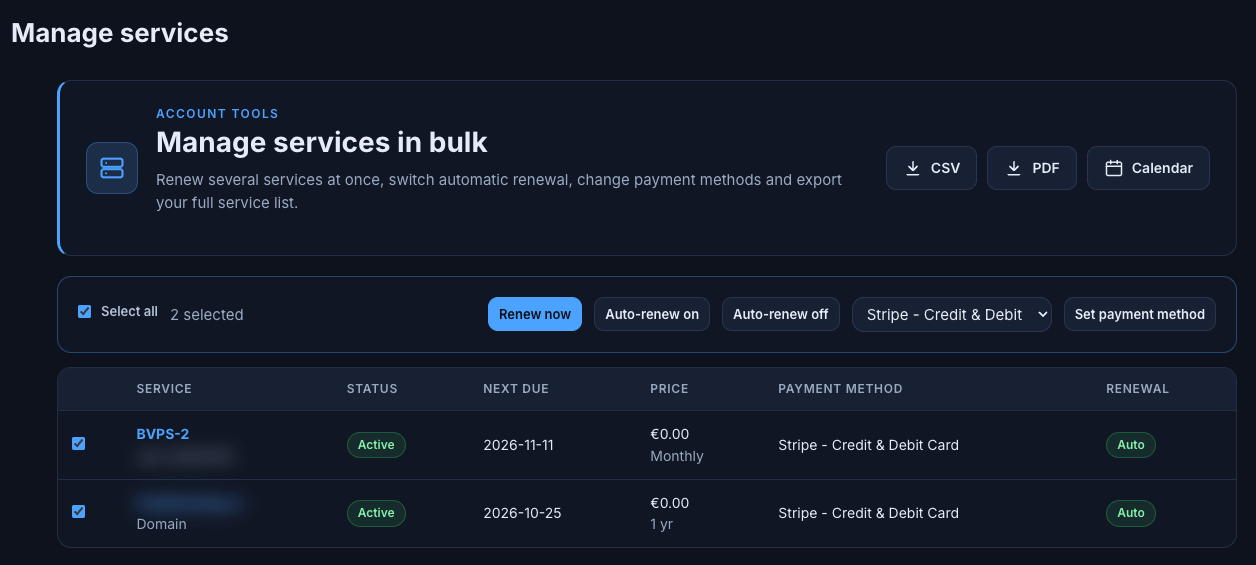
Manage in bulk
Do something to several services
1
Select services
Tick the box next to each service or domain, or tick Select all. The counter shows how many you’ve selected.
2
Choose an action
3
Pay if needed
If you chose Renew now, complete checkout to pay the renewal.
Export your services
Use the buttons at the top right of the Manage in bulk page:- CSV: download your full service list as a spreadsheet.
- PDF: download it as a printable document.
- Calendar: open the renewal calendar to add your due dates to your calendar (how it works).
Need Extra Help?
If you encounter any issues, our support team is ready to assist:- Live Chat: Quick assistance via our website.
- Support Ticket: Open a Ticket
- Discord: Join our Community
- Email: support@freakhosting.com
Last Updated: October 2026